sketchucation logo sketchucation
    • Login
    Oops, your profile's looking a bit empty! To help us tailor your experience, please fill in key details like your SketchUp version, skill level, operating system, and more. Update and save your info on your profile page today!
    ⚠️ Update | Sketchucation Tools 5.0.8 released with licensing improvements and bugfixes Download

    [Plugin] CleanUp

    Scheduled Pinned Locked Moved Plugins
    974 Posts 217 Posters 1.2m Views 217 Watching
    Loading More Posts
    • Oldest to Newest
    • Newest to Oldest
    • Most Votes
    Reply
    • Reply as topic
    Log in to reply
    This topic has been deleted. Only users with topic management privileges can see it.
    • tt_suT
      tt_su
      last edited by

      Ah, right!
      And the error message you posted here: http://sketchucation.com/forums/viewtopic.php?f=323%26amp;t=22920%26amp;view=unread%26amp;sid=3c5780a432a36ee6c62eb305f16f5390#p516006
      Was that with or without CleanUp installed?

      1 Reply Last reply
      Reply Quote 0
      • S
        saucerful
        last edited by

        With. Without I get just the first half:

        
        Error Loading File C;/Program Files/Google/Google SketchUp 8/Plugins/TT_Lib2/core.rb
        uninitialized constant TT;;GUI;;ToolWindowError Loading File TT_Lib2.rb
        uninitialized constant TT;;GUI;;ToolWindow
        
        
        1 Reply Last reply
        Reply Quote 0
        • thomthomT
          thomthom
          last edited by

          Are you able to run SU2014? It should provide a more detailed error to pin-point where it fails.

          I'm not a linux user and I only ever tried Ubuntu briefly in 2008... :s

          Thomas Thomassen β€” SketchUp Monkey & Coding addict
          List of my plugins and link to the CookieWare fund

          1 Reply Last reply
          Reply Quote 0
          • S
            saucerful
            last edited by

            Unfortunately SketchUp 2014 doesn't work at all. I've attached diagnostic output from SketchUp 2013, in case that helps...


            SketchUp-Diagnostic2013.txt

            1 Reply Last reply
            Reply Quote 0
            • tt_suT
              tt_su
              last edited by

              I'm sorry how much back and forth this takes, but without being able to reproduce I'm a bit blind here.

              SketchUp prior to SU2014 has flawed error messages that makes it hard to debug. Can I ask you to open the Ruby Console (SketchUp's console, not Linux) and see what you get from this command: load "TT_Lib2/core.rb"

              1 Reply Last reply
              Reply Quote 0
              • tt_suT
                tt_su
                last edited by

                What? "load_uninstalled.txt" was a result of running load "TT_Lib2/core.rb when TT_Lib was uninstalled? That makes no sense because it's loading files... if you had unisntalled TT_Lib2 then load "TT_Lib2/core.rb should have returned an error about file not found.
                I'm not able to make any sense out of this...

                Did you restart SketchUp after uninstalling?

                1 Reply Last reply
                Reply Quote 0
                • S
                  saucerful
                  last edited by

                  Sorry, by uninstall I meant unchecking TT_Lib2 and Cleanup in the Extensions dialog and restarting SketchUp.

                  The TT_Lib2 files are still in the Plugins directory. Maybe it makes no sense to run "TT_Lib2/core.rb" in this state? I thought it might be akin to how SketchUp loads the extension at startup?

                  1 Reply Last reply
                  Reply Quote 0
                  • tt_suT
                    tt_su
                    last edited by

                    Unchecking TT_Lib2 in the Extension Manager will have no effect.

                    This error is very strange.

                    Can you try a few other mutations?

                    ` load "TT_Lib2/sketchup.rb"

                    load "TT_Lib2/system.rb"

                    load "TT_Lib2/entities.rb"`

                    1 Reply Last reply
                    Reply Quote 0
                    • S
                      saucerful
                      last edited by

                      Here's one log for all of them (search for the command to get to it).


                      loads.txt

                      1 Reply Last reply
                      Reply Quote 0
                      • S
                        saucerful
                        last edited by

                        @tt_su said:

                        I'm sorry how much back and forth this takes, but without being able to reproduce I'm a bit blind here.

                        No worries! I really appreciate your patience and am happy to send you any debug info.

                        @tt_su said:

                        SketchUp prior to SU2014 has flawed error messages that makes it hard to debug. Can I ask you to open the Ruby Console (SketchUp's console, not Linux) and see what you get from this command: load "TT_Lib2/core.rb"

                        I ran this with both TT_Lib2 installed, and not. I think the latter has more information about the error...


                        load_uninstalled.txt


                        load_installed.txt

                        1 Reply Last reply
                        Reply Quote 0
                        • TIGT
                          TIG Moderator
                          last edited by

                          @saucerful said:

                          ...The TT_Lib2 files are still in the Plugins directory. Maybe it makes no sense to run "TT_Lib2/core.rb" in this state?...
                          πŸ˜• !!! Do you mean by that you have files from the TT_Lib2 folder 'loose' in the Plugins folder?? πŸ˜’
                          When you install the TT_Lib2 you should have a loader .rb and a subfolder with the same name which contains everything else.
                          I ANY of the files inside the subfolder have found there way into the Plugins folder they will load out of sync as SketchUp starts, rather that as TT's other plugins 'require' them, as they themselves auto-load...
                          So if that is the case, then you need to carefully 'sanitize' your Plugins folder and remove all of the TT Lib files that should NOT ever be in there... πŸ˜•

                          TIG

                          1 Reply Last reply
                          Reply Quote 0
                          • S
                            saucerful
                            last edited by

                            It works! Thank you so much. This plugin is extremely useful for our workflow at Open Source Ecology (see here).

                            Any idea when 2.9.9 will be pushed to the extension warehouse?

                            1 Reply Last reply
                            Reply Quote 0
                            • tt_suT
                              tt_su
                              last edited by

                              @saucerful said:

                              It works!

                              Huh! How about that! Stab in the dark!
                              Glad it worked. πŸ˜„
                              I'll upload to EW right now. Not sure when it goes live, depends on the moderation queue.

                              1 Reply Last reply
                              Reply Quote 0
                              • tt_suT
                                tt_su
                                last edited by

                                So, I'm making a guess here: Wine calls Linux's file functions which returns the files in a different order - revealing a dependency bug that isn't visible in Windows or OSX.

                                Can you try this version attached:
                                (Deleted file as it's now been uploaded to Extension Warehouse, Plugin Store and GitHub.)

                                1 Reply Last reply
                                Reply Quote 0
                                • A
                                  Asloric
                                  last edited by

                                  Hello i have a problem: useless faces in models (per exemple a face in a cube) doesnt erase with the plugin . could it be possible to add please? or explain how to do if there is yet

                                  here is a screen if you don't understand what i mean
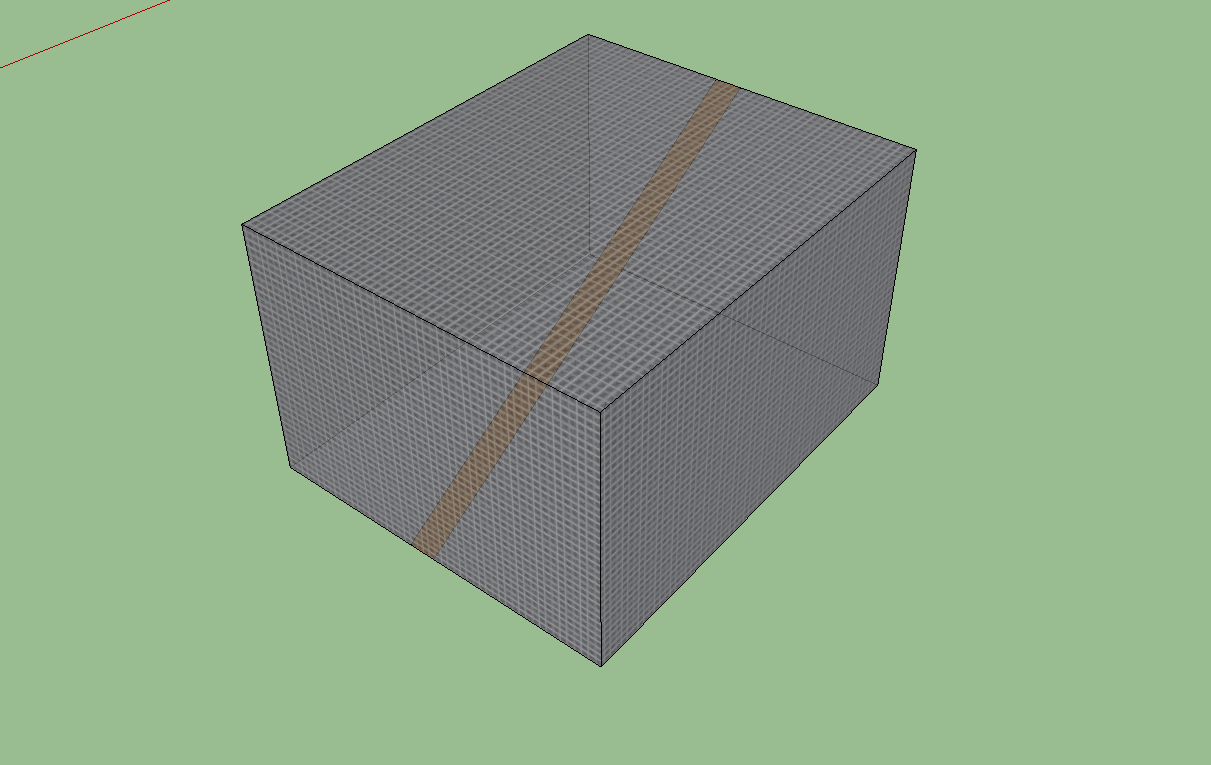
                                  the wood face in the cube doesn't erase

                                  PS: thanks a lot for this usefull plugin πŸ˜„

                                  1 Reply Last reply
                                  Reply Quote 0
                                  • TIGT
                                    TIG Moderator
                                    last edited by

                                    If it's the one occurrence, then can't you cut a temporary section to give access to the inner unwanted face and erase it/its edges that way ?
                                    Some tools like my SolidSolver will remove inner partitions/flaps if the 'box' [group] is intended to be a 'solid'...

                                    TIG

                                    1 Reply Last reply
                                    Reply Quote 0
                                    • A
                                      Asloric
                                      last edited by

                                      thanks.i've erase all useless faces πŸ˜„ .but i thinks it's a bit buggy with my model ( it erase most part of my project sometimes)

                                      1 Reply Last reply
                                      Reply Quote 0
                                      • thomthomT
                                        thomthom
                                        last edited by

                                        Does your model have many very small faces/edges? Like ~1mm?

                                        Thomas Thomassen β€” SketchUp Monkey & Coding addict
                                        List of my plugins and link to the CookieWare fund

                                        1 Reply Last reply
                                        Reply Quote 0
                                        • A
                                          Asloric
                                          last edited by

                                          yes beacause a lot of detail for much immersion ( i use the playup plugin to export it to crysis2)

                                          1 Reply Last reply
                                          Reply Quote 0
                                          • Dave RD
                                            Dave R
                                            last edited by

                                            If you are trying to create tiny faces (less than 1mm) you are going to have problems unless you work at a larger scale. This has nothing to do with CleanUp, it's just a fact of using SketchUp.


                                            Etaoin Shrdlu

                                            %

                                            (THERE'S NO PLACE LIKE)

                                            G28 X0.0 Y0.0 Z0.0

                                            M30

                                            %

                                            1 Reply Last reply
                                            Reply Quote 0

                                            Hello! It looks like you're interested in this conversation, but you don't have an account yet.

                                            Getting fed up of having to scroll through the same posts each visit? When you register for an account, you'll always come back to exactly where you were before, and choose to be notified of new replies (either via email, or push notification). You'll also be able to save bookmarks and upvote posts to show your appreciation to other community members.

                                            With your input, this post could be even better πŸ’—

                                            Register Login
                                            • 1
                                            • 2
                                            • 22
                                            • 23
                                            • 24
                                            • 25
                                            • 26
                                            • 48
                                            • 49
                                            • 24 / 49
                                            • First post
                                              Last post
                                            Buy SketchPlus
                                            Buy SUbD
                                            Buy WrapR
                                            Buy eBook
                                            Buy Modelur
                                            Buy Vertex Tools
                                            Buy SketchCuisine
                                            Buy FormFonts

                                            Advertisement

