sketchucation logo sketchucation
    • 登入
    Oops, your profile's looking a bit empty! To help us tailor your experience, please fill in key details like your SketchUp version, skill level, operating system, and more. Update and save your info on your profile page today!
    🔌 Smart Spline | Fluid way to handle splines for furniture design and complex structures. Download

    [Plugin] CleanUp

    已排程 已置頂 已鎖定 已移動 Plugins
    974 貼文 217 Posters 865.6k 瀏覽 217 Watching
    正在載入更多貼文
    • 從舊到新
    • 從新到舊
    • 最多點贊
    回覆
    • 在新貼文中回覆
    登入後回覆
    此主題已被刪除。只有擁有主題管理權限的使用者可以查看。
    • Z 離線
      Zacchia
      最後由 編輯

      Hi Tom
      It's not over 😕 In office (XP) there I have still the problem, see screenshot. In Window 7 it is ok.
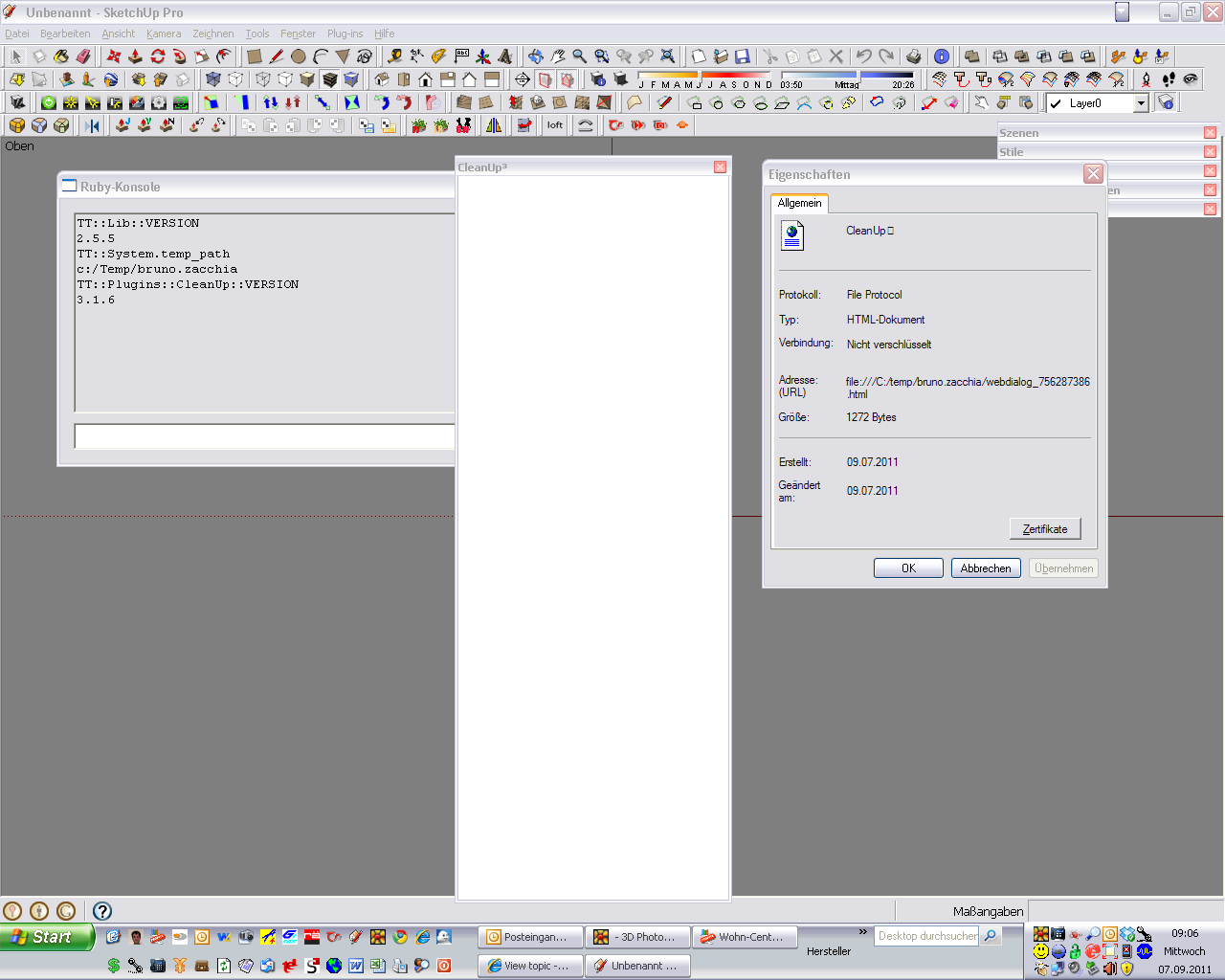

      Screenshot2011_09_07_09_06_32.jpg

      1 條回覆 最後回覆 回覆 引用 0
      • thomthomT 離線
        thomthom
        最後由 編輯

        Cursed! 😞
        Ok, can you Right Click and empty window and click "View Source" ?

        Thomas Thomassen — SketchUp Monkey & Coding addict
        List of my plugins and link to the CookieWare fund

        1 條回覆 最後回覆 回覆 引用 0
        • Z 離線
          Zacchia
          最後由 編輯

          @thomthom said:

          Cursed! 😞
          Ok, can you Right Click and empty window and click "View Source" ?

          In german lanuage "Quelltext anzeigen", hope you mean this...
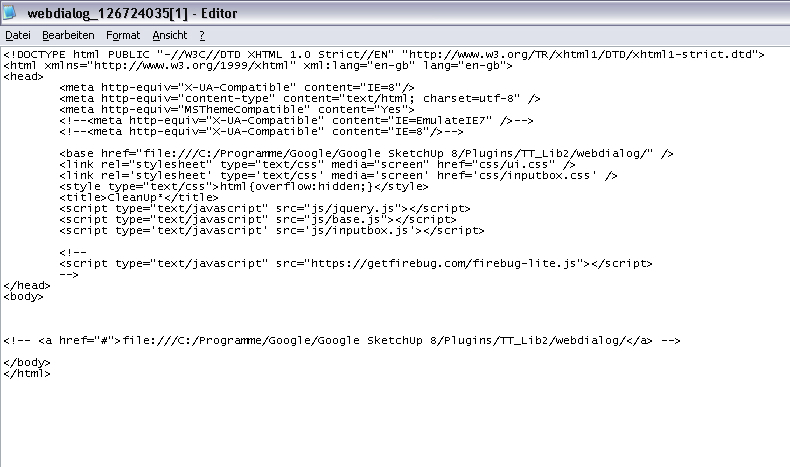

          Screenshot2011_09_07_11_04_57.jpg

          1 條回覆 最後回覆 回覆 引用 0
          • thomthomT 離線
            thomthom
            最後由 編輯

            I really do not understand why.

            What is your Internet Explorer version btw?

            Thomas Thomassen — SketchUp Monkey & Coding addict
            List of my plugins and link to the CookieWare fund

            1 條回覆 最後回覆 回覆 引用 0
            • charly2008C 離線
              charly2008
              最後由 編輯

              Hi Thomas.

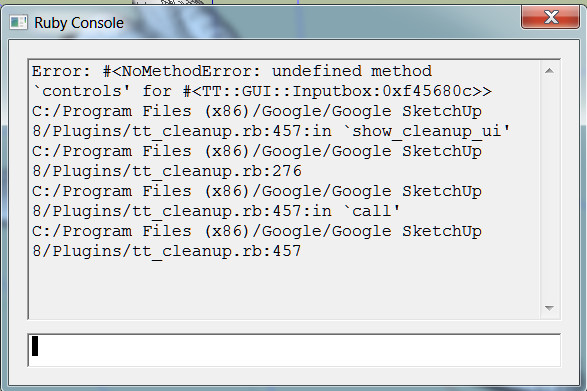
              I have updated to version 3.1.6 but now no more menu box appears. I can run it but only with "Clean with last settings". What could be wrong? In the ruby console appears (see picture below)

              Charly

              Command: Clean


              Command: Clean with last settings

              He who makes no mistakes, makes nothing

              1 條回覆 最後回覆 回覆 引用 0
              • thomthomT 離線
                thomthom
                最後由 編輯

                @charly2008 said:

                I have updated to version 3.1.6 but now no more menu box appears. I can run it but only with "Clean with last settings". What could be wrong? In the ruby console appears (see picture below)

                That error indicate that you haven't updated TT_Lib2 to 2.5.5. It should have given you an error about that at startup, so I don't understand why you didn't. 😕

                Thomas Thomassen — SketchUp Monkey & Coding addict
                List of my plugins and link to the CookieWare fund

                1 條回覆 最後回覆 回覆 引用 0
                • charly2008C 離線
                  charly2008
                  最後由 編輯

                  Thanks for the tip, I had an older version of TT_Lib2. Now it works again.

                  Charly

                  He who makes no mistakes, makes nothing

                  1 條回覆 最後回覆 回覆 引用 0
                  • dereiD 離線
                    derei
                    最後由 編輯

                    @thomthom said:

                    Also be sure that all setting where identical between your test. Could be some some checkbox being unticked.

                    Sorry,my mistake ! the model was on Monochrome style view and I forgot I had materials applied.That is why the Cleanup didn't worked as expected. It overlapped with plugin update, so I thought is a plugin issue.

                    DESIGNER AND ARTIST DEREI.UK

                    1 條回覆 最後回覆 回覆 引用 0
                    • Z 離線
                      Zacchia
                      最後由 編輯

                      @thomthom said:

                      I really do not understand why.

                      What is your Internet Explorer version btw?

                      1. IE? Why is this important?
                      1 條回覆 最後回覆 回覆 引用 0
                      • thomthomT 離線
                        thomthom
                        最後由 編輯

                        If it had been IE6 it would. WebDialogs use the IE engine under Windows.

                        Thomas Thomassen — SketchUp Monkey & Coding addict
                        List of my plugins and link to the CookieWare fund

                        1 條回覆 最後回覆 回覆 引用 0
                        • L 離線
                          leocallejas
                          最後由 編輯

                          Hi ThomThom.... I just recently discovered your plugin, and I´m really excited to test it out, but I get that same blank window in Windows 7 x64 running Sketchup 8, and Internet Explorer 8. Here are my screenshots, maybe they'll help you sort it out.

                          Cheers! 😄

                          http://img694.imageshack.us/img694/8228/blankhr.jpg

                          http://img217.imageshack.us/img217/8760/versionsq.jpg

                          http://img821.imageshack.us/img821/6006/propertiest.jpg

                          http://img163.imageshack.us/img163/7218/sourceh.jpg

                          1 條回覆 最後回覆 回覆 引用 0
                          • thomthomT 離線
                            thomthom
                            最後由 編輯

                            I'll post an update to TT_Lib shortly. Not sure if it helps, but we'll see.

                            Meanwhile, do you see a Compatibility Files button in Windows explorer when you view the plugins folder?

                            Thomas Thomassen — SketchUp Monkey & Coding addict
                            List of my plugins and link to the CookieWare fund

                            1 條回覆 最後回覆 回覆 引用 0
                            • Z 離線
                              Zacchia
                              最後由 編輯

                              @thomthom said:

                              Meanwhile, do you see a Compatibility Files button in Windows explorer when you view the plugins folder?

                              I do not understand this...

                              1 條回覆 最後回覆 回覆 引用 0
                              • thomthomT 離線
                                thomthom
                                最後由 編輯

                                @leocallejas said:

                                Hi ThomThom.... I just recently discovered your plugin, and I´m really excited to test it out, but I get that same blank window in Windows 7 x64 running Sketchup 8, and Internet Explorer 8. Here are my screenshots, maybe they'll help you sort it out.

                                Cheers! 😄

                                Can you update to TT_Lib version 2.5.6 and report back if that made any difference?

                                Thomas Thomassen — SketchUp Monkey & Coding addict
                                List of my plugins and link to the CookieWare fund

                                1 條回覆 最後回覆 回覆 引用 0
                                • thomthomT 離線
                                  thomthom
                                  最後由 編輯

                                  @zacchia said:

                                  @thomthom said:

                                  Meanwhile, do you see a Compatibility Files button in Windows explorer when you view the plugins folder?

                                  I do not understand this...

                                  That was for leocallejas - he's on Vista. You won't see such a button in XP.

                                  If you want, you could try CleanUp 3.4.6 with TT_Lib 2.5.6 and see if that works.

                                  Thomas Thomassen — SketchUp Monkey & Coding addict
                                  List of my plugins and link to the CookieWare fund

                                  1 條回覆 最後回覆 回覆 引用 0
                                  • B 離線
                                    blajnov
                                    最後由 編輯

                                    @thomthom said:

                                    @zacchia said:

                                    @thomthom said:

                                    Meanwhile, do you see a Compatibility Files button in Windows explorer when you view the plugins folder?

                                    I do not understand this...

                                    That was for leocallejas - he's on Vista. You won't see such a button in XP.

                                    If you want, you could try CleanUp 3.4.6 with TT_Lib 2.5.6 and see if that works.

                                    With the new library TT_Lib 2.5.6, the same problem, blank screen menu....

                                    1 條回覆 最後回覆 回覆 引用 0
                                    • thomthomT 離線
                                      thomthom
                                      最後由 編輯

                                      @blajnov said:

                                      @thomthom said:

                                      @zacchia said:

                                      @thomthom said:

                                      Meanwhile, do you see a Compatibility Files button in Windows explorer when you view the plugins folder?

                                      I do not understand this...

                                      That was for leocallejas - he's on Vista. You won't see such a button in XP.

                                      If you want, you could try CleanUp 3.4.6 with TT_Lib 2.5.6 and see if that works.

                                      With the new library TT_Lib 2.5.6, the same problem, blank screen menu....

                                      sigh I'm completely stomped. I have no idea why it fails on one computer but not the other - without any errors... 😞

                                      I'm not sure how I can debug this, since I cannot reproduce it. ...maybe a Remote Desktop session... ?

                                      Thomas Thomassen — SketchUp Monkey & Coding addict
                                      List of my plugins and link to the CookieWare fund

                                      1 條回覆 最後回覆 回覆 引用 0
                                      • B 離線
                                        blajnov
                                        最後由 編輯

                                        @thomthom said:

                                        If you want, you could try CleanUp 3.4.6 with TT_Lib 2.5.6 and see if that works.

                                        With the new library TT_Lib 2.5.6, the same problem, blank screen menu....[/quote]
                                        sigh I'm completely stomped. I have no idea why it fails on one computer but not the other - without any errors... 😞
                                        [quote:344sw0qv]
                                        I'm not sure how I can debug this, since I cannot reproduce it. ...maybe a Remote Desktop session... ?[/quote:344sw0qv]
                                        Returned to the library and TT_Lib 2.5.4 CleanUp 3.1.4, instead TT_Lib 2.5.6 and CleanUp 3.1.6, it worked ...
                                        It is unclear what the problem is!

                                        1 條回覆 最後回覆 回覆 引用 0
                                        • thomthomT 離線
                                          thomthom
                                          最後由 編輯

                                          Did you try the file I sent you?

                                          Thomas Thomassen — SketchUp Monkey & Coding addict
                                          List of my plugins and link to the CookieWare fund

                                          1 條回覆 最後回覆 回覆 引用 0
                                          • B 離線
                                            blajnov
                                            最後由 編輯

                                            @thomthom said:

                                            Did you try the file I sent you?

                                            I apologize for any inconvenience, I threw inputbox.rb file in the wrong folder, now replaced in the folder 😄 \ Program Files (x86) \ Google \ Google SketchUp 8 \ Plugins \ TT_Lib2
                                            Everything works fine.
                                            Many thanks for the sympathy!

                                            1 條回覆 最後回覆 回覆 引用 0
                                            • 1
                                            • 2
                                            • 37
                                            • 38
                                            • 39
                                            • 40
                                            • 41
                                            • 48
                                            • 49
                                            • 39 / 49
                                            • 第一個貼文
                                              最後的貼文
                                            Buy SketchPlus
                                            Buy SUbD
                                            Buy WrapR
                                            Buy eBook
                                            Buy Modelur
                                            Buy Vertex Tools
                                            Buy SketchCuisine
                                            Buy FormFonts

                                            Advertisement