sketchucation logo sketchucation
    • 登入
    Oops, your profile's looking a bit empty! To help us tailor your experience, please fill in key details like your SketchUp version, skill level, operating system, and more. Update and save your info on your profile page today!
    ⚠️ Important | Libfredo 15.6b introduces important bugfixes for Fredo's Extensions Update

    Transformations

    已排程 已置頂 已鎖定 已移動 Developers' Forum
    23 貼文 10 Posters 15.6k 瀏覽 10 Watching
    正在載入更多貼文
    • 從舊到新
    • 從新到舊
    • 最多點贊
    回覆
    • 在新貼文中回覆
    登入後回覆
    此主題已被刪除。只有擁有主題管理權限的使用者可以查看。
    • M 離線
      MSP_Greg
      最後由 編輯

      TIG,

      @tig said:

      if would be nice to be able to get just the angle of rotation out of an existing transformation

      I think the below might help. I haven't tested it that much, and never with 'stretched' trans...

      suATan just returns the arctan of the two numbers (x,y), x=0 => +/- 90

      
      aT = e.transformation.to_a
        # aT[12], aT[13], aT[14]           x, y, z offsets from component origin
        # suATan(aT[0], aT[1])             xy plane angle
        # xy = (aT[8]**2 + aT[9]**2)**0.5
        # suATan(xy, aT[10]) - 90          rise angle, check this one 


      HTH,

      Greg

      1 條回覆 最後回覆 回覆 引用 0
      • chrisglasierC 離線
        chrisglasier
        最後由 編輯

        Can I add this topic and particularly this post, to make this topic more complete, even if duplicated in parts.

        Thanks

        Chris

        With TBA interfaces we can analyse what is to be achieved so that IT can help with automation to achieve it.

        1 條回覆 最後回覆 回覆 引用 0
        • M 離線
          MSP_Greg
          最後由 編輯

          Jim,

          Can you post the file that you used for import shown?

          Thanks,

          greg

          1 條回覆 最後回覆 回覆 引用 0
          • J 離線
            Jim
            最後由 編輯

            Here it is.


            LDraw part No 3001

            Hi

            1 條回覆 最後回覆 回覆 引用 0
            • C 離線
              CPhillips
              最後由 編輯

              Jim, what is the problem with the brick? The axis look ok to me. Is it that the brick isn't upright?

              1 條回覆 最後回覆 回覆 引用 0
              • J 離線
                Jim
                最後由 編輯

                @cphillips said:

                Jim, what is the problem with the brick? The axis look ok to me. Is it that the brick isn't upright?

                Yes that is all. One option would be to flip the SKetchUp axes to match the LDraw axes before inporting. But I just want the bricks to be imported using the SU axes instead of the LDraw axes - including the sub-components.

                I thought it would simply be a matter of performing an axes transformation on import - but so far the solution has been evasive.

                Hi

                1 條回覆 最後回覆 回覆 引用 0
                • C 離線
                  CPhillips
                  最後由 編輯

                  Looks like LDraw uses Y is up instead of Z. You could just swap the Y and Z elements when you build the points for the faces. And also swap Y and Z in the translate part of the transform. That will change the axis.

                  1 條回覆 最後回覆 回覆 引用 0
                  • C 離線
                    CPhillips
                    最後由 編輯

                    I tried out what I suggested and it totally didnt work. I think it is because of the way scaling is being used. Flip Y and Z and you also need to flip ScaleY and ScaleZ. That is surely possible, but I dont know how to do it.

                    1 條回覆 最後回覆 回覆 引用 0
                    • A 離線
                      avariant
                      最後由 編輯

                      Have you tried the Transformation.axes method? It sounds like you should be able to "remap" the standard axes using this transform. Something like Transformation.axes(ORIGIN, X_AXES, Z_AXES, Y_AXES). Just a thought, I have no idea if it will work.

                      1 條回覆 最後回覆 回覆 引用 0
                      • J 離線
                        Jim
                        最後由 編輯

                        That is what I tried to use, but got some crazy results. My initial reaction is to assume I am not understanding how to use them. But if Chris had a problem, I might be inclined to think it's not just me.

                        Hi

                        1 條回覆 最後回覆 回覆 引用 0
                        • J 離線
                          jessejames
                          最後由 編輯

                          @martinrinehart said:

                          If one of you who has figured on transformations could write a little article for those of us who haven't, it would be a GOOD THING!

                          What do you mean exactly Martin?

                          1. How do Transformations work on a mathematical level and all the boring details that go along with it?
                          2. How do i use the Geom::Transformtion class to trans, rotate, and scale stuff in SU?

                          A huge part of understanding Transformations in a mathematical sense is getting past the cryptic syntax. The good thing about a Transformation class is that you don't need to know crap about advanced math and even some basic college math principals to use the Transformation class quite easily.

                          Thats one thing i love about programming, code up a class that abstracts away all the details and forget about it! I'll leave the asinine number crunching to my processor!

                          Always sleep with a loaded gun under your pillow!

                          1 條回覆 最後回覆 回覆 引用 0
                          • M 離線
                            MartinRinehart
                            最後由 編輯

                            @jessejames said:

                            What do you mean exactly Martin?

                            1. How do Transformations work on a mathematical level and all the boring details that go along with it?
                            2. How do i use the Geom::Transformtion class to trans, rotate, and scale stuff in SU?

                            2

                            I love those very smart people who can do #1, so the rest of us don't have to.

                            Author, Edges to Rubies - The Complete SketchUp Tutorial at http://www.MartinRinehart.com/models/tutorial.

                            1 條回覆 最後回覆 回覆 引用 0
                            • C 離線
                              cjthompson
                              最後由 編輯

                              The transformation.axes method just transforms the object so that it's axes match the internal ones.

                              try using transformation.axes on the grouponent (I believe you used that one 😉)

                              then use

                              grouponent.entities.transform_entities(grouponent.transformation.inverse,grouponent.entities.to_a)
                              

                              EDIT: Just tried it and it should work.

                              1 條回覆 最後回覆 回覆 引用 0
                              • C 離線
                                cjthompson
                                最後由 編輯

                                I just looked at the picture you posted again. Do you want flip the axes, instead of rotating them? If so, I don't know if that is possible. It's has to do with the fact that sketchup uses a right hand orientation, instead of left-hand orientation that I'm guessing LDraw uses (http://en.wikipedia.org/wiki/Right-hand_rule).

                                Is there a way to change the orientation of axes in LDraw? (I haven't used it myself, so I have no idea)

                                1 條回覆 最後回覆 回覆 引用 0
                                • J 離線
                                  Jim
                                  最後由 編輯

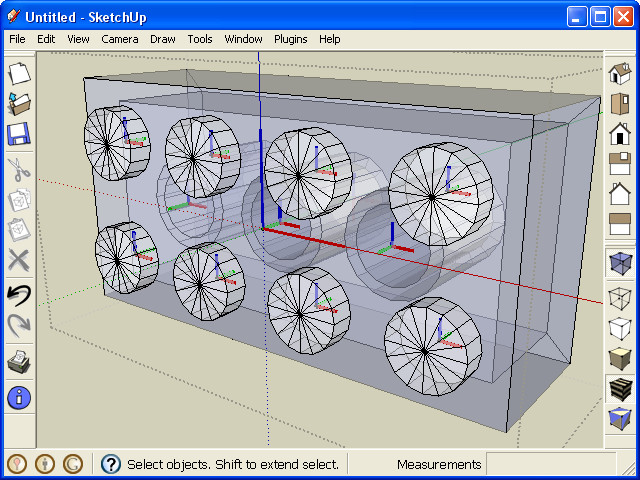
                                  One of the reasons I asked was that I wrote this LDraw importer. But the LDraw axes system does not match SketchUps, and I really want the importer to correct this on import. You can see the import works, but I haven't been able to figure out how to trasnform the geometry during the import so it uses a SketchUp axes that people are familiar with using.

                                  019.jpg

                                  Hi

                                  1 條回覆 最後回覆 回覆 引用 0
                                  • 1
                                  • 2
                                  • 2 / 2
                                  • 第一個貼文
                                    最後的貼文
                                  Buy SketchPlus
                                  Buy SUbD
                                  Buy WrapR
                                  Buy eBook
                                  Buy Modelur
                                  Buy Vertex Tools
                                  Buy SketchCuisine
                                  Buy FormFonts

                                  Advertisement