sketchucation logo sketchucation
    • 登入
    Oops, your profile's looking a bit empty! To help us tailor your experience, please fill in key details like your SketchUp version, skill level, operating system, and more. Update and save your info on your profile page today!
    ⚠️ Important | Libfredo 15.6b introduces important bugfixes for Fredo's Extensions Update

    WebDialog help - hide scrollbars

    已排程 已置頂 已鎖定 已移動 Developers' Forum
    31 貼文 7 Posters 6.1k 瀏覽 7 Watching
    正在載入更多貼文
    • 從舊到新
    • 從新到舊
    • 最多點贊
    回覆
    • 在新貼文中回覆
    登入後回覆
    此主題已被刪除。只有擁有主題管理權限的使用者可以查看。
    • N 離線
      NewOne
      最後由 編輯

      How can I hide scrollbars in webdialog?
      I tried with CSS overflow:auto; , but this works just if I don't use !DOCTYPE, but I need !DOCTYPE (Transitional) to enable :focus css pseudoelement.
      The vertical scrollbar is there, grayed-oud and taking my pixels abusive. I need that little space 😞
      💭

      One more thing: JS statement element.selected = true; did not worked on my native SU instalation. After I updated my Internet Explorer from 6 to 7, it did worked... how is this possible, because in SU I still have IE4 ?

      1 條回覆 最後回覆 回覆 引用 0
      • D 離線
        DIEGO-RODRIGUEZ
        最後由 編輯

        try >

        in html, body properties

        <body scroll="no" (l add here other property "color" etc ...)>

        1 條回覆 最後回覆 回覆 引用 0
        • N 離線
          NewOne
          最後由 編輯

          @unknownuser said:

          try >

          in html, body properties

          <body scroll="no" (l add here other property "color" etc ...)>

          Thanks elcorto, the option is working.

          Maybe someone can explain why element.selected = true; doesn't work properly in native SU installation, but after updating IE from 6 to 7 on Windows machine, it is fixed. Is there some JS update? can it be applied without updating IE?

          1 條回覆 最後回覆 回覆 引用 0
          • M 離線
            MartinRinehart
            最後由 編輯

            The second parameter to WebDialog.new, "scrollable" (show scroll bars if true), works correctly for Mac, but does nothing on PC where you get scrollbars unless your HTML/CSS/JavaScript eliminates them.

            Author, Edges to Rubies - The Complete SketchUp Tutorial at http://www.MartinRinehart.com/models/tutorial.

            1 條回覆 最後回覆 回覆 引用 0
            • Dan RathbunD 離線
              Dan Rathbun
              最後由 編輯

              NewOne, and all ... I found this article on virtuosimedia very informative
              Ultimate IE6 Cheatsheet: How To Fix 25+ Internet Explorer 6 Bugs

              .. in addition the author recommends always using !DOCTYPE, and makes a good case.
              .. other good tips, ie: the CSS Reset Rule.

              have a read y'all !

              I'm not here much anymore.

              1 條回覆 最後回覆 回覆 引用 0
              • chrisglasierC 離線
                chrisglasier
                最後由 編輯

                @newone said:

                How can I hide scrollbars in webdialog?


                css ...
                
                body{
                border;0px; 
                margin;0px; 
                overflow;hidden   }


                With TBA interfaces we can analyse what is to be achieved so that IT can help with automation to achieve it.

                1 條回覆 最後回覆 回覆 引用 0
                • Dan RathbunD 離線
                  Dan Rathbun
                  最後由 編輯

                  CSS Attribute overflow:

                  @unknownuser said:

                  With Internet Explorer 6 and later, when you use the !DOCTYPE declaration to specify standards-compliant mode, this property (overflow ) applies to the html object.
                  1. MSDN Library / CSS Reference: overflow Attribute | overflow Property

                  I'm not here much anymore.

                  1 條回覆 最後回覆 回覆 引用 0
                  • M 離線
                    MartinRinehart
                    最後由 編輯

                    @dan rathbun said:

                    NewOne, and all ... I found this article ... very informative

                    Thanks, Dan.

                    So informative, in fact, that it would be nice if you posted a new topic re IE6 Cheat Sheet, or something similar so Google will find it for us.

                    Author, Edges to Rubies - The Complete SketchUp Tutorial at http://www.MartinRinehart.com/models/tutorial.

                    1 條回覆 最後回覆 回覆 引用 0
                    • chrisglasierC 離線
                      chrisglasier
                      最後由 編輯

                      @chrisglasier said:

                      @newone said:

                      How can I hide scrollbars in webdialog?

                      
                      > 
                      > css ...
                      > 
                      > body{
                      > border;0px; 
                      > margin;0px; 
                      > overflow;hidden   }
                      > 
                      > 
                      

                      Sorry forgot the pic
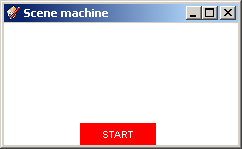
                      cgScenes no scroll.png

                      With TBA interfaces we can analyse what is to be achieved so that IT can help with automation to achieve it.

                      1 條回覆 最後回覆 回覆 引用 0
                      • N 離線
                        NewOne
                        最後由 編輯

                        @chrisglasier said:

                        
                        > 
                        > css ...
                        > 
                        > body{
                        > border;0px; 
                        > margin;0px; 
                        > overflow;hidden   }
                        > 
                        > 
                        

                        But you don't use !DOCTYPE, right? 💚 Paste this on the top of your Html page and tell me if overflow works for you. Also your window border...

                        <!DOCTYPE HTML PUBLIC "-//W3C//DTD HTML 4.01 Transitional//EN" "http://www.w3.org/TR/html4/loose.dtd">
                        
                        1 條回覆 最後回覆 回覆 引用 0
                        • chrisglasierC 離線
                          chrisglasier
                          最後由 編輯

                          @newone said:

                          But you don't use !DOCTYPE, right? 💚 Paste this on the top of your Html page and tell me if overflow works for you. Also your window border...

                          <!DOCTYPE HTML PUBLIC "-//W3C//DTD HTML 4.01 Transitional//EN" "http://www.w3.org/TR/html4/loose.dtd">
                          

                          My top:


                          <!DOCTYPE HTML PUBLIC "-//W3C//DTD HTML 4.01 Transitional//EN">
                          
                          <html>
                          
                          <!-- Copyright 2007-9 Chris Glasier -->
                          
                          <!--This follows the Nameset format for easy integration-->
                          
                          <head>
                          
                          <title>Scene machine</title>
                          
                          <LINK href="Scene machine.css" rel="stylesheet" type="text/css">
                          
                          <script type = "text/javascript" src = "javascript/sceneDevice.js"></script>
                          
                          </head>
                          

                          Body css in external file of course.

                          With TBA interfaces we can analyse what is to be achieved so that IT can help with automation to achieve it.

                          1 條回覆 最後回覆 回覆 引用 0
                          • chrisglasierC 離線
                            chrisglasier
                            最後由 編輯

                            Adding "http://www.w3.org/TR/html4/loose.dtd" looks like this:
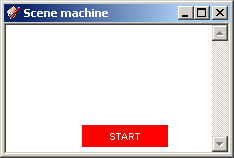
                            cgScenes no scroll 002.png

                            but the webdialog is on the local drive so I don't see the big deal. But please let me know if there is one!

                            With TBA interfaces we can analyse what is to be achieved so that IT can help with automation to achieve it.

                            1 條回覆 最後回覆 回覆 引用 0
                            • N 離線
                              NewOne
                              最後由 編輯

                              @chrisglasier said:

                              Adding "http://www.w3.org/TR/html4/loose.dtd" looks like this:

                              [attachment=0:1ma73d3a]<!-- ia0 -->cgScenes no scroll 002.png<!-- ia0 -->[/attachment:1ma73d3a]

                              but the webdialog is on the local drive so I don't see the big deal. But please let me know if there is one!

                              Same thing happens to me. So, I used your version of !DOCTYPE 💚

                              1 條回覆 最後回覆 回覆 引用 0
                              • J 離線
                                Jim
                                最後由 編輯

                                Is there a single, simple answer to this?

                                Hi

                                1 條回覆 最後回覆 回覆 引用 0
                                • N 離線
                                  NewOne
                                  最後由 編輯

                                  @jim said:

                                  Is there a single, simple answer to this?

                                  Well, I use <!DOCTYPE HTML PUBLIC "-//W3C//DTD HTML 4.01 Transitional//EN"> and <body scroll="no">. This seems to be working in all the cases. Other suggestions are not working if I use !DOCTYPE.

                                  I think this is the universal answer.

                                  1 條回覆 最後回覆 回覆 引用 0
                                  • thomthomT 離線
                                    thomthom
                                    最後由 編輯

                                    I use STRICT doctype and <body scroll="no">. Since this is for an application I don't care that it's not standard.

                                    Thomas Thomassen — SketchUp Monkey & Coding addict
                                    List of my plugins and link to the CookieWare fund

                                    1 條回覆 最後回覆 回覆 引用 0
                                    • chrisglasierC 離線
                                      chrisglasier
                                      最後由 編輯

                                      @thomthom said:

                                      I use STRICT doctype and <body scroll="no">. Since this is for an application I don't care that it's not standard.

                                      Don't you think in good time such application may well need web connectivity, say, to get or set remote data? Making things comply with today's standards could save future hassles for following generations.

                                      With TBA interfaces we can analyse what is to be achieved so that IT can help with automation to achieve it.

                                      1 條回覆 最後回覆 回覆 引用 0
                                      • thomthomT 離線
                                        thomthom
                                        最後由 編輯

                                        I'm a strong proponent of webstandards. But I'm also pragmatic - this is to work around an SU bug where the scrollbar argument in SU's Webdialog class doesn't take effect.
                                        It's not something that will cause problems for future plugins - if future SU corrects the bug, then this little attribute don't do much.

                                        Thomas Thomassen — SketchUp Monkey & Coding addict
                                        List of my plugins and link to the CookieWare fund

                                        1 條回覆 最後回覆 回覆 引用 0
                                        • chrisglasierC 離線
                                          chrisglasier
                                          最後由 編輯

                                          @thomthom said:

                                          I'm a strong proponent of webstandards. But I'm also pragmatic - this is to work around an SU bug where the scrollbar argument in SU's Webdialog class doesn't take effect.
                                          It's not something that will cause problems for future plugins - if future SU corrects the bug, then this little attribute don't do much.

                                          Ok no big deal except I am working on the API webdialog (which will include snippets). It seems there is a conflict between this:

                                          
                                          body{
                                          border;0px; 
                                          margin;0px; 
                                          overflow;hidden   }
                                          

                                          and STRICT doctype, so shouldn't the solution be within HTML compliance and standards and not within Sketchup webdialogs?

                                          It would be useful for me to understand.

                                          Chris

                                          With TBA interfaces we can analyse what is to be achieved so that IT can help with automation to achieve it.

                                          1 條回覆 最後回覆 回覆 引用 0
                                          • thomthomT 離線
                                            thomthom
                                            最後由 編輯

                                            I don't know why the overflow with STRICT doctype within a Webdialog doesn't work - it's how you do it with websites.

                                            @chrisglasier said:

                                            so shouldn't the solution be within HTML compliance and standards and not within Sketchup webdialogs?

                                            Seeing that the Webdialog has a scroll property for it's creating of the ruby class I'd expect that the scrollbars should be set from ruby. I think that the embedded IE control has a scroll property which developers who wish to embed HTML content can set to a fixed override. Why this argument isn't adhered to, I don't know.

                                            I wonder if the SU dev team has been made aware of the scrollnar bug.
                                            Was it so that this is PC only - that it works as expected on Mac?

                                            Thomas Thomassen — SketchUp Monkey & Coding addict
                                            List of my plugins and link to the CookieWare fund

                                            1 條回覆 最後回覆 回覆 引用 0
                                            • 1
                                            • 2
                                            • 1 / 2
                                            • 第一個貼文
                                              最後的貼文
                                            Buy SketchPlus
                                            Buy SUbD
                                            Buy WrapR
                                            Buy eBook
                                            Buy Modelur
                                            Buy Vertex Tools
                                            Buy SketchCuisine
                                            Buy FormFonts

                                            Advertisement

