sketchucation logo sketchucation
    • 登入
    Oops, your profile's looking a bit empty! To help us tailor your experience, please fill in key details like your SketchUp version, skill level, operating system, and more. Update and save your info on your profile page today!
    ⚠️ Important | Libfredo 15.6b introduces important bugfixes for Fredo's Extensions Update

    WebDialog help - hide scrollbars

    已排程 已置頂 已鎖定 已移動 Developers' Forum
    31 貼文 7 Posters 6.1k 瀏覽 7 Watching
    正在載入更多貼文
    • 從舊到新
    • 從新到舊
    • 最多點贊
    回覆
    • 在新貼文中回覆
    登入後回覆
    此主題已被刪除。只有擁有主題管理權限的使用者可以查看。
    • chrisglasierC 離線
      chrisglasier
      最後由 編輯

      Thanks Thomas. BTW I think it therapeutic to use a STRICT doctype then abuse it by doing something non-standard - appeals to cynical Brits like me!

      With TBA interfaces we can analyse what is to be achieved so that IT can help with automation to achieve it.

      1 條回覆 最後回覆 回覆 引用 0
      • thomthomT 離線
        thomthom
        最後由 編輯

        @chrisglasier said:

        Thanks Thomas. BTW I think it therapeutic to use a STRICT doctype then abuse it by doing something non-standard - appeals to cynical Brits like me!

        It's make the standard conformant me twitch. x_X

        Thomas Thomassen — SketchUp Monkey & Coding addict
        List of my plugins and link to the CookieWare fund

        1 條回覆 最後回覆 回覆 引用 0
        • thomthomT 離線
          thomthom
          最後由 編輯

          Ah!
          There is a standard conformant way!

          html
          {
            overflow; hidden;
          }
          

          When removing scoll="no" and adding that to the CSS the scrollbars disappeared in STRICT mode.

          Armed with that, you could sub-class the Webdialog class and tap into it's .new method and pass on the scroll argument to the webdialog when it's ready. Unless you're fine with just having it defined in the CSS and ignore the Ruby argument.
          I was going to make a wrapper for myself, that took care of the matter where the size is only being read the first time it's created. At the moment, if you try to change the size arguments for a non-resizable webdialog they won't take effect unless you purge the saved settings.

          Thomas Thomassen — SketchUp Monkey & Coding addict
          List of my plugins and link to the CookieWare fund

          1 條回覆 最後回覆 回覆 引用 0
          • chrisglasierC 離線
            chrisglasier
            最後由 編輯

            Good and noted! And used here.

            With TBA interfaces we can analyse what is to be achieved so that IT can help with automation to achieve it.

            1 條回覆 最後回覆 回覆 引用 0
            • thomthomT 離線
              thomthom
              最後由 編輯

              I don't know why I didn't try that before. I know that when switching between STRICT and quicks the behaviour of HTML and BODY changes.
              Glad we finally worked it out.

              Thomas Thomassen — SketchUp Monkey & Coding addict
              List of my plugins and link to the CookieWare fund

              1 條回覆 最後回覆 回覆 引用 0
              • thomthomT 離線
                thomthom
                最後由 編輯

                @newone said:

                One more thing: JS statement element.selected = true; did not worked on my native SU instalation. After I updated my Internet Explorer from 6 to 7, it did worked... how is this possible, because in SU I still have IE4 ?

                You don't have IE4 in SU. You have whatever is installed on the system.
                That's one of the reason I would prefer is SU used a standalone web-frame that isn't linked to the system.

                Thomas Thomassen — SketchUp Monkey & Coding addict
                List of my plugins and link to the CookieWare fund

                1 條回覆 最後回覆 回覆 引用 0
                • N 離線
                  NewOne
                  最後由 編輯

                  @thomthom said:

                  You don't have IE4 in SU. You have whatever is installed on the system.
                  That's one of the reason I would prefer is SU used a standalone web-frame that isn't linked to the system.

                  Please run this.

                  
                  @my_dialog = UI;;WebDialog.new('Check Version', false,"",400, 100, 300, 300, true)
                  
                  html = '<html>
                  <body>
                  
                  <script type="text/javascript">
                  var browser=navigator.appName;
                  var b_version=navigator.appVersion;
                  var version=parseFloat(b_version);
                  
                  document.write("Browser name; "+ browser);
                  document.write("<br />");
                  document.write("Browser version; "+ version);
                  </script>
                  
                  </body>
                  </html>'
                  
                  @my_dialog.set_html(html)
                  
                  @my_dialog.show{}
                  @my_dialog.bring_to_front
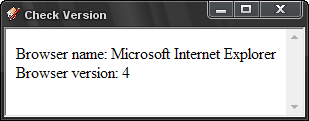


                  IE version.png

                  1 條回覆 最後回覆 回覆 引用 0
                  • thomthomT 離線
                    thomthom
                    最後由 編輯

                    You can't rely on navigator.appVersion. Since IE4 and up it has always reported 4 for legacy support reasons. You must parse the navigator.userAgent string.
                    http://javascript.gakaa.com/navigator-appversion.aspx

                    http://www.quirksmode.org/js/detect.html

                    Thomas Thomassen — SketchUp Monkey & Coding addict
                    List of my plugins and link to the CookieWare fund

                    1 條回覆 最後回覆 回覆 引用 0
                    • N 離線
                      NewOne
                      最後由 編輯

                      If so, why does it renders buttons so old-way? 😞

                      1 條回覆 最後回覆 回覆 引用 0
                      • thomthomT 離線
                        thomthom
                        最後由 編輯

                        IE is quick to do weird stuff to form control. In general - form controls in any browser is unpredictable.

                        If it'd been rendering like IE4 it would be permanently stuck in Quicks mode. Standard mode in IE wasn't introduced until IE6.

                        Thomas Thomassen — SketchUp Monkey & Coding addict
                        List of my plugins and link to the CookieWare fund

                        1 條回覆 最後回覆 回覆 引用 0
                        • Dan RathbunD 離線
                          Dan Rathbun
                          最後由 編輯

                          @newone said:

                          If so, why does it renders buttons so old-way?

                          Sometimes Standards Compliant mode on MSIE turns MS Common Controls back to the old 'unthemed' set (they look like old Win 3.x ugly controls.)

                          See my post in the other WebDialog thread for a META tag that goes in the HEAD section.
                          Sometimes it can turn the 'XP themed' ver 6 controls back on.
                          I don't know if they work in Strict mode, but the tag should work for Tranistional mode.

                          http://forums.sketchucation.com/viewtopic.php?f=180&t=22698#p196706

                          I'm not here much anymore.

                          1 條回覆 最後回覆 回覆 引用 0
                          • 1
                          • 2
                          • 2 / 2
                          • 第一個貼文
                            最後的貼文
                          Buy SketchPlus
                          Buy SUbD
                          Buy WrapR
                          Buy eBook
                          Buy Modelur
                          Buy Vertex Tools
                          Buy SketchCuisine
                          Buy FormFonts

                          Advertisement

