sketchucation logo sketchucation
    • Login
    Oops, your profile's looking a bit empty! To help us tailor your experience, please fill in key details like your SketchUp version, skill level, operating system, and more. Update and save your info on your profile page today!
    โš ๏ธ Update | Sketchucation Tools 5.0.8 released with licensing improvements and bugfixes Download

    How do you detect a Polygon?

    Scheduled Pinned Locked Moved Developers' Forum
    31 Posts 7 Posters 3.2k Views 7 Watching
    Loading More Posts
    • Oldest to Newest
    • Newest to Oldest
    • Most Votes
    Reply
    • Reply as topic
    Log in to reply
    This topic has been deleted. Only users with topic management privileges can see it.
    • TIGT
      TIG Moderator
      last edited by

      A mystery I was thinking about the other day... without success ! Polygons and Circles are all 'Curves' and 'ArcCurves' ๐Ÿ˜ž A Circle/Arc 'extrudes' with 'smooth' faces - but a Polygon doesn't ? I thought perhaps if you look for an Edge's Curve and if it's an ArcCurve it could then be an Arc, a Circle or a Polygon. If the ArcCurve Curve's Vertices are not looped

      loop=true;curve.vertices.each{|v|if v.edges.length==1;loop=false;break;end}
      

      then it's Circle or a Polygon. Then, if edge.smooth? (or .soft? ???) it's circle, else it's a Polygon...

      BUT the smoothness of both is the same - false ... ๐Ÿ˜ฎ

      So how does SUp know the difference between a Circle/Arc and a Polygon. 'Welding' Edges into a Curve

      entities.add_curve(points)
      

      makes a a curve where smooth?==true. You make a Polygon with

      entities.add_ngon(points)
      
      • however, if you have two Edges one in a Curve of a Cirle and the other a Polygon you can't tell which is whicha s their properties seem to be the same ??? ๐Ÿ˜•

      TIG

      1 Reply Last reply
      Reply Quote 0
      • R
        remus
        last edited by

        The brute force way would be to check the angle between all the lines is the same and all lines are the same length. theres got to be a better way of doing it, though.

        http://remusrendering.wordpress.com/

        1 Reply Last reply
        Reply Quote 0
        • TIGT
          TIG Moderator
          last edited by

          @remus said:

          The brute force way would be to check the angle between all the lines is the same and all lines are the same length. theres got to be a better way of doing it, though.

          BUT that could still be Circle !!! ๐Ÿ˜’

          TIG

          1 Reply Last reply
          Reply Quote 0
          • R
            remus
            last edited by

            Sorry, i forgot to add that it should also be a curve/arccurve. Beyond that the distinction is pretty arbitrary anyway because of the segmented nature of circles in SU.

            http://remusrendering.wordpress.com/

            1 Reply Last reply
            Reply Quote 0
            • pilouP
              pilou
              last edited by

              Ingenuous suggestion ๐Ÿ’š
              You can't read the "Entity info" by ruby? ๐Ÿ˜‰

              Frenchy Pilou
              Is beautiful that please without concept!
              My Little site :)

              1 Reply Last reply
              Reply Quote 0
              • thomthomT
                thomthom
                last edited by

                @tig said:

                If the ArcCurve Curve's Vertices are not looped

                I check the radius of the ArcCurve to work out if it's a Circle/Polygon. Less entity iteration that way.

                
                def self.is_circle?(ent)
                	# (i) A bug in SU makes extruded circles into Arcs with .end_angle of 720 degrees when reopening the file.
                	# Instead of checking for 360 degrees exactly, we check for anything larger as well. A 2D arc
                	# can't have more than 360 degrees.
                	
                	return false unless ent.kind_of?(Sketchup;;Edge) && ent.curve && ent.curve.kind_of?(Sketchup;;ArcCurve)
                	arc_curve = ent.curve
                
                	# This doesn't work. Maybe due to rounding errors?
                	#return (arc_curve.end_angle - arc_curve.start_angle >= 360.degrees) ? true ; false
                
                	return ((arc_curve.end_angle - arc_curve.start_angle).radians >= 360) ? true ; false
                end


                @tig said:

                So how does SUp know the difference between a Circle/Arc and a Polygon

                SU must have more info internally which isn't hooked up to the Ruby. ๐Ÿ˜ž

                @remus said:

                Sorry, i forgot to add that it should also be a curve/arccurve. Beyond that the distinction is pretty arbitrary anyway because of the segmented nature of circles in SU.

                Polygons comes out as an ArcCurve - so still no go.

                @unknownuser said:

                Ingenuous suggestion ๐Ÿ’š
                You can't read the "Entity info" by ruby? ๐Ÿ˜‰

                Nope. ๐Ÿ˜ž

                Thomas Thomassen โ€” SketchUp Monkey & Coding addict
                List of my plugins and link to the CookieWare fund

                1 Reply Last reply
                Reply Quote 0
                • thomthomT
                  thomthom
                  last edited by

                  That was the only method I could think of as well. But for what I want to use it for (my Selection Toys plugins - that can potentially evaluate millions of entities in some models) it would be too slow. ๐Ÿ˜ž

                  I guess an evaluation that doesn't require to test-push-pull the polygon/circle is something to ask for in a feature request?

                  I tried to have a quick look at the private methods - hoping to find something locked up there. Might try to have another look.

                  Crosswords puzzles are boring. SU Ruby challenges are much more fun! ๐Ÿ˜„

                  Thomas Thomassen โ€” SketchUp Monkey & Coding addict
                  List of my plugins and link to the CookieWare fund

                  1 Reply Last reply
                  Reply Quote 0
                  • thomthomT
                    thomthom
                    last edited by

                    I had hopes for .typename to work - but alas. ๐Ÿ˜ž

                    Thomas Thomassen โ€” SketchUp Monkey & Coding addict
                    List of my plugins and link to the CookieWare fund

                    1 Reply Last reply
                    Reply Quote 0
                    • TIGT
                      TIG Moderator
                      last edited by

                      You would parse down the entities quite quickly ?

                      all_entities ==1000000
                      all_edges ==500000
                      edge.curve ==50000
                      is ArCurve ==25000
                      ArcCurve.is_loop? ==10000
                      that ArcCurve.is_polygon? ==1000

                      ???

                      BUT, it would be MUCH easier if we had access to the internal methods that SUP has to return Polygon etc in the Entity Info Panel !!!

                      TIG

                      1 Reply Last reply
                      Reply Quote 0
                      • TIGT
                        TIG Moderator
                        last edited by

                        Lateral solution [at last !!!]... ๐Ÿค“
                        which we can now write into three new methods - ArcCurve.is_loop? [returns true if it's a Circle OR a Polygon; false if it's an Arc] and also ArcCurve.is_polygon? [true if it's a Polygon and false if it's a Circle or an Arc], or ArcCurve.is_circle? [true if it's a Circle and false if it's a Polygon or an Arc[/ruby] ...

                        EDIT: added all 'three' methods...

                        
                        class Sketchup;;ArcCurve
                          def is_loop?()### circle OR polygon
                            self.edges.each{|e|
                              e.vertices.each{|v|
                                if not v.edges[1]
                                  return false ### it's an arc
                                  break
                                end#if
                              }
                            }
                            return true
                          end#if
                          def is_polygon?()
                            self.edges.each{|e|
                              e.vertices.each{|v|
                                if not v.edges[1]
                                  return false ### it's an arc
                                  break
                                end#if
                              }
                            }
                            ### if we get here it might be a polygon !!!
                            model=Sketchup.active_model
                            entities=model.active_entities
                            edge=self.edges[0]
                            all_connected=edge.all_connected
                            tgroup=entities.add_group(all_connected)
                            es=edge.start.position
                            ee=edge.end.position
                            group=tgroup.copy
                            tgroup.explode
                            gents=group.entities
                            gedges=[]
                            gents.each{|e|gedges<<e if e.class==Sketchup;;Edge}
                            gedge=nil
                            gedges.each{|e|
                              e.smooth=false
                              e.soft=false
                              gedge=e if (e.start.position==es and e.end.position==ee)or(e.start.position==ee and e.end.position==es)}
                            ### remove all faces so only face and pushpull's remain
                            gents.each{|e|e.erase! if e.class==Sketchup;;Face}
                            gedge.find_faces
                            face=nil
                            gents.each{|e|face=e if e.class==Sketchup;;Face}
                            return false if not face
                            face.pushpull(1.0)
                            edges=[]
                            gents.each{|e|edges<<e if e.class==Sketchup;;Edge}
                            edges.each{|e|
                              if e.smooth? and e.soft?
                                group.erase! if group.valid?
                                return false ### a circle
                              end#if
                            }
                            group.erase! if group.valid?
                            return true ### a polygon
                          end#def
                          def is_circle?()
                            self.edges.each{|e|
                              e.vertices.each{|v|
                                if not v.edges[1]
                                  return false ### it's an arc
                                  break
                                end#if
                              }
                            }
                            ### if we get here it might be a polygon !!!
                            model=Sketchup.active_model
                            entities=model.active_entities
                            edge=self.edges[0]
                            all_connected=edge.all_connected
                            tgroup=entities.add_group(all_connected)
                            es=edge.start.position
                            ee=edge.end.position
                            group=tgroup.copy
                            tgroup.explode
                            gents=group.entities
                            gedges=[]
                            gents.each{|e|gedges<<e if e.class==Sketchup;;Edge}
                            gedge=nil
                            gedges.each{|e|
                              e.smooth=false
                              e.soft=false
                              gedge=e if (e.start.position==es and e.end.position==ee)or(e.start.position==ee and e.end.position==es)}
                            ### remove all faces so only face and pushpull's remain
                            gents.each{|e|e.erase! if e.class==Sketchup;;Face}
                            gedge.find_faces
                            face=nil
                            gents.each{|e|face=e if e.class==Sketchup;;Face}
                            return false if not face
                            face.pushpull(1.0)
                            edges=[]
                            gents.each{|e|edges<<e if e.class==Sketchup;;Edge}
                            edges.each{|e|
                              if e.smooth? and e.soft?
                                group.erase! if group.valid?
                                return true ### a circle
                              end#if
                            }
                            group.erase! if group.valid?
                            return false ### a polygon
                          end#def
                        end#class


                        ๐Ÿ’ญ

                        TIG

                        1 Reply Last reply
                        Reply Quote 0
                        • J
                          Jim
                          last edited by

                          Can't just check if 2 adjacent edges are soft? Circles are, polys are not, right?

                          Guess not.

                          Hi

                          1 Reply Last reply
                          Reply Quote 0
                          • thomthomT
                            thomthom
                            last edited by

                            @jim said:

                            Can't just check if 2 adjacent edges are soft? Circles are, polys are not, right?

                            Guess not.

                            You'd think so, so did I and TIG, but that's not the case. ๐Ÿ˜•

                            Thomas Thomassen โ€” SketchUp Monkey & Coding addict
                            List of my plugins and link to the CookieWare fund

                            1 Reply Last reply
                            Reply Quote 0
                            • thomthomT
                              thomthom
                              last edited by

                              @thomthom said:

                              @jim said:

                              Can't just check if 2 adjacent edges are soft? Circles are, polys are not, right?

                              Guess not.

                              You'd think so, so did I and TIG, but that's not the case. ๐Ÿ˜•

                              Thinking of it - it makes sense that they don't as that would render extruded circles invisible.

                              Thomas Thomassen โ€” SketchUp Monkey & Coding addict
                              List of my plugins and link to the CookieWare fund

                              1 Reply Last reply
                              Reply Quote 0
                              • TIGT
                                TIG Moderator
                                last edited by

                                The Edges in a Curve that's an ArcCurve, that's either a Circle and a Polygon, are identical [neither are smooth nor soft] !!! It's only when you Extrude them in 3D the difference is visually [and Ruby-test-ably] apparent. There is [seems to be?] no Ruby-accessible Method to see if a looped ArcCurve is a Circle or a Polygon... UNLESS you do my elaborate lateral and clunky test by extruding it and testing the extrusion's edges for smooth/soft? ...

                                TIG

                                1 Reply Last reply
                                Reply Quote 0
                                • thomthomT
                                  thomthom
                                  last edited by

                                  Another oddity. Select an extruded circle. From the console: sel[0].soft=true If you click on the circle where one of the edges now are soft - the circle is now selected as well as the faces connected to it.

                                  Thomas Thomassen โ€” SketchUp Monkey & Coding addict
                                  List of my plugins and link to the CookieWare fund

                                  1 Reply Last reply
                                  Reply Quote 0
                                  • TIGT
                                    TIG Moderator
                                    last edited by

                                    @thomthom said:

                                    @thomthom said:

                                    @jim said:

                                    Can't just check if 2 adjacent edges are soft? Circles are, polys are not, right?

                                    Guess not.

                                    You'd think so, so did I and TIG, but that's not the case. ๐Ÿ˜•

                                    Thinking of it - it makes sense that they don't as that would render extruded circles invisible.

                                    Smooth/soft edges that are profiles stay visible...

                                    TIG

                                    1 Reply Last reply
                                    Reply Quote 0
                                    • J
                                      Jim
                                      last edited by

                                      Right, it's the connecting edges of an extrusion that are softened, not the perimeter of the polygon/circle.

                                      Hi

                                      1 Reply Last reply
                                      Reply Quote 0
                                      • thomthomT
                                        thomthom
                                        last edited by

                                        Only the edges that forms the outline of the geometry from the current view.

                                        Look at it from an angle where it doesn't take part of the outline and it's hidden.
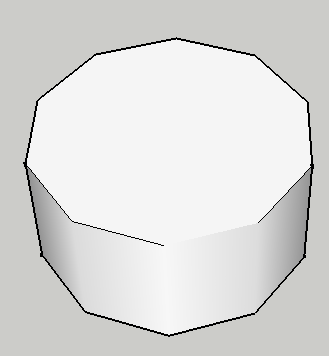

                                        circle_soft.PNG

                                        Thomas Thomassen โ€” SketchUp Monkey & Coding addict
                                        List of my plugins and link to the CookieWare fund

                                        1 Reply Last reply
                                        Reply Quote 0
                                        • TIGT
                                          TIG Moderator
                                          last edited by

                                          When you Smooth/Soften the Polygon's Edge its Face merges with the already Smoothed/Softened side Faces in the extrusion to give a single 'Surface' - as reported in the Entity Info Box. This 'Surface' Selects and Highlights as one thing... unless Hidden Geometry is 'on', then the separate Faces that make up that 'Surface' are individually Selectable/Highlighted. Presumably the [assumed] Face::is_surface? method that Entity Info uses, simply looks to see if some of the Face's Edges are Smooth/Soft and have extra Faces attached ?

                                          TIG

                                          1 Reply Last reply
                                          Reply Quote 0
                                          • thomthomT
                                            thomthom
                                            last edited by

                                            I added a feature request on this topic.

                                            Thomas Thomassen โ€” SketchUp Monkey & Coding addict
                                            List of my plugins and link to the CookieWare fund

                                            1 Reply Last reply
                                            Reply Quote 0

                                            Hello! It looks like you're interested in this conversation, but you don't have an account yet.

                                            Getting fed up of having to scroll through the same posts each visit? When you register for an account, you'll always come back to exactly where you were before, and choose to be notified of new replies (either via email, or push notification). You'll also be able to save bookmarks and upvote posts to show your appreciation to other community members.

                                            With your input, this post could be even better ๐Ÿ’—

                                            Register Login
                                            • 1
                                            • 2
                                            • 2 / 2
                                            • First post
                                              Last post
                                            Buy SketchPlus
                                            Buy SUbD
                                            Buy WrapR
                                            Buy eBook
                                            Buy Modelur
                                            Buy Vertex Tools
                                            Buy SketchCuisine
                                            Buy FormFonts

                                            Advertisement
