[Plugin] GhostComp - v1.4a - 31 Oct 18
-
Many years I wanted to ask.. On some stage Ghostcomp puts ALL 'real' instances at file's origin point. Is it a bug or a feature?
The problem with those instances is if you'd delete them (at origin point) and run purge plugin there's no way to swap from ghost representation to 'real'. -
@rv1974 said:
Many years I wanted to ask.. On some stage Ghostcomp puts ALL 'real' instances at file's origin point. Is it a bug or a feature?
The problem with those instances is if you'd delete them (at origin point) and run purge plugin there's no way to swap from ghost representation to 'real'.I'll see what I can do to force a conversion to real before a Purge.
-
@fredo6 said:
@rv1974 said:
Many years I wanted to ask.. On some stage Ghostcomp puts ALL 'real' instances at file's origin point. Is it a bug or a feature?
The problem with those instances is if you'd delete them (at origin point) and run purge plugin there's no way to swap from ghost representation to 'real'.I'll see what I can do to force a conversion to real before a Purge.
EDIT: I am not able to reproduce your problem. Could you elaborate. Thanks
-
Haha.. Thats exactly the problem! I can't catch the moment when this Shashlik of components
get created @0,0,0
but I can PM the file where it's alreadythere. Eventually I get this in every project. -
Fredo, would it be hard to implement an extra display mode?
Instead of cubes- a simple short line* of 5-10cm?
Thank you for attention- The line must be aligned to original component of course and placed at insertion point.
Alignent is crucial, thats why a quide point is not good.
** The goal of this thing: when exported to 3ds Max, all short lines (of the same kind) get merged onto one spline, and then Multiscatter plugin
https://rendering.ru/multiscatter.html
parametrically puts items (varied and properly aligned) on on every short segment.
*** Even other users would benefit because frequently those pink cubes are too bulky and obstruct the main model
- The line must be aligned to original component of course and placed at insertion point.
-
@rv1974 said:
Fredo, would it be hard to implement an extra display mode?
Instead of cubes- a simple short line* of 5-10cm?I am preparing a new extension to replace GhostComp, where you can replace an object by another one. That would be simpler and can use lines or whatever you like as a proxy.
Fredo
PS: so, I won't probably update GhostComp but release this new plugin instead.
-
Amazing news! Would be happy to beta test

-
@rv1974 said:
Amazing news! Would be happy to beta test
Could you PM me an email address so that I can send it to you along with the doc.
-
Hi guys,
Ghostcomp has become one of the most useful tools in my palette. I think its intention was to lighten the scenes for heavy objects but what I mostly use it for, is aligning non rectangular objects (make that sofa touch the wall/ arrange cushions on a sofa/ take dimensions from tubes etc etc.)
My only problem is that for some reason it only works for components. at times this becomes frustrating and I have found myself many times converting a group into a component just to use ghostcomp.
So, firstly I would want to ask (if anyone is listening) to give it the ability to create ghosts for groups and
secondly, is there in the meanwhile something equivalent that replaces objects with their bounding box? -
@aris said:
So, firstly I would want to ask (if anyone is listening) to give it the ability to create ghosts for groups and
secondly, is there in the meanwhile something equivalent that replaces objects with their bounding box?You should read Fredo6's last post in this thread. He has a newer extension called FredoGhost. It will work with groups.
-
@fredo6 said:
@fredo6 said:
@rv1974 said:
Many years I wanted to ask.. On some stage Ghostcomp puts ALL 'real' instances at file's origin point. Is it a bug or a feature?
The problem with those instances is if you'd delete them (at origin point) and run purge plugin there's no way to swap from ghost representation to 'real'.I'll see what I can do to force a conversion to real before a Purge.
EDIT: I am not able to reproduce your problem. Could you elaborate. Thanks
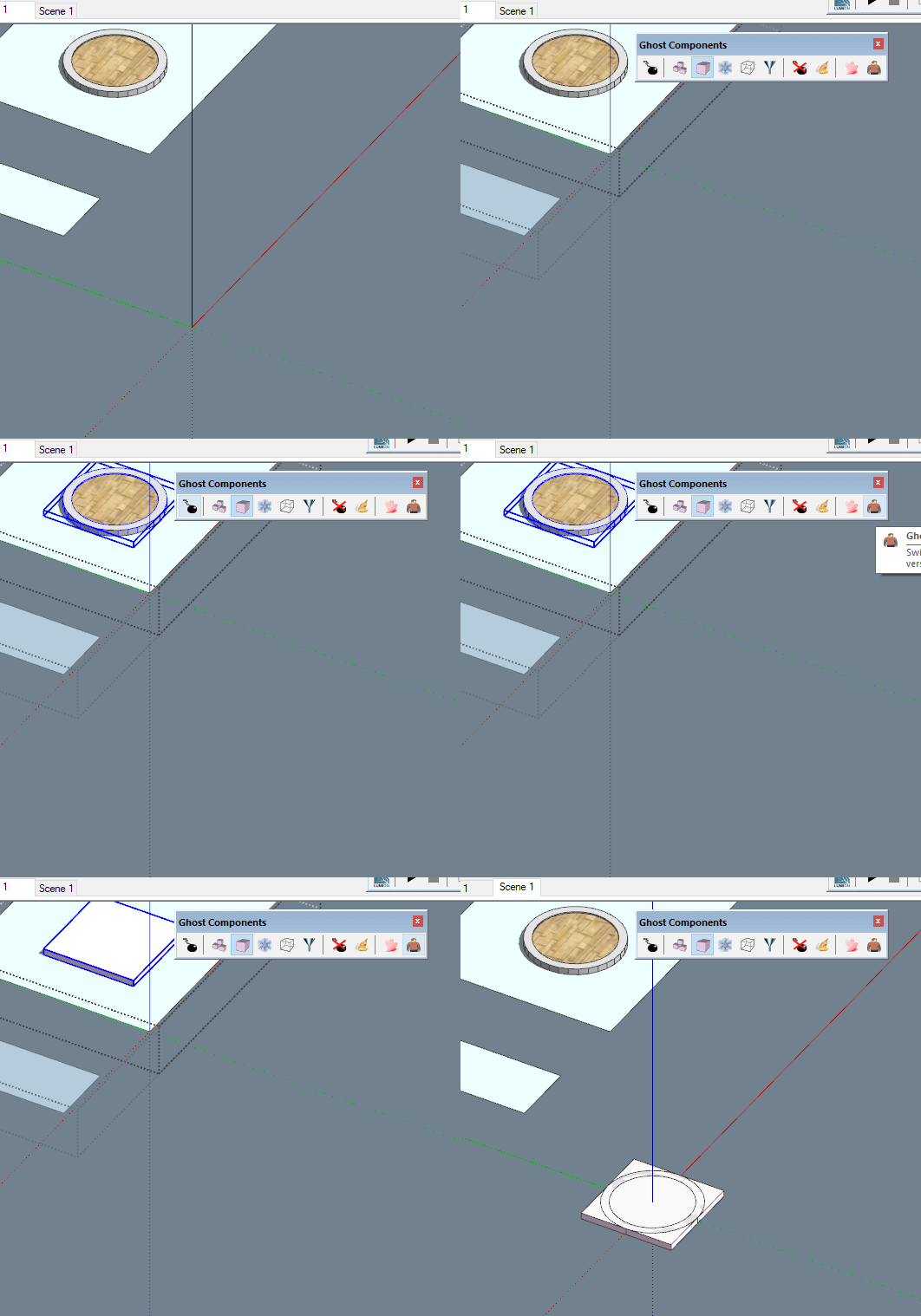
I Think I managed to catch the bug:
- Staying in Scene1: Enter context, select desired component (donut) make a ghost, exit context.
- Go to Scene 2. Ghost dummy plus original donut geometry created at 0,0,0.
The file PM'd.





Advertisement