sketchucation logo sketchucation
    • 登入
    Oops, your profile's looking a bit empty! To help us tailor your experience, please fill in key details like your SketchUp version, skill level, operating system, and more. Update and save your info on your profile page today!
    🔌 Smart Spline | Fluid way to handle splines for furniture design and complex structures. Download

    [Plugin] Scale2Face.rb

    已排程 已置頂 已鎖定 已移動 Plugins
    27 貼文 10 Posters 43.5k 瀏覽 10 Watching
    正在載入更多貼文
    • 從舊到新
    • 從新到舊
    • 最多點贊
    回覆
    • 在新貼文中回覆
    登入後回覆
    此主題已被刪除。只有擁有主題管理權限的使用者可以查看。
    • TIGT 離線
      TIG Moderator
      最後由 編輯

      At long last version v1.2 is now available.
      Link: http://forums.sketchucation.com/viewtopic.php?p=173374#p173374

      It Scales any Selected Component-instances/Groups up in Z to Selected Faces above them. It works for curved Surfaces, but remember that it Scales to all Selected Faces... so if you select a horizontal cylinder its whole curved Face gets Selected (which is actually Face facets) and therefore it Scales to the lower [nearer] Faces and then the upper Faces - if you want to Scale to just the lower [nearer] Faces you must first switch on Hidden Geometry and them Select just the lower Face facets required and it then Scales things just to those...

      Feedback please

      TIG

      1 條回覆 最後回覆 回覆 引用 0
      • olisheaO 離線
        olishea
        最後由 編輯

        nice plugin, thank you

        oli

        1 條回覆 最後回覆 回覆 引用 0
        • R 離線
          rv1974
          最後由 編輯

          Tig it doesn't work within groups 😢
          And maybe clicking 3 points instead of face would be better solution?
          Thank you (I mean it!)

          1 條回覆 最後回覆 回覆 引用 0
          • TIGT 離線
            TIG Moderator
            最後由 編輯

            Here's a Ruby that'll do it [please change the original post's title to [Plugin]...]

            . scale2face.rb

            Usage:
            Select face(s) & group/component-instance(s) located below face(s).

            Unacceptable selections produce error dialogs.

            Pick 'Scale2Face' off the Plugins Menu
            or type scale2face in the Ruby Console.

            The selected items will be
            scaled upwards [in the Z] until their CLs meet the face or faces.

            Any intermediate faces etc are ignored; the scaling passes through them.

            It has a one step un-do.

            To Do: Alternative orientations to just the UP in Z.
            E.G. down and in XY

            Version: 1.0 20090717 First Release.
            1.1 20090721 Tweaked to avoid height glitches.
            1.2 20090811 Multi-face support added. Error msgs disabled.
            1.3 20090819 Now works within groups/component edits.

            Put in Plugins Folder...PayPalButton

            TIG

            1 條回覆 最後回覆 回覆 引用 0
            • TIGT 離線
              TIG Moderator
              最後由 編輯

              @rv1974 said:

              Tig it doesn't work within groups 😢
              And maybe clicking 3 points instead of face would be better solution?
              Thank you (I mean it!)

              It does work inside groups etc now !

              See here for v1.3 http://forums.sketchucation.com/viewtopic.php?p=173374#p173374

              Easy fix ray[1] .last gives face if in group/component edit mode... 😄 🤓 🤓

              TIG

              1 條回覆 最後回覆 回覆 引用 0
              • X 離線
                xrok1
                最後由 編輯

                don't know how i missed this one 😳
                Thankyou! 😄

                “There are three classes of people: those who see. Those who see when they are shown. Those who do not see.”

                http://www.Twilightrender.com try it!

                1 條回覆 最後回覆 回覆 引用 0
                • X 離線
                  xrok1
                  最後由 編輯

                  @j_forrester said:

                  Great Plugin btw,
                  Just wondered if there are any developments of a version that takes into account a sloped surface instead of a flat plane?

                  Many thanks

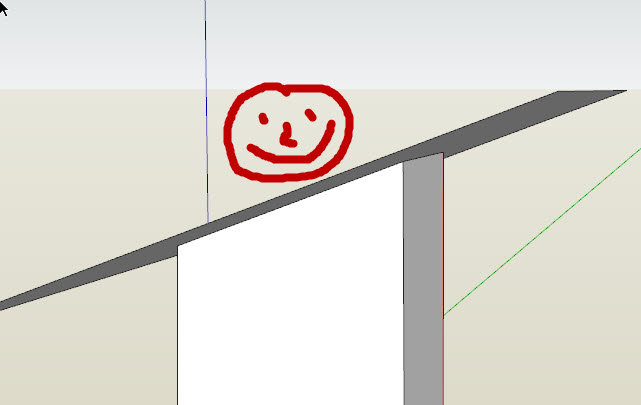
                  it would be awsome if the scaled face matched the shape/angle of the scaled to face. any plans?
                  http://twilightrender.com/phpBB3/images/smilies/think.gif


                  Capture1.JPG

                  “There are three classes of people: those who see. Those who see when they are shown. Those who do not see.”

                  http://www.Twilightrender.com try it!

                  1 條回覆 最後回覆 回覆 引用 0
                  • 1
                  • 2
                  • 2 / 2
                  • 第一個貼文
                    最後的貼文
                  Buy SketchPlus
                  Buy SUbD
                  Buy WrapR
                  Buy eBook
                  Buy Modelur
                  Buy Vertex Tools
                  Buy SketchCuisine
                  Buy FormFonts

                  Advertisement