sketchucation logo sketchucation
    • Login
    Oops, your profile's looking a bit empty! To help us tailor your experience, please fill in key details like your SketchUp version, skill level, operating system, and more. Update and save your info on your profile page today!
    Mac User? | Join the Rayscaper Beta for Mac Learn More

    [Plugin] Scale2Face.rb

    Scheduled Pinned Locked Moved Plugins
    27 Posts 10 Posters 45.6k Views 10 Watching
    Loading More Posts
    • Oldest to Newest
    • Newest to Oldest
    • Most Votes
    Reply
    • Reply as topic
    Log in to reply
    This topic has been deleted. Only users with topic management privileges can see it.
    • daikuD
      daiku
      last edited by

      Check out FredoScale. In particular, the "scale to target" and "stretch to target" modes.

      Clark Bremer
      http://www.northernlightstimberframing.com

      1 Reply Last reply
      Reply Quote 0
      • free agentF
        free agent
        last edited by

        wow TIG nice one, and good idea, that couldve saved me some time a couple projects ago πŸ‘

        http://i167.photobucket.com/albums/u143/FreeAgent84/bug.gif

        1 Reply Last reply
        Reply Quote 0
        • utilerU
          utiler
          last edited by

          Very cool indeed!!! Just wondering TIG; will this script work when you want to extend a wall top to a sloping roof for instance? πŸ‘

          Just Curious...

          1 Reply Last reply
          Reply Quote 0
          • S
            su30
            last edited by

            @tig said:

            Here's a Ruby that'll do it [please change the original post's title to [Plugin]...]
            . scale2face.rb
            Usage: Select a face and some groups/component-instances that are
            located below that face.
            Pick 'Scale2Face' off the Plugins Menu or type scale2face in the Ruby
            Console.
            Unacceptable selections produce error dialogs.
            The selected items will be
            scaled upwards [in the Z] until their CLs meet the face.
            If items CLs do not intersect with the face then they are not scaled
            and there's a closing message...
            Any intermediate faces etc are ignored and the scaling passes through
            them.
            It has a one step un-do.

            To Do: Alternative orientations not just the UP in Z.

            TIG,
            I have to say you are great! It's not the first time that my request answered by you quickly,
            your describe for the script is what exactly what I am searching for, and even more that I didn't image.
            I changed the title of this thread and tested the script, but some unexpected results comes,
            the items were not scaled correctly, I think there must be some difference happens between our system condition,
            do you remember the 'lines2component.rb' last time you write? I found nearly the same thing happened this time.

            su30

            1 Reply Last reply
            Reply Quote 0
            • TIGT
              TIG Moderator
              last edited by

              su30

              What's the nature of the problem you are having ? I quickly churned out this first version... It might be buggy. Are you components originally drawn so that their eventual Z is the model Z etc ? Please try it using a simple box component (say 500x500x1000mm high and see if that [or several copies] scales up to a selected face ? Because the component instance is stretched up in the Z it must be consistent in its XY cross-section, otherwise it will distort... If you want to keep the base detail unchanged and simply want the top faces of the instances' to stretch up [with the base detail remaining unchanged] then the script would need to make each instance 'unique' and then change its definition - finding its top face and then using '.move!' on it to relocate it up at the face-intersect Z to suit...

              Please feedback - I don't like flaky scripts out there with my name on...

              TIG

              1 Reply Last reply
              Reply Quote 0
              • S
                su30
                last edited by

                TIG

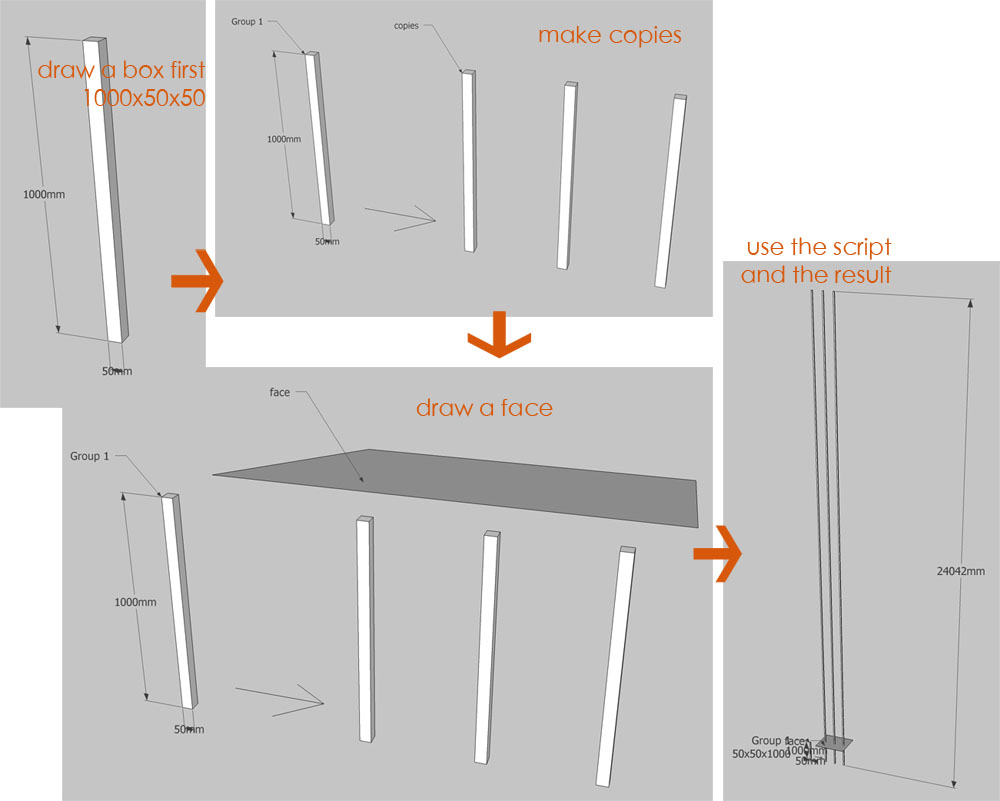
                I used the script and followed the steps, but this happened every time,
                this is the feed back, please check the picture bellow:

                scale2face1.0.jpg

                su30

                1 Reply Last reply
                Reply Quote 0
                • TIGT
                  TIG Moderator
                  last edited by

                  su30

                  I'm getting the exact same problems ! I didn't before - I am investigating...

                  TIG

                  1 Reply Last reply
                  Reply Quote 0
                  • TIGT
                    TIG Moderator
                    last edited by

                    Version 1.1 is here...
                    http://forums.sketchucation.com/viewtopic.php?p=173374#p173374
                    Fixed the glitch [I think]...
                    Code was all messed up somehow !!!

                    TIG

                    1 Reply Last reply
                    Reply Quote 0
                    • S
                      su30
                      last edited by

                      TIG

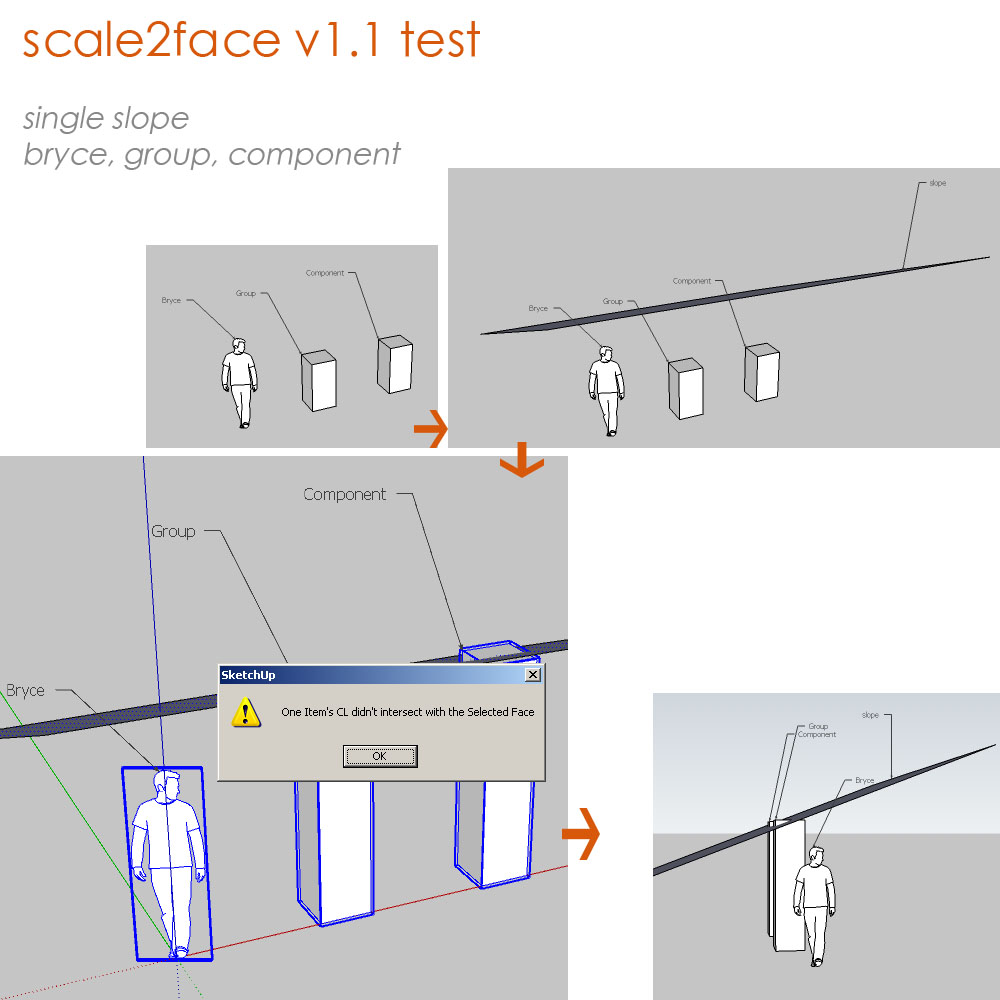
                      Here is a simple feedback of the script,
                      scale items to a single slope.
                      It works pretty fine with the boxes in group and component,
                      but a little problem with 'Bryce', a face camera component.
                      picture followed...

                      scale2face101a.jpg

                      su30

                      1 Reply Last reply
                      Reply Quote 0
                      • S
                        su30
                        last edited by

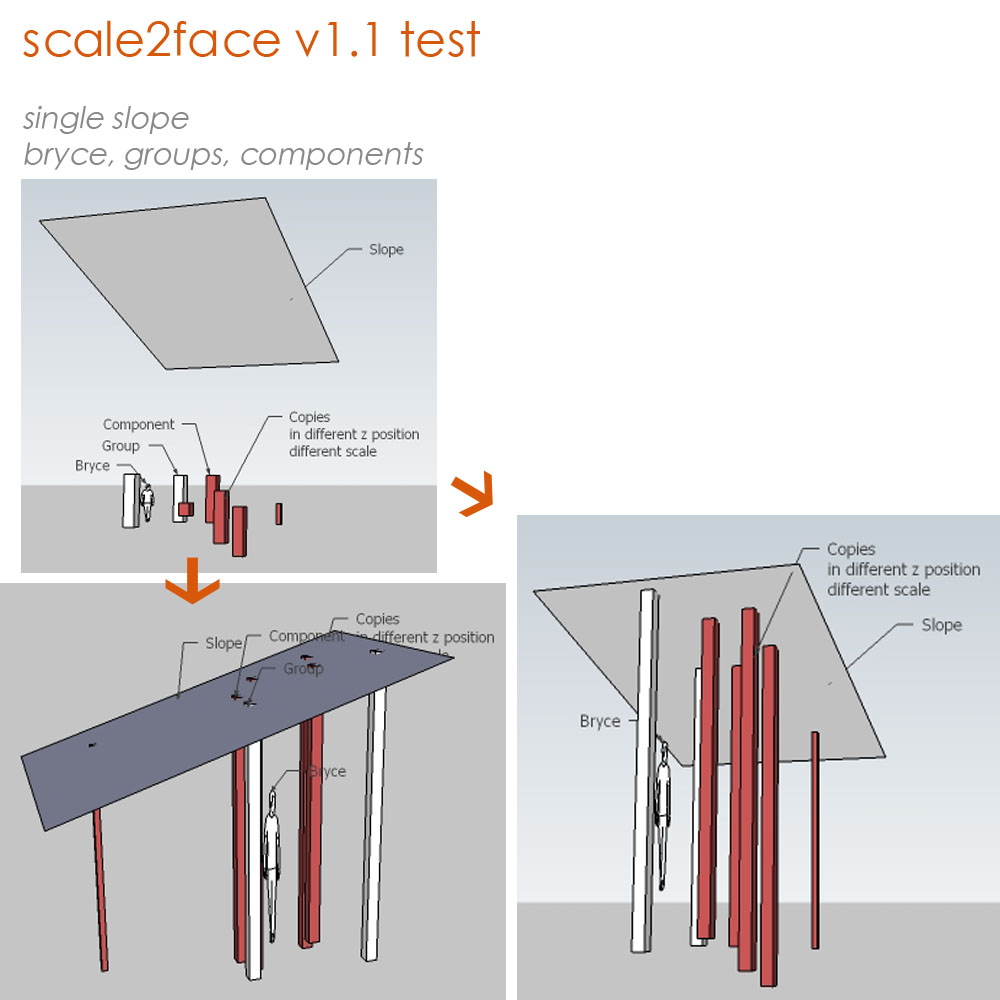
                        This is another test for v1.1
                        groups, components, single slope
                        components are in different x,y,z position, and in different x,y,z scale,
                        it proves good with these items.
                        now the plugin works when only 1 face was selected, I don't know if it is possible to do it on multi faces or curve face,
                        maybe you have already worked on it, TIG.
                        Sorry that I can't reply on time because the time difference...

                        scale2face101b.jpg

                        su30

                        1 Reply Last reply
                        Reply Quote 0
                        • TIGT
                          TIG Moderator
                          last edited by

                          I have considered multiple faces and have a draft almost ready...

                          I don't know why 'Bryce' fails - I suspect it's because the face was originally draw flat on the Z plane and then tilts up to 'face-me' ? I'll look at it...

                          In passing: I've also got an early draft for a 'Stretch2Face' Ruby that takes works with groups and faces; the topmost vertices of any vertical faces in the group get moved up to snap onto the face(s) selected - that way you could easily stretch the top of a wall face up to the underside of a sloping or even curved roof ?

                          Thanks for the feedback, any other ideas or problems please let me know... πŸ˜„

                          TIG

                          1 Reply Last reply
                          Reply Quote 0
                          • S
                            su30
                            last edited by

                            yes I am looking forward for the multi_face version
                            this script will be very efficiency while editing a big amount of components, and I think it is promising.
                            thank you TIG for the excellent work!
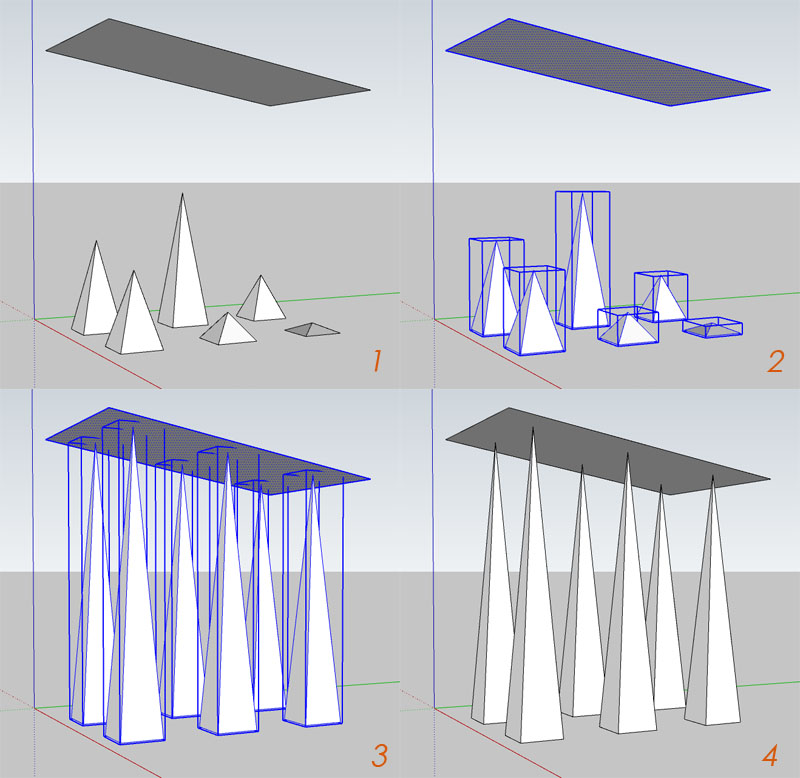

                            scale2face101 copy.jpg

                            su30

                            1 Reply Last reply
                            Reply Quote 0
                            • S
                              su30
                              last edited by

                              TIG, I am wondering if you have some process script I can have a try?
                              still watching this ^_^

                              su30

                              1 Reply Last reply
                              Reply Quote 0
                              • TIGT
                                TIG Moderator
                                last edited by

                                Very busy - maybe next week ? 😐

                                TIG

                                1 Reply Last reply
                                Reply Quote 0
                                • D
                                  dtrarch
                                  last edited by

                                  Hi All
                                  Didier's [Project_faces_vector.rb] will put selected face on inclined plane.
                                  Just draw a reference line vector in the direction wanted for projection path.

                                  dtr


                                  SCALE TO FACE.png

                                  1 Reply Last reply
                                  Reply Quote 0
                                  • S
                                    su30
                                    last edited by

                                    @tig said:

                                    Very busy - maybe next week ? 😐

                                    Sure TIG, in no hurry πŸ˜„

                                    su30

                                    1 Reply Last reply
                                    Reply Quote 0
                                    • J
                                      j_forrester
                                      last edited by

                                      Great Plugin btw,
                                      Just wondered if there are any developments of a version that takes into account a sloped surface instead of a flat plane?

                                      Many thanks

                                      1 Reply Last reply
                                      Reply Quote 0
                                      • utilerU
                                        utiler
                                        last edited by

                                        @j_forrester said:

                                        Great Plugin btw,
                                        Just wondered if there are any developments of a version that takes into account a sloped surface instead of a flat plane?

                                        Many thanks

                                        Ditto.
                                        I think this would be neat!!!

                                        Just Curious...

                                        1 Reply Last reply
                                        Reply Quote 0
                                        • J
                                          j_forrester
                                          last edited by

                                          TIG,

                                          Tried and tested.

                                          Works absolutely perfect! Many thanks this will be a great help.

                                          1 Reply Last reply
                                          Reply Quote 0
                                          • TIGT
                                            TIG Moderator
                                            last edited by

                                            At long last version v1.2 is now available.
                                            Link: http://forums.sketchucation.com/viewtopic.php?p=173374#p173374

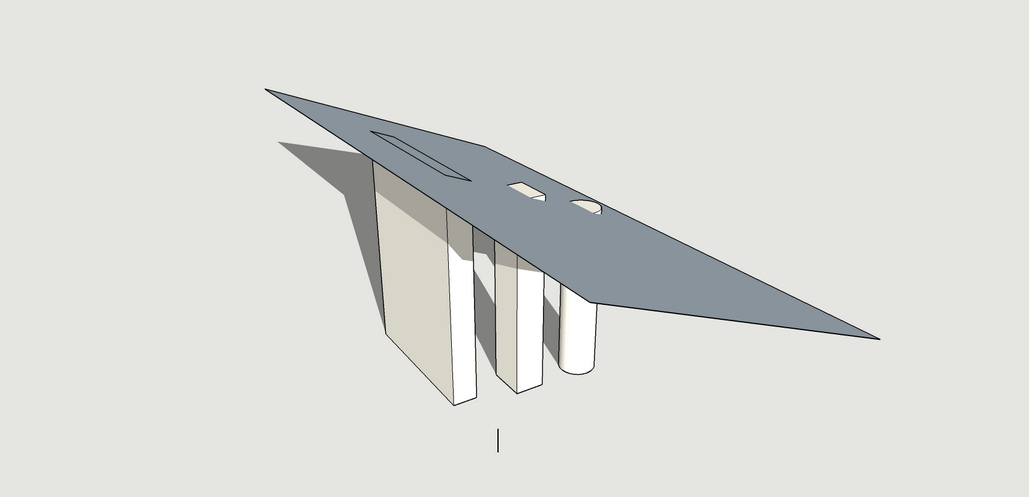
                                            It Scales any Selected Component-instances/Groups up in Z to Selected Faces above them. It works for curved Surfaces, but remember that it Scales to all Selected Faces... so if you select a horizontal cylinder its whole curved Face gets Selected (which is actually Face facets) and therefore it Scales to the lower [nearer] Faces and then the upper Faces - if you want to Scale to just the lower [nearer] Faces you must first switch on Hidden Geometry and them Select just the lower Face facets required and it then Scales things just to those...

                                            Feedback please

                                            TIG

                                            1 Reply Last reply
                                            Reply Quote 0

                                            Hello! It looks like you're interested in this conversation, but you don't have an account yet.

                                            Getting fed up of having to scroll through the same posts each visit? When you register for an account, you'll always come back to exactly where you were before, and choose to be notified of new replies (either via email, or push notification). You'll also be able to save bookmarks and upvote posts to show your appreciation to other community members.

                                            With your input, this post could be even better πŸ’—

                                            Register Login
                                            • 1
                                            • 2
                                            • 1 / 2
                                            • First post
                                              Last post
                                            Buy SketchPlus
                                            Buy SUbD
                                            Buy WrapR
                                            Buy eBook
                                            Buy Modelur
                                            Buy Vertex Tools
                                            Buy SketchCuisine
                                            Buy FormFonts

                                            Advertisement