sketchucation logo sketchucation
    • Login
    Oops, your profile's looking a bit empty! To help us tailor your experience, please fill in key details like your SketchUp version, skill level, operating system, and more. Update and save your info on your profile page today!
    Mac User? | Join the Rayscaper Beta for Mac Learn More

    [Plugin] Import OBJ with Materials v2.1 20131118

    Scheduled Pinned Locked Moved Plugins
    279 Posts 87 Posters 448.6k Views 87 Watching
    Loading More Posts
    • Oldest to Newest
    • Newest to Oldest
    • Most Votes
    Reply
    • Reply as topic
    Log in to reply
    This topic has been deleted. Only users with topic management privileges can see it.
    • KrisidiousK
      Krisidious
      last edited by

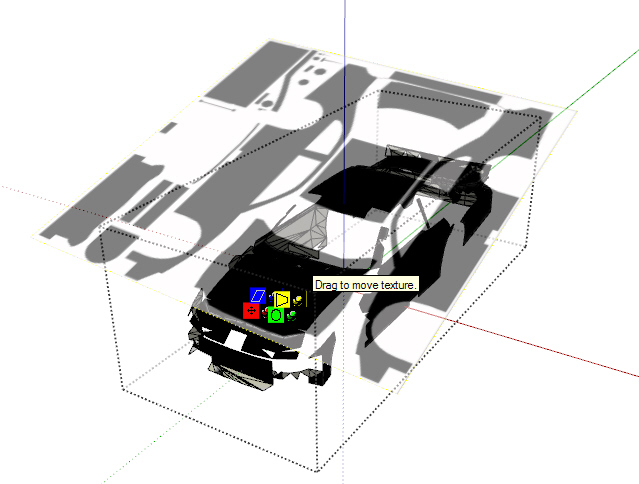
      I imported an Obj file and the uvw map came in perfectly.
      objimporter02.jpg

      but some geometry was lost... any ideas on why?

      objimporter01.jpg

      By: Kristoff Rand
      Home DesignerUnique House Plans

      1 Reply Last reply
      Reply Quote 0
      • TIGT
        TIG Moderator
        last edited by

        @onesimo said:

        hi tig! im using 3ds max design 2011. when i open/obj import my exported file the textures are not showing.. it seems my .mtl file is different from the one posted (the one with the building). thanks!

        The MTL file has the lines

        Ka 0.0000 0.0000 0.0000
        Kd 0.0000 0.0000 0.0000
        Ks 0.3500 0.3500 0.3500
        

        they should read

        Ka 0.0000 0.0000 0.0000
        Kd 0.3500 0.3500 0.3500
        Ks 0.0000 0.0000 0.0000
        

        The Kd value sets the material's RGB color in the original MTL file it is [0,0,0] = 'black'
        If you swap the Kd and Ks values and it renders 'gray' as expected...
        Only the 'Kd' value is read by the SUp importer - the other twp 'K' values involve reflectivity and spectral info that SUp can't use and are superfluous...
        Also if an MTL material has an image_file defined at the end of its text_block that will be used as its 'texture', overriding any RGB 'color' - but this material does not have a texture.
        When you make an OBJ file check that its MTL file's 'Kd' is set to RGB otherwise it will be 'black'.

        TIG

        1 Reply Last reply
        Reply Quote 0
        • TIGT
          TIG Moderator
          last edited by

          @krisidious said:

          I imported an Obj file and the uvw map came in perfectly.
          but some geometry was lost... any ideas on why?
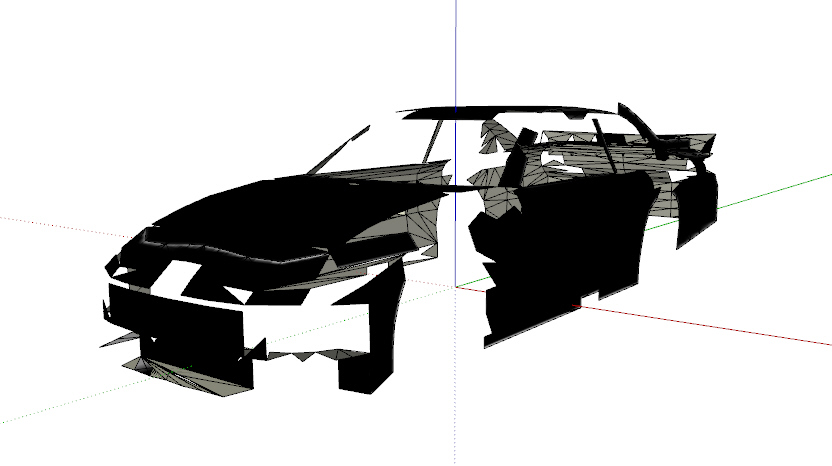
          The OBJ importer should import all available geometry described in the file - sometimes with very convoluted meshes it can fail, but it rarely 'misses' stuff out - in fact it's more likely to try and tie vertices together that don't join in the original with extra geometry!
          If you import the same file into another app - like Blender? - is it still missing parts?
          If so perhaps the export didn't pick up parts in the first place πŸ˜•
          What app made the OBJ file originally?

          TIG

          1 Reply Last reply
          Reply Quote 0
          • KrisidiousK
            Krisidious
            last edited by

            @tig said:

            @krisidious said:

            I imported an Obj file and the uvw map came in perfectly.
            but some geometry was lost... any ideas on why?

            The OBJ importer should import all available geometry described in the file - sometimes with very convoluted meshes it can fail, but it rarely 'misses' stuff out - in fact it's more likely to try and tie vertices together that don't join in the original with extra geometry!
            If you import the same file into another app - like Blender? - is it still missing parts?
            If so perhaps the export didn't pick up parts in the first place πŸ˜•
            What app made the OBJ file originally?

            it came from AC3D, I tried the file in 3Dmax and it's all there. it's no biggy, I don't need to do it. I was just trying it out.

            By: Kristoff Rand
            Home DesignerUnique House Plans

            1 Reply Last reply
            Reply Quote 0
            • TIGT
              TIG Moderator
              last edited by

              Kristoff

              Can you PM me the OBJ/MTL etc [zipped].
              I'd like to see if I can find out the cause anyway... πŸ€“

              TIG

              1 Reply Last reply
              Reply Quote 0
              • TIGT
                TIG Moderator
                last edited by

                Kristoff

                I got the 'Ford' OBJ file by PM.
                It imported fine for me... IF I set the units to 'meters' - it also then comes in at the correct 'size'!
                If you use 'mm' it is tries to make some edges that are 1000 times too small 0 as you might have seen in other threads that guarantees that geometry fails to be made. SUp / OpenGL doesn't like anything smaller than about 0.1mm...
                The importer reads the OBJ file's 'header' and if it has 'units=' in it then that is given as the default displayed in the dialog as it starts, otherwise it defaults to 'inches'.
                In the case of this 'Ford' OBJ there's no header info at all, so you need to take a guess - trying larger scale units should always make geometry as the 0.1mm is never likely but of course the imported object might then be the wrong 'size'.
                Meters are a common unit in non-US made OBJs...
                So, panic over - try it in 'meters' and it should work fine... πŸ€“

                TIG

                1 Reply Last reply
                Reply Quote 0
                • KrisidiousK
                  Krisidious
                  last edited by

                  damn counting with 10's burned me again... (hits self in head meter not millimeter!)

                  awesome plugin. I also love the groupstoobj.rb ...

                  By: Kristoff Rand
                  Home DesignerUnique House Plans

                  1 Reply Last reply
                  Reply Quote 0
                  • E
                    eloiraiol
                    last edited by

                    Because the images do not appear in the trial, only show the textures in SketchUp itself. Where is a picture is blank!

                    1 Reply Last reply
                    Reply Quote 0
                    • TIGT
                      TIG Moderator
                      last edited by

                      @eloiraiol said:

                      Because the images do not appear in the trial, only show the textures in SketchUp itself. Where is a picture is blank!

                      Please explain your problem another way... I don't understand πŸ˜•

                      TIG

                      1 Reply Last reply
                      Reply Quote 0
                      • W
                        wyatt
                        last edited by

                        I'm stepping into an area that I don't fully understand, so hopefully this question makes sense. I would like to import an obj with vertex colors turned on. I have a tcs file that I believe contains the vertex color data, but the obj and mtl don't appear to reference that file at all. I haven't found much searching Google for the tcs file format. Is it possible to import vertex colors into SU?

                        1 Reply Last reply
                        Reply Quote 0
                        • TIGT
                          TIG Moderator
                          last edited by

                          @unknownuser said:

                          I'm stepping into an area that I don't fully understand, so hopefully this question makes sense. I would like to import an obj with vertex colors turned on. I have a tcs file that I believe contains the vertex color data, but the obj and mtl don't appear to reference that file at all. I haven't found much searching Google for the tcs file format. Is it possible to import vertex colors into SU?

                          Not with this tool - it only imports 'faces' with their colors/textures - not even raw 'edges'...

                          TIG

                          1 Reply Last reply
                          Reply Quote 0
                          • thomthomT
                            thomthom
                            last edited by

                            Vertex colours, the connected face should have a surface that blends the colour from each vertex?

                            Thomas Thomassen β€” SketchUp Monkey & Coding addict
                            List of my plugins and link to the CookieWare fund

                            1 Reply Last reply
                            Reply Quote 0
                            • W
                              wyatt
                              last edited by

                              Yes, that's the idea.

                              1 Reply Last reply
                              Reply Quote 0
                              • majidM
                                majid
                                last edited by

                                thanx again TIG πŸ‘ now I can play with sculptris + SU

                                My inspiring A, B, Sketches book: https://sketchucation.com/shop/books/intermediate/2612-alphabet-inspired-sketches--inspiring-drills-for-architects--3d-artists-and-designers-

                                1 Reply Last reply
                                Reply Quote 0
                                • Chris FullmerC
                                  Chris Fullmer
                                  last edited by

                                  @unknownuser said:

                                  I'm stepping into an area that I don't fully understand, so hopefully this question makes sense. I would like to import an obj with vertex colors turned on. I have a tcs file that I believe contains the vertex color data, but the obj and mtl don't appear to reference that file at all. I haven't found much searching Google for the tcs file format. Is it possible to import vertex colors into SU?

                                  Wyatt, where di you get the "tcs" file? I think I know what you're asking, but I have not seen any tcs file at any point. I'm scheming some things right now along these lines.

                                  Lately you've been tan, suspicious for the winter.
                                  All my Plugins I've written

                                  1 Reply Last reply
                                  Reply Quote 0
                                  • W
                                    wyatt
                                    last edited by

                                    Hey Chris. Yes, the tcs file comes from tree[d]. I'm not at my computer right now, but from what I remember it's a series of rgb values that I believe tree[d] uses to compute the color variations in the leaves. It would be great if you are figuring out a way to use that data in SU. Let me know if I can help.

                                    1 Reply Last reply
                                    Reply Quote 0
                                    • P
                                      pibuz
                                      last edited by

                                      +1 to Wyatt's request! Could be very useful using Tree[d] trees!

                                      WEB (ita) - https://filipposcarso.wixsite.com/ordinentropico

                                      1 Reply Last reply
                                      Reply Quote 0
                                      • Z
                                        zubenelgennubi
                                        last edited by

                                        thank you so much!!!!!

                                        1 Reply Last reply
                                        Reply Quote 0
                                        • R
                                          rattusNOR
                                          last edited by

                                          worked very well... thanks!!

                                          1 Reply Last reply
                                          Reply Quote 0
                                          • 3
                                            3deviator
                                            last edited by

                                            hellow TIG, i got some problem using this plug-ins. i don't know if the import OBJ plug-ins have a problem or the software i used. I use Frecle tree[d] 3.1 its a free tree generator software to generate tree and export it to .obj file and then import it to sketchup pro 8 using Import OBJ. when i finish importing it, the tree has no texture even i use import OBJ[with texture]as seen in the pictures. whats the problem for it TIG? Anyways, heres the link for tree[d]3.1 software http://www.frecle.net/index.php?show=treed.about . It is great help to us if you can fix this one, we can generate trees and load it to sketchup. hope you will reply this post, thanks.
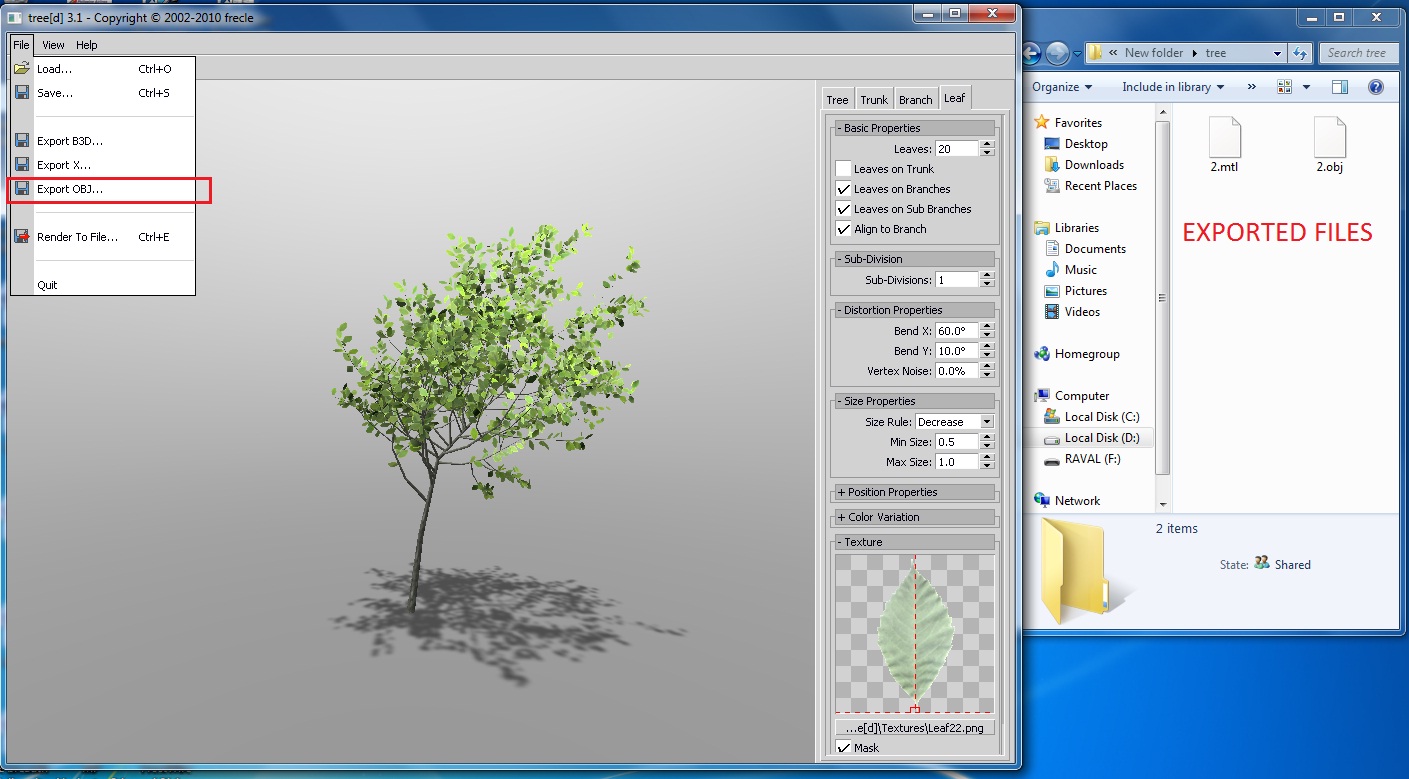
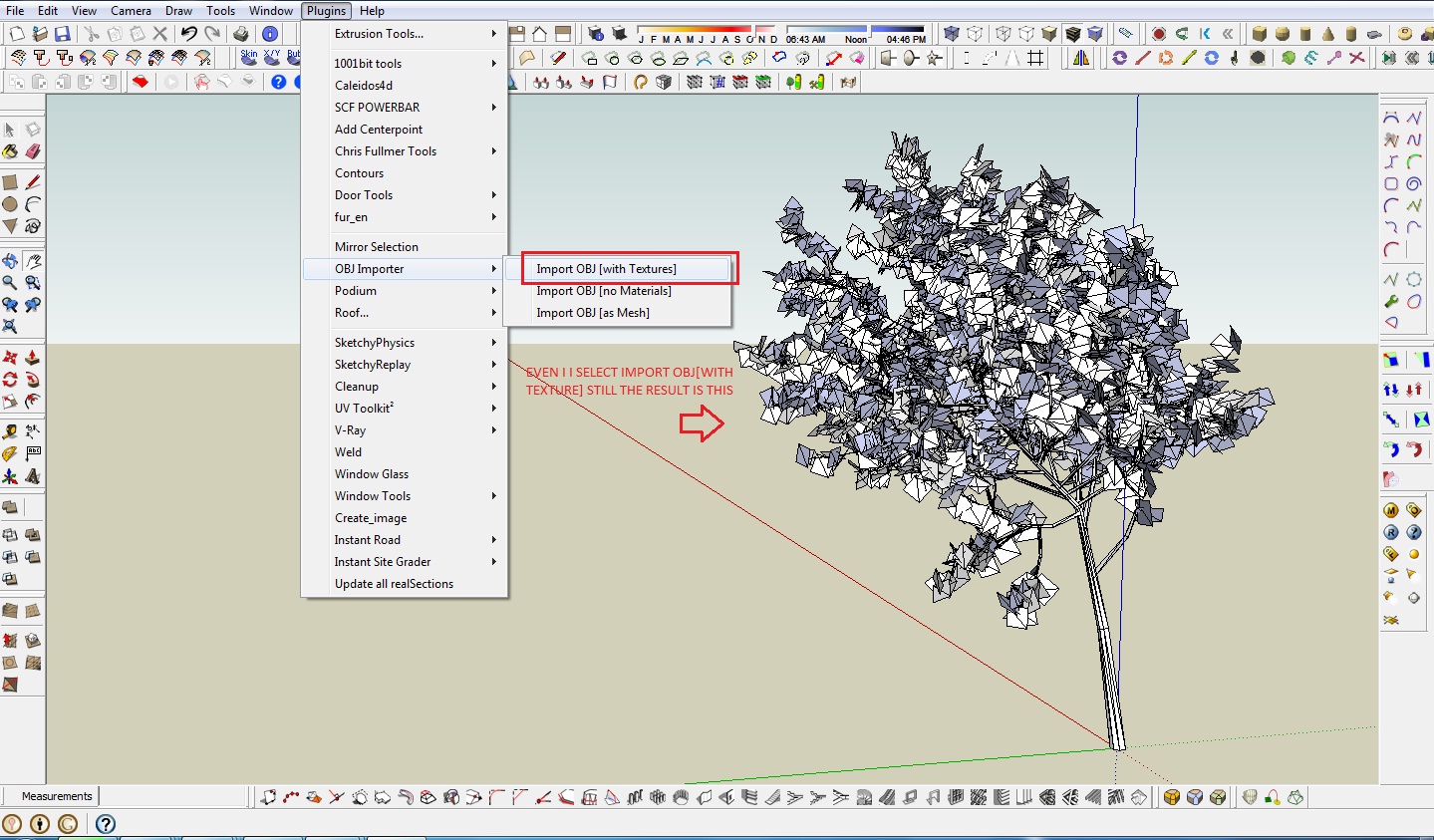

                                            Exported files


                                            imported files to sketchup

                                            1 Reply Last reply
                                            Reply Quote 0

                                            Hello! It looks like you're interested in this conversation, but you don't have an account yet.

                                            Getting fed up of having to scroll through the same posts each visit? When you register for an account, you'll always come back to exactly where you were before, and choose to be notified of new replies (either via email, or push notification). You'll also be able to save bookmarks and upvote posts to show your appreciation to other community members.

                                            With your input, this post could be even better πŸ’—

                                            Register Login
                                            • 1
                                            • 2
                                            • 3
                                            • 4
                                            • 5
                                            • 13
                                            • 14
                                            • 3 / 14
                                            • First post
                                              Last post
                                            Buy SketchPlus
                                            Buy SUbD
                                            Buy WrapR
                                            Buy eBook
                                            Buy Modelur
                                            Buy Vertex Tools
                                            Buy SketchCuisine
                                            Buy FormFonts

                                            Advertisement



