sketchucation logo sketchucation
    • Login
    Oops, your profile's looking a bit empty! To help us tailor your experience, please fill in key details like your SketchUp version, skill level, operating system, and more. Update and save your info on your profile page today!
    Mac User? | Join the Rayscaper Beta for Mac Learn More

    [Plugin] SectionCutFace

    Scheduled Pinned Locked Moved Plugins
    569 Posts 171 Posters 540.9k Views 170 Watching
    Loading More Posts
    • Oldest to Newest
    • Newest to Oldest
    • Most Votes
    Reply
    • Reply as topic
    Log in to reply
    This topic has been deleted. Only users with topic management privileges can see it.
    • B
      Bob_CP
      last edited by

      I've used this for years on multiple versions of SU. All of a sudden, it crashes SU 2023 Pro. Yesterday it worked, today it's causing SU to hang

      1 Reply Last reply
      Reply Quote 0
      • TIGT
        TIG Moderator
        last edited by

        Everything you have set up looks correct.
        Try reverting to an earlier version.
        It has changed from RBS to RBE filetypes which might be causing the heartache...
        SectionCutFace_v6.2.rbz

        TIG

        1 Reply Last reply
        Reply Quote 0
        • A
          alskaro
          last edited by

          Hello! Love this extension thank you ! Do you think it would be possible to be able to change the fill individually after the cut ? (like when you cut trough multiple materials) or simply having a color style that would color the face in the same material as the cut object ? That would be dope, especially with the 2025 "patterns" material!
          Thank you ! Have a nice day ! πŸ™‚

          TIGT Dave RD 2 Replies Last reply
          Reply Quote 0
          • TIGT
            TIG Moderator @alskaro
            last edited by TIG

            @alskaro
            You can already do that to a section cut face group.
            Unlock it [if needed], then edit the group, and apply the different materials you want to the faces.
            If you regenerate the section cut face then those changes are lost.

            TIG

            1 Reply Last reply
            Reply Quote 0
            • Dave RD
              Dave R @alskaro
              last edited by

              @alskaro do you mean something like this? As TIG says, apply whatever materials you want to the various faces in the SectionCut Face.
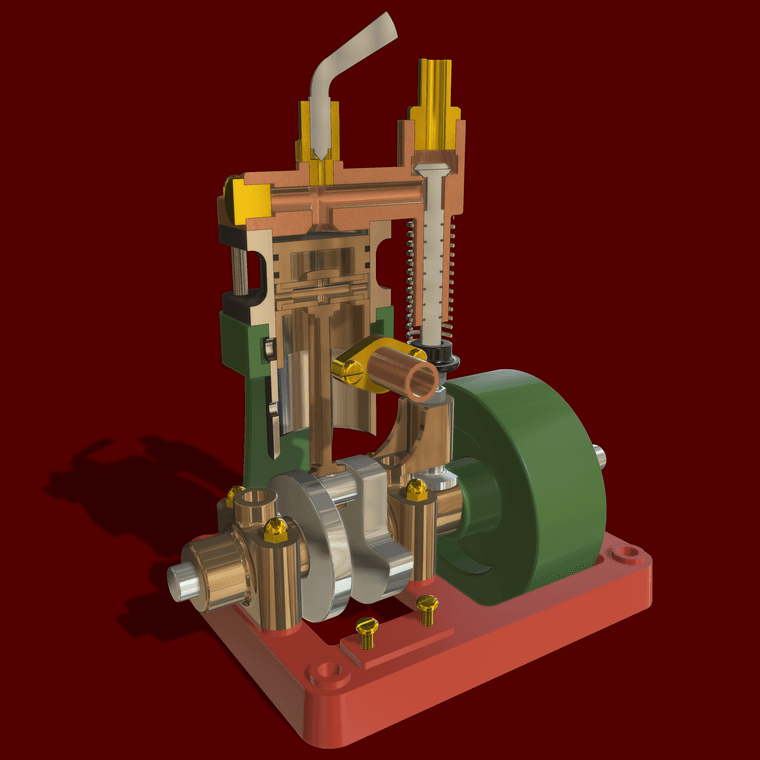
              Uniflow Steam Engine Cut away Small.png

              Etaoin Shrdlu

              %

              (THERE'S NO PLACE LIKE)

              G28 X0.0 Y0.0 Z0.0

              M30

              %

              1 Reply Last reply
              Reply Quote 1
              • I
                IDK
                last edited by

                Good day,
                would it be possible to have the last version that works with SketchUp 8? Thank you very much!

                1 Reply Last reply
                Reply Quote 0
                • TIGT
                  TIG Moderator
                  last edited by TIG

                  @idk

                  Our archived old copies are not perfect - try this v2.6 it should work with older SketchUp versions like v8, but has it none of the abilities of the current v8.0.
                  SectionCutFace.rb
                  There's also this intermediate version which might still work ?
                  SectionCutFace_v6.2.rbz

                  TIG

                  1 Reply Last reply
                  Reply Quote 0
                  • I
                    IDK
                    last edited by

                    Thank you very much

                    1 Reply Last reply
                    Reply Quote 0
                    • I
                      IDK
                      last edited by

                      The v2.6 work fine TY, no the 6.2.
                      All solved. TYVM!

                      1 Reply Last reply
                      Reply Quote 0

                      Hello! It looks like you're interested in this conversation, but you don't have an account yet.

                      Getting fed up of having to scroll through the same posts each visit? When you register for an account, you'll always come back to exactly where you were before, and choose to be notified of new replies (either via email, or push notification). You'll also be able to save bookmarks and upvote posts to show your appreciation to other community members.

                      With your input, this post could be even better πŸ’—

                      Register Login
                      • 1
                      • 2
                      • 25
                      • 26
                      • 27
                      • 28
                      • 29
                      • 29 / 29
                      • First post
                        Last post
                      Buy SketchPlus
                      Buy SUbD
                      Buy WrapR
                      Buy eBook
                      Buy Modelur
                      Buy Vertex Tools
                      Buy SketchCuisine
                      Buy FormFonts

                      Advertisement
