sketchucation logo sketchucation
    • Login
    Oops, your profile's looking a bit empty! To help us tailor your experience, please fill in key details like your SketchUp version, skill level, operating system, and more. Update and save your info on your profile page today!
    ⚠️ Update | Sketchucation Tools 5.0.8 released with licensing improvements and bugfixes Download

    [Plugin][$] RoundCorner - v3.4a - 31 Mar 24


    Scheduled Pinned Locked Moved Plugins
    1.5k Posts 477 Posters 4.1m Views 477 Watching
    Loading More Posts
    • Oldest to Newest
    • Newest to Oldest
    • Most Votes
    Reply
    • Reply as topic
    Log in to reply
    This topic has been deleted. Only users with topic management privileges can see it.
    • Dave RD
      Dave R
      last edited by

      @taktakplz said:

      where i can install the higher version of libfredo6?i install it using extension warehouse

      It's clearly spelled out for you in the first post on the first page of this thread.
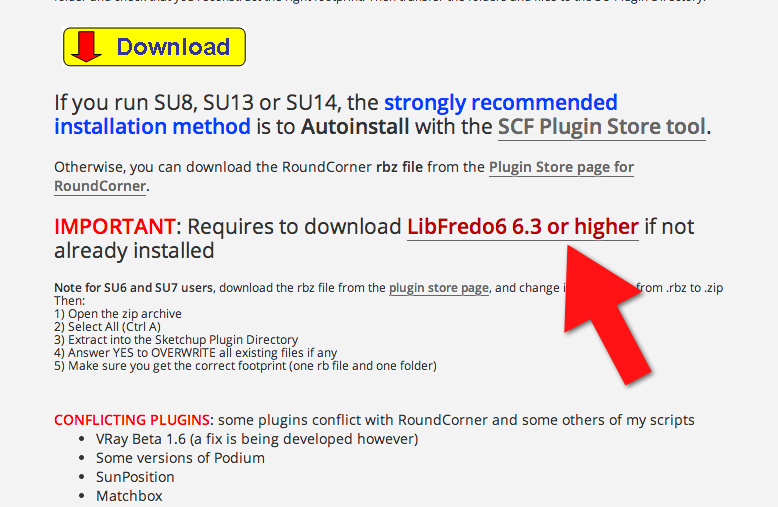
      2014-10-22_05-58-49.png

      Which takes you to the first post on the first page of the LibFredo6 thread which has the link you need.
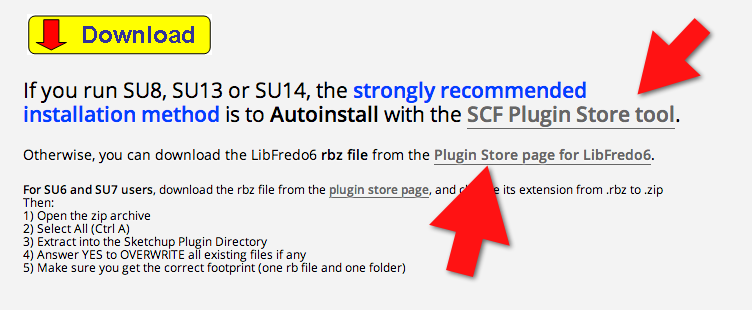
      2014-10-22_05-59-57.png

      Get the SCF Plugin Store tool and use it to auto install your plugins.

      Etaoin Shrdlu

      %

      (THERE'S NO PLACE LIKE)

      G28 X0.0 Y0.0 Z0.0

      M30

      %

      1 Reply Last reply
      Reply Quote 0
      • T
        taktakplz
        last edited by

        @fredo6 said:

        @mattiab said:

        SketchUp crashes each time i try to use this plugin, do you know why?

        Do you have an old version of Vray?

        fredo i do have the same problem

        i have installed V-Ray for SketchUp v1.60.22

        1 Reply Last reply
        Reply Quote 0
        • Dave RD
          Dave R
          last edited by

          Remove VRay for SketchUp. It is has been known to cause problems with other plugins. Or at least use the current version of it. The current version appears to be 2.0.

          Etaoin Shrdlu

          %

          (THERE'S NO PLACE LIKE)

          G28 X0.0 Y0.0 Z0.0

          M30

          %

          1 Reply Last reply
          Reply Quote 0
          • T
            taktakplz
            last edited by

            thanks for the help fredo

            1 Reply Last reply
            Reply Quote 0
            • cottyC
              cotty
              last edited by

              @taktakplz said:

              thanks for the help fredo

              Dave!?

              my SketchUp gallery

              1 Reply Last reply
              Reply Quote 0
              • L
                littleche
                last edited by

                @unknownuser said:

                oundCorner cannot do anything for this model, because it is triangulated.

                The method is to use Subdivision, which you may possibly try with Artisan by Whaat.

                Fredo

                thank you fredo for your help .
                I thought this work is Possible whit your plugin .

                I hope this Reliability Be included in future versions. 😛

                1 Reply Last reply
                Reply Quote 0
                • G
                  goblinteasemaid
                  last edited by

                  very nice tool, works on SU6
                  doesnt do groups so you need to group edit or explode

                  and you only get one chance for offset input. Get it wrong and you must revert to sharp edge start - obvious really, no big deal

                  think of the time spent doing it manually YUK

                  thanx mille foix

                  Goblint

                  1 Reply Last reply
                  Reply Quote 0
                  • G
                    goblinteasemaid
                    last edited by

                    F6 one thing I forgot to mention, I have an annoying issue with the drop down window in Round corners, its squashed up.
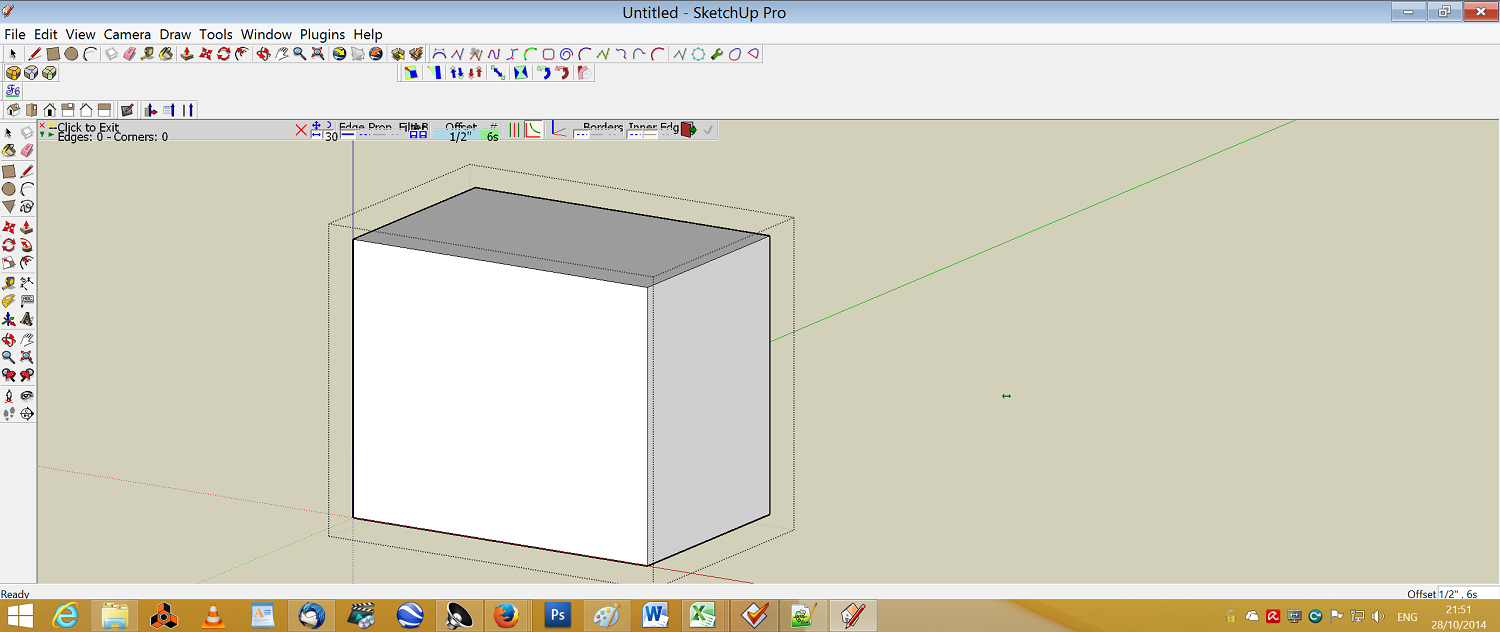

                    window problem

                    1 Reply Last reply
                    Reply Quote 0
                    • M
                      marcostakahasi
                      last edited by

                      i'm trying to install. where's the archive?

                      1 Reply Last reply
                      Reply Quote 0
                      • Dave RD
                        Dave R
                        last edited by

                        @marcostakahasi said:

                        i'm trying to install. where's the archive?

                        It's very clearly spelled out in the first post on the first page of this thread.
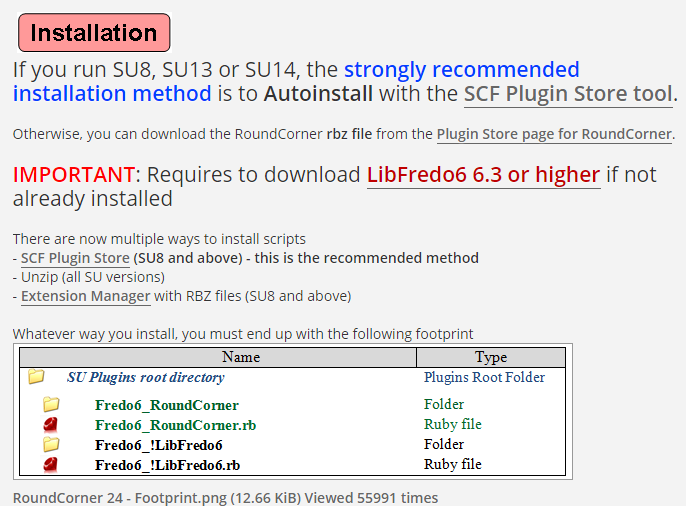
                        Screenshot - 10_29_2014 , 4_46_52 AM.png

                        Don't forget to read and follow the rest of the directions.

                        Screenshot - 10_29_2014 , 4_46_23 AM.png

                        Etaoin Shrdlu

                        %

                        (THERE'S NO PLACE LIKE)

                        G28 X0.0 Y0.0 Z0.0

                        M30

                        %

                        1 Reply Last reply
                        Reply Quote 0
                        • fredo6F
                          fredo6
                          last edited by

                          @marcostakahasi said:

                          i'm trying to install. where's the archive?

                          Installation of my Plugins is now done via the SCF Plugin Store.

                          Fredo

                          1 Reply Last reply
                          Reply Quote 0
                          • fredo6F
                            fredo6
                            last edited by

                            @goblinteasemaid said:

                            F6 one thing I forgot to mention, I have an annoying issue with the drop down window in Round corners, its squashed up.

                            You must have a screen with high resolution, analog to Retina screens on Mac.

                            Nothing to do, because this dépends on Sketchup and these problem of high résolutions screen are not fixed yet.

                            Possibly you can select the option "Retina screen" in the Default parameters of LibFredo6, but the correction is not guaranteed (see this thread).

                            Fredo

                            1 Reply Last reply
                            Reply Quote 0
                            • G
                              gruzdev_f
                              last edited by

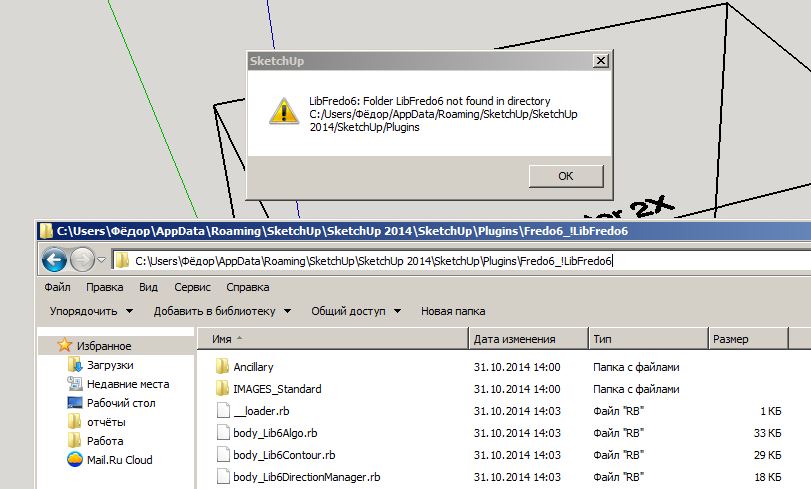
                              Install all the instructions.
                              but what is it?

                              Безымянный.jpg

                              1 Reply Last reply
                              Reply Quote 0
                              • TIGT
                                TIG Moderator
                                last edited by

                                If you read the tool's installation guidance it explains that, as with most of Fredo's tools, it need a set of helper files installed too - 'LibFredo6'
                                You can get that from the PluginStore...

                                http://sketchucation.com/pluginstore?pln=LibFredo6

                                Install it, then restart SketchUp to ensure everything gets reintegrated...

                                TIG

                                1 Reply Last reply
                                Reply Quote 0
                                • G
                                  gruzdev_f
                                  last edited by

                                  As you can see in the screenshot, LibFredo6 installed but sketchup not see him.
                                  LibFredo6 folder is where it is necessary

                                  1 Reply Last reply
                                  Reply Quote 0
                                  • TIGT
                                    TIG Moderator
                                    last edited by

                                    Sorry, I now see the problem.
                                    You have a 'Cyrillic name'.
                                    In v2014 FILE can return incorrectly if there are no ASCII characters in the Plugins folder's path, at least without further 'trapping' of errors.
                                    I though Fredo has addressed the issue recently, when he updated his Lib and all of his tools.
                                    Have you installed the very latest versions of all of Fredo's tools AND Lib from the PluginStore... ?

                                    If so... if you make a Windows User account with an ASCII name [like "Fedos" ?] does it work ?

                                    TIG

                                    1 Reply Last reply
                                    Reply Quote 0
                                    • S
                                      SketchMax
                                      last edited by

                                      Hello Sketchupers!

                                      First post here for me ever, I'm currently working as a 3d-modeler for a company in Sweden and I've been on it for soon 2½ months.
                                      With that said I've tried to learn everything by myself now for 2½ months, so I'm still quite new to sketchup.

                                      But I finally have come to some struggle and i tried to look around for solutions, but unsuccessful unfortunately.
                                      My problem is that I got a dome-shaped object which is not entirely domy(Jokes aside) and I need the sloped side to the top to be more round without having to raise the top a few MM just to round the top of that(which also does not change the fact it won't look right).
                                      I'll insert a picture for better understanding my situation(I hope).

                                      http://i.imgur.com/kqcLh2j.png

                                      The reason I post here is because I'm not to familiar with forums and such,
                                      and for that I use your "Round Corners" ALOT! Kudos to that plugin.
                                      I'm also sorry if I posted in the wrong forum.

                                      I hope I didn't make this to complicated for you guys to understand and I thank you in advance.

                                      //Max

                                      1 Reply Last reply
                                      Reply Quote 0
                                      • S
                                        snapster42
                                        last edited by

                                        Roundcorner is a very useful plugin. But I am having some trouble using it for my purpose. I am trying to create a model for 3D printing, and one of the design requirements is that sharp edges should be avoided. Another requirement, however, is that the object must be a "water-tight" solid in the end, and I am having trouble satisfying that with roundcorner. For example, if I try to round the corners on something like this:
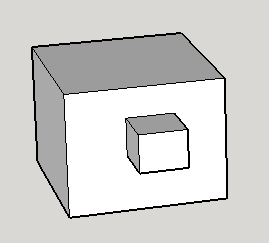
                                        Screen Shot 2014-10-31 at 3.32.46 PM.png

                                        The plugin appears to work, but when I group it, it doesn't become a solid. I use the "solid inspector" plugin to see what's wrong, and it shows me this:
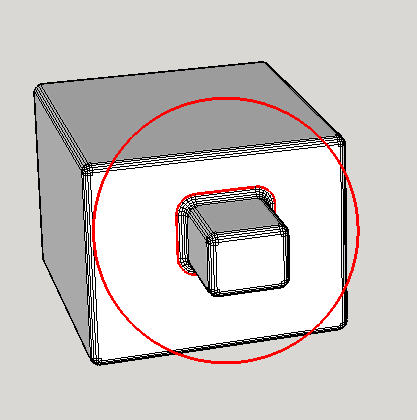
                                        Screen Shot 2014-10-31 at 3.33.30 PM.png

                                        When I zoom in to this, I can't see any problem:
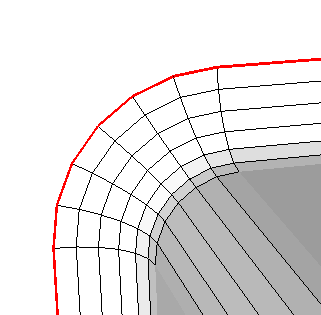
                                        Screen Shot 2014-10-31 at 3.33.41 PM.png

                                        Has anyone encountered this type of problem, and found a solution?
                                        Thanks

                                        1 Reply Last reply
                                        Reply Quote 0
                                        • cottyC
                                          cotty
                                          last edited by

                                          RoundCorner sometimes creates additional faces, in your case there is an internal face created and after you deleted this face, the object will get solid.


                                          my SketchUp gallery

                                          1 Reply Last reply
                                          Reply Quote 0
                                          • fredo6F
                                            fredo6
                                            last edited by

                                            @cotty said:

                                            RoundCorner sometimes creates additional faces, in your case there is an internal face created and after you deleted this face, the object will get solid.

                                            That's probably the explanation. A face is created between the big and the small cube.

                                            Actually, RoundCorner does not create the face, it is rather Sketchup that does it automatically (i.e. find_face).

                                            Fredo

                                            1 Reply Last reply
                                            Reply Quote 0

                                            Hello! It looks like you're interested in this conversation, but you don't have an account yet.

                                            Getting fed up of having to scroll through the same posts each visit? When you register for an account, you'll always come back to exactly where you were before, and choose to be notified of new replies (either via email, or push notification). You'll also be able to save bookmarks and upvote posts to show your appreciation to other community members.

                                            With your input, this post could be even better 💗

                                            Register Login
                                            • 1
                                            • 2
                                            • 45
                                            • 46
                                            • 47
                                            • 48
                                            • 49
                                            • 74
                                            • 75
                                            • 47 / 75
                                            • First post
                                              Last post
                                            Buy SketchPlus
                                            Buy SUbD
                                            Buy WrapR
                                            Buy eBook
                                            Buy Modelur
                                            Buy Vertex Tools
                                            Buy SketchCuisine
                                            Buy FormFonts

                                            Advertisement