sketchucation logo sketchucation
    • 登入
    Oops, your profile's looking a bit empty! To help us tailor your experience, please fill in key details like your SketchUp version, skill level, operating system, and more. Update and save your info on your profile page today!
    🔌 Smart Spline | Fluid way to handle splines for furniture design and complex structures. Download

    [Plugin][$] RoundCorner - v3.4a - 31 Mar 24


    已排程 已置頂 已鎖定 已移動 Plugins
    1.5k 貼文 473 Posters 3.4m 瀏覽 472 Watching
    正在載入更多貼文
    • 從舊到新
    • 從新到舊
    • 最多點贊
    回覆
    • 在新貼文中回覆
    登入後回覆
    此主題已被刪除。只有擁有主題管理權限的使用者可以查看。
    • L 離線
      lavangmuathu
      最後由 編輯

      thank you so much , great

      1 條回覆 最後回覆 回覆 引用 0
      • B 離線
        brandonsh
        最後由 編輯

        Please, PLEASE help me here. I'm trying to round edges on a cube but I never get any green lines to show where it's going to round, and if I press enter anyway my model just completely explodes everywhere, turning into a mess of whatever. Can anyone give an idiot some simple instructions?

        1 條回覆 最後回覆 回覆 引用 0
        • fredo6F 離線
          fredo6
          最後由 編輯

          @brandonsh said:

          Please, PLEASE help me here. I'm trying to round edges on a cube but I never get any green lines to show where it's going to round, and if I press enter anyway my model just completely explodes everywhere, turning into a mess of whatever. Can anyone give an idiot some simple instructions?

          Watch the Offset value (indicated in the button palette). It may be either too big or too small relative to your cube.

          Fredo

          1 條回覆 最後回覆 回覆 引用 0
          • C 離線
            caktusbill
            最後由 編輯

            thanks for plugin, very, very usefull.
            Maybe a quad chamfer like this http://www.scriptspot.com/3ds-max/scripts/quad-chamfer in future versions? It's better to edit uv's and apply subdivision later.

            Thanks again.

            1 條回覆 最後回覆 回覆 引用 0
            • fredo6F 離線
              fredo6
              最後由 編輯

              @caktusbill said:

              Maybe a quad chamfer like this http://www.scriptspot.com/3ds-max/scripts/quad-chamfer in future versions? It's better to edit uv's and apply subdivision later.

              RoundCorner allows specifying the number of segments, so with '4s' you will obtain what you refer to as quad chamfer (unless I missed something!).
              Note however that Roundcorner is not able to support the concave / convex corners with 6 rounding which is shown is the picture (regardless of the number of segments for the rounding).

              Fredo

              1 條回覆 最後回覆 回覆 引用 0
              • J 離線
                Jim
                最後由 編輯

                @unknownuser said:

                (unless I missed something!)

                Yep, all the faces are quad faces, not that there are 4 segments that make the curve. Quads are better than tris if you use subdivision in your workflow.

                Hi

                1 條回覆 最後回覆 回覆 引用 0
                • fredo6F 離線
                  fredo6
                  最後由 編輯

                  @jim said:

                  @unknownuser said:

                  (unless I missed something!)

                  Yep, all the faces are quad faces, not that there are 4 segments that make the curve. Quads are better than tris if you use subdivision in your workflow.

                  Jim

                  OK I got it!

                  The problem is that this quad faces would not be planar, and therefore would be build from 2 triangles in Sketchup. Let's not forget that Nurbs-based modelling tools display shapes with quads which are usually not planar (that's what Curviloft doe in preview mode), but it does not really matter because the rendering is also taken care by the software without going to the true geometry with facets.

                  Fredo

                  1 條回覆 最後回覆 回覆 引用 0
                  • dereiD 離線
                    derei
                    最後由 編輯

                    I think this plugin somehow does "somethnig" to the CPU that stops Twilight from work.
                    How it happens: I have a SU instance where TW is rendering... I work something else in another SU instance and I use the plugin. It is slow responsive, especially when I try to open the inputbox to change rounding and precision values. In the end I can use it. But, when I look on the other SU window, where the render goes on... the passes counter is stopped. If I pause the render, then I resume it, everything works again.
                    If this is TW related, rather thant RoundCorner issue, maybe Fletcher should be advised?

                    Thank you.

                    DESIGNER AND ARTIST DEREI.UK

                    1 條回覆 最後回覆 回覆 引用 0
                    • fredo6F 離線
                      fredo6
                      最後由 編輯

                      Dereeei,

                      I don't have twilight and I would need to install it to investigate.

                      In the meantime, maybe some other Twilight users could try to reroduce your case with 2 instances of SU and advise if there is this performance problem.

                      By the way, is it just for RoundCorner or for other plugins like ToolsonSurface?

                      Fredo

                      1 條回覆 最後回覆 回覆 引用 0
                      • dereiD 離線
                        derei
                        最後由 編輯

                        @unknownuser said:

                        By the way, is it just for RoundCorner or for other plugins like ToolsonSurface?

                        Fredo

                        I will try with TOS too, as soon as I can and I will post the conclusions.
                        Thanks for your attention.

                        DESIGNER AND ARTIST DEREI.UK

                        1 條回覆 最後回覆 回覆 引用 0
                        • T 離線
                          TonyGasz
                          最後由 編輯

                          I do not understand anything, set as indicated.
                          when doing surgery just gives an error.
                          They are used - Google SketchUp 8
                          -LibFredo6 3.7c - 07 Jun 11
                          -RoundCorner 2.3a - 26 May 11
                          what could be the problem, do put a small block parameters 0.10 and 6. help
                          sorry for my english I'm from Russia

                          1 條回覆 最後回覆 回覆 引用 0
                          • dereiD 離線
                            derei
                            最後由 編輯

                            @tonygasz said:

                            I do not understand anything, set as indicated.
                            when doing surgery just gives an error.

                            If you don't tell what error (maybe a print-screen), I wonder how somebody could help. 😕

                            DESIGNER AND ARTIST DEREI.UK

                            1 條回覆 最後回覆 回覆 引用 0
                            • T 離線
                              TonyGasz
                              最後由 編輯

                              I think I figured out in your plugin, I stood apart from the fact that I listed above - Podium render, when I removed the folder completely plug and insert a blank without any plug-ins in addition to the required course, then it worked. so here, but about the Scrin is a common mistake Google's screen. 😉

                              1 條回覆 最後回覆 回覆 引用 0
                              • K 離線
                                kimley2011
                                最後由 編輯

                                Very helpful! thanks a lot!!!

                                1 條回覆 最後回覆 回覆 引用 0
                                • L 離線
                                  lilsamofro
                                  最後由 編輯

                                  Hi,

                                  I was having a problem with RoundCorner...
                                  Both 2.3a and Fredolib 3.7 are installed
                                  I have had curviloft and fredoscale installed for some time and they have been a great help, (Many Thanks!!).
                                  I installed Roundcorner the same way but it simply wont work, the Roundcorner toolbar appears and the Roundcorner extension appears in the FredoCollection tool tab but clicking on the icons on the tool bar do nothing, similarly if i select it through the tools menu nothing happens.
                                  Curviloft and Fredoscale still work fine, however select edges mouse for Round Corner simply wont appear, do you know any reason why this may be?

                                  1 條回覆 最後回覆 回覆 引用 0
                                  • D 離線
                                    dizain
                                    最後由 編輯

                                    Hello,
                                    I have uploaded ROUNDCORNER_Dir_23 (with ZLoader__RoundCorner) and LIBFREDO6_Dir_40 (with LibFredo6) in the dir 😄 \ Program Files \ Google \ Google SketchUp 8 \ Plugins, but the plugin does not load, there is not even the toolbar, or and not appear any error message.
                                    I ask for help ...

                                    1 條回覆 最後回覆 回覆 引用 0
                                    • fredo6F 離線
                                      fredo6
                                      最後由 編輯

                                      @dizain said:

                                      Hello,
                                      I have uploaded ROUNDCORNER_Dir_23 (with ZLoader__RoundCorner) and LIBFREDO6_Dir_40 (with LibFredo6) in the dir 😄 \ Program Files \ Google \ Google SketchUp 8 \ Plugins, but the plugin does not load, there is not even the toolbar, or and not appear any error message.
                                      I ask for help ...

                                      Since you have LibFredo6 40, could you go to Window > LibFredo6 Settings > View Trace Log files and check if it says something about RoundCorner (and other scripts).

                                      Thanks

                                      Fredo

                                      1 條回覆 最後回覆 回覆 引用 0
                                      • D 離線
                                        dizain
                                        最後由 編輯

                                        Hello Fredo,
                                        I attach the txt file View trace log files.
                                        I do not see anomalies ...
                                        thank you very much


                                        LibFredo6Trace_8_1314724767421.txt

                                        1 條回覆 最後回覆 回覆 引用 0
                                        • fredo6F 離線
                                          fredo6
                                          最後由 編輯

                                          @dizain said:

                                          Hello Fredo,
                                          I attach the txt file View trace log files.
                                          I do not see anomalies ...
                                          thank you very much

                                          It seems you do not have a folder ROUNDCORNER_Dir_23 in the Plugins directory (or if you have it, it is not properly unzipped - you must have a RoundCorner.plugin file). I suggest you check the content, which should be something like
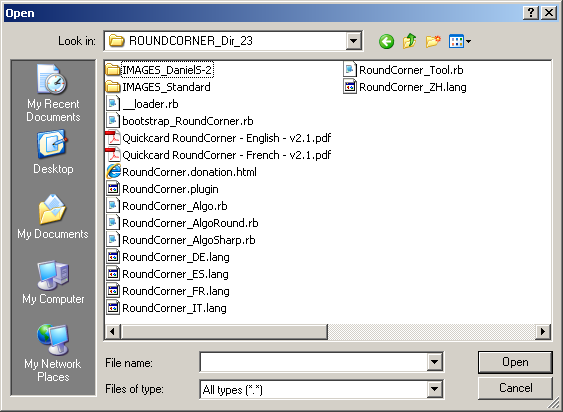
                                          Internall footprint rdc.png

                                          Note that the Zloader__RoundCorner.rb with LibFredo6 4.0+ is of no use (you can delete it).

                                          Fredo

                                          1 條回覆 最後回覆 回覆 引用 0
                                          • D 離線
                                            dizain
                                            最後由 編輯

                                            Dear Fredo,
                                            my file is identical to your!
                                            Where is the problem??
                                            thank you very much
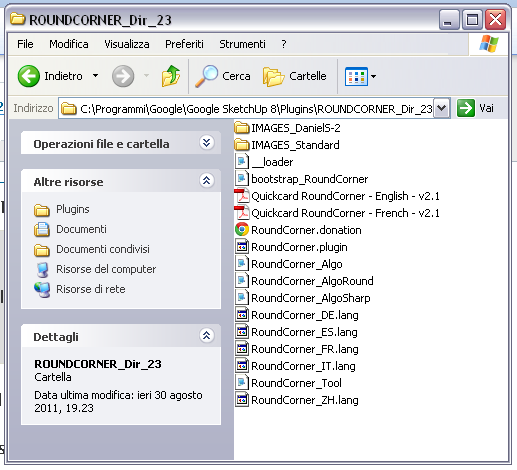

                                            Roundcorner_dir_23.png

                                            1 條回覆 最後回覆 回覆 引用 0
                                            • 1
                                            • 2
                                            • 25
                                            • 26
                                            • 27
                                            • 28
                                            • 29
                                            • 73
                                            • 74
                                            • 27 / 74
                                            • 第一個貼文
                                              最後的貼文
                                            Buy SketchPlus
                                            Buy SUbD
                                            Buy WrapR
                                            Buy eBook
                                            Buy Modelur
                                            Buy Vertex Tools
                                            Buy SketchCuisine
                                            Buy FormFonts

                                            Advertisement



