sketchucation logo sketchucation
    • 登入
    Oops, your profile's looking a bit empty! To help us tailor your experience, please fill in key details like your SketchUp version, skill level, operating system, and more. Update and save your info on your profile page today!
    🔌 Smart Spline | Fluid way to handle splines for furniture design and complex structures. Download

    [Plugin][$] RoundCorner - v3.4a - 31 Mar 24


    已排程 已置頂 已鎖定 已移動 Plugins
    1.5k 貼文 473 Posters 3.4m 瀏覽 472 Watching
    正在載入更多貼文
    • 從舊到新
    • 從新到舊
    • 最多點贊
    回覆
    • 在新貼文中回覆
    登入後回覆
    此主題已被刪除。只有擁有主題管理權限的使用者可以查看。
    • S 離線
      Steven Boldt
      最後由 編輯

      I keep getting this message after unzipping and opening sketchup

      Error Loading File ZLoader__RoundCorner.rb
      uninitialized constant Traductor::Plugin

      1 條回覆 最後回覆 回覆 引用 0
      • fredo6F 離線
        fredo6
        最後由 編輯

        @steven boldt said:

        I keep getting this message after unzipping and opening sketchup

        Error Loading File ZLoader__RoundCorner.rb
        uninitialized constant Traductor::Plugin

        Did you install LibFredo6?

        Fredo

        1 條回覆 最後回覆 回覆 引用 0
        • S 離線
          Steven Boldt
          最後由 編輯

          @unknownuser said:

          @steven boldt said:

          I keep getting this message after unzipping and opening sketchup

          Error Loading File ZLoader__RoundCorner.rb
          uninitialized constant Traductor::Plugin

          Did you install LibFredo6?

          Fredo

          Yes, I did.

          1 條回覆 最後回覆 回覆 引用 0
          • S 離線
            Steven Boldt
            最後由 編輯

            All is well. It's working on both systems-XP and Vista 64.
            Fredo, you're plugins are great.

            1 條回覆 最後回覆 回覆 引用 0
            • L 離線
              leffoot
              最後由 編輯

              thanks a lot Great plugin!!

              1 條回覆 最後回覆 回覆 引用 0
              • K 離線
                krash88
                最後由 編輯

                This plugin looks great, but I'm running into a problem here. I have a rather simple triangulated mesh and need to bevel the edges before running it through Subdivide and Smooth. However, the script seems to stop around 6%, yet still says computing.

                http://i109.photobucket.com/albums/n65/krash88/bevel.jpg

                Any ideas?

                1 條回覆 最後回覆 回覆 引用 0
                • pilouP 離線
                  pilou
                  最後由 編輯

                  Post your skp file 😉

                  Frenchy Pilou
                  Is beautiful that please without concept!
                  My Little site :)

                  1 條回覆 最後回覆 回覆 引用 0
                  • K 離線
                    krash88
                    最後由 編輯

                    Hmm, I attached the file, but something messed up. Here it is.
                    BL-141SOF-002.skp

                    1 條回覆 最後回覆 回覆 引用 0
                    • fredo6F 離線
                      fredo6
                      最後由 編輯

                      @krash88 said:

                      Hmm, I attached the file, but something messed up. Here it is.
                      [attachment=1:uzwl37lk]<!-- ia1 -->BL-141SOF-002.skp<!-- ia1 -->[/attachment:uzwl37lk]

                      I found the bug, which explains why the scripts stops. In your case, you can however exit the tool.

                      Beyond that, you are in case where RoundCorner would not function very well, because of the triangulation. This is one of the limitations mentioned at the end of the documentation.

                      I attach here the result which is not very good for some edges, so that you can judge.

                      Fredo


                      BL-141SOF-002 - beveled.skp

                      1 條回覆 最後回覆 回覆 引用 0
                      • K 離線
                        krash88
                        最後由 編輯

                        Thanks for taking a look at this for me. While I may not be able to use your script on this particular model, I can see many uses elsewhere. I appreciate the hard work that you and others have put into these scripts and for your time in answering questions. Guys like you have really turned SketchUp into something great. Thanks again!

                        1 條回覆 最後回覆 回覆 引用 0
                        • M 離線
                          magpie
                          最後由 編輯

                          Fredo, I echo the sentiment of all the grateful users who benefit from your talent and selfless dedication. Many thanks for this!

                          1 條回覆 最後回覆 回覆 引用 0
                          • M 離線
                            mgfranz
                            最後由 編輯

                            Excellent plugin! My router is going to be jealous... 😍

                            "If you like what you do, it will never be work..."
                            In memory of Sam Maloof, 1916-2009

                            1 條回覆 最後回覆 回覆 引用 0
                            • A 離線
                              AR-51
                              最後由 編輯

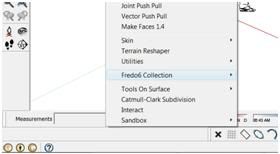
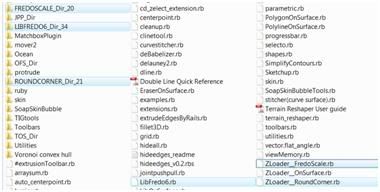
                              Hi, I install RoundCorner, but I'm unable to access it in SketchUp. When I click on Tools>FredoScale noting happens.
                              I also get no response when I click on Set Preference Languages.

                              I'm using Vista

                              Thanks for the help.

                              http://i601.photobucket.com/albums/tt93/Bestworldphoto/Sketch.jpg

                              Plug in foulder

                              http://i601.photobucket.com/albums/tt93/Bestworldphoto/Plugin.jpg

                              1 條回覆 最後回覆 回覆 引用 0
                              • F 離線
                                fine2444
                                最後由 編輯

                                http://cfile234.uf.daum.net/original/155C3D1D4B6EA9867F0B3A

                                I made two round corner model Yesterday, today.
                                I want two same shape of rondcorner model but It is not working out.
                                Working conditions were the same as the shape ..
                                What's wrong?
                                I dont want small triangle particles at all in very right model.
                                You mean It happens becasue the edge is not aligned, I think I aligned it
                                would like to tell me why and how?

                                1 條回覆 最後回覆 回覆 引用 0
                                • GaieusG 離線
                                  Gaieus
                                  最後由 編輯

                                  Hi Fine,

                                  Can you delete those edges without losing the faces?
                                  It's not necessarily there because you did not align your model but maybe because the newly created facets would not be co-planar otherwise.

                                  In any case, after smoothing those surfaces, it won't be seen (but I understand that you wish to have the least geometry and cleanest possible model)

                                  Gai...

                                  1 條回覆 最後回覆 回覆 引用 0
                                  • fredo6F 離線
                                    fredo6
                                    最後由 編輯

                                    @fine2444 said:

                                    http://cfile234.uf.daum.net/original/155C3D1D4B6EA9867F0B3A

                                    I made two round corner model Yesterday, today.
                                    I want two same shape of rondcorner model but It is not working out.
                                    Working conditions were the same as the shape ..
                                    What's wrong?
                                    I dont want small triangle particles at all in very right model.
                                    You mean It happens becasue the edge is not aligned, I think I aligned it
                                    would like to tell me why and how?

                                    Can you check if you use the same setting for the option "Strict Offset" (this is the button with the vertical green and red bars).

                                    Fredo

                                    1 條回覆 最後回覆 回覆 引用 0
                                    • A 離線
                                      archi-sketch
                                      最後由 編輯

                                      i don't know what to say..or should i just say~THANK YOU VERY MUCH!!! ..you make my day!

                                      1 條回覆 最後回覆 回覆 引用 0
                                      • R 離線
                                        rd84
                                        最後由 編輯

                                        Hi,

                                        Many thanks for this utility - my life using Sketchup is suddenly much easier !

                                        Cheers
                                        Paul

                                        1 條回覆 最後回覆 回覆 引用 0
                                        • A 離線
                                          aea
                                          最後由 編輯

                                          2D round corner is ? plugin , something ?


                                          Untitled.jpg

                                          1 條回覆 最後回覆 回覆 引用 0
                                          • mitcorbM 離線
                                            mitcorb
                                            最後由 編輯

                                            See TIG's 2D Tools.
                                            Or fillet one corner with arc, mirror copy the others.

                                            I take the slow, deliberate approach in my aimless wandering.

                                            1 條回覆 最後回覆 回覆 引用 0
                                            • 1
                                            • 2
                                            • 70
                                            • 71
                                            • 72
                                            • 73
                                            • 74
                                            • 72 / 74
                                            • 第一個貼文
                                              最後的貼文
                                            Buy SketchPlus
                                            Buy SUbD
                                            Buy WrapR
                                            Buy eBook
                                            Buy Modelur
                                            Buy Vertex Tools
                                            Buy SketchCuisine
                                            Buy FormFonts

                                            Advertisement