sketchucation logo sketchucation
    • 登入
    Oops, your profile's looking a bit empty! To help us tailor your experience, please fill in key details like your SketchUp version, skill level, operating system, and more. Update and save your info on your profile page today!
    ⚠️ Important | Libfredo 15.6b introduces important bugfixes for Fredo's Extensions Update

    [Plugin] triangulateFaces.rb v1.2 20101120

    已排程 已置頂 已鎖定 已移動 Plugins
    97 貼文 21 Posters 110.6k 瀏覽 21 Watching
    正在載入更多貼文
    • 從舊到新
    • 從新到舊
    • 最多點贊
    回覆
    • 在新貼文中回覆
    登入後回覆
    此主題已被刪除。只有擁有主題管理權限的使用者可以查看。
    • TIGT 離線
      TIG Moderator
      最後由 編輯

      This was CJP's code...
      I've messed on with your ideas but can only get the front OR back UVs to work... how do I get both ? Here's the re-jigged code so far...

      def triangulateFace(face)
          mesh=face.mesh(3)
          verts=mesh.points
          ents=Sketchup.active_model.active_entities
          mat=face.material
          bac=face.back_material
          face.erase!
          grp=ents.add_group
          grp.entities.add_faces_from_mesh(mesh)
          grp.entities.each{|e|
              if e.class==Sketchup;;Edge
                  e.smooth=false
                  e.soft=false           
              elsif e.class==Sketchup;;Face
                uva=verts.index(e.vertices[0].position)
                uvb=verts.index(e.vertices[1].position)
                uvc=verts.index(e.vertices[2].position)
                if mat
                  uvsF=mesh.uvs(true)
                  e.position_material(mat, [verts[uva],uvsF[uva], verts[uvb],uvsF[uvb], verts[uvc],uvsF[uvc]], true)
                end#if
                if bac
                  uvsB=mesh.uvs(false)
                  e.position_material(bac,[verts[uva],uvsB[uva], verts[uvb],uvsB[uvb], verts[uvc],uvsB[uvc]], false)
                end#if
              end#if
          }
          grp.explode
      end#def
      

      TIG

      1 條回覆 最後回覆 回覆 引用 0
      • thomthomT 離線
        thomthom
        最後由 編輯

        That bit of code seem to work.

        Thomas Thomassen — SketchUp Monkey & Coding addict
        List of my plugins and link to the CookieWare fund

        1 條回覆 最後回覆 回覆 引用 0
        • TIGT 離線
          TIG Moderator
          最後由 編輯

          @thomthom said:

          That bit of code seem to work.

          It does work for the back_material but it doesn't map the front material's uvs...
          Try running it on a face with a hole in it and and materials front and back - both adjusted at angles/shear etc with Texture tool... Both materials are put back onto the now triangulated faces but the front material will be at its default settings...

          I can't see how to do it 😕

          TIG

          1 條回覆 最後回覆 回覆 引用 0
          • thomthomT 離線
            thomthom
            最後由 編輯

            Holes and sheared textures seems fine.

            But, when I distort them, so the texture doesn't fit to a parallelogram, then it fails.
            And that's excatly the conversation I've been having with Whaat a couple of days ago. That in order to sample textures which are distorted you need four points. Which leads to the question of PolygonMeshes: what do you do then, because if you just sample the UV from each point in the polygon you only get tree samples.

            I wonder if PolygonMesh.uv_at(u,v) can be used though. The manual is not clear on this method. The description and example don't add up.

            Thomas Thomassen — SketchUp Monkey & Coding addict
            List of my plugins and link to the CookieWare fund

            1 條回覆 最後回覆 回覆 引用 0
            • TIGT 離線
              TIG Moderator
              最後由 編輯

              See what you mean - I had a distorted front face that failed...
              if you have 4 ubs's how do we check ? 😕

              TIG

              1 條回覆 最後回覆 回覆 引用 0
              • TIGT 離線
                TIG Moderator
                最後由 編輯

                I have some thoughts... 💭
                The original face's mesh has a number of points - 3 or more.
                A texture usually has 3 uvs 'points'.
                A distorted texture has 4 uvs 'points'.
                How do these uvs 'points' relate to the mesh points ? If you give them the equivalent 'index' then they'll work until index=3...
                A face made from the mesh always has 3 points, these relate to the mesh points in sets of 3 - but how do these tie back to the texture uvs 'points' ? The fourth one index=3 fails ???
                How do we make an array to place the material that has this fourth pair of a 3D point and a uvs 'point' ? It must reflect the 'extra point' somehow ??

                I shall sleep on it and see if the little-grey-cells come up with anything... ➡

                TIG

                1 條回覆 最後回覆 回覆 引用 0
                • thomthomT 離線
                  thomthom
                  最後由 編輯

                  For my UV plugins I have used the UVHelper to sample the points. What I did then was sample four points of the face's place - completely ignoring the face's vertices.

                  Maybe, for each face that's turned into a PolygonMesh, sample four points of the front and back. Then once converted into PolygonMesh, apply the sampled UV points to each of the polygon faces. That should work. All the created polygon faces are still on the old face's plane.

                  Thomas Thomassen — SketchUp Monkey & Coding addict
                  List of my plugins and link to the CookieWare fund

                  1 條回覆 最後回覆 回覆 引用 0
                  • TIGT 離線
                    TIG Moderator
                    最後由 編輯

                    More ideas... let me sleep... zzzzzzzzzzzzz x 💭

                    TIG

                    1 條回覆 最後回覆 回覆 引用 0
                    • TIGT 離線
                      TIG Moderator
                      最後由 編輯

                      def triangulateFace(face)
                      ### if already a triangle leave alone...
                       if face.vertices[3]
                        mesh=face.mesh(3)
                        ents=face.parent.entities
                        mat=face.material
                        bac=face.back_material
                        ###
                        p0=face.vertices[0].position
                        p1=face.vertices[1].position
                        p2=face.vertices[2].position
                        p3=face.vertices[3].position
                        ### get uvs
                        tw=Sketchup.create_texture_writer
                        uv_helperF=face.get_UVHelper(true,false,tw)
                        uv_helperB=face.get_UVHelper(false,true,tw)
                        uf0=uv_helperF.get_front_UVQ(p0)
                        uf1=uv_helperF.get_front_UVQ(p1)
                        uf2=uv_helperF.get_front_UVQ(p2)
                        uf3=uv_helperF.get_front_UVQ(p3)
                        ub0=uv_helperB.get_back_UVQ(p0)
                        ub1=uv_helperB.get_back_UVQ(p1)
                        ub2=uv_helperB.get_back_UVQ(p2)
                        ub3=uv_helperB.get_back_UVQ(p3)
                        ###
                        grp=ents.add_group
                        grp.entities.add_faces_from_mesh(mesh)
                        grp.entities.each{|e|
                          if e.class==Sketchup;;Edge
                            e.smooth=false
                            e.soft=false     
                          elsif e.class==Sketchup;;Face
                            if mat
                              e.position_material(mat,[p0,uf0, p1,uf1, p2,uf2, p3,uf3], true)
                            end#if
                            if bac
                              e.position_material(bac,[p0,ub0, p1,ub1, p2,ub2, p3,ub3], false)
                            end#if
                          end#if
                        }
                        face.erase!
                        grp.explode
                       end#if
                      end#def
                      

                      Seems to me that this should work... but it doesn't - Thomthom, any ideas 😕

                      TIG

                      1 條回覆 最後回覆 回覆 引用 0
                      • thomthomT 離線
                        thomthom
                        最後由 編輯

                        
                        def triangulateFace(face)
                        ### if already a triangle leave alone...
                        if face.vertices[3]
                          mesh=face.mesh(3)
                          ents=face.parent.entities
                          mat=face.material
                          bac=face.back_material
                          ###
                        	# (TT)
                        	# Instead sampling vertices we sample points of the face's plane.
                        	# This is because we need four points, and some times a face only has tree vertices.
                        	# And we also get the wrong result if any of the first four vertices are co-linear.
                        	samples = []
                        	samples << face.vertices[0].position			 # 0,0 | Origin
                        	samples << samples[0].offset(face.normal.axes.x) # 1,0 | Offset Origin in X
                        	samples << samples[0].offset(face.normal.axes.y) # 0,1 | Offset Origin in Y
                        	samples << samples[1].offset(face.normal.axes.y) # 1,1 | Offset X in Y
                          ### get uvs
                          tw=Sketchup.create_texture_writer
                        	# (TT)
                        	uv_helper=face.get_UVHelper(true,true,tw) # (TT) Only need one UV Helper
                        	xyz = []
                        	uv_f = []
                        	uv_b = []
                        	samples.each { |position|
                        		# XYZ 3D coordinates
                        		xyz << position
                        		# UV 2D coordinates
                        		# Front
                        		uvq = uv_helper.get_front_UVQ(position)
                        		uv_f << flattenUVQ(uvq)
                        		# Back
                        		uvq = uv_helper.get_back_UVQ(position)
                        		uv_b << flattenUVQ(uvq)
                        	}
                          ###
                          grp=ents.add_group
                          grp.entities.fill_from_mesh(mesh, true, 0) # (TT) Adds the mesh without soft/smooth edges. (and faster)
                          grp.entities.each{|e|
                            next unless e.class==Sketchup;;Face
                              if mat
                        		# (TT)
                        		# Position texture.
                        		pts = []
                        		(0..3).each { |i|
                        			pts << xyz[i]
                        			pts << uv_f[i]
                        		}
                                e.position_material(mat,pts, true)
                              end#if
                              if bac
                        		# (TT)
                        		# Position texture.
                        		pts = []
                        		(0..3).each { |i|
                        			pts << xyz[i]
                        			pts << uv_b[i]
                        		}
                                e.position_material(bac,pts, false)
                              end#if
                          }
                          face.erase!
                          grp.explode
                        end#if
                        end#def
                        # (TT)
                        # Get UV coordinates from UVQ matrix.
                        def flattenUVQ(uvq)
                        	return Geom;;Point3d.new(uvq.x / uvq.z, uvq.y / uvq.z, 1.0)
                        end


                        Thomas Thomassen — SketchUp Monkey & Coding addict
                        List of my plugins and link to the CookieWare fund

                        1 條回覆 最後回覆 回覆 引用 0
                        • TIGT 離線
                          TIG Moderator
                          最後由 編輯

                          Thanks to CPhillips's inciteful ideas I have now made a 'joint' script called 'triangulateFaces.rb' which is attached. It uses CPhillips's triangulateFace(face) code [with a slight TIG addition for back_materials] and the TIG Plugin triangulateFaces(face_array)...
                          Originally 2009 (c) CPhillips* then (c) TIG** THEN (c) ThomThom ***
                          Script: triangulateFaces.rb
                          Code Usage: triangulateFace(face)*
                          Result: it triangulates a face... all Texture UVs are kept.
                          Plugin Usage: triangulateFaces(faces_array)**
                          Result: it triangulates faces in a selection...
                          v1.0
                          First Release: Def Code 'mesh' idea by CPhillips*,
                          retained back_materials added by TIG [failed] ###,
                          Plugin parts by TIG**. 20090729
                          v1.1
                          Rewritten entirely by TIG... THEN completely corrected by Thomthom (TT)!***
                          It now retains all Texture mapping successfully. 20091203
                          v1.2
                          Triangulated faces with 4 sides glitch fixed using intersection.
                          Get the latest version from here http://sketchucation.com/pluginstore?pln=triangulateFaces

                          TIG

                          1 條回覆 最後回覆 回覆 引用 0
                          • TIGT 離線
                            TIG Moderator
                            最後由 編輯

                            Here's v1.1 http://forums.sketchucation.com/viewtopic.php?p=175613#p175613
                            ☀
                            Thanks to Thomtom's knowledge of uvs mapping etc it now successfully triangulates any face [even with holes like Swiss Cheese] and keeps the front AND back uv texture mapping as it was ! Thanks!

                            TIG

                            1 條回覆 最後回覆 回覆 引用 0
                            • GaieusG 離線
                              Gaieus
                              最後由 編輯

                              Hi TIG,

                              Would it be possible for the plugin to triangulate faces with a more "even" or "regular" triangles? After this topic, I thought maybe pre-triangulating the face on the ramp would spare some extra hand-work but it seems that the plugin triangulates the faces just exactly the same way native SU does when autofolding.
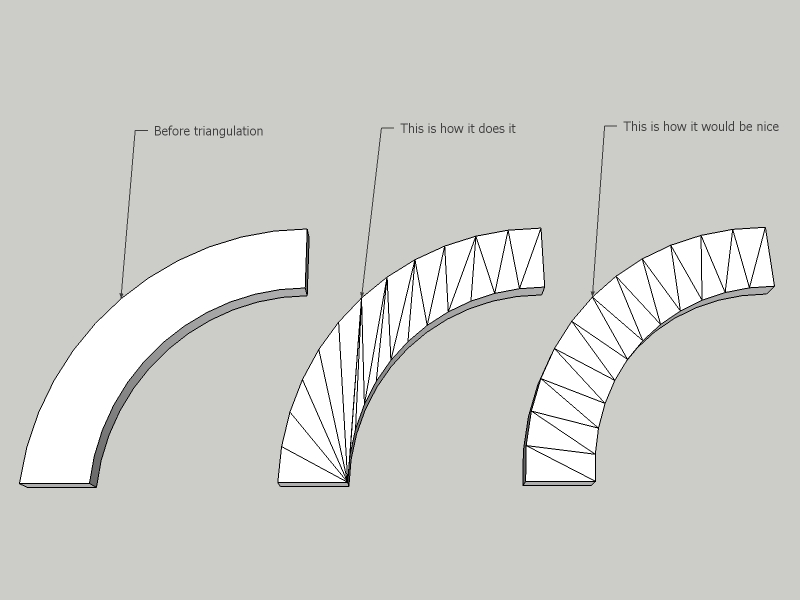

                              TriangulateFaces.jpg


                              TriangulateFaces.skp

                              Gai...

                              1 條回覆 最後回覆 回覆 引用 0
                              • TIGT 離線
                                TIG Moderator
                                最後由 編輯

                                @gaieus said:

                                Hi TIG,
                                Would it be possible for the plugin to triangulate faces with a more "even" or "regular" triangles? After this topic, I thought maybe pre-triangulating the face on the ramp would spare some extra hand-work but it seems that the plugin triangulates the faces just exactly the same way native SU does when autofolding.

                                TriangulateFaces uses the built-in SUp mesh making methods, which presumably match the auto-fold ones, hence the similarity.
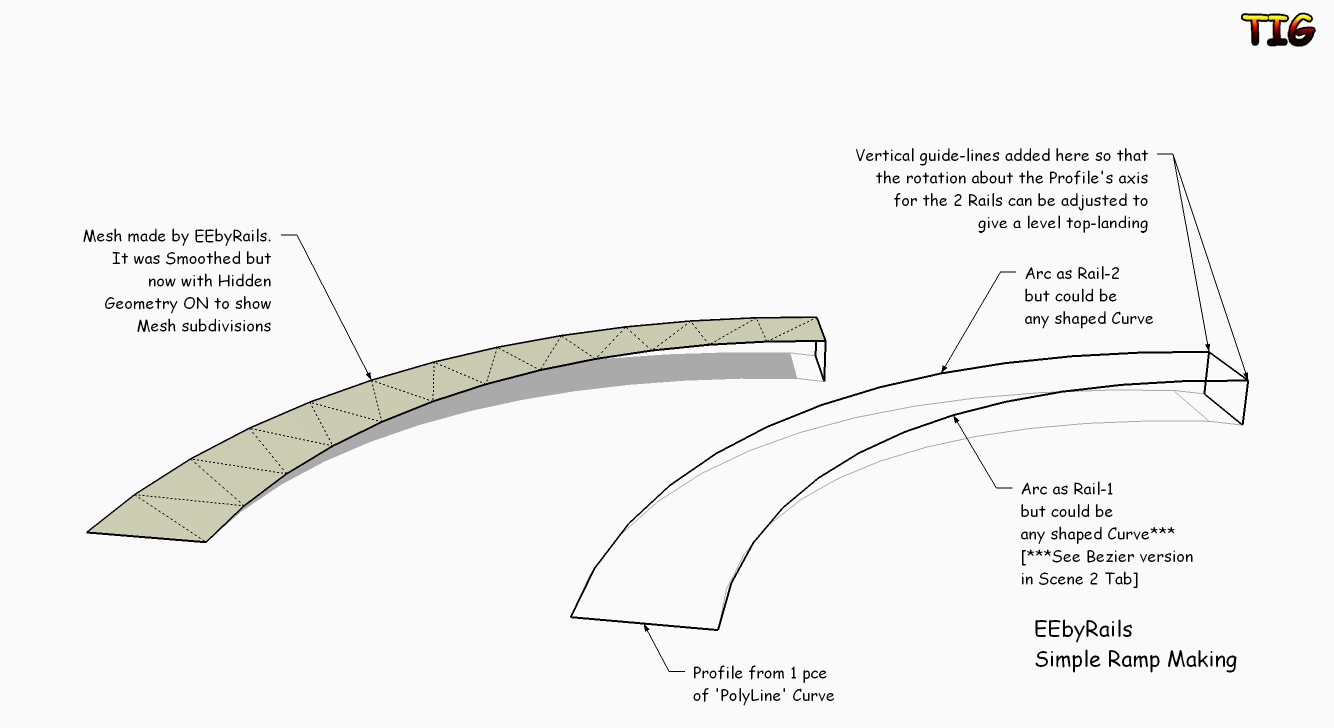
                                You might have noticed that my ExtendEdgesByRails script does produce a neat set of faces as that can't use the mesh methods directly but has to make up its own...
                                Using EEbyRails is a MUCH simpler way of making a curved ramp - I've attached an example...EEbyRailsSimpleRamp1.pngEEbyRailsSimpleRamp2.pngEEbyRailsSimpleRamp.skp
                                TIG

                                1 條回覆 最後回覆 回覆 引用 0
                                • GaieusG 離線
                                  Gaieus
                                  最後由 編輯

                                  Thanks TIG for the examples - although my question was more a bit "academical" and theoretical - but at least I know why the two meshes are similar.

                                  Certainly the other twoo tools are also great and would probably fit more to this particular need - that moving of the face was just so simple method - too bad autofold screws it up.

                                  Gai...

                                  1 條回覆 最後回覆 回覆 引用 0
                                  • thomthomT 離線
                                    thomthom
                                    最後由 編輯

                                    @gaieus said:

                                    Certainly the other twoo tools are also great and would probably fit more to this particular need - that moving of the face was just so simple method - too bad autofold screws it up.

                                    This triangulation would be a separate plugin. It's just too specific. But I've been thinking of this myself. I often find I want such partitioning. It seems that it's usually long strip of a face where two of the sides runs parallel-ish to each other. So you want an edge to go between each opposite vertex. I've had it on my list of things to do - just not got around to it yet.

                                    Thomas Thomassen — SketchUp Monkey & Coding addict
                                    List of my plugins and link to the CookieWare fund

                                    1 條回覆 最後回覆 回覆 引用 0
                                    • A 離線
                                      alz
                                      最後由 編輯

                                      Yeah, I agree -- having a more uniform triangulation method is preferred. It makes things a lot easier developing models if it's more uniformed and less "meet all at one point".

                                      With the current method, I have to spend time flip-flopping various divisions (and sometimes just recutting the face).

                                      😄

                                      1 條回覆 最後回覆 回覆 引用 0
                                      • W 離線
                                        Woz2007
                                        最後由 編輯

                                        @tig said:

                                        ###,
                                        Plugin parts by TIG**. 20090729
                                        v1.1
                                        Rewritten entirely by TIG... THEN completely corrected by Thomthom (TT)!***
                                        It now retains all Texture mapping successfully. 20091203

                                        [attachment=0:kz9i3jbr]<!-- ia0 -->triangulateFaces.rb<!-- ia0 -->[/attachment:kz9i3jbr]

                                        Im using this & seeing the UV mapping failing...is this the latest version?!

                                        1 條回覆 最後回覆 回覆 引用 0
                                        • thomthomT 離線
                                          thomthom
                                          最後由 編輯

                                          Got a sample of where it fails?

                                          Thomas Thomassen — SketchUp Monkey & Coding addict
                                          List of my plugins and link to the CookieWare fund

                                          1 條回覆 最後回覆 回覆 引用 0
                                          • W 離線
                                            Woz2007
                                            最後由 編輯

                                            @thomthom said:

                                            Got a sample of where it fails?

                                            If you look at the texture in the tringle before & after you will see that it is affected. When I export the model as a mesh the surface is indeed messed up.

                                            I hope the image is enough to work from?!
                                            Thnaks for looking into this. This script could save me a lot of hassle if working correctly 😄
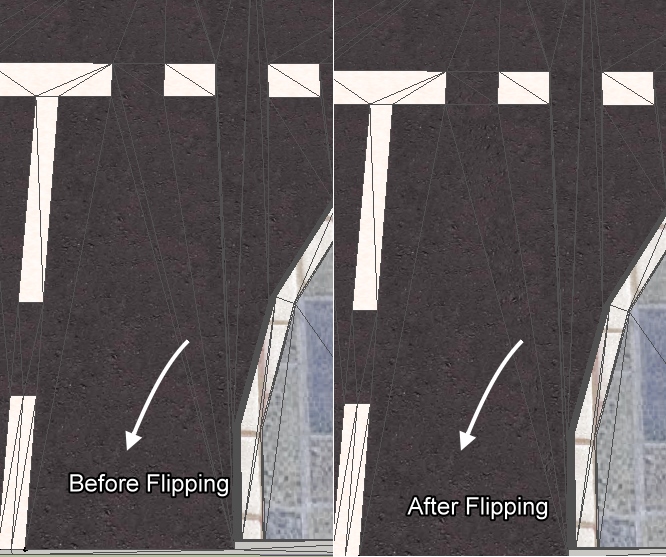

                                            before & after shot

                                            1 條回覆 最後回覆 回覆 引用 0
                                            • 1
                                            • 2
                                            • 3
                                            • 4
                                            • 5
                                            • 3 / 5
                                            • 第一個貼文
                                              最後的貼文
                                            Buy SketchPlus
                                            Buy SUbD
                                            Buy WrapR
                                            Buy eBook
                                            Buy Modelur
                                            Buy Vertex Tools
                                            Buy SketchCuisine
                                            Buy FormFonts

                                            Advertisement