sketchucation logo sketchucation
    • 登入
    Oops, your profile's looking a bit empty! To help us tailor your experience, please fill in key details like your SketchUp version, skill level, operating system, and more. Update and save your info on your profile page today!
    ⚠️ Important | Libfredo 15.6b introduces important bugfixes for Fredo's Extensions Update

    Move groups with different measures?

    已排程 已置頂 已鎖定 已移動 Developers' Forum
    55 貼文 4 Posters 29.4k 瀏覽 4 Watching
    正在載入更多貼文
    • 從舊到新
    • 從新到舊
    • 最多點贊
    回覆
    • 在新貼文中回覆
    登入後回覆
    此主題已被刪除。只有擁有主題管理權限的使用者可以查看。
    • pilouP 離線
      pilou
      最後由 編輯

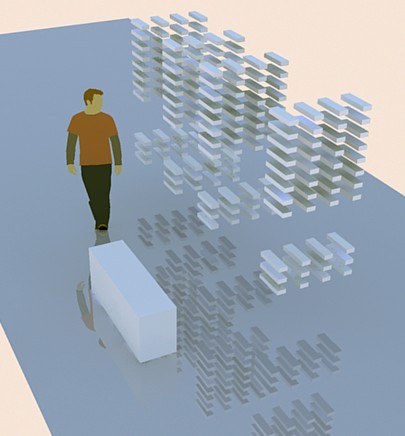
      Funny thing 😄


      explode.jpg

      Frenchy Pilou
      Is beautiful that please without concept!
      My Little site :)

      1 條回覆 最後回覆 回覆 引用 0
      • thomthomT 離線
        thomthom
        最後由 編輯

        Looking good Pilou!
        Instant assembly drawings! 😄 This should come in handy.

        Thomas Thomassen — SketchUp Monkey & Coding addict
        List of my plugins and link to the CookieWare fund

        1 條回覆 最後回覆 回覆 引用 0
        • pilouP 離線
          pilou
          最後由 編輯

          @unknownuser said:

          Instant assembly

          Alas for the inverse, that must be more tricky! 😕
          Better is use the Undo 💚

          Frenchy Pilou
          Is beautiful that please without concept!
          My Little site :)

          1 條回覆 最後回覆 回覆 引用 0
          • thomthomT 離線
            thomthom
            最後由 編輯

            hm... You could store the relative position you move the entities by in and attribute dictionary. Then perform the opposite when you want to reassemble.

            though, that will fail if the user moves anything...
            Maybe, you could store the original absolute position before you move stuff. Then you can reassemble back to that original position. That would allow the user to move things around as they please.

            Thomas Thomassen — SketchUp Monkey & Coding addict
            List of my plugins and link to the CookieWare fund

            1 條回覆 最後回覆 回覆 引用 0
            • Chris FullmerC 離線
              Chris Fullmer
              最後由 編輯

              Store the original transformation in a dictionary attached to the group/component. Then to unexplode, just re-apply that transformation onto the group. It will go right back where it belongs.

              I wrote that crazy scrambler script a while ago that does this and it worked very well.

              Chris

              Lately you've been tan, suspicious for the winter.
              All my Plugins I've written

              1 條回覆 最後回覆 回覆 引用 0
              • pilouP 離線
                pilou
                最後由 編輯

                In theory that must be more easy 😉
                Just select that you want and apply a "negative" translation : a deflation 😉
                Maybe my next 😄
                And the above is not yet perfect! The Pivot Point seems not have the wished result wanted 😒
                be continued...

                Ps When Groups or Components are nested how to process automatically?
                A plug for make each components individual is maybe existing?
                Edit
                one exist for group by TIG Explode2groups

                miss now somethings transform Transform2goups or Explode2Components 😄

                Frenchy Pilou
                Is beautiful that please without concept!
                My Little site :)

                1 條回覆 最後回覆 回覆 引用 0
                • pilouP 離線
                  pilou
                  最後由 編輯

                  @Chris Any chance to see it somewhere? 😄

                  PS
                  A plug for make each components individual is maybe existing?
                  Edit
                  one exist for group by TIG Explode2groups

                  miss now somethings for components Transform2goups or Explode2Components

                  Frenchy Pilou
                  Is beautiful that please without concept!
                  My Little site :)

                  1 條回覆 最後回覆 回覆 引用 0
                  • Chris FullmerC 離線
                    Chris Fullmer
                    最後由 編輯

                    take the componentInstance, add it to a group, then explode the component instance.

                    And I posted my scrambler script here. I'll see if I can find the thread.

                    Chris

                    Lately you've been tan, suspicious for the winter.
                    All my Plugins I've written

                    1 條回覆 最後回覆 回覆 引用 0
                    • pilouP 離線
                      pilou
                      最後由 編輯

                      @Chris thx for the Info ☀
                      Fredo6 has inside the FredoScale something who transform any selection of groups or Components in "Unique" groups or componants! (each become individual)
                      (last icon)

                      Frenchy Pilou
                      Is beautiful that please without concept!
                      My Little site :)

                      1 條回覆 最後回覆 回覆 引用 0
                      • pilouP 離線
                        pilou
                        最後由 編輯

                        Some tests 💚 Put the code inside the WebConsole by Jim Foltz
                        Press "Eval" button and have fun 😄
                        Veyron model is from 3Dwarehouse!

                        model = Sketchup.active_model
                        entities = model.entities
                        selection = model.selection
                        
                        xp=100  # Pivot Point (as you want)
                        yp=100
                        zp=100
                        
                        q=50 # Measure of translation (as you want) 
                        
                        selection.each do |e| # update!
                          # Skip all entities that aren't groups or components (replace follow "ComponentInstance" by "Group" if you have groups
                          next unless e.is_a? Sketchup;;ComponentInstance  # Now we process the component or group
                         center = e.bounds.center #Center Point of the grouped object
                           xc= center.x
                           yc= center.y
                           zc= center.z
                           
                        xe=xc #End Point of the grouped object
                        ye=yc
                        ze=zc
                        
                        if xc<xp
                         xe =xc - q
                        end
                        
                        if xc>xp
                         xe =xc + q
                        end
                        
                        if yc<yp
                         ye =yc - q
                        end
                        
                        if yc>yp
                         ye =yc + q
                        end
                        
                        if zc<zp
                         ze =zc - q
                        end
                        
                        if zc>zp
                         ze =zc + q
                        end
                        
                          point = Geom;;Point3d.new xe,ye,ze
                          t = Geom;;Transformation.new point
                          # Apply the transformation
                          e.transform!(t)
                        end
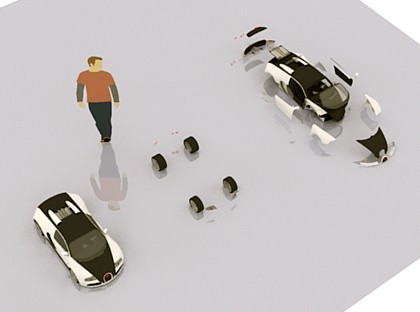
                        

                        veyron.jpg

                        Frenchy Pilou
                        Is beautiful that please without concept!
                        My Little site :)

                        1 條回覆 最後回覆 回覆 引用 0
                        • pilouP 離線
                          pilou
                          最後由 編輯

                          Yep!!! THX! Miracle that is working! 😍
                          Sure I should read the Api document before 😳 😳 😳 But I had risked the trick 💚
                          So my second script was a new speedy success and a big lesson 😄

                          @unknownuser said:

                          groups=[];selection.each{|entity|groups.push(entity) if entity.kind_of?(Sketchup::ComponentInstance)}

                          groups.each{|ComponentInstance|zeds.push([ComponentInstance.bounds.min.z, index])
                          

                          Copy my code follow in the Web console from Jim Foltz ❗ ❗ ❗
                          (if you have components use the file linked )

                          
                              model = Sketchup.active_model
                              model.start_operation("Move in Z")
                              entities = model.entities
                              selection = model.selection
                          
                              zeds=[]
                              index=0
                              sorted_groups=[]
                          
                              groups=[];selection.each{|entity|groups.push(entity) if entity.kind_of?(Sketchup;;Group)}
                          
                              groups.each{|group|zeds.push([group.bounds.min.z, index])
                                 index+=1
                              }
                              zeds.sort!
                              zeds.each{|z|sorted_groups.push(groups[z[1]]) }
                              ### sorted_groups is now groups sorted by z
                          
                              z = 0.0
                              sorted_groups.each do |e| # update!
                                # Now we process the groups
                                t = Geom;;Transformation.new(Geom;;Point3d.new(0,0,z))
                                # Apply the transformation
                                e.transform!(t)
                                z = z + 100.cm
                              end
                             
                            model.commit_operation
                            return nil


                          Some help for fun variations 😄

                          http://forums.polyloop.net/picture.php?albumid=23&pictureid=421


                          Undrop_component.zip

                          Frenchy Pilou
                          Is beautiful that please without concept!
                          My Little site :)

                          1 條回覆 最後回覆 回覆 引用 0
                          • 1
                          • 2
                          • 3
                          • 1 / 3
                          • 第一個貼文
                            最後的貼文
                          Buy SketchPlus
                          Buy SUbD
                          Buy WrapR
                          Buy eBook
                          Buy Modelur
                          Buy Vertex Tools
                          Buy SketchCuisine
                          Buy FormFonts

                          Advertisement