Graphical Issues on Laptop
-
Hi Guys,
Here's my Laptops Specs
Dell Latitude D400
Intel Pentium M 1700MHZ Processor
1GB Ram
Intel 82852/82855 GM/GME Graphics Controller
40GB HDDRecently while modeling the house below i experience display issues
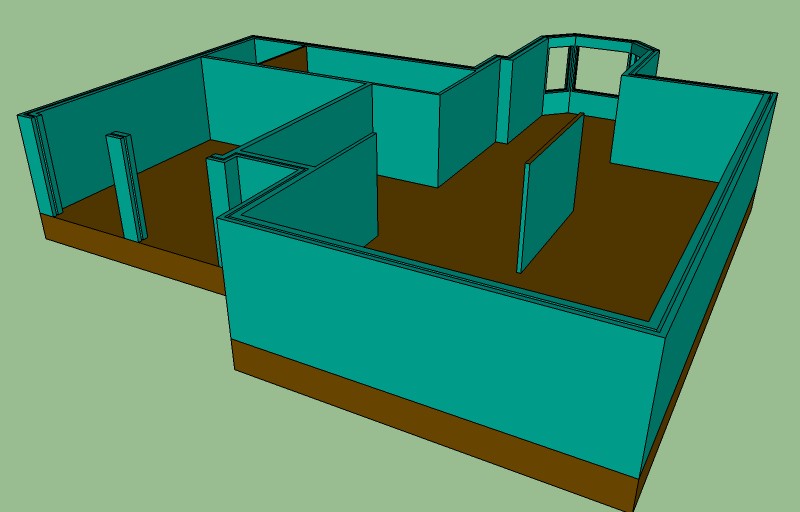
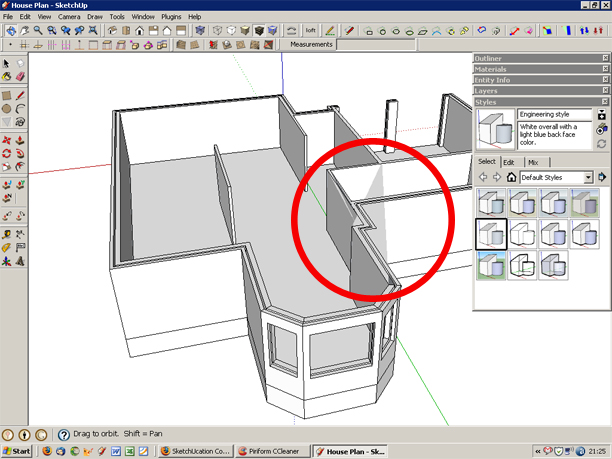
I've each part Grouped and on its own layer but when i attempt to add interior walls to existing interior walls artifacts appear and faces vanish? Also no indication appears on any face when is use select tool or push/pull etc. And at time SU will push/pull the adjacent face?
Here's an example of the issue
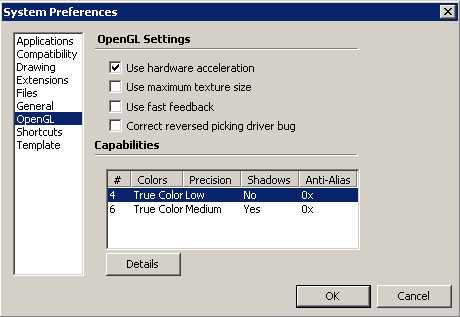
And here's my system preferences
Recently i've installed some plugins but i don't know if that is the issue? All my drivers are up to date as i've DriverMax 5 installed and it keeps it up to date on a daily basis.
Any ideas or advice?
-
Hi Rich,
@unknownuser said:
Intel 82852/82855 GM/GME Graphics Controller
That's the culprit. It means you don't even have a "real" video card at all (these integrated chipsets are okay to work in an MS Office document maximum). From the "zero" antialiasing options in your HW acceleration I also suspect that you practically have no video card support at all.
Turn off hardware acceleration completely; you don't benefit from it anyway. It would (probably) help with the issues at least (while your performance souldn't be worse)
-
Hi,
Thanks for the info, it worked alright but now that i know laptop is not much use for modelling larger models i'm gaining leverage for the boss (herself) to get me a new one!!
Anyone got suggestions on which laptop is good for modelling on? That's within €700 or so


Hello! It looks like you're interested in this conversation, but you don't have an account yet.
Getting fed up of having to scroll through the same posts each visit? When you register for an account, you'll always come back to exactly where you were before, and choose to be notified of new replies (either via email, or push notification). You'll also be able to save bookmarks and upvote posts to show your appreciation to other community members.
With your input, this post could be even better 💗
Register Login


Advertisement