sketchucation logo sketchucation
    • 登入
    Oops, your profile's looking a bit empty! To help us tailor your experience, please fill in key details like your SketchUp version, skill level, operating system, and more. Update and save your info on your profile page today!
    ⚠️ Important | Libfredo 15.6b introduces important bugfixes for Fredo's Extensions Update

    Select Perimeter Edges only

    已排程 已置頂 已鎖定 已移動 Developers' Forum
    27 貼文 10 Posters 15.8k 瀏覽 10 Watching
    正在載入更多貼文
    • 從舊到新
    • 從新到舊
    • 最多點贊
    回覆
    • 在新貼文中回覆
    登入後回覆
    此主題已被刪除。只有擁有主題管理權限的使用者可以查看。
    • JClementsJ 離線
      JClements
      最後由 編輯

      Thanks, Chris!

      When the script is needed (although it may not be often) it will be greatly appreciated ... usually after doing deformations + plus mulitiple intersections, odd shapes, etc., which seems like its always at the end of the day, near a deadline, and you don't time and are impatient 😄 )

      It worked pretty well on this one (which is a result of a projection) but not quite. Anyway it will work I think for a majority of cases 👍 . Thanks again for sharing.

      John

      P.S. At least keep it alive in your archives.


      Perimeter (outer) Edges only 2.skp

      John | Illustrator | Beaverton, Oregon

      1 條回覆 最後回覆 回覆 引用 0
      • Chris FullmerC 離線
        Chris Fullmer
        最後由 編輯

        Wow John, how can you work like that? Where's your axis? That model was very weird to try and orient with the axis off and no prior knowledge of what should be up or down.

        anyhow, I turned on the axis and I was able to figure it out 😄

        As for the script not working right, that is actually because the model is a little off. Its not perfectly flat.

        EDIT: Not that a model has to be flat for my plugin to work. But in this case, there are overlaps that apear to be flat, which are not flat. So the plugin selects edges that don't look like outer edges, but in fact are since they are not flat with the faces that are overlapping them.

        Chris

        Lately you've been tan, suspicious for the winter.
        All my Plugins I've written

        1 條回覆 最後回覆 回覆 引用 0
        • pilouP 離線
          pilou
          最後由 編輯

          Seems that is a 2D view of a 3D work 😉

          Frenchy Pilou
          Is beautiful that please without concept!
          My Little site :)

          1 條回覆 最後回覆 回覆 引用 0
          • JClementsJ 離線
            JClements
            最後由 編輯

            Chris, I only turned of the axis so they wouldn't show when I exported a jpg 😄

            John | Illustrator | Beaverton, Oregon

            1 條回覆 最後回覆 回覆 引用 0
            • mitcorbM 離線
              mitcorb
              最後由 編輯

              this starts to suggest selection of loops, maybe creation of loops, maybe loop subdivide on volumetric models, not just planar objects.
              never mind-- just a tangential rambling

              I take the slow, deliberate approach in my aimless wandering.

              1 條回覆 最後回覆 回覆 引用 0
              • Chris FullmerC 離線
                Chris Fullmer
                最後由 編輯

                @mitcorb said:

                this starts to suggest selection of loops, maybe creation of loops, maybe loop subdivide on volumetric models, not just planar objects.
                never mind-- just a tangential rambling

                Doesn't Thom have some selection toys that work with loops? Thom, I've looked at your script, but I've forgotten which it is and what exactly it does. Want to step in and enlighten us?

                Chris

                Lately you've been tan, suspicious for the winter.
                All my Plugins I've written

                1 條回覆 最後回覆 回覆 引用 0
                • Chris FullmerC 離線
                  Chris Fullmer
                  最後由 編輯

                  Well, here's his selection tools plugin:

                  http://forums.sketchucation.com/viewtopic.php?f=180&t=14975&p=114380&hilit=%5BPlugin%5D#p114380

                  It does have select loop. Its not something I've gotten the hang of in other modelers, so I'd have a hard time implementing it. But check out Thom's, looks like it should work for loops!

                  Chris

                  Lately you've been tan, suspicious for the winter.
                  All my Plugins I've written

                  1 條回覆 最後回覆 回覆 引用 0
                  • mitcorbM 離線
                    mitcorb
                    最後由 編輯

                    I don't think he has loop selection of edges--only faces at this time. I might be wrong. He may have updated it. What I am suggesting is already a native tool in Blender and a few other solid modelers.
                    Selecting a loop of edges could become problematic unless you had options to select at the bifurcations of a heavy triangulated model. Of course, Zorro would make short work of it unless that would be too heavy handed--in some cases a dispassionate slasher.
                    mitcorb

                    I take the slow, deliberate approach in my aimless wandering.

                    1 條回覆 最後回覆 回覆 引用 0
                    • thomthomT 離線
                      thomthom
                      最後由 編輯

                      Edge Loop, could anyone post a screenshot of what that means? A "Loop" can be interpreted as many things.

                      Thomas Thomassen — SketchUp Monkey & Coding addict
                      List of my plugins and link to the CookieWare fund

                      1 條回覆 最後回覆 回覆 引用 0
                      • R 離線
                        remus
                        最後由 編輯

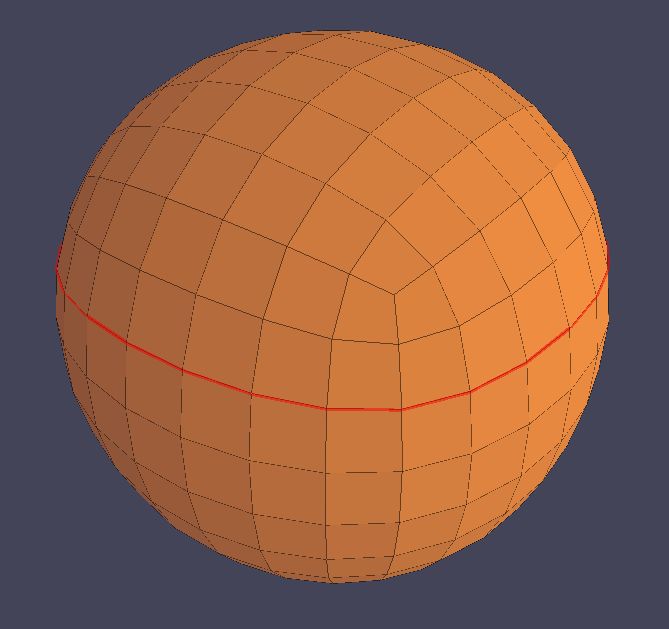
                        Here you go.


                        edge loop.JPG

                        http://remusrendering.wordpress.com/

                        1 條回覆 最後回覆 回覆 引用 0
                        • thomthomT 離線
                          thomthom
                          最後由 編輯

                          The thing about these kind of selections, how do you expect them to work on irregular shaped objects? How do they work in other applications?

                          If it assumes that the shape is made out of triangles or quads things are very easy.

                          Thomas Thomassen — SketchUp Monkey & Coding addict
                          List of my plugins and link to the CookieWare fund

                          1 條回覆 最後回覆 回覆 引用 0
                          • pilouP 離線
                            pilou
                            最後由 編輯

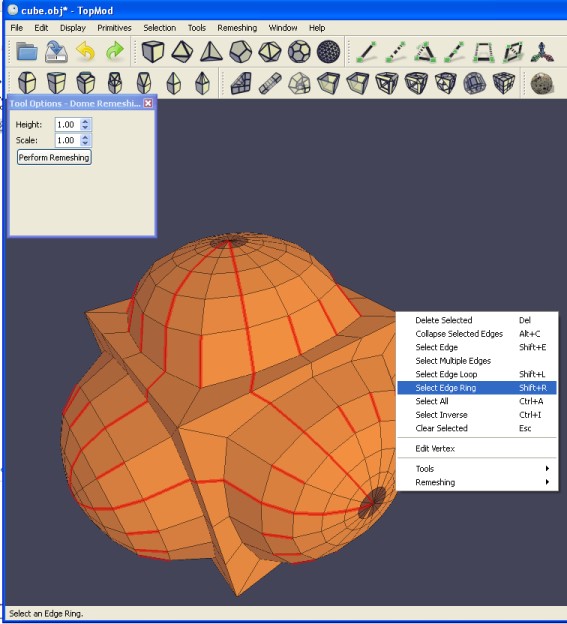
                            See TopMod 😉 (free)
                            Have cool loops selection 😉
                            And it's a crazzy prog 😎 (here old version)
                            topmod.jpg

                            Frenchy Pilou
                            Is beautiful that please without concept!
                            My Little site :)

                            1 條回覆 最後回覆 回覆 引用 0
                            • mitcorbM 離線
                              mitcorb
                              最後由 編輯

                              Yes, Remus and Pilou:
                              That is what would be called edge loop selection.
                              Now, what if the volume were made up of only triangle faces? or a combination of both quads and triangles(either hard or soft edges)
                              You would want to select the shortest edge loop around the volume, or the longest loop around the volume, or some specific path. You could then duplicate the path in order to subdivide, or do a follow me with an added figure, or an array copy--or whatever.

                              I take the slow, deliberate approach in my aimless wandering.

                              1 條回覆 最後回覆 回覆 引用 0
                              • N 離線
                                notareal
                                最後由 編輯

                                Here is a good explanation of edge loop.
                                http://wiki.cgsociety.org/index.php/Edge_Loop
                                Edge loop terminates if there 3 or 5 (or more junctions), so for a mesh build with only triangle faces there is no edge loop.

                                Welcome to try [Thea Render](http://www.thearender.com/), Thea support | [kerkythea.net](http://www.kerkythea.net/) -team member

                                1 條回覆 最後回覆 回覆 引用 0
                                • thomthomT 離線
                                  thomthom
                                  最後由 編輯

                                  Thanks. That helps alot. Such a function is easy to add.

                                  @unknownuser said:

                                  In a stricter sense an edge loop is defined as set of edges where the loop follows the middle edge in every 'four way junction'

                                  I'll add that shortly to my Selection Toys plugin.

                                  Thomas Thomassen — SketchUp Monkey & Coding addict
                                  List of my plugins and link to the CookieWare fund

                                  1 條回覆 最後回覆 回覆 引用 0
                                  • thomthomT 離線
                                    thomthom
                                    最後由 編輯

                                    Only thing is, from the screenshot in that article, I don't think the quad faces are planar. So in SU there'd be a hidden/soft edge across. I could make the script ignore hidden/soft edges, as an option perhaps.

                                    Thomas Thomassen — SketchUp Monkey & Coding addict
                                    List of my plugins and link to the CookieWare fund

                                    1 條回覆 最後回覆 回覆 引用 0
                                    • N 離線
                                      notareal
                                      最後由 編輯

                                      @thomthom said:

                                      I don't think the quad faces are planar.

                                      That's possible. So option to ignore soft/hidden faces would good.

                                      Welcome to try [Thea Render](http://www.thearender.com/), Thea support | [kerkythea.net](http://www.kerkythea.net/) -team member

                                      1 條回覆 最後回覆 回覆 引用 0
                                      • thomthomT 離線
                                        thomthom
                                        最後由 編輯

                                        But how many model in SU in such a manner? With only quad faces? With hard edges (with or without soft edges that splits the quad.)

                                        Thomas Thomassen — SketchUp Monkey & Coding addict
                                        List of my plugins and link to the CookieWare fund

                                        1 條回覆 最後回覆 回覆 引用 0
                                        • mitcorbM 離線
                                          mitcorb
                                          最後由 編輯

                                          Thomthom:
                                          If an edge loop selection terminates at a 3 or 5 junction, do you see this as terminating the selection or retaining the selection up to the junction? And thereafter the selection is made edge by edge, adding to the path, or restarting the loop selection without losing what has been selected before. Just some thoughts.
                                          How many people model like this, you ask. Because I have some limited experience with Blender, I often think in terms of that workflow (wishing that Sketchup had that versatility) as I model in SU.
                                          In my opinion, this loop selection capability (and your current Selection Toys) is at least as important as the Point Merger tool recently developed and Select only Visible.

                                          Somewhere out there is the Grand Unified Modeling Program....or GUMP for short. (edit: add small chuckle)


                                          I take the slow, deliberate approach in my aimless wandering.

                                          1 條回覆 最後回覆 回覆 引用 0
                                          • 1
                                          • 2
                                          • 1 / 2
                                          • 第一個貼文
                                            最後的貼文
                                          Buy SketchPlus
                                          Buy SUbD
                                          Buy WrapR
                                          Buy eBook
                                          Buy Modelur
                                          Buy Vertex Tools
                                          Buy SketchCuisine
                                          Buy FormFonts

                                          Advertisement