sketchucation logo sketchucation
    • 登入
    Oops, your profile's looking a bit empty! To help us tailor your experience, please fill in key details like your SketchUp version, skill level, operating system, and more. Update and save your info on your profile page today!
    🔌 Smart Spline | Fluid way to handle splines for furniture design and complex structures. Download

    Shadow settings

    已排程 已置頂 已鎖定 已移動 SketchUp Bug Reporting
    sketchup
    26 貼文 7 Posters 3.8k 瀏覽 7 Watching
    正在載入更多貼文
    • 從舊到新
    • 從新到舊
    • 最多點贊
    回覆
    • 在新貼文中回覆
    登入後回覆
    此主題已被刪除。只有擁有主題管理權限的使用者可以查看。
    • G 離線
      Gidon Yuval
      最後由 編輯

      Hi guys.
      It's been a while since I was here.
      Sorry about that. It's been a tumultuous year.
      Anyawy, I've got this little problem I was hoping you guys could help me with. For somw reason I can't activate the shadow settings dialogue box. I've got the toolbar and I can switch shadows on and off and change the time and date but the dialogue box that lets you determin the brightness or darkness and whether to use the sun for shading or not doesn't pop up when I hit the settings button.
      Any idea what this could be and how I can correct this?
      Thanks guys.

      If you don't know where you're going, you're never going to get there.

      1 條回覆 最後回覆 回覆 引用 0
      • Dave RD 離線
        Dave R
        最後由 編輯

        Hello Gidon. Good to see you here again.

        Is it possible that the Shadow Settings dialog box is showing up off screen someplace? If you reduce but not minimize the drawing window, perhaps you can find the edge of the dialog box along the edge of the screen?

        Etaoin Shrdlu

        %

        (THERE'S NO PLACE LIKE)

        G28 X0.0 Y0.0 Z0.0

        M30

        %

        1 條回覆 最後回覆 回覆 引用 0
        • G 離線
          Gidon Yuval
          最後由 編輯

          Hi Dave,
          How exactly do I reduce the drawing window? I tried grabbing the edge and dragging like in other applications but the drawing window didn't budge. This is realy freaking me out. 😮 😲

          If you don't know where you're going, you're never going to get there.

          1 條回覆 最後回覆 回覆 引用 0
          • Dave RD 離線
            Dave R
            最後由 編輯

            Click on the two little squares button between the _ and X in the upper right corner. After that, you should be able to resize the window by dragging the corners/edges.

            Etaoin Shrdlu

            %

            (THERE'S NO PLACE LIKE)

            G28 X0.0 Y0.0 Z0.0

            M30

            %

            1 條回覆 最後回覆 回覆 引用 0
            • G 離線
              Gidon Yuval
              最後由 編輯

              OOOOh thaaaat!
              That was actualy one of the first things I tried.
              No luck. The shadow settings window didn't show up anywhere.

              If you don't know where you're going, you're never going to get there.

              1 條回覆 最後回覆 回覆 引用 0
              • R 離線
                remus
                最後由 編輯

                You could try increasing your screen resolution to its maximum (temporarily). I think you do it by right clicking your desktop->properties->something like display settings.

                http://remusrendering.wordpress.com/

                1 條回覆 最後回覆 回覆 引用 0
                • GaieusG 離線
                  Gaieus
                  最後由 編輯

                  Hi Gidon and glad to see you!

                  As for the "lost" dialog (unless something else is broken), do what the others suggest. It must be hiding somewhere either behind your main SU window or somewhere off-screen (happened to me with some dialogs once in a while, too).

                  Don't you by any chance use dual monitors?

                  Gai...

                  1 條回覆 最後回覆 回覆 引用 0
                  • G 離線
                    Gidon Yuval
                    最後由 編輯

                    Hi Csaba,
                    So nice to be talking to you guys again. I've really missed you all.
                    In answer to your question, no. I don't use dual monitors. I also shrank down the draing window to just about nothing and moved it around all over my screen to make sure the dialogue box wasn't hidden behind it.
                    No luck.

                    If you don't know where you're going, you're never going to get there.

                    1 條回覆 最後回覆 回覆 引用 0
                    • GaieusG 離線
                      Gaieus
                      最後由 編輯

                      and what Remus suggested? It may be just off screen somewhere. I once found it behind my taskbar so hiding that could also reveal it.

                      Gai...

                      1 條回覆 最後回覆 回覆 引用 0
                      • Dave RD 離線
                        Dave R
                        最後由 編輯

                        I found it! It was on my computer screen. How'd it get there?

                        😄

                        Sorry, I couldn't help it.

                        I'm obviously grasping at straws here but, have you closed all of the other dialog boxes to make sure it isn't behind them?

                        How do you feel about looking at the registry on your computer?

                        Etaoin Shrdlu

                        %

                        (THERE'S NO PLACE LIKE)

                        G28 X0.0 Y0.0 Z0.0

                        M30

                        %

                        1 條回覆 最後回覆 回覆 引用 0
                        • J 離線
                          Jim
                          最後由 編輯

                          This happens to me too.

                          What I do is make sure the Window > Shadows menu item is checked, then close and re-open Sketchup.

                          Hi

                          1 條回覆 最後回覆 回覆 引用 0
                          • G 離線
                            Gidon Yuval
                            最後由 編輯

                            Hi Jim,
                            Tried that too. Didn't help.
                            Dave, how do look in the registry and what am I looking for?

                            If you don't know where you're going, you're never going to get there.

                            1 條回覆 最後回覆 回覆 引用 0
                            • Dave RD 離線
                              Dave R
                              最後由 編輯

                              Gidon, click on Start>Run and type regedit. Hit OK. Next click on the plus sign next to HKEY_CURRENT_USER then Software, then Google, then SketchUp 7. Look down the list for SnappyShadows. Here's a screen grab showing it and the values for mine. What do you see on yours?

                              Caution: You can screw up your computer if you aren't careful in the registry. That said, just don't approve any changes and you should be alright.
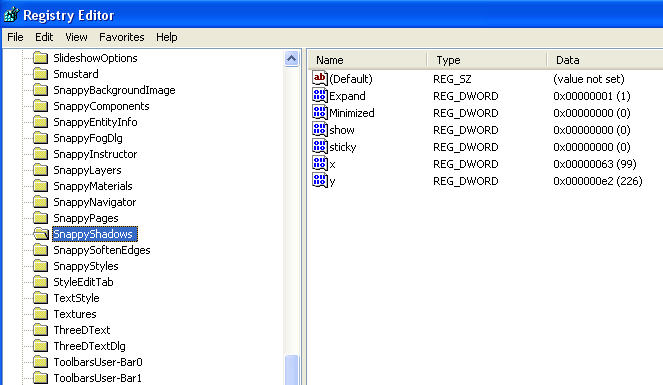
                              Reg2.jpg

                              Etaoin Shrdlu

                              %

                              (THERE'S NO PLACE LIKE)

                              G28 X0.0 Y0.0 Z0.0

                              M30

                              %

                              1 條回覆 最後回覆 回覆 引用 0
                              • G 離線
                                Gidon Yuval
                                最後由 編輯

                                Csaba, I didn't know you can hide the task bar. How is that done?
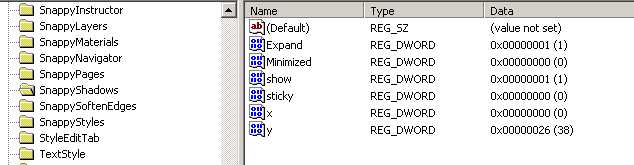
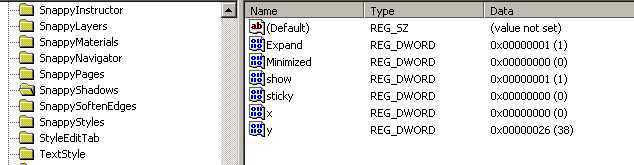
                                Dave, thanks for the screen grab. I followed the steps for both SU6 and SU7 and found that the values are different from yours.
                                I took a 'snap-shot' of both screens for you to have a look at.
                                Do you think the difference in the values could be the problem?
                                And if so, is this something I can fix?

                                These are the values for SU6:
                                snappy 6.jpg
                                and these are the values for SU7:
                                snappy 7.jpg

                                If you don't know where you're going, you're never going to get there.

                                1 條回覆 最後回覆 回覆 引用 0
                                • Dave RD 離線
                                  Dave R
                                  最後由 編輯

                                  Gidon,

                                  It's alright that the values are different. If I understand it, the Shadows dialog doesn't appear for you under either SU6 or SU7? It's odd that the values for X and Y are the same between the two.

                                  The values in parentheses for the first four entries just relate tot he state of the dialog box. 1 is on and 0 is off. The last two relate to the location on the screen.

                                  You could try editing those last two by right clicking on the Name and choosing Modify. Change the Base to Decimal and the Value Data to a higher number. Then click on OK. Set them to something in the 100-300 range. You could look at the location of one of the other dialog boxes that does appear to get an idea of the kind of values it has. Then reopen SketchUp and see what you've got.

                                  By the way, playing with the Registry can be a dangerous thing but, I've deleted the Entire Registry Entry for SketchUp 7 without problem and before writing the above, I experimented with changing the values of X and Y and saw the Shadow dialog box change position. In neither case did anything bad happen to my computer.

                                  Etaoin Shrdlu

                                  %

                                  (THERE'S NO PLACE LIKE)

                                  G28 X0.0 Y0.0 Z0.0

                                  M30

                                  %

                                  1 條回覆 最後回覆 回覆 引用 0
                                  • G 離線
                                    Gidon Yuval
                                    最後由 編輯

                                    Dave, I did the values thing in the registry as you suggested.
                                    Still nothing.
                                    I consided removing the program from my computer and then re-downloading and re-installing but then I'd lose my SU6 copy and I'd have no way of getting it back, and I have to say I'm still not sure if I prefer SU7 to SU6. Also, what's to say that this will solve the problem.

                                    If you don't know where you're going, you're never going to get there.

                                    1 條回覆 最後回覆 回覆 引用 0
                                    • Dave RD 離線
                                      Dave R
                                      最後由 編輯

                                      Gidon, before removing and reinstalling the program, try this next step. Go back to the regsitry. Right click on SnappyShadows and choose Export. You'll save a copy of this registry entry someplace where you can find it if needed. Maybe on the Desktop.

                                      Next, right click on SnappyShadows again and Delete it. Now open SketchUp again and try displaying the Shadows dialog box. Any luck?

                                      Etaoin Shrdlu

                                      %

                                      (THERE'S NO PLACE LIKE)

                                      G28 X0.0 Y0.0 Z0.0

                                      M30

                                      %

                                      1 條回覆 最後回覆 回覆 引用 0
                                      • G 離線
                                        Gidon Yuval
                                        最後由 編輯

                                        Still nothing Dave. I even put the snappyshadows file back into the registry but I'm still not getting the shadows dialogue box, not even when I go to window>shadows.

                                        If you don't know where you're going, you're never going to get there.

                                        1 條回覆 最後回覆 回覆 引用 0
                                        • Dave RD 離線
                                          Dave R
                                          最後由 編輯

                                          I'm starting to run out ideas but if it is registry-related, this might work. Delete all of the SketchUp 7 registry entry. Do the same for the SketchUp 7 registry entry. These things will get rewritten when you opn sketchUp again. You may need to set up the toolbars again, though.

                                          As before, back up the file before deleting it.

                                          Etaoin Shrdlu

                                          %

                                          (THERE'S NO PLACE LIKE)

                                          G28 X0.0 Y0.0 Z0.0

                                          M30

                                          %

                                          1 條回覆 最後回覆 回覆 引用 0
                                          • G 離線
                                            Gidon Yuval
                                            最後由 編輯

                                            OK, if you promise not to laugh I'll tell you how I fixed the problem. I don't use Layout because I haven't had the time to learn it and the few times I did try it I couldn't get it to do what I wanted. So I removed it from my computer. I never dreamed that removing the Layout would affect the SU program. I re-installed Layout out of curiosity, a kind of last resort and...Lo and behold! the shadows dialogue box is back!
                                            Who'd have thought that removing Layout would screw up the shadow dialogue!

                                            If you don't know where you're going, you're never going to get there.

                                            1 條回覆 最後回覆 回覆 引用 0
                                            • 1
                                            • 2
                                            • 1 / 2
                                            • 第一個貼文
                                              最後的貼文
                                            Buy SketchPlus
                                            Buy SUbD
                                            Buy WrapR
                                            Buy eBook
                                            Buy Modelur
                                            Buy Vertex Tools
                                            Buy SketchCuisine
                                            Buy FormFonts

                                            Advertisement