sketchucation logo sketchucation
    • Login
    Oops, your profile's looking a bit empty! To help us tailor your experience, please fill in key details like your SketchUp version, skill level, operating system, and more. Update and save your info on your profile page today!
    Mac User? | Join the Rayscaper Beta for Mac Learn More

    [Plugin] Sculpt Tools (help)

    Scheduled Pinned Locked Moved Plugins
    207 Posts 48 Posters 112.3k Views 48 Watching
    Loading More Posts
    • Oldest to Newest
    • Newest to Oldest
    • Most Votes
    Reply
    • Reply as topic
    Log in to reply
    This topic has been deleted. Only users with topic management privileges can see it.
    • J
      Jim
      last edited by

      calling view.invalidate forces a refresh. Hope that helps.

      Hi

      1 Reply Last reply
      Reply Quote 0
      • Chris FullmerC
        Chris Fullmer
        last edited by

        When you figure it out, let me know 😄

        I've also had difficulty with it. I eventually get it to work, but I never feel confident I've implemented how it is supposed to be implemented.

        Chris

        Lately you've been tan, suspicious for the winter.
        All my Plugins I've written

        1 Reply Last reply
        Reply Quote 0
        • B
          BTM
          last edited by

          @jim said:

          calling view.invalidate forces a refresh. Hope that helps.

          That much I do know, but my problem is where to put it, and when to do it. 😕

          1 Reply Last reply
          Reply Quote 0
          • mitcorbM
            mitcorb
            last edited by

            Nice concatenation there, Majid.

            I take the slow, deliberate approach in my aimless wandering.

            1 Reply Last reply
            Reply Quote 0
            • B
              BTM
              last edited by

              ( 03/07/09) Working icons on windows. easy install.

              … These are the only files necessary, and where they should go:

              btm_Sculpt_Tools_Loader.rb > plugins folder
              btm_Sculpt_Tools folder > plugins folder

              btm_sculpt1_dialog1.png > btm_Sculpt_Tools folder
              btm_sculpt2_bulge1.png > btm_Sculpt_Tools folder
              btm_sculpt3_push1.png > btm_Sculpt_Tools folder
              btm_sculpt4_smooth1.png > btm_Sculpt_Tools folder
              btm_Sculpt1_Dialog.rb > btm_Sculpt_Tools folder
              btm_Sculpt2_Bulge.rb > btm_Sculpt_Tools folder
              btm_Sculpt3_Push.rb > btm_Sculpt_Tools folder
              btm_Sculpt4_smooth.rb > btm_Sculpt_Tools folder

              … Post here if you are having problems.

              NOTES: for Bulge and Push, Shift will reverse the tools, so Bulge will carve, and Push will Pull. Bulge bulges the mesh, push pushes things away from the cursor, and smooth smoothes out the mesh.

              1 Reply Last reply
              Reply Quote 0
              • N
                negativa
                last edited by

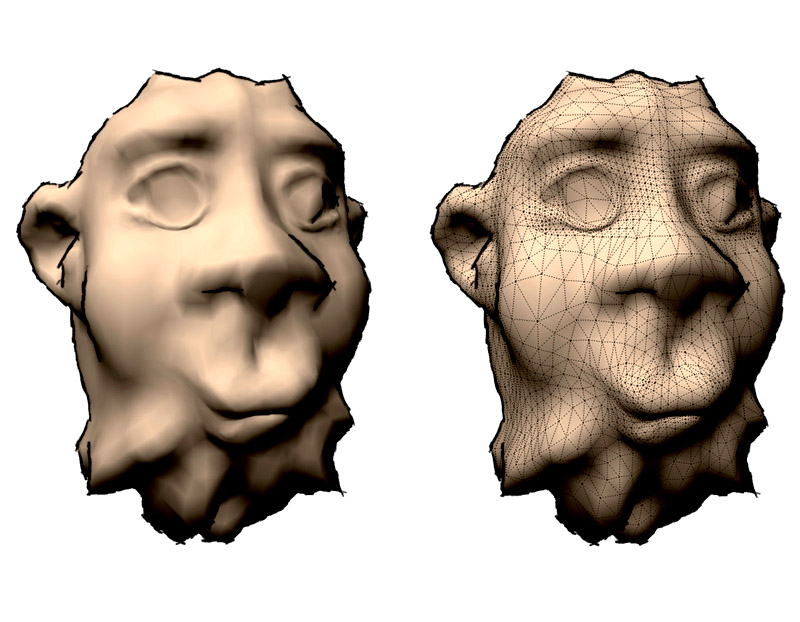
                Hello all! Here's another head 😄...
                Great script
                head

                1 Reply Last reply
                Reply Quote 0
                • B
                  BTM
                  last edited by

                  @negativa said:

                  Hello all! Here's another head 😄...
                  Great script
                  [attachment=0:2reuq2g6]<!-- ia0 -->my_sculpthead.jpg<!-- ia0 -->[/attachment:2reuq2g6]

                  Nice! 😄

                  1 Reply Last reply
                  Reply Quote 0
                  • C
                    Click Draw
                    last edited by

                    Very cool!...thanks for your reply BTM. I've downloaded and am currently playin' around. Thank you for the script!
                    Jeff

                    Have I mentioned how much of a laugh I get out of some of the Signatures on here!

                    1 Reply Last reply
                    Reply Quote 0
                    • B
                      BTM
                      last edited by

                      Okay, after looking through the utilitiestools script, and through the SU API for a while, I have found out how to add inferencing and view.draw objects you can see 😉 scripts will be updated eventually.

                      ` def activate
                      @ip1 = Sketchup::InputPoint.new
                      @ip2 = Sketchup::InputPoint.new
                      # new inputpoints.
                      end

                      def onMouseMove(flags,x,y,view)
                      @ip1.pick view, x, y
                      #gets 1.
                      if @ip1 != @ip2
                      # if 1 moved from the last position, where 2 is, do this.
                      view.invalidate if( @ip1.display? or @ip2.display? )
                      # invalidate the view if either point is shown. remove the if( @ip1.display? or @ip2.display? ) part when adding other visualizations.
                      @ip2.copy! @ip1
                      # set 2 to 1, so that when 1 moves again, it can tell.
                      end
                      end

                      def draw(view)
                      @ip1.draw view
                      # draw 1.
                      end`

                      1 Reply Last reply
                      Reply Quote 0
                      • charly2008C
                        charly2008
                        last edited by

                        Hi to All,

                        it is a very nice tool but where can i find the icons for the toolbar. The toolbar works but without icons.
                        The icons were not included at the download.

                        Karlheinz


                        Sculp Toolbar.jpg

                        He who makes no mistakes, makes nothing

                        1 Reply Last reply
                        Reply Quote 0
                        • B
                          BTM
                          last edited by

                          @charly2008 said:

                          Hi to All,

                          it is a very nice tool but where can i find the icons for the toolbar. The toolbar works but without icons.
                          The icons were not included at the download.

                          They should have been, and are included in the latest version. Maybe try re-installing it 😕 ( go to page 4; the download there has been updated several times. )

                          1 Reply Last reply
                          Reply Quote 0
                          • B
                            BTM
                            last edited by

                            … on a side note, does anyone know how to get view.draw to draw a 12 point circle, oriented in any direction with any given radius? 😳

                            1 Reply Last reply
                            Reply Quote 0
                            • charly2008C
                              charly2008
                              last edited by

                              Thankyou BTM

                              Karlheinz

                              He who makes no mistakes, makes nothing

                              1 Reply Last reply
                              Reply Quote 0
                              • Chris FullmerC
                                Chris Fullmer
                                last edited by

                                Charly, you don't have duplicate icons and your on Windows. Are most people still getting double set of toolbar icons? I am running Vista 64bit and I still get ther double icons. Anyone else?

                                Chris

                                Lately you've been tan, suspicious for the winter.
                                All my Plugins I've written

                                1 Reply Last reply
                                Reply Quote 0
                                • B
                                  BTM
                                  last edited by

                                  @chris fullmer said:

                                  Charly, you don't have duplicate icons and your on Windows. Are most people still getting double set of toolbar icons? I am running Vista 64bit and I still get ther double icons. Anyone else?

                                  Chris

                                  … I don't think anybody else said they were getting duplicate icons but you. ( Though, in an older version of the script there were duplicates in the plugins menu; there shouldn't be anymore. )
                                  It's a bit weird. does anyone else with vista have the same problem as Chris? 😕

                                  1 Reply Last reply
                                  Reply Quote 0
                                  • majidM
                                    majid
                                    last edited by

                                    this is not Sketchup...you are kidding me this is skerinobrush **U**P, .... thanx this is working fine....

                                    My inspiring A, B, Sketches book: https://sketchucation.com/shop/books/intermediate/2612-alphabet-inspired-sketches--inspiring-drills-for-architects--3d-artists-and-designers-

                                    1 Reply Last reply
                                    Reply Quote 0
                                    • majidM
                                      majid
                                      last edited by

                                      It is definetely a great plugin... it workes fine with SU6 ,but bulge tool sometimes doesn't works with SU7...and I must choose another tool , then comeback to sculp tool, to force it working.is it a bug or interfere with other plugs...something abou SU7 or...?

                                      My inspiring A, B, Sketches book: https://sketchucation.com/shop/books/intermediate/2612-alphabet-inspired-sketches--inspiring-drills-for-architects--3d-artists-and-designers-

                                      1 Reply Last reply
                                      Reply Quote 0
                                      • T
                                        tomasz
                                        last edited by

                                        Thank you BTM. It is a great addition to SU!

                                        Tomasz

                                        Author of Thea Render for SketchUp

                                        1 Reply Last reply
                                        Reply Quote 0
                                        • B
                                          BTM
                                          last edited by

                                          @majid said:

                                          It is definetely a great plugin... it workes fine with SU6 ,but bulge tool sometimes doesn't works with SU7...and I must choose another tool , then comeback to sculp tool, to force it working.is it a bug or interfere with other plugs...something abou SU7 or...?

                                          I don't know.
                                          When it doesn't work, what exactly do you mean? Does it stop working altogether? try keeping the ruby console open and tell me what pops up in it when the tool stops working.

                                          1 Reply Last reply
                                          Reply Quote 0
                                          • D
                                            dacad
                                            last edited by

                                            hi btm
                                            I've been playing with the plugin, which as you know already it's great (can imagine the smove tool stop being used that much now for land sculpting...) but i have some suggestions if you don't mind.

                                            • i'm also one that would like to have visual helpers like a circle showing the radios when sculpting;
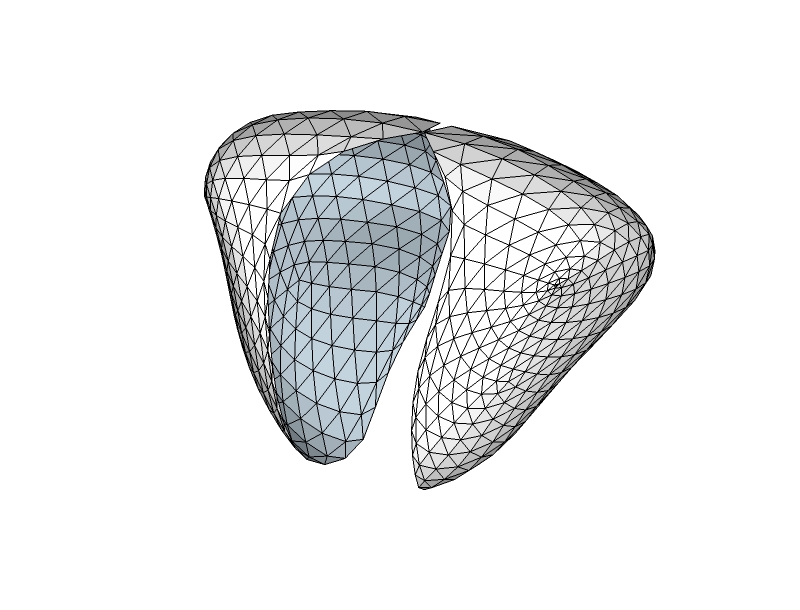
                                            • is possible so have an option to have a "symmetry option" on? Because when i know i can use 2 components for half of each face but that won't really work that well because the faces in the extremities will move too making a hole in the middle (see pic below);
                                            • an option that i can turn off or on for when sculpting if i keep pressing the mouse he will keep smoothing/bulging/etc or will just do it once for each stroke (hope I'm making myself clear).

                                            Again thanks for this plugin and i hope you don't think i'm being ungrateful and asking for too much.
                                            thanks

                                            David


                                            Untitled.jpg

                                            1 Reply Last reply
                                            Reply Quote 0

                                            Hello! It looks like you're interested in this conversation, but you don't have an account yet.

                                            Getting fed up of having to scroll through the same posts each visit? When you register for an account, you'll always come back to exactly where you were before, and choose to be notified of new replies (either via email, or push notification). You'll also be able to save bookmarks and upvote posts to show your appreciation to other community members.

                                            With your input, this post could be even better 💗

                                            Register Login
                                            • 1
                                            • 2
                                            • 3
                                            • 4
                                            • 5
                                            • 10
                                            • 11
                                            • 2 / 11
                                            • First post
                                              Last post
                                            Buy SketchPlus
                                            Buy SUbD
                                            Buy WrapR
                                            Buy eBook
                                            Buy Modelur
                                            Buy Vertex Tools
                                            Buy SketchCuisine
                                            Buy FormFonts

                                            Advertisement