sketchucation logo sketchucation
    • 登入
    Oops, your profile's looking a bit empty! To help us tailor your experience, please fill in key details like your SketchUp version, skill level, operating system, and more. Update and save your info on your profile page today!
    ⚠️ Important | Libfredo 15.6b introduces important bugfixes for Fredo's Extensions Update

    [Plugin] Simple Loft alpha 0.1b -- UPDATED May-15-09

    已排程 已置頂 已鎖定 已移動 Plugins
    251 貼文 88 Posters 154.9k 瀏覽 88 Watching
    正在載入更多貼文
    • 從舊到新
    • 從新到舊
    • 最多點贊
    回覆
    • 在新貼文中回覆
    登入後回覆
    此主題已被刪除。只有擁有主題管理權限的使用者可以查看。
    • K 離線
      kwistenbiebel
      最後由 編輯

      Thanks Massimo,
      I already have the skin22 in my plugins folder but somehow it never worked. I enabled it in the Preferences panel...but the skin ruby never appeared as icons nor in the tools/plugins menu. A lot of people seem to have trouble with it.

      1 條回覆 最後回覆 回覆 引用 0
      • massimoM 離線
        massimo Moderator
        最後由 編輯

        Hmmm, that's strange. I have it disabled in the preferences>extentions panel, but the icons are there and the plugin works fine!

        1 條回覆 最後回覆 回覆 引用 0
        • K 離線
          kwistenbiebel
          最後由 編輯

          I do have 'D.B.tools' in the Tools menu. Is that the one? (it has a skin option) and that seems to work.. sort of.

          1 條回覆 最後回覆 回覆 引用 0
          • massimoM 離線
            massimo Moderator
            最後由 編輯

            Just checked and yes, i think that you're right. And it works also via icons.

            1 條回覆 最後回覆 回覆 引用 0
            • K 離線
              kwistenbiebel
              最後由 編輯

              Thanks for the help.
              I think either skin22.rb or blend.rb will do for now.
              Hopefully the Loft.rb will be further developed so it can loft between closed polylines as that seems impossible for now (only open curves seem to work).
              I might try it in Rhino to get it right later on.

              1 條回覆 最後回覆 回覆 引用 0
              • Chris FullmerC 離線
                Chris Fullmer
                最後由 編輯

                Hi Kwist, yeah, loft only works on open splines (non-closed) for now. Plus, it currently forces a curve surface, even if its just on 2 splines like your example is. It would not directly connect, but it would squeeze the walls in a little I think.

                Eventually loft will work on closed loops and also with loops with different amount of vertices. But for now, its only sort of half a plugin. missing those very important functions.

                Chris

                Lately you've been tan, suspicious for the winter.
                All my Plugins I've written

                1 條回覆 最後回覆 回覆 引用 0
                • F 離線
                  Foun10Head-X
                  最後由 編輯

                  I like the concept to this. I'll be checking back for updates

                  1 條回覆 最後回覆 回覆 引用 0
                  • jeff hammondJ 離線
                    jeff hammond
                    最後由 編輯

                    @archibum said:

                    This tool is amazing. Definitely helped on some of my school projects. I do have one problem and dont know if its the tool or the system.
                    So I am on a mac. Leopard updated and all that.
                    I noticed that on starting sketchup, the red dot in the corner would indicate that the file had not yet been saved. Usually, this only happens when you actually start drawing. So, i removed all my plugins, downloaded sketchup fresh, and went back and added the plugins again one at a time. Found out that it was this tool that was causing sketchup to think that the file needed to be saved, even if nothing had been drawn. This wouldnt be a problem as i could just click "dont save," but doing that caused sketchup to crash every time.

                    So thats my dilemma. Does it make sense? Am i the only one with this problem?

                    @chris fullmer said:

                    That is very interesting Kyle. I'll have to look into it. Does anyone else see this?

                    Chris

                    yes, i'm getting the same thing.. i didn't notice it until it was too late for me to pinpoint which ruby was doing it so i just lived with it because i didn't want to troubleshoot my entire plugin folder 😄..
                    luckily, i came across the post and found that it is in fact simple loft causing the problem.. your other scripts are fine (at least -- perpendicular face, arc cpoint finder, and shapebender)

                    dotdotdot

                    1 條回覆 最後回覆 回覆 引用 0
                    • Chris FullmerC 離線
                      Chris Fullmer
                      最後由 編輯

                      Ahh, I am remembering that Macs have a thing where they initialize their model at a different point than PC's do, and this can cause problems. Perhaps I am attempting to access the model in an unstable state in this plugin.

                      In fact, I just checked the file, and I think I see the problem. Will someone download this script update and replace the file in the clf_simple_loft folder please? It is only replacing a single file for the script, and I think it will fix the problem.

                      And please make sure to put it in the clf_cimple_loft folder. It should overwrite an existing file. If it does not, you probably put it in the wrong spot.

                      Once we test it and see if this fixes anything, I'll update the script on the main page, and remove it from this post.

                      Chris


                      trial fix

                      Lately you've been tan, suspicious for the winter.
                      All my Plugins I've written

                      1 條回覆 最後回覆 回覆 引用 0
                      • jeff hammondJ 離線
                        jeff hammond
                        最後由 編輯

                        yep, that fixed it.
                        thank you!

                        dotdotdot

                        1 條回覆 最後回覆 回覆 引用 0
                        • Chris FullmerC 離線
                          Chris Fullmer
                          最後由 編輯

                          Great, thanks Jeff! I'll try to update the script tomorrow.

                          And go to bed! Its almost 02:00 in the morning!

                          Chris

                          Lately you've been tan, suspicious for the winter.
                          All my Plugins I've written

                          1 條回覆 最後回覆 回覆 引用 0
                          • O 離線
                            ohmohm
                            最後由 編輯

                            How to Activate the loft tool?
                            I clicked on it and it opens the notepad.???

                            1 條回覆 最後回覆 回覆 引用 0
                            • Chris FullmerC 離線
                              Chris Fullmer
                              最後由 編輯

                              You have to install it by unzipping it into your SketchUp plugins folder. The loader file goes into the plugins folder and all other files go into the sub folder, exactly how it is in the zip file.

                              Then it should install a SketchUp toolbar that you can use to activate the tool inside of SU.

                              Chris

                              Lately you've been tan, suspicious for the winter.
                              All my Plugins I've written

                              1 條回覆 最後回覆 回覆 引用 0
                              • I 離線
                                ivreich
                                最後由 編輯

                                Hi Chris

                                I tried out your loft tool on my office computer and built a form with a series of b-splines. It worked fine, but when I took the model home and tried to replicate the same loft on my home computers, the face orientation became all screwy and the model folded in on itself.

                                I've attached my model for you to take a look at. The form coloured red is the problematic one that I built at home; the b-splines used in both forms are identical.

                                Thanks!

                                Joel
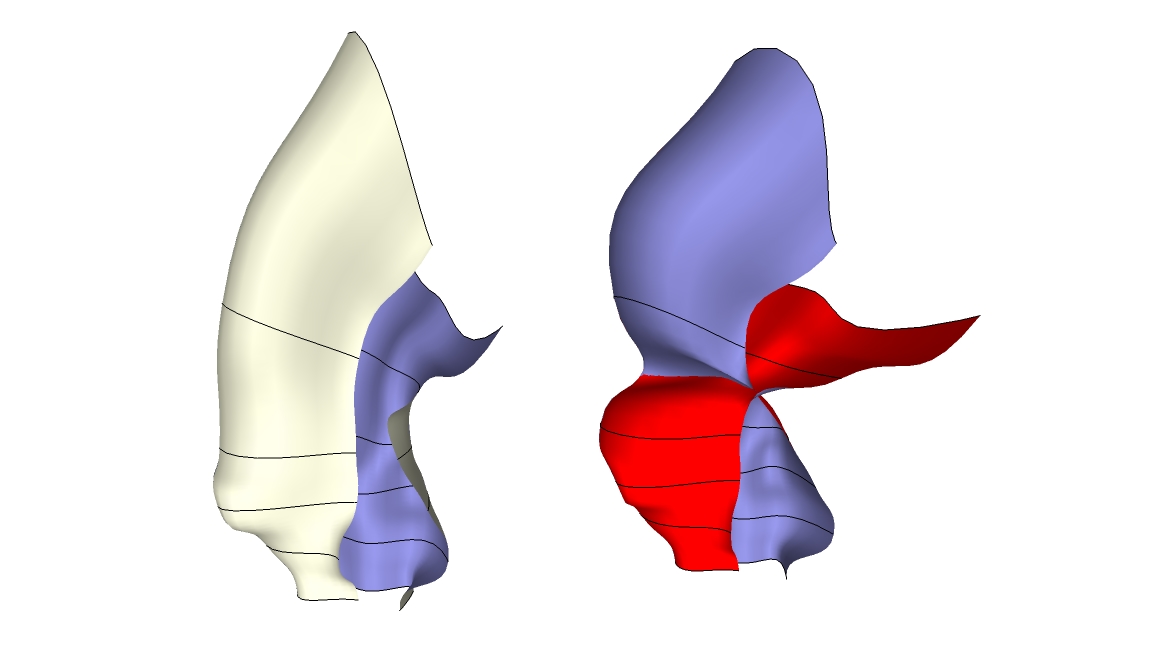

                                Problematic loft...


                                Loft Problem.jpg

                                1 條回覆 最後回覆 回覆 引用 0
                                • T 離線
                                  tald311
                                  最後由 編輯

                                  This Ruby is brilliant.

                                  1 條回覆 最後回覆 回覆 引用 0
                                  • H 離線
                                    hsjzyangbin
                                    最後由 編輯

                                    Hi Chris
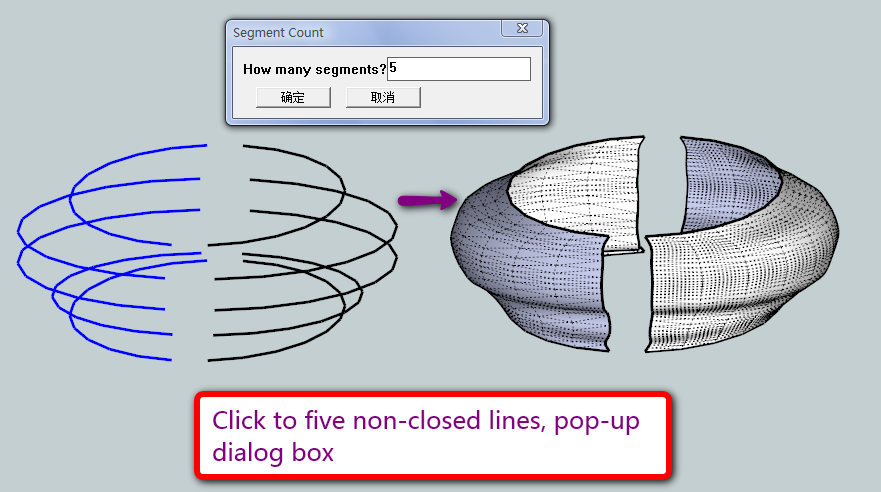
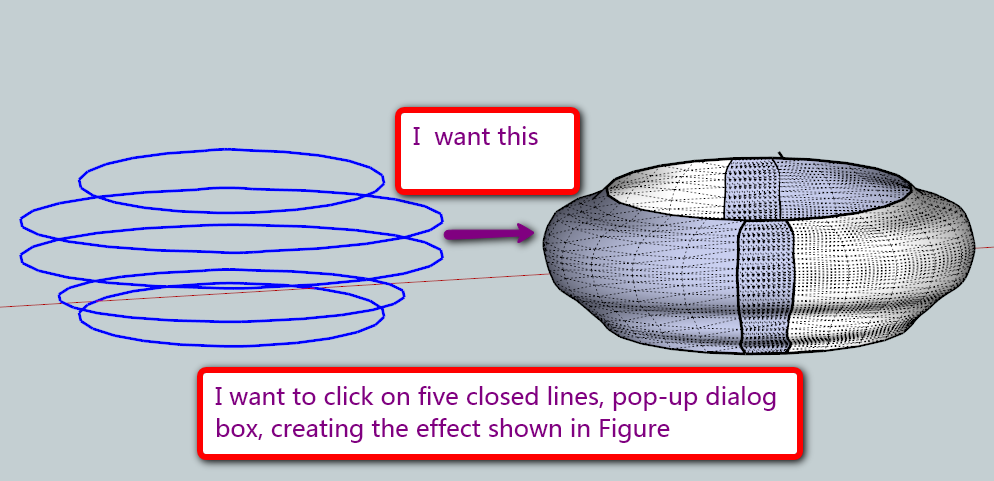
                                    I found a problem. LOFT is to implement an order to choose the non-closed line, the feasibility of improving the closed line, I want to click on five closed lines, pop-up dialog box, creating the effect shown in Figure
                                    l1.png


                                    l2.png

                                    1 條回覆 最後回覆 回覆 引用 0
                                    • EscapeArtistE 離線
                                      EscapeArtist
                                      最後由 編輯

                                      Issue trying to loft 3 curves:

                                      onSelectionBulkChange46
                                      onSelectionBulkChange96
                                      onSelectionBulkChange142
                                      onSelectionCleared
                                      Error; #<ArgumentError; Cannot convert argument to Sketchup;;Point3d>
                                      L;/Modeling/Sketchup Google/Plugins/clf_simple_loft/clf_simple_loft.rb;142;in `vector_to'
                                      L;/Modeling/Sketchup Google/Plugins/clf_simple_loft/clf_simple_loft.rb;142;in `middle_handles'
                                      L;/Modeling/Sketchup Google/Plugins/clf_simple_loft/clf_simple_loft.rb;137;in `each_index'
                                      L;/Modeling/Sketchup Google/Plugins/clf_simple_loft/clf_simple_loft.rb;137;in `middle_handles'
                                      L;/Modeling/Sketchup Google/Plugins/clf_simple_loft/clf_simple_loft.rb;87;in `onReturn'
                                      L;/Modeling/Sketchup Google/Plugins/clf_simple_loft/clf_simple_loft.rb;86;in `times'
                                      L;/Modeling/Sketchup Google/Plugins/clf_simple_loft/clf_simple_loft.rb;86;in `onReturn'
                                      L;/Modeling/Sketchup Google/Plugins/clf_simple_loft/clf_simple_loft.rb;86


                                      In a nutshell, I select 3 unattached curves and apply loft - nothing happens.

                                      1 條回覆 最後回覆 回覆 引用 0
                                      • M 離線
                                        mspisz
                                        最後由 編輯

                                        Hey Chris!

                                        Great plugin!, does exactly what I need it for in school!

                                        Your the man!

                                        Milo

                                        1 條回覆 最後回覆 回覆 引用 0
                                        • Chris FullmerC 離線
                                          Chris Fullmer
                                          最後由 編輯

                                          Great, glad it helped. It is admitedly outdated now though. Check out TIG's extrude scripts. Those are considerably more powerful!

                                          Chris

                                          Lately you've been tan, suspicious for the winter.
                                          All my Plugins I've written

                                          1 條回覆 最後回覆 回覆 引用 0
                                          • O 離線
                                            ovandenbroek
                                            最後由 編輯

                                            Hi Chris and all others,

                                            I like the concept of loft very much. In fact, it is one of the tools IMO that are making sketchup becoming a 'really' professional tool...

                                            see the attachment of a particular shape (based on a design made earlier in 3DMAX, it's a counter).

                                            I think you can make this only with 'loft' and not with TIG extrude tools. (?)

                                            Okke

                                            (PS For this kind of work I would love to have some more control over the 'bending' spline. In planview it's supposed to be a round counter, but as you can see the bending is not totaly 'circular')
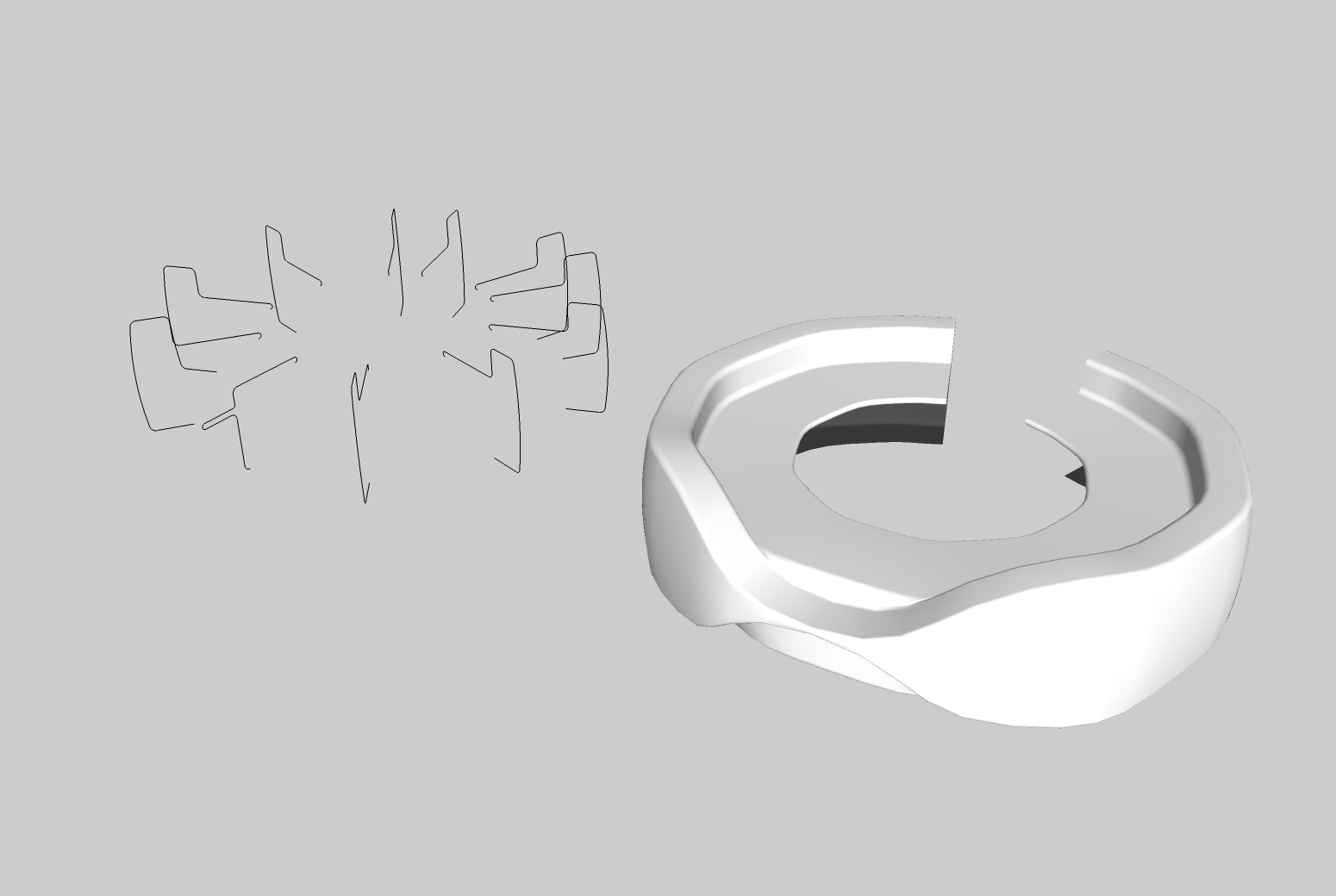


                                            Loftshape-ovdb

                                            1 條回覆 最後回覆 回覆 引用 0
                                            • 1
                                            • 2
                                            • 3
                                            • 4
                                            • 5
                                            • 6
                                            • 12
                                            • 13
                                            • 4 / 13
                                            • 第一個貼文
                                              最後的貼文
                                            Buy SketchPlus
                                            Buy SUbD
                                            Buy WrapR
                                            Buy eBook
                                            Buy Modelur
                                            Buy Vertex Tools
                                            Buy SketchCuisine
                                            Buy FormFonts

                                            Advertisement

