Making a SketchUp tool - incorporating the mouse & keyboard
-
-
That's what I was saying was the problem in that first bit of script you showed - you can't vconvert an array to_i, or to_l. I'm not sure why it was working on your end. Its ok though, its an easy solution.
So results is an array of whatever was in the inputbox. In that array, the radius is in the zero position. So when you save @rad, just convert it to a length:
@rad = results[0].to_l
Now @rad is not an array. Its just a length. Hope that helps,
Chris
-
[0].
 Man, I KNEW it was going to be something completely obvious. The first item in the array! Why can't I think of these things!
-
Issue I'm having NOW. How to implement .transform_by_vectors. I have the Set I want to transform, @dvert, and the vector, @vect (Will add math to it later), but I don't know how to get it to work.

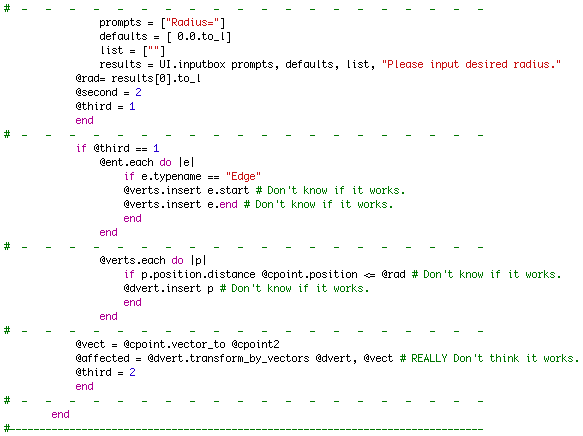
I've tried @ent.transform_to_vectors @dvert, @vect, @dvert.transform_to_vectors @vect, etc., etc.

-
You're really close. It looks like the @verts should be populating correctly. And also @dvert looks like its being populated correctly too.
The line
@vect = cpoint.vector_to @cpoint2wont work because your @vect has to be an array of vectors (not just a single vector) with the same amount of elements in it as your @dverts. So after setting the @dvert Set, you need to iterate through them and define a vector for each that will tell it how far to move. Lets try it without math at first. Here is an example.@dvert.each do |e| @vect.insert e.position.vector_to [0,0,0] endSo now you have a Set of vertices (lets say there are 30 of them in that array). And you also have the @vect Set and it has 30 vectors, and they correspond with the vertices in @dvert. That is what you need to give to the transform_by_vector. So your transform_by_vectors is:
@ents.transform_by_vectors @dverts.to_a, @vect.to_aI'm not sure that you need to the .to_a conversion on those, but I think you might because they are actually sets, not arrays. And transform by vectors is expecting to get arrays.
Hope that makes sense (and I hope its right, I haven't tested that code)
Chris
-
Chris,
If BTM has certain of my scripts installed, he will have array_to.rb which adds methods .to_i and .to_f to the Array class to convert all members to integers or floats. That could be why array.to_i worked for him and not for you.
-
OHH!! I get it now. I couldn't think of what would make that work for him. Thank you for explaining that one Rick.
I also could never quite figure out what that script did (before I had started using Ruby). It all makes sense now, thanks for the heads up Rick!
Chris
-
I think I'm close, but it still isn't working.
` %(#600000)[****require "sketchup.rb"
#-------------------------------------------------------------------------------
class Pinchmover
#-------------------------------------------------------------------------------
def activate
@model = Sketchup.active_model
@ent = @model.entities
@view = @model.active_view
@slct = @model.selection
@slct.clear
@vect = Set.new
@verts = Set.new
@dvert = Set.new- - - - - - - - - - - - - - - - - - - -
@thing = 0- - - - - - - - - - - - - - - - - - - -
end#-------------------------------------------------------------------------------
def onLButtonUp(flags, x, y, view)- - - - - - - - - - - - - - - - - - - -
		if @thing == 0
		ip1 = view.inputpoint x,y
		pt1 = ip1.position
		pt2 = Geom::Point3d.new pt1
		@cpoint = @ent.add_cpoint pt2
		@thing = 1
		end
- - - - - - - - - - - - - - - - - - - -
		if @thing == 1
		ip2 = view.inputpoint x,y
		pt3 = ip2.position
		pt4 = Geom::Point3d.new pt3
		@cpoint2 = @ent.add_cpoint pt4
- - - - - - - - - - - - - - - - - - - -
			prompts = ["Radius="]
			defaults = [ 0.0.to_l]
			list = [""]
			results = UI.inputbox prompts, defaults, list, "Please input desired radius."
		@rad= results[0].to_l
- - - - - - - - - - - - - - - - - - - -
			@ent.each do |e|
				if e.typename == "Edge"
				@verts.insert e.start
				@verts.insert e.end
				end
			end
- - - - - - - - - - - - - - - - - - - -
			@verts.each do |v|
			dist = v.position.distance @cpoint.position
				if dist < @rad
				@dvert.insert v
				end
			end
- - - - - - - - - - - - - - - - - - - -
			@dvert.each do |d| # Doesn't seem to work.
			vec = @cpoint.position.vector_to @cpoint2.position
			@vect.insert vec
			end
		@affected = @ent.transform_by_vectors @dvert.to_a, @vect.to_a
		@thing = 2
		end
- - - - - - - - - - - - - - - - - - - -
end#-------------------------------------------------------------------------------
end
#-------------------------------------------------------------------------------
plugins_menu = UI.menu("Plugins")
item = plugins_menu.add_item("Pinch Mover") {
Sketchup.active_model.select_tool Pinchmover.new
}****]`... WHY can't I get it to work?
I really think the biggest problem could be in how it's set up overall, or in the last few lines, but can't be sure. I've been trying to get it to work on my own for some time now, to no avail. Anyone know what I've done completely wrong? -
I couldn't identify the problem, but I got it to work just as soon as I made all the sets be regular arrays. And also I hod to take the first if @thing=1 group and move that down below the rest of the code in the method. Otherwise it wasn't letting me input 2 cpoints.
And lastly the @cpoint.vector_to @cpoint2 - those two points should be reversed. You want to move from cpoint2 toward @cpoint.
That got some things working for me when I made those couple of changes. See if that helps?
Chris
-
How this coming, any luck getting it to work yet?
Chris
-
Still no luck.
It's weird though; you said that code didn't allow you to place 2 c.points?  It worked for me, except for the transformation, and the parts with the Sets works in the Webdialogue box. Also, the changes you were talking about didn't seem to fix it.
-
Here is your code how I tweaked it. I think all I did was move the if @thing == 0 to the bottom and then changed all the sets back to arrays and then made the @vert array uniq!. SO look this over and compare it to yours. See if that helps.
require "sketchup.rb"

class Pinchmover
def activate
	@model = Sketchup.active_model
	@ent = @model.entities
	@view = @model.active_view
	@slct = @model.selection
	@slct.clear
	@vect = []
	@verts = []
	@dvert = []
	@thing = 0
end

def onLButtonUp(flags, x, y, view)

	if @thing == 1
		vec=[]
		ip2 = view.inputpoint x,y
		pt3 = ip2.position
		pt4 = Geom;;Point3d.new pt3
		@cpoint2 = @ent.add_cpoint pt4
		prompts = ["Radius="]
		defaults = [ 0.0.to_l]
		list = [""]
		results = UI.inputbox prompts, defaults, list, "Please input desired radius."
		@rad= results[0].to_l

		@ent.each do |e|
			if e.typename == "Edge"
				@verts << e.start
				@verts << e.end
			end
		end
		@verts.uniq!
		@verts.each do |v|
			dist = v.position.distance @cpoint.position
			if dist < @rad
				@dvert << v
			end
		end

		@dvert.each do |d| # Doesn't seem to work.
			vec = @cpoint.position.vector_to @cpoint2.position
			@vect << vec
		end
		Sketchup.active_model.entities.transform_by_vectors @dvert, @vect
		@thing = 2
	end

	if @thing == 0
		ip1 = view.inputpoint x,y
		pt1 = ip1.position
		pt2 = Geom;;Point3d.new pt1
		@cpoint = @ent.add_cpoint pt2
		@thing = 1
	end
end
end

Sketchup.active_model.select_tool Pinchmover.new
Chris



Advertisement