sketchucation logo sketchucation
    • 登入
    Oops, your profile's looking a bit empty! To help us tailor your experience, please fill in key details like your SketchUp version, skill level, operating system, and more. Update and save your info on your profile page today!
    🔌 Smart Spline | Fluid way to handle splines for furniture design and complex structures. Download

    [Plugin] Center on Origin UPDATE May 23, 2013

    已排程 已置頂 已鎖定 已移動 Plugins
    35 貼文 18 Posters 45.0k 瀏覽 18 Watching
    正在載入更多貼文
    • 從舊到新
    • 從新到舊
    • 最多點贊
    回覆
    • 在新貼文中回覆
    登入後回覆
    此主題已被刪除。只有擁有主題管理權限的使用者可以查看。
    • Chris FullmerC 離線
      Chris Fullmer
      最後由 編輯

      Oh that's not good 😞

      I'll have to work on testing this one tomorrow. I'm not sure what has gone wrong, but I'm pretty sure it'll be easy enough to find. Thanks Charly,

      Chris

      Lately you've been tan, suspicious for the winter.
      All my Plugins I've written

      1 條回覆 最後回覆 回覆 引用 0
      • charly2008C 離線
        charly2008
        最後由 編輯

        No reason, I have to thank you. Another note, in Sketchup 2013 it works fine.

        He who makes no mistakes, makes nothing

        1 條回覆 最後回覆 回覆 引用 0
        • Chris FullmerC 離線
          Chris Fullmer
          最後由 編輯

          Do you have any of my other scripts installed in 2013?

          Also make sure that you deleted the old version that is in SU 8.

          Chris

          Lately you've been tan, suspicious for the winter.
          All my Plugins I've written

          1 條回覆 最後回覆 回覆 引用 0
          • charly2008C 離線
            charly2008
            最後由 編輯

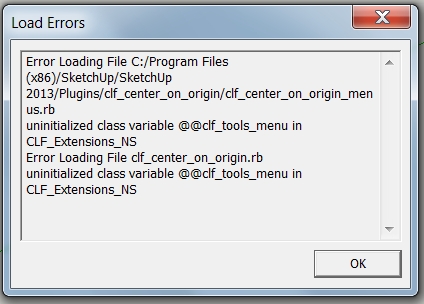
            I have to correct myself, even in "Sketchup 2013," an error message appears.

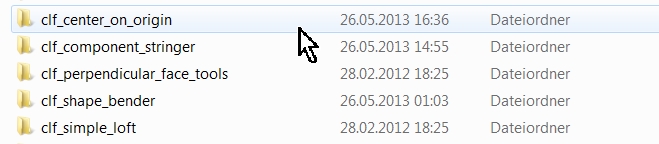
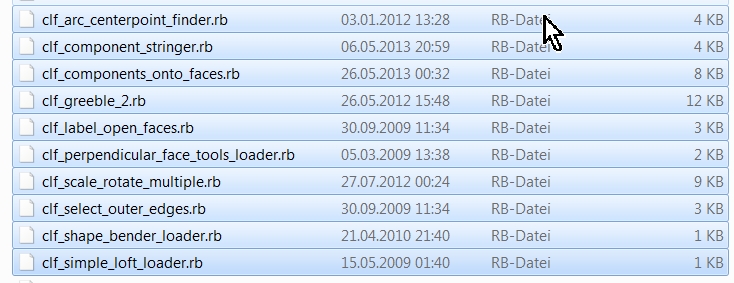
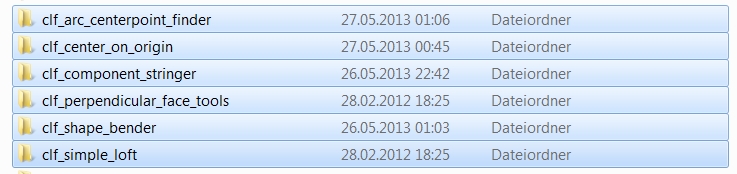
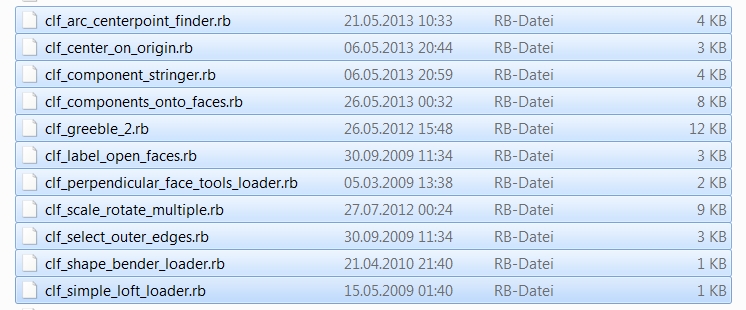
            Yes I have more plugins from you, see picture below.

            2.jpg


            2013-05-26_223430.jpg


            2013-05-26_225628.jpg

            He who makes no mistakes, makes nothing

            1 條回覆 最後回覆 回覆 引用 0
            • Chris FullmerC 離線
              Chris Fullmer
              最後由 編輯

              Hey Charly, the screen shots are useful, but it does not show clf_center_on_orogin.rb listed in the lower screenshot, which I would expect, since you have the folder loaded, and the errors seems to be pertaining to center on origin.

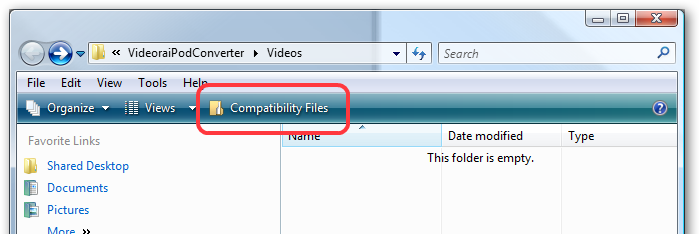
              I wonder if you have plugins lost in the Compatibility folders sonwhere. In the plugins folder, at the top do you see "Compatibility Folders" anywhere? See the first screenshot in the following:
              Link Preview Image
              Vista's "Show Compatibility Files" and the Scrumptious Wonder that is File Virtualization

              I was trying to convert some (totally legal) video files into MP4 format for ...

              favicon

              (www.hanselman.com)

              If you have that, click on it, select everything there and MOVE it back into the actual plugins folder.

              Then try to restart SU, if you still have issues, take screenshots again and let me see what you have.

              Or if you don't have any compatibility folders, could you send me your copy of center on origin? Thanks,

              Chris

              Lately you've been tan, suspicious for the winter.
              All my Plugins I've written

              1 條回覆 最後回覆 回覆 引用 0
              • charly2008C 離線
                charly2008
                最後由 編輯

                I have all the clf_plugins piece by piece deactivated and found out that the "clf_arc_centerpoint_finder.rb" caused the error. After reinstalling everything works perfectly again. Sorry.

                Charly

                He who makes no mistakes, makes nothing

                1 條回覆 最後回覆 回覆 引用 0
                • Chris FullmerC 離線
                  Chris Fullmer
                  最後由 編輯

                  Oh good, glad you got it working. That makes sense to me. I had accidentally released a bugged version of arc_centerpoint_finder that was live for a few days. Looks like you got a copy of that one - sorry!

                  Lately you've been tan, suspicious for the winter.
                  All my Plugins I've written

                  1 條回覆 最後回覆 回覆 引用 0
                  • charly2008C 離線
                    charly2008
                    最後由 編輯

                    Dear Chris,

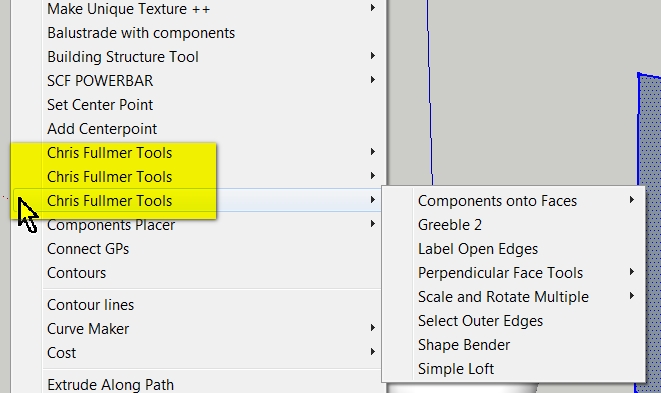
                    I have now found that you are represented in the "Plugins menu" three times. Is that intentional from you?
                    3.jpg


                    2.jpg


                    1.jpg

                    He who makes no mistakes, makes nothing

                    1 條回覆 最後回覆 回覆 引用 0
                    • Chris FullmerC 離線
                      Chris Fullmer
                      最後由 編輯

                      Hi Charly, that is an unfortunate side-effect of my efforts to clean up my scripts. In your case, from what I can see, anything in the first and third menus are old scripts and should be updated. Unfortunately the updated versions are not yet published anywhere.....so for now you're stuck with the extra menu items - sorry about that! I'll let you know when I get all my updated scripts published. Thanks!

                      Chris

                      Lately you've been tan, suspicious for the winter.
                      All my Plugins I've written

                      1 條回覆 最後回覆 回覆 引用 0
                      • N 離線
                        nesh70
                        最後由 編輯

                        Hi!

                        Thanks for creating so useful SU plugin!

                        BTW, is there a way to center a model or component like the image B (not like the original script do - image A)?

                        Best regards!
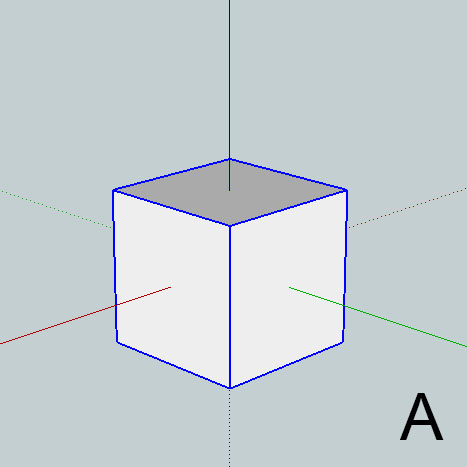

                        Original plugin behavior.


                        My intention.

                        1 條回覆 最後回覆 回覆 引用 0
                        • N 離線
                          nesh70
                          最後由 編輯

                          @nesh70 said:

                          Hi!

                          Thanks for creating so useful SU plugin!

                          BTW, is there a way to center a model or component like the image B (not like the original script do - image A)?

                          Best regards!
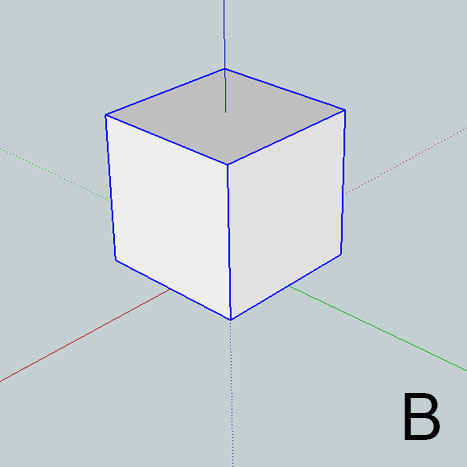
                          I found out how to achieve it, changing the line

                          vector = point.vector_to [0,0,0]

                          to

                          vector = point.vector_to [0,0,model.bounds.height / 2]

                          😄

                          1 條回覆 最後回覆 回覆 引用 0
                          • TIGT 離線
                            TIG Moderator
                            最後由 編輯

                            Why not use something like
                            vector = point.vector_to(model.bounds.center)
                            for the center, or
                            pt=model.bounds.center pt.z=model.bounds.min.z vector = point.vector_to(pt)
                            for the center-bottom

                            TIG

                            1 條回覆 最後回覆 回覆 引用 0
                            • B 離線
                              babak
                              最後由 編輯

                              @nesh70 said:

                              @nesh70 said:

                              Hi!

                              Thanks for creating so useful SU plugin!

                              BTW, is there a way to center a model or component like the image B (not like the original script do - image A)?

                              😄

                              I use this plugin for centering an object while setting it's bounding box bottom at 0 :

                              center_group_bottom.rb

                              You can find it at http://www.fsdeveloper.com/forum/showthread.php?t=71321

                              download link
                              http://www.fsdeveloper.com/forum/attachment.php?attachmentid=10061&d=1310763814

                              1 條回覆 最後回覆 回覆 引用 0
                              • N 離線
                                nesh70
                                最後由 編輯

                                @babak said:

                                @nesh70 said:

                                @nesh70 said:

                                Hi!

                                Thanks for creating so useful SU plugin!

                                BTW, is there a way to center a model or component like the image B (not like the original script do - image A)?

                                😄

                                I use this plugin for centering an object while setting it's bounding box bottom at 0 :

                                center_group_bottom.rb

                                You can find it at http://www.fsdeveloper.com/forum/showthread.php?t=71321

                                download link
                                http://www.fsdeveloper.com/forum/attachment.php?attachmentid=10061&d=1310763814

                                Thanks babak! It works perfectly! Just what I wanted!

                                1 條回覆 最後回覆 回覆 引用 0
                                • T 離線
                                  tsurfing
                                  最後由 編輯

                                  Hi Chris,
                                  Tried to enter the patch script at the start of this thread, but the the ruby script is different than what you quoted:

                                  And here's another option. If you want it to reset the component rotation and scale, edit the ruby file in a plain text editor (like Notepad for example) and after the line:

                                  if comp.typename == "Group" || comp.typename == "ComponentInstance"

                                  add the two following lines:

                                  t = Geom::Transformation.new comp.transformation = t

                                  This is it now:
                                  sela.each do |e| if e.is_a?(Sketchup::Group) || e.is_a?(Sketchup::ComponentInstance) to_move << e end
                                  ...
                                  I need to zero out the components rotation/scale
                                  What's your thoughts?

                                  Terry

                                  1 條回覆 最後回覆 回覆 引用 0
                                  • 1
                                  • 2
                                  • 2 / 2
                                  • 第一個貼文
                                    最後的貼文
                                  Buy SketchPlus
                                  Buy SUbD
                                  Buy WrapR
                                  Buy eBook
                                  Buy Modelur
                                  Buy Vertex Tools
                                  Buy SketchCuisine
                                  Buy FormFonts

                                  Advertisement