sketchucation logo sketchucation
    • Login
    Oops, your profile's looking a bit empty! To help us tailor your experience, please fill in key details like your SketchUp version, skill level, operating system, and more. Update and save your info on your profile page today!
    ⚠️ Important | Libfredo 15.6b introduces important bugfixes for Fredo's Extensions Update

    Cannot move face...

    Scheduled Pinned Locked Moved SketchUp Discussions
    sketchup
    7 Posts 3 Posters 789 Views 3 Watching
    Loading More Posts
    • Oldest to Newest
    • Newest to Oldest
    • Most Votes
    Reply
    • Reply as topic
    Log in to reply
    This topic has been deleted. Only users with topic management privileges can see it.
    • GaieusG Offline
      Gaieus
      last edited by Gábor

      "...face touching at corner must be a triangle"
      ❓ ❓ ❓

      See attached. Try to move that end face (or the other one at the origin).
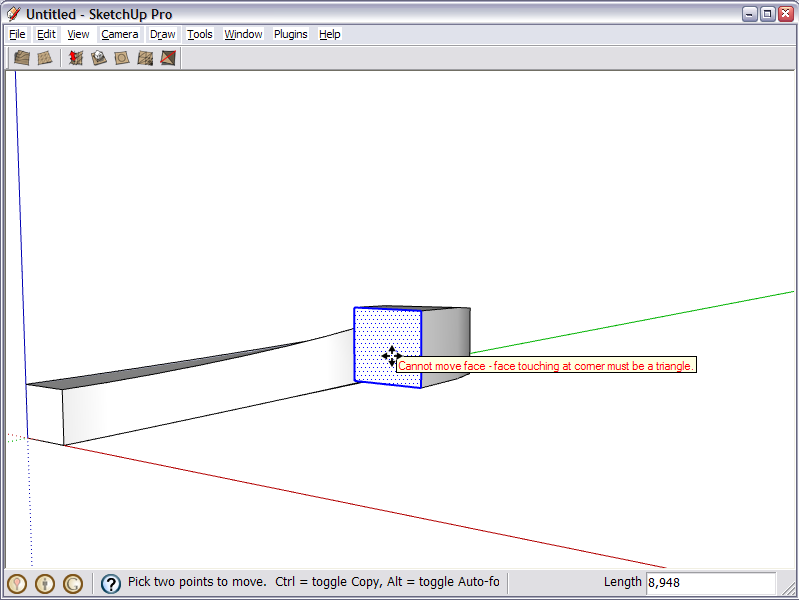
      ScreenShot001.png
      I have never seen such a "tooltip" (as far as I remember).

      Before:

      1. I made and arc,
      2. scaled a copy down
      3. closed ends to fill face
      4. pushpulled to thickness
      5. moved this face upwards to create a "slanting ramp"
      6. flipped acouple of edges to make the surface nicer

      CannotMoveFace.skp

      Gai...

      1 Reply Last reply Reply Quote 0
      • Chris FullmerC Offline
        Chris Fullmer
        last edited by

        Thats good one Gaieus! Never seen that error before.

        Lately you've been tan, suspicious for the winter.
        All my Plugins I've written

        1 Reply Last reply Reply Quote 0
        • GaieusG Offline
          Gaieus
          last edited by

          And can you move either of the faces? They seem to have gotten stuck in space. 😲
          They are not glued (also, in this case you should be able to move them aside).

          Gai...

          1 Reply Last reply Reply Quote 0
          • thomthomT Offline
            thomthom
            last edited by

            If you explode the arches the faces will move.
            Seems that SU doesn't want to break arches.

            Thomas Thomassen — SketchUp Monkey & Coding addict
            List of my plugins and link to the CookieWare fund

            1 Reply Last reply Reply Quote 0
            • thomthomT Offline
              thomthom
              last edited by

              hmm... Odd that they could be moved the first time...

              I say: Voodoo
              You've been playing with dark magic again Gaieus

              Thomas Thomassen — SketchUp Monkey & Coding addict
              List of my plugins and link to the CookieWare fund

              1 Reply Last reply Reply Quote 0
              • GaieusG Offline
                Gaieus
                last edited by

                No, this is a normal, easy way to build those ramps: just move the face upwards (sometimes you have to fiddle with autofold afterwards but that's okay) like in the attached below (here I "pre-fixed" the autofold lines for easier example).


                SlantingRamp.skp

                Gai...

                1 Reply Last reply Reply Quote 0
                • thomthomT Offline
                  thomthom
                  last edited by

                  You know what, I think I've run across this before when I'd done just that, trying to create a ramp. Just jugged my memory.


                  Thomas Thomassen — SketchUp Monkey & Coding addict
                  List of my plugins and link to the CookieWare fund

                  1 Reply Last reply Reply Quote 0
                  • 1 / 1
                  • First post
                    Last post
                  Buy SketchPlus
                  Buy SUbD
                  Buy WrapR
                  Buy eBook
                  Buy Modelur
                  Buy Vertex Tools
                  Buy SketchCuisine
                  Buy FormFonts

                  Advertisement
