[Plugin] ComponentReporter++ v1.2
-
Hi TIG - Love the plugin! I just recently stumbled on this page and it has been super useful tracking my work! I was wondering if you had the time to help me make a slight tweak? Basically, I want to tidy up the parentage report to display nested components in a more intuitive way similar to the sketchup outliner?. Hopefully the attached image makes sense: It shows only the counts of of instances, and also puts the them to the right of its parent component. This way, I can visually track the hierarchy.
If you have the time, I'd really appreciate the help given that I am not versed in ruby.
Thank you very much!

-
Hi TIG, Thank you so much for your powerful script. I'm using it to do my construction schedules. It helps me a lot. Could you please add a modification that allow me to get volume numbers for components? (my components are solid ready). I don't have much Ruby knowledge and was failed to do it my self.
-
@nghminh81 said:
Hi TIG, Thank you so much for your powerful script. I'm using it to do my construction schedules. It helps me a lot. Could you please add a modification that allow me to get volume numbers for components? (my components are solid ready). I don't have much Ruby knowledge and was failed to do it my self.
Edit the file with Notepad++...
Around line #149 you can see the 'area' code.
You need to add some similar 'volume' code near that, like this:volume=0.0 volume=c.volume if c.volume > 0 # it's always in cu" - to make into something else use a conversion factor like this for cu metres; volume=volume*0.000016387064 # convert it into a string volume=volume.to_s.tr(",",".")### trap for comma as decimal point... # edit line ~ # 166 [remember that it will have shifted down after you entered the new volume code !] ilist.push([dname,iname,lname,cname,id,x,y,z,pname,area,areas].flatten!) # to include volume... ilist.push([dname,iname,lname,cname,id,x,y,z,pname,area,areas,volume].flatten!) # edits the lines making the header text ~ # 178 file.puts("DEFN-NAME,PARENT[NAME<TYPE>],INST-NAME,LAYER,MATERIAL,ID,X,Y,Z,AREA,SUB-MAT-AREAS\n\n")if miner file.puts("DEFN-NAME,INST-NAME,LAYER,MATERIAL,ID,X,Y,Z,AREA,SUB-MAT-AREAS\n\n")if not miner # to read... file.puts("DEFN-NAME,PARENT[NAME<TYPE>],INST-NAME,LAYER,MATERIAL,ID,X,Y,Z,AREA,SUB-MAT-AREAS,VOLUME\n\n")if miner file.puts("DEFN-NAME,INST-NAME,LAYER,MATERIAL,ID,X,Y,Z,AREA,SUB-MAT-AREAS,VOLUME\n\n")if not miner # now edit the code around lines ~ # ilist.each{|c| xx=""; c[10..-1].each{|x|;xx=","+x.to_s} if miner file.puts(c[0]+","+c[8]+","+c[1]+","+c[2]+","+c[3]+","+c[4]+","+c[5]+","+c[6]+","+c[7]+","+c[9]+xx) else file.puts(c[0]+","+c[1]+","+c[2]+","+c[3]+","+c[4]+","+c[5]+","+c[6]+","+c[7]+","+c[9]+xx) end#if } # to read with the extra volume element ... +","+c[-1] ... # -1 says last element in array which we know in the newly added 'volume' string. ilist.each{|c| xx=""; c[10..-1].each{|x|;xx=","+x.to_s} if miner file.puts(c[0]+","+c[8]+","+c[1]+","+c[2]+","+c[3]+","+c[4]+","+c[5]+","+c[6]+","+c[7]+","+c[9]+","+c[-1]+xx) else file.puts(c[0]+","+c[1]+","+c[2]+","+c[3]+","+c[4]+","+c[5]+","+c[6]+","+c[7]+","+c[9]+","+c[-1]+xx) end#if }Hope that helps...
-
Thanks TIG so much for spending time with my case. Your help make it works perfectly. I've learned many many of Ruby language with your code.
-
Hello TIG
thank you for your time with this plugin.do you think it is possible to list dynamic components and their LenX, LenY, LenZ that are inside another dynamic component?
-
sorry....
-
This is somewhat more complex...
Why not post a similar request in the DC forum ? -
Hi TIG, thanks for the plugin!
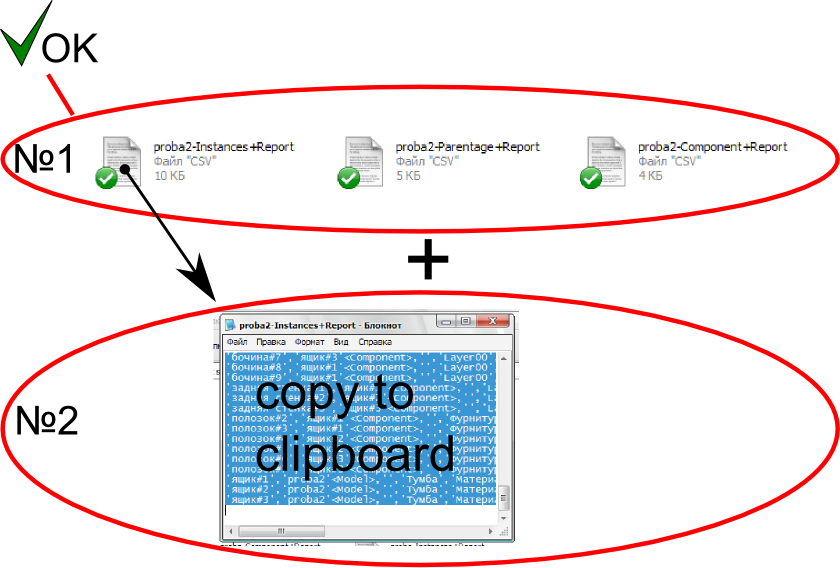
Whether it is possible to copy the report in a clipboard? But only "Instances+Report"!
It is sometimes better than the CSV file.
-
Hi Tig, I'm trying to get this to work, reporting the components only if the dynamic attribute "report" is true. After a little experimentation, I think I should be changing line 135 to read
inlist.push(c) if ((c.typename=="ComponentInstance") && (c.attribute_dictionaries['report'] == 'TRUE'))But that creates no results (I do have a DC in my model with the attribute 'report' set to 'TRUE')
Could you point out where I'm going wrong?
-
Should you not be looking at the
c.definitionrather than the instance ?
Also are you sure that's the attribute_dictionary name ?
Perhaps 'dynamic_attributes' ??
Try this Ruby Console snippet on a selected DC instance to see what I mean:
Sketchup.active_model.selection[0].definition.attribute_dictionaries.each{|d|puts;p d.name;puts;d.each_pair{|k,v|puts"#{k} = #{v}"}} -
oh I see! I completely misunderstood attribute_dictionaries.
		dict = c.attribute_dictionaries['dynamic_attributes']
	    inlist.push(c) if ((c.typename=="ComponentInstance") && (dict['report'] == 1))
This works great, thanks Tig.
-
Hi TIG
About "ComponentReporter++.rb"
is theres some way the plugin including columns like Lenght X, Lenght y and Lenght Z of the box ?:
im new in rubys, sorry.
DEFN-NAME | COUNT | DESCRIPTION | X | Y | Z| GUID |
Any help i will apreciate.

-
@rubenamaroh said:
Hi TIG
About "ComponentReporter++.rb"
is theres some way the plugin including columns like Lenght X, Lenght y and Lenght Z of the box ?:
im new in rubys, sorry.DEFN-NAME | COUNT | DESCRIPTION | X | Y | Z| GUID |
Any help i will apreciate.
Of course.
This is just an 'example' script.
Get the group/component-instance .bounds and get .width/height/depth [lenX/lenY/lenZ]
The add the extra columns into the CSV and include the three values .to_s etc... -
@tig said:
@rubenamaroh said:
Hi TIG
About "ComponentReporter++.rb"
is theres some way the plugin including columns like Lenght X, Lenght y and Lenght Z of the box ?:
im new in rubys, sorry.DEFN-NAME | COUNT | DESCRIPTION | X | Y | Z| GUID |
Any help i will apreciate.
Of course.
This is just an 'example' script.
Get the group/component-instance .bounds and get .width/height/depth [lenX/lenY/lenZ]
The add the extra columns into the CSV and include the three values .to_s etc...Ok.
I will try to do it
I was trying to make a list of material of framing walls but did not have the length of the studs and ledgers, i'm more familiar with the language of AutoLISP for AutoCAD, so I'm starting to learn the language of the rubys, any suggestions to learn ruby?
thanks. -
Is it possible to find and retrieve information from attributes in nested components?
ideally I would like to achieve a plugin like "TIG-exportDCs2csv[2].rb" that is able to Exports all Selected DCs' data into a file BUT FROM "NESTED" (or child) COMPONENTS AS WELL.
Anyone can help with this? -
@Tig,
Can this plugin report current Attribute values AND formulas (if any) side by side?
If yes - Great!
If not, please consider this a suggested improvement, as well as a request for information - should you know of another plugin that provides this functionality.
Thanks in advance!
Steve
-
Hi, TIG Thanks for this plugin.
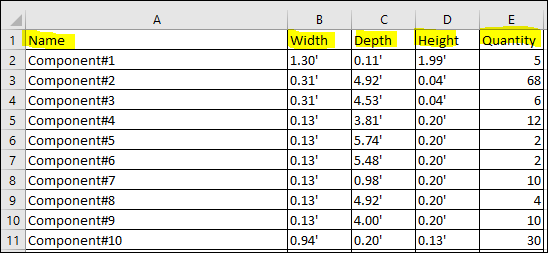
can I get this (Please see attached image) information in one and a simple excel sheet?
Thanks again.
-
This is old code.
It's for DCs only.
It was posted as an example, for you to edit as you wish.
To add a 'header' simply create the first line before the other rows.
Then adjust the units to report in feet and change the code to report the instance count rather than material...
So from line#40 change it to read like this:data=["Name#{sep}Width#{sep}Depth#{sep}Height#{sep}Quantity"] insts.each{|inst| defn=inst.definition name=defn.name.tr(sep, "_") lenx=defn.get_attribute("dynamic_attributes", "lenx", 0).to_f.to_feet.to_s leny=defn.get_attribute("dynamic_attributes", "leny", 0).to_f.to_feet.to_s lenz=defn.get_attribute("dynamic_attributes", "lenz", 0).to_f.to_feet.to_s quan=defn.instances.length.to_s dat = "#{name}#{sep}#{lenx}#{sep}#{leny}#{sep}#{lenz}#{sep}#{quan}" data << dat } -
@tig said:
This is old code.
It's for DCs only.
It was posted as an example, for you to edit as you wish.
To add a 'header' simply create the first line before the other rows.
Then adjust the units to report in feet and change the code to report the instance count rather than material...
So from line#40 change it to read like this:data=["Name#{sep}Width#{sep}Depth#{sep}Height#{sep}Quantity"] > insts.each{|inst| > defn=inst.definition > name=defn.name.tr(sep, "_") > lenx=defn.get_attribute("dynamic_attributes", "lenx", 0).to_f.to_feet.to_s > leny=defn.get_attribute("dynamic_attributes", "leny", 0).to_f.to_feet.to_s > lenz=defn.get_attribute("dynamic_attributes", "lenz", 0).to_f.to_feet.to_s > quan=defn.instances.length.to_s > dat = "#{name}#{sep}#{lenx}#{sep}#{leny}#{sep}#{lenz}#{sep}#{quan}" > data << dat > } >Thanks a lot this worked perfectly fine.
-
Hi TIG, I stumbled on this plugin as the 2020 pro version generate report does not give the option of exporting the length of a welded curve as an option. I can see the length in the entity info when I click on a curve so I assume that data can be extracted. Do you know if this is possible to do? I started to study basic ruby but if this is not a possibility then I will just have to wait for sketchup pro to provide that in the future.






Advertisement