sketchucation logo sketchucation
    • Login
    Oops, your profile's looking a bit empty! To help us tailor your experience, please fill in key details like your SketchUp version, skill level, operating system, and more. Update and save your info on your profile page today!
    ⚠️ Update | Sketchucation Tools 5.0.8 released with licensing improvements and bugfixes Download

    [Plugin] Shape Bender Beta

    Scheduled Pinned Locked Moved Plugins
    1.3k Posts 331 Posters 2.3m Views 329 Watching
    Loading More Posts
    • Oldest to Newest
    • Newest to Oldest
    • Most Votes
    Reply
    • Reply as topic
    Log in to reply
    This topic has been deleted. Only users with topic management privileges can see it.
    • Dave RD
      Dave R
      last edited by

      @z donk said:

      Hi moderator, I found the problem, I didn't know I had to have the entire file in my plugins folder.. Off and running.

      So we can put your problem down to incorrect installation? That seems to be the most common reason plugins don't work for folks. It's one of the reasons for the Sketchucation Plugin Store. If you haven't got it and installed it, you should.

      Etaoin Shrdlu

      %

      (THERE'S NO PLACE LIKE)

      G28 X0.0 Y0.0 Z0.0

      M30

      %

      1 Reply Last reply
      Reply Quote 0
      • P
        PabloNCS
        last edited by

        Hi everyone,

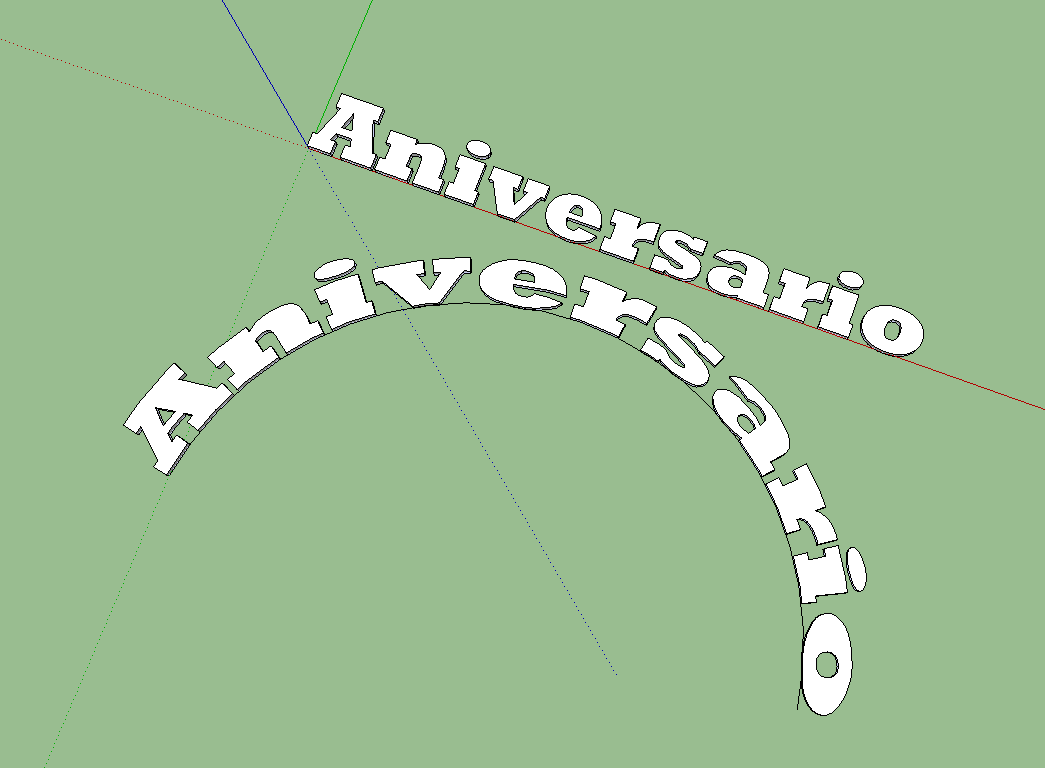
        I don't know what am I doing wrong, but the text I am trying to bend does not mantein its original size and it kind of stretches out.

        Anyone can give a hint?

        Thanks.

        Shape.png

        1 Reply Last reply
        Reply Quote 0
        • Dave RD
          Dave R
          last edited by

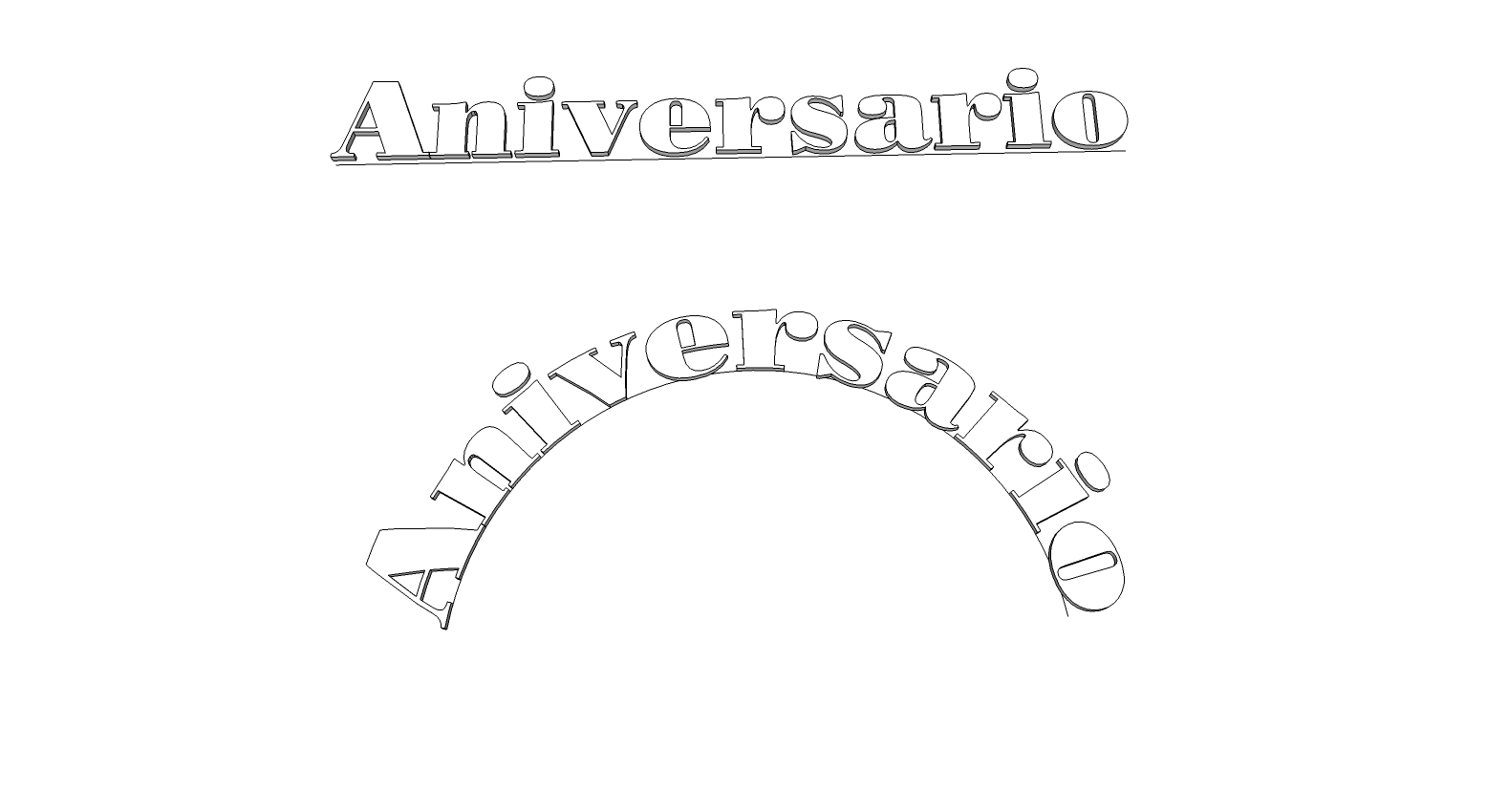
          The length of the arc is longer than the length of the original text and the original line so of course the text would get stretched. Make the straight line the same length as the text and the arc the length of the straight line and it works better. The letters will still get a bit distorted but that's to be expected. You might even make the arc a little shorter than the straight line in the case of your text.

          shape.png

          Etaoin Shrdlu

          %

          (THERE'S NO PLACE LIKE)

          G28 X0.0 Y0.0 Z0.0

          M30

          %

          1 Reply Last reply
          Reply Quote 0
          • P
            PabloNCS
            last edited by

            Thanks for the tip. It worked better that way.

            1 Reply Last reply
            Reply Quote 0
            • A
              archipenti
              last edited by

              Hello

              Seems we can not use custom axes for the "red axis"

              is there any update or solutions for this little bug?

              1 Reply Last reply
              Reply Quote 0
              • Dave RD
                Dave R
                last edited by

                That's not a bug. πŸ˜’

                Etaoin Shrdlu

                %

                (THERE'S NO PLACE LIKE)

                G28 X0.0 Y0.0 Z0.0

                M30

                %

                1 Reply Last reply
                Reply Quote 0
                • V
                  viahe
                  last edited by

                  Thank you so much. Simple but yet, great ruby

                  1 Reply Last reply
                  Reply Quote 0
                  • danchoD
                    dancho
                    last edited by

                    Hi Chris,

                    plugin don't work with FREDO's AdditionalPluginFolders.
                    Is it possible to make it work with it?

                    THX
                    Dancho

                    1 Reply Last reply
                    Reply Quote 0
                    • TIGT
                      TIG Moderator
                      last edited by

                      Like I told you in another recent post... πŸ˜‰
                      The code needs adjusting around lines #158-160 of the main code file clf_shape_bender/clf_shape_bender.rb...
                      Use Notepad plain text editor...
                      Change the lines:
                      line_cursor_path = Sketchup.find_support_file("line_pointer.png", "Plugins/clf_shape_bender") curve_cursor_path = Sketchup.find_support_file("curve_pointer.png", "Plugins/clf_shape_bender") default_cursor_path = Sketchup.find_support_file("default_pointer.png", "Plugins/clf_shape_bender")
                      to read:
                      line_cursor_path = File.join(File.dirname(__FILE__), "clf_shape_bender", "line_pointer.png") curve_cursor_path = File.join(File.dirname(__FILE__), "clf_shape_bender", "curve_pointer.png") default_cursor_path = File.join(File.dirname(__FILE__), "clf_shape_bender", "default_pointer.png")
                      Save the file and restart SketchUp...
                      This approach will then work with any folder location. which is auto-loading a plugin like this, and which is looking for helper files in a subfolder within its folder...

                      TIG

                      1 Reply Last reply
                      Reply Quote 0
                      • Chris FullmerC
                        Chris Fullmer
                        last edited by

                        Cool, thanks TIG.

                        Lately you've been tan, suspicious for the winter.
                        All my Plugins I've written

                        1 Reply Last reply
                        Reply Quote 0
                        • LanaL
                          Lana
                          last edited by

                          Is very cool!!!Thank you!!! 😍

                          1 Reply Last reply
                          Reply Quote 0
                          • J
                            janpaw_kei
                            last edited by

                            Hi Guys!

                            I'm new in Sketchup and I just downloaded the shape bender tool for the curved car ramp that I'm making, and I can't seem to make it work.

                            My reference would be:
                            http://www.youtube.com/watch?v=tGHTIOMm_34

                            I followed the video step by step.

                            1. Click "grouped" shape.
                            2. Click SHAPE BENDER TOOL.
                            3. Click "straight" line.
                            4. Click "arched" line.

                            I have problems with step 3.
                            I can't seem to click THAT separate straight line I made after I clicked on the shape bender tool icon. πŸŽ‰

                            Is this a download error?

                            Thanks a lot!!

                            1 Reply Last reply
                            Reply Quote 0
                            • BoxB
                              Box
                              last edited by

                              The straight line must follow the red axis, not be part of a group or attached to anything.

                              1 Reply Last reply
                              Reply Quote 0
                              • J
                                janpaw_kei
                                last edited by

                                Yeah, I've been doing that. I still can't click on that straight line on the red axis 😞

                                1 Reply Last reply
                                Reply Quote 0
                                • Dave RD
                                  Dave R
                                  last edited by

                                  Upload the SKP file so we can see what you've got going on.

                                  Etaoin Shrdlu

                                  %

                                  (THERE'S NO PLACE LIKE)

                                  G28 X0.0 Y0.0 Z0.0

                                  M30

                                  %

                                  1 Reply Last reply
                                  Reply Quote 0
                                  • J
                                    janpaw_kei
                                    last edited by

                                    Here it is πŸ˜„


                                    Bender tool.skp


                                    curved ramp.pdf

                                    1 Reply Last reply
                                    Reply Quote 0
                                    • BoxB
                                      Box
                                      last edited by

                                      It's three lines, it needs to be one line. Redraw it as one, and draw it along the length of your shape.
                                      The length and position of all parts effect how it works.

                                      1 Reply Last reply
                                      Reply Quote 0
                                      • J
                                        janpaw_kei
                                        last edited by

                                        Alright, I just did that. Still can't click the straight line. I'm so sorry for this 😞


                                        Bender tool.skp

                                        1 Reply Last reply
                                        Reply Quote 0
                                        • BoxB
                                          Box
                                          last edited by

                                          It's behind the shape now, draw it at the front, or move it to the front. Also you have two shapes, one on top of the other.

                                          1 Reply Last reply
                                          Reply Quote 0
                                          • Dave RD
                                            Dave R
                                            last edited by

                                            Works fine once you get rid of one copy of the component.


                                            Bender tool.skp

                                            Etaoin Shrdlu

                                            %

                                            (THERE'S NO PLACE LIKE)

                                            G28 X0.0 Y0.0 Z0.0

                                            M30

                                            %

                                            1 Reply Last reply
                                            Reply Quote 0

                                            Hello! It looks like you're interested in this conversation, but you don't have an account yet.

                                            Getting fed up of having to scroll through the same posts each visit? When you register for an account, you'll always come back to exactly where you were before, and choose to be notified of new replies (either via email, or push notification). You'll also be able to save bookmarks and upvote posts to show your appreciation to other community members.

                                            With your input, this post could be even better πŸ’—

                                            Register Login
                                            • 1
                                            • 2
                                            • 60
                                            • 61
                                            • 62
                                            • 63
                                            • 64
                                            • 63 / 64
                                            • First post
                                              Last post
                                            Buy SketchPlus
                                            Buy SUbD
                                            Buy WrapR
                                            Buy eBook
                                            Buy Modelur
                                            Buy Vertex Tools
                                            Buy SketchCuisine
                                            Buy FormFonts

                                            Advertisement



