Camera As an Object
-
I believe so.
-
sweet.
-
guys, I am really interested in this plugin! I may be studying architecture. but nevertheless this would be a great new way to control the camera position in SketchUp (and we haven't even started considering the manifold opportunities for animation plugins to make use of all the camera information). especially the V-Ray bit is interesting for at the moment it is not very intuitive to fill in all the camera info in a window.
simply setting up a camera and instantly seeing the result (like in real life) is such a great thing. makes everything a lot easier.
(and maybe even Google would contribute it's part by introducing a DOF display mode within SketchUp for version 8 )
) -
I was thinking it'd be nice to get a DOF calculator implemented into some sort of camera info window.
-
@thomthom said:
It's like you read my mind.
Like a carbon copy.hope you dont want me to pay copyright fees

about the zoom... what zoom REALLY is? Isnt it just FOV?
I dont think this will make sense IN SKETCHUP... but I remember some other 3D programs (cant remember right, I think Rhino3D was one of them) also had the CLIPPING issue Sketchup constantly has.
How did you usually solved the CLIPPING ISSUE? You would CHANGE THE CAMERA SIZE! Yup, the camera was a model that you could change the size. Making it smaller would most times end with the clipping issues.
-
I believe Scott has a plug-in or ruby that will display the camera as an object with the camera field of view shown. I seem to remember seeing it (the graphic representation of a camera) on one of his you-tube videos. Maybe Scott can chime in when he gets a chance.
-
That was probably the old Film and Stage plugin. It created a camera component that you could move and rotate and then click on it and set the view to that camera and it would then chance the view to that camera's view. You could set all the aspect ratios to the camera too. Quite a handy plugin. It had issues with dolly, pan, and zoom amongst other things if I recall that they seem to not want to fix.
Chris
-
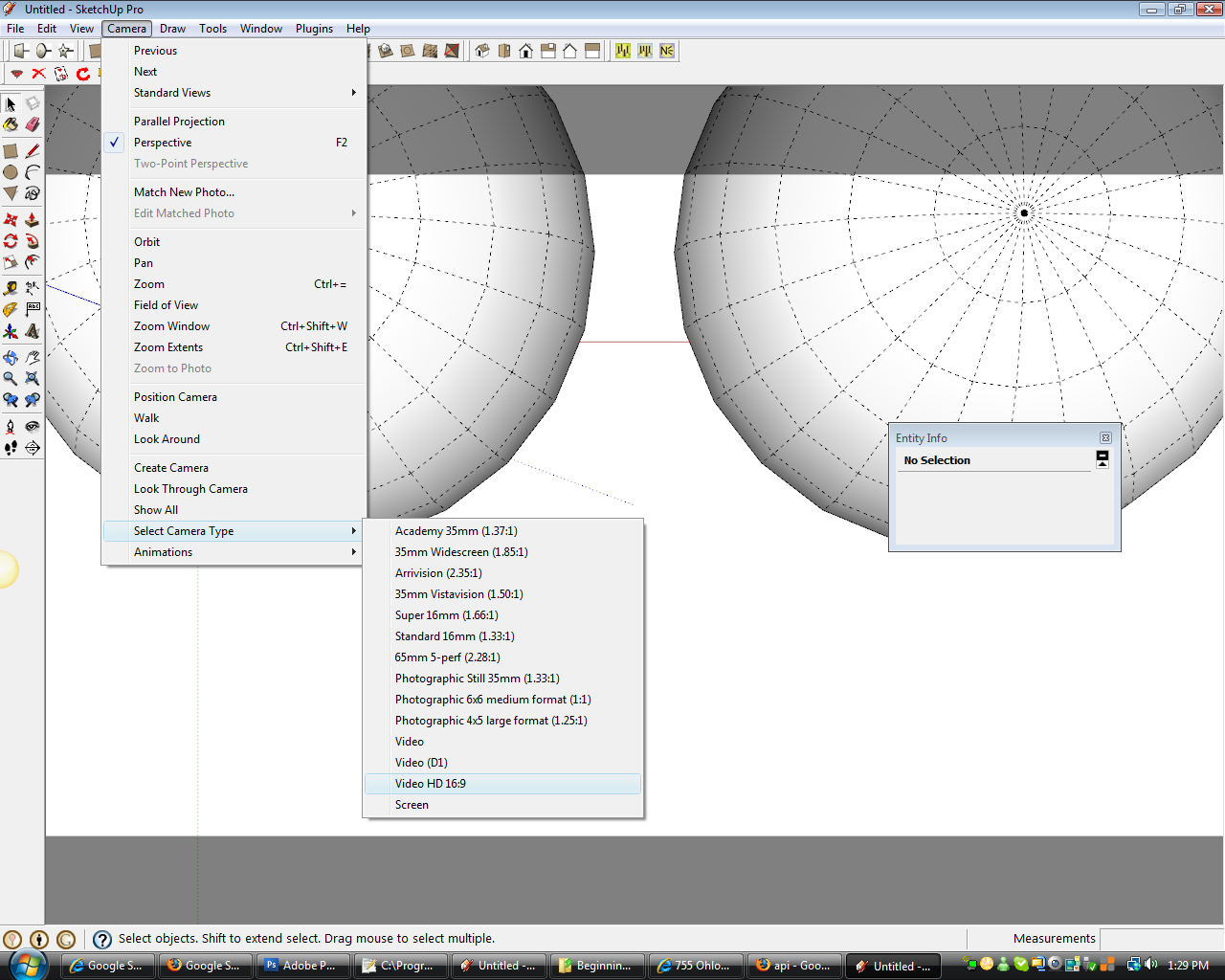
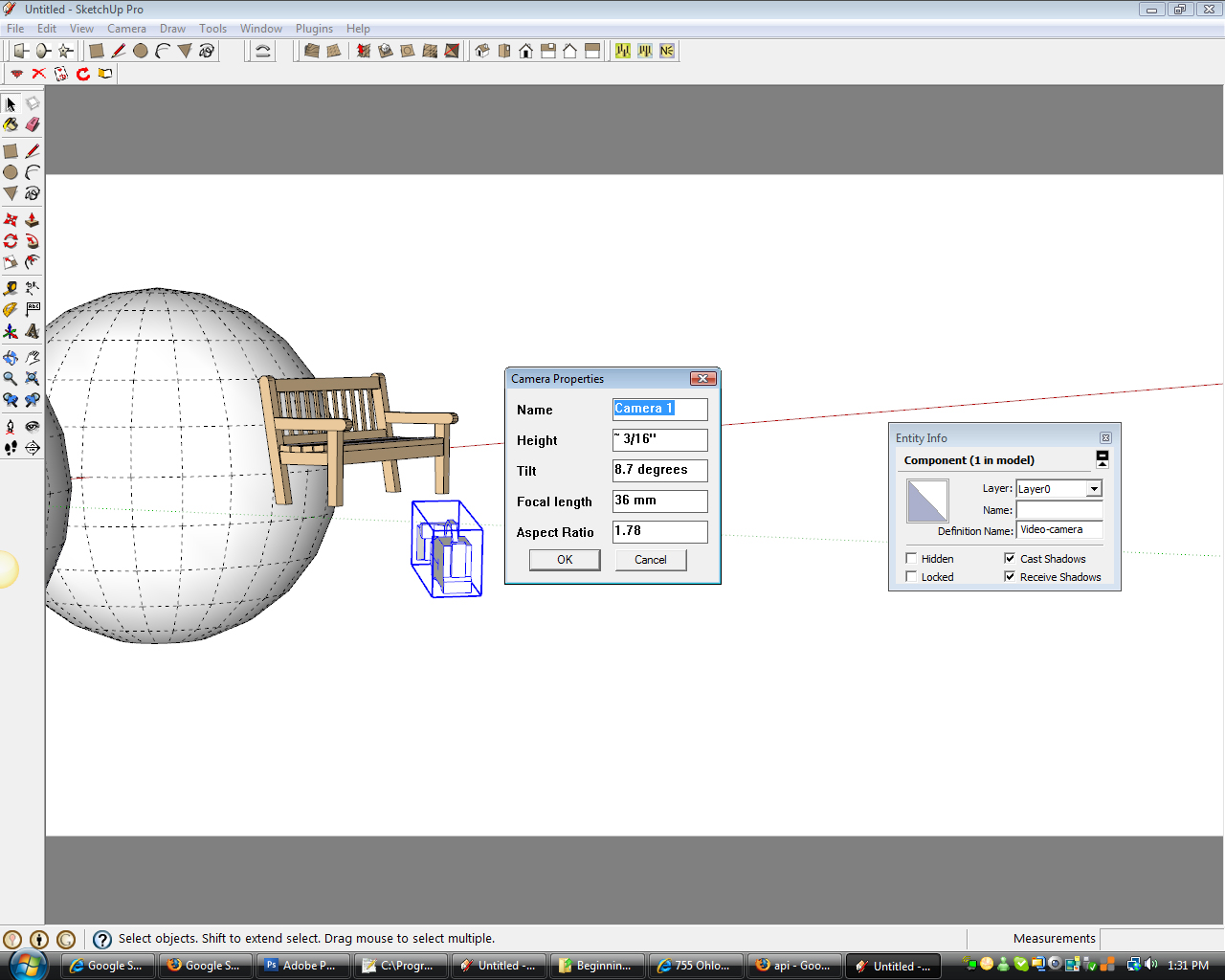
Here 2 screen shots from the film and stage plugin (scroll down about 1/2 the page and look for Film and Stage Plugin, and yes it works on SU7, Mac's and on Vista too!).
In this image, the options at bottom "Create Camera", "Look Through Camera", and "Select Camera Type" are all part of the Film and stage Plugin. Notice the default provided camera types provided. The greyed out SketchUp window is because I have the aspect ratio set to "Video HD 16:9" camera.
If you right click on the camera and choose "Edit Camera" you get this box. You can also see the camera component that SketchUp placed in the model. It is moveable and rotateable, and then you can click on "Look Through Camera" to then see the new view. But again, dolly and pan while looking through the camera were intended to work, but never did fully work apparently.
And lastly, Thom brought up an interesting thread here in the forum a few weeks ago that was started by TBD and it shows how to bring up a camera control dialog box in Windows only. It is native to SU, but its not accessible through any menu system. To get it, open the ruby console - Windows>Ruby Console. Then type this in:
Sketchup.send_action 10624Anyhow, I'm sure none of that is quite exactly useful, which is why there is such a good discussion about creating a new camera tool. But in the meantime, these tips might come in handy for someone,
Chris
-
it seems to me the Film And Stage plugin adds too much stuff that most of us dont really care... if we could ONLY add the Film And Stage camera feature...
-
It adds a few components to your library is all. They are pretty easy to ignore, or delete I suppose.
-
It would even be nicer if the 'render area' which is defined in maxwell render would be preserved in the different cameras from film and stage...
I think we could definitely use a new and easier to use film and stage plugin!







Advertisement