[Plugin][$] FredoScale - v3.7c - 19 Aug 26




-
i'm still not convinced you're hearing me about the tape measure...
don't use for that.. use
[flash=750,446:prdy63au]http://www.youtube.com/v/u3tsguLP74A?fs=1&hl=en_US&color1=0x2b405b&color2=0x6b8ab6[/flash:prdy63au]
-
you are a genius.

jajaaj
I feel a fool.
three years using sketchup and I did not know this function.
thank you very much -
Thanks Fredo
-
-
@unknownuser said:
i'm still not convinced you're hearing me about the tape measure...
don't use for that.. useThanks Jeff! Lot of time using SU and still something new to learn.
-
Still an awesome plugin Fredo, but I do have a question.
Is there a way to make stretching and tapering non-destructive? [Keeping the same component name]
I'm working on a building with a lot of glass panels on the outside. About 80% of these are the same component [for future use, where I'll add some detail]. With stretching and tapering as a non-destructive tool I can make the building entirely out of one component which, besides being totally awesome, will make adding detail to the building a breeze.Anyway, with or without non-destructive tools, this plugin is still one of my favorites.
Hugo.
-
@hfm said:
Is there a way to make stretching and tapering non-destructive?
Can't apply such a transformation to an instance without doing a destructive operation.
-
@thomthom said:
@hfm said:
Is there a way to make stretching and tapering non-destructive?
Can't apply such a transformation to an instance without doing a destructive operation.
Why not? Sorry for my ignorance, maybe an example will explain it better
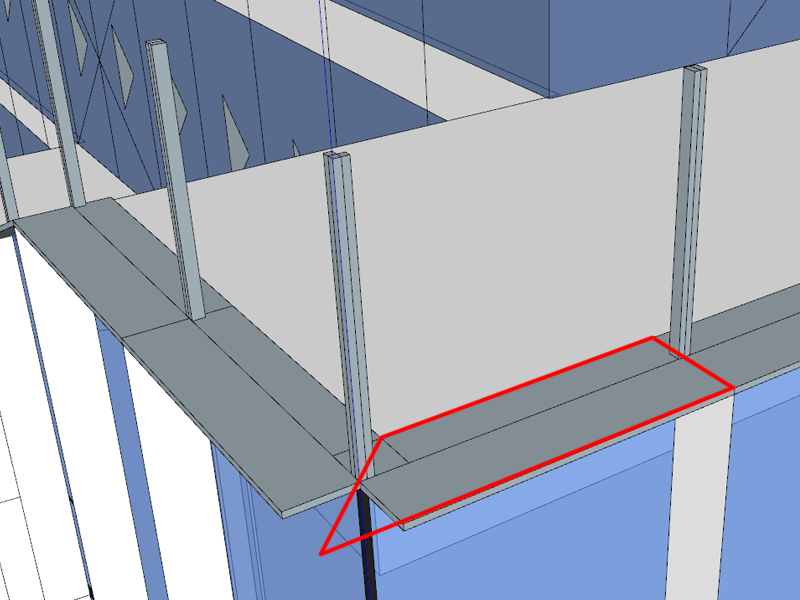
This means that one side can vary in length. Do you mean that this cannot be done?
-
You can apply a scale or skew transformation to a component in a non-destructive manner, but you can not taper or stretch. It's just not possible with the API we have available.
-
Hello there!
First I want to thank Fredo6 for the awesome plugin, but I've hit a problem with scale to target tool.
I'm trying to scale a small filled arch (1m by 10m) along the flat to hit an edge near it. Once I doubleclick the correct corner to activate the target scaling, I can't select any point for origin.
The funniest thing is, that if I scale the arch bigger by other methods, I'm able to select some points to use as origin.
Is there some sort of minimum size requirement for the scale to target tool? What am I doing wrong here?
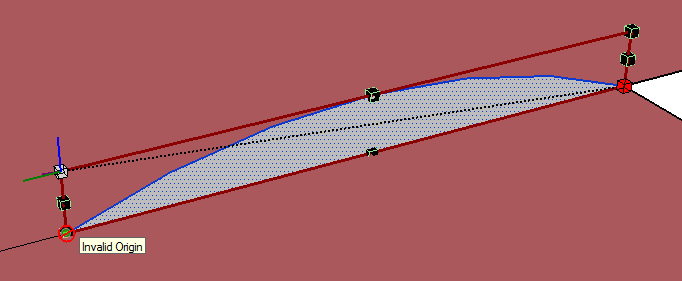
-
SketchUp doesn't handle very small units very well. 1mm is getting very close to the minimum.
SU's tolerance is 1/1000" -
The arch is 1 meter by 10 meters, not 1 millimeter by 10 millimeters.
And I don't think it's the scale that matters, nor that it's 2D. I started a blank sketchup and recreated the same arch at the same size, 1m by 10m and the scale tool refused to use any point as origin except points in a direct line above the selected handle.
Then I copied and scaled the same arch by a factor of 10, so it was now 10 by 100 and the scale tool behaved exactly the same.Then I made a rectangle of the same size and the scale too still didn't work, so I extruded it to a box and tried to pick the corner handles for the scale tool, but again the scale tool didn't work.
However, if I shrink the same arch/rectangle/box so that it's ratio of edges is more close 1 by 4 example, the tool allows me to pick some points below the selected handle, but not all the way down.
As I see it, it should not matter for the scale tool where I choose the origin and target points, since all it needs is the distance and direction between to translate it to a scale factor for the selected entity.
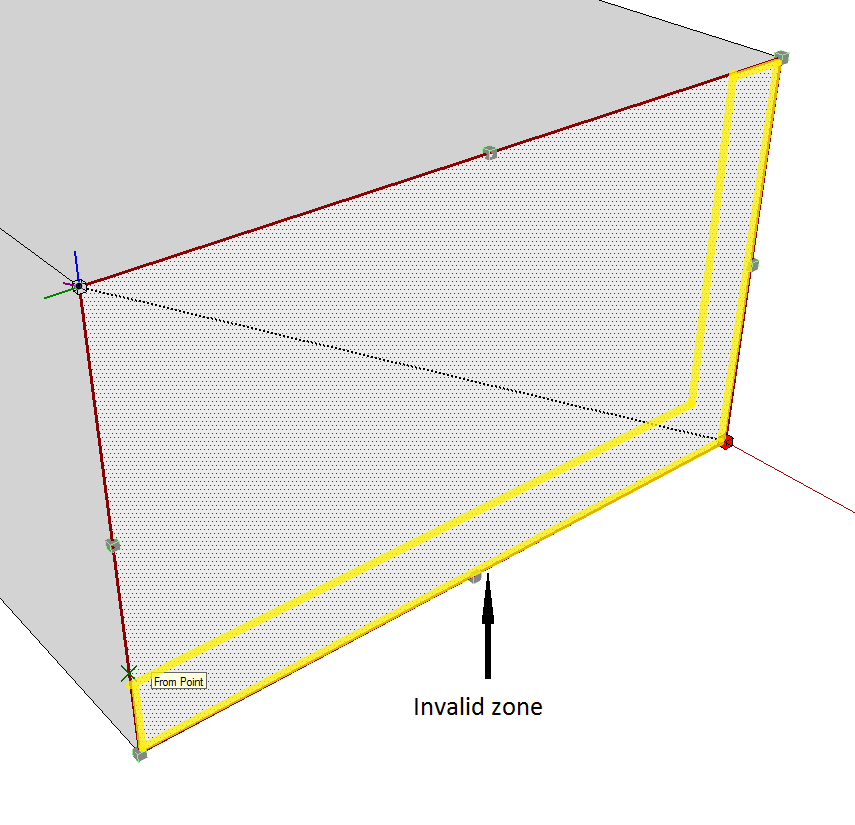
I've attached an image that better shows the problem I'm experiencing. The yellow area highlighted is the zone where the tool refuses to work. Every point outside this zone is operable. The rectangle is about 35 by 22 meters in size. The invalid zone border is about 4 meters.
-
Scale to Target imposes to have the origin in a valid area. For some reasons, I have put the a tolerance of about 10% due to problems I have found, which I don't remember very well).
In your cases, why do you want to use the Scale to Target mode, not the regular mode?
Fredo
-
Well, I need the corner of the bottom edge of the shape (the arch, in my case) to touch a line.
Of course I could measure the ratio by hand, but it won't give accurate enough results so that the corner is exactly on the line. That's why I was hoping this tool would do it for me. When I tried the scale tool in normal mode, it does not snap correctly to the other edge, even if I put a guide point or an endpoint there. The little yellow box does snap to an endpoint, but it doesn't correlate with behavior of the scale tool, ie. it ignores the snap target completely and scales in freeform.

-
@icchan said:
Well, I need the corner of the bottom edge of the shape (the arch, in my case) to touch a line.
if that's an arc (as in, SU will say it's an arc in entity info), then just use the move tool
don't select the arc first.. just place the move tool cursor on the end of the arc, click and move it to the end..
if it's an arc, it will scale accordingly.[actually, that should work with polylines or welded lines as well]
[edit] yeah, forget the bit about it needing to be an arc..
-
Thanks for the tip, it does work as I needed with arcs, but the problem remains for rectangles or other non-regular shapes.
-
@icchan said:
Thanks for the tip, it does work as I needed with arcs, but the problem remains for rectangles or other non-regular shapes.
You can do it with rectangles and odd shapes as well but it requires a little setup. There's another way to do this with a rectangle too.
I'm on a phone right now but when I get back to the hotel tonight, I'll post a little tutorial. -
if you weld the segments into a polyline, the scaling with the move tool will work..
with the rectangle, you weld 3 sides and leave the bottom untouched.. after scaling, select the 3 welded lines and explode if you wish..i also included an alternate method using guide lines to create an intersection which the scale tool will snap to..
[i use jim's cline tool for the diagonal]
http://sketchuptips.blogspot.com/2008/02/plugin-construction-line-tool.html[flash=800,475:m8lhsjxs]http://www.youtube.com/v/4Zx7dt58v7w?fs=1&hl=en_US&rel=0&hd=1&color1=0x2b405b&color2=0x6b8ab6[/flash:m8lhsjxs]
-
Wow... I was at most expecting an explanation for the tool behavior, was not definitely expecting a detailed tutorial! Excellent job, I hope others with similar problems will find this also. Thanks!
-
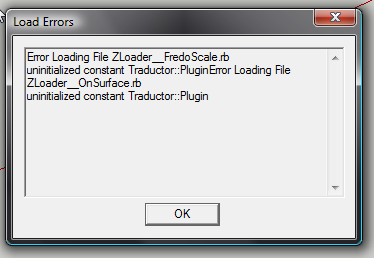
Getting this error now when I open SketchUp.
I thought I updated a bunch of Plugins... apparently something went wrong.







Hello! It looks like you're interested in this conversation, but you don't have an account yet.
Getting fed up of having to scroll through the same posts each visit? When you register for an account, you'll always come back to exactly where you were before, and choose to be notified of new replies (either via email, or push notification). You'll also be able to save bookmarks and upvote posts to show your appreciation to other community members.
With your input, this post could be even better 💗
Register Login


Advertisement