sketchucation logo sketchucation
    • Login
    Oops, your profile's looking a bit empty! To help us tailor your experience, please fill in key details like your SketchUp version, skill level, operating system, and more. Update and save your info on your profile page today!
    ⚠️ Update | Sketchucation Tools 5.0.8 released with licensing improvements and bugfixes Download

    [Plugin Library] LibFredo6 - v16.2b - 22 Sep 26


    Scheduled Pinned Locked Moved Plugins
    2.2k Posts 583 Posters 9.1m Views 585 Watching
    Loading More Posts
    • Oldest to Newest
    • Newest to Oldest
    • Most Votes
    Reply
    • Reply as topic
    Log in to reply
    This topic has been deleted. Only users with topic management privileges can see it.
    • D
      driven
      last edited by

      Fred,

      Everything now works on Safari 5.0.6.

      thanks for all your great plugins and pursuance of cross platform performance.

      if I had the money, I'd buy you a mac as a well deserved reward...

      john

      learn from the mistakes of others, you may not live long enough to make them all yourself...

      1 Reply Last reply
      Reply Quote 0
      • thomthomT
        thomthom
        last edited by

        @unknownuser said:

        NEW RELEASE: LibFredo6 v4.2a - 16 Sep 11

        LibFredo6 4.2 should fix some issues for recent versions of Mac OS and Safari 5.0.6 and above (images not displayed and check-for-update not working). LibFredo6 4.1 was not fully solving the problem.

        See main post of this thread for Download.

        Fredo

        What was your solution?

        Thomas Thomassen β€” SketchUp Monkey & Coding addict
        List of my plugins and link to the CookieWare fund

        1 Reply Last reply
        Reply Quote 0
        • fredo6F
          fredo6
          last edited by

          @thomthom said:

          What was your solution?

          The solution is to use set_file with a temporary HTML file in the Temp directory. Simply, I had inadvertedly left a piece of code which was still doing a set_html under certain conditions, and set_file did not supersede the set_html (strangely, even if the HTML was taken from the temp file, the web dialog was created with the window.location = about:blank -- only a refresh of the page would make it right).

          Fredo

          1 Reply Last reply
          Reply Quote 0
          • mariochaM
            mariocha
            last edited by

            Yep, solved it here.
            Cookies to Fredo !

            %(#008000)[Mario C.
            Every rule has exceptions, but some.]

            1 Reply Last reply
            Reply Quote 0
            • N
              niks
              last edited by

              thank you Fredo πŸ˜‰

              1 Reply Last reply
              Reply Quote 0
              • C
                coolie44
                last edited by

                Hi
                I'm trying to install this on a mac. Not clear on how to extract the files into SUplugins.

                I unzipped the file on the desktop and can select all the files but unsure what to do next.

                Thanks

                1 Reply Last reply
                Reply Quote 0
                • fredo6F
                  fredo6
                  last edited by

                  @coolie44 said:

                  Hi
                  I'm trying to install this on a mac. Not clear on how to extract the files into SUplugins.

                  I unzipped the file on the desktop and can select all the files but unsure what to do next.

                  Thanks

                  The unzip operation should lead to a simple footprint in the SU plugins directory

                  • a file: libFredo6.rb
                  • a folder: LIBFREDO6_Dir_42

                  Possibly do the extract in a neutral place, and then copy the file and folder to the SU Plugins directory.

                  Fredo

                  1 Reply Last reply
                  Reply Quote 0
                  • L
                    loyflut
                    last edited by

                    Hello Fredo6,

                    I'm on Mac running OS X Snow Leopard and I've DL all your files and don' manage to install it properly despite I've been following your advices on the .pdf or this web site.
                    I don't know exactly what's wrong with what I'm doing but it's not working...
                    libFredo6.rb and libFredo6.pluging are in the right (I think) directory "Macintosh HD/Library/Application Support/Google SketchUp 8/SketchUp/plugins"
                    I've DL 000_AdditionalPluginFolders.rb and put it in this directory "Macintosh HD/Library/Application Support/Google SketchUp 7/SketchUp/plugins" but same same, it's not working.

                    Basically I'm a bit lost and would love to find the solution to make it work.
                    This tools looks amazing to use and make the work so much easier.

                    If any one as a idea I will be pleased and really thankful.

                    1 Reply Last reply
                    Reply Quote 0
                    • D
                      driven
                      last edited by

                      hi,

                      do you have any working plugins? i.e. others that do work.

                      can you post a screenshot of the path to your plugins folder.

                      john

                      learn from the mistakes of others, you may not live long enough to make them all yourself...

                      1 Reply Last reply
                      Reply Quote 0
                      • fredo6F
                        fredo6
                        last edited by

                        @loyflut said:

                        Hello Fredo6,

                        I'm on Mac running OS X Snow Leopard and I've DL all your files and don' manage to install it properly despite I've been following your advices on the .pdf or this web site.
                        I don't know exactly what's wrong with what I'm doing but it's not working...
                        libFredo6.rb and libFredo6.pluging are in the right (I think) directory "Macintosh HD/Library/Application Support/Google SketchUp 8/SketchUp/plugins"
                        I've DL 000_AdditionalPluginFolders.rb and put it in this directory "Macintosh HD/Library/Application Support/Google SketchUp 7/SketchUp/plugins" but same same, it's not working

                        First, I guess you use Sketchup 8. So the standard directory for Plugins should be
                        "Macintosh HD/Library/Application Support/Google SketchUp 8/SketchUp/plugins".
                        I say that as you seem to use also the ...Google Sketchup 7...directory.

                        Second, LibFredo6 is not really a plugin by itself, but a library supporting other plugins.
                        At least did you check you have a menu ***Windows > LibFredo6 settings.....***If so, then you have a correct installation and ready to dowload and install my other scripts (like FredoScale, Roundcorner, ...)

                        Fredo

                        1 Reply Last reply
                        Reply Quote 0
                        • L
                          loyflut
                          last edited by

                          Hi,

                          John,
                          No i don't have any working plugin yet.
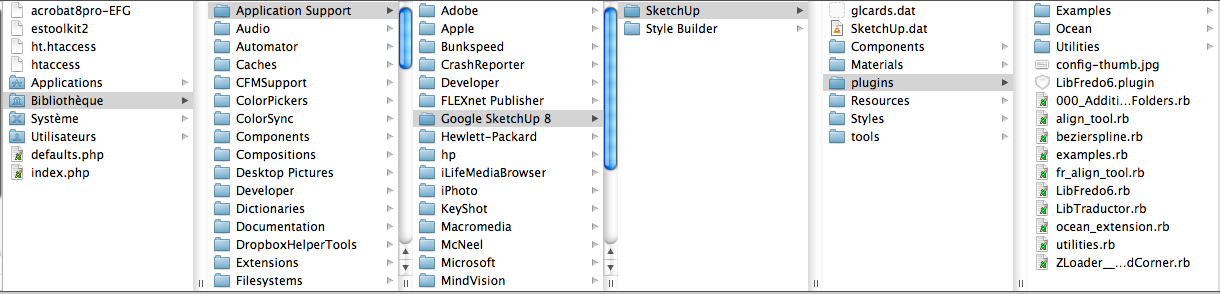
                          So here the first screenshot where I put all of them.
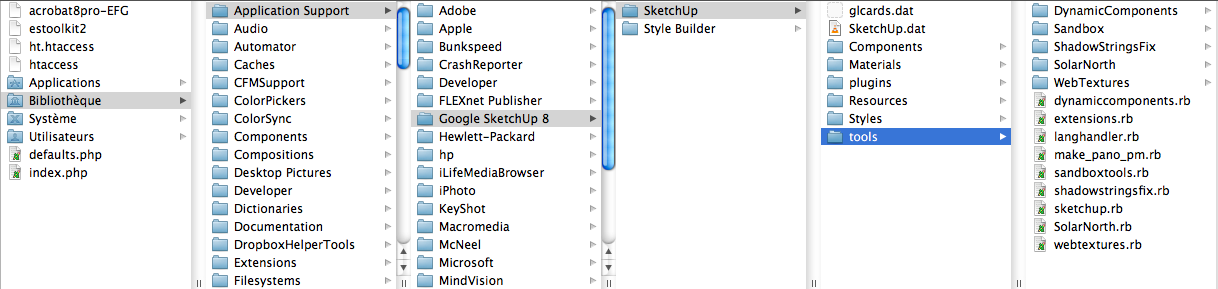
                          I don't think I should put it here (second screenshot)

                          Fredo,
                          Yes I use SU pro 8 (I copy/past from the first post you give 😳 )
                          So Where should I put LibFredo6 ?
                          No I don't see LibFredo6 settings in my menu, I don't get what to do btw LibFredo6, and 000_AdditionalPluginFolders or even FreeScale....
                          Sorry guys I'm a waist of time...

                          Thank your help


                          Where I put all the plugin


                          2nd shot

                          1 Reply Last reply
                          Reply Quote 0
                          • fredo6F
                            fredo6
                            last edited by

                            @loyflut said:

                            Hi,

                            John,
                            No i don't have any working plugin yet.
                            So here the first screenshot where I put all of them.
                            I don't think I should put it here (second screenshot)

                            Fredo,
                            Yes I use SU pro 8 (I copy/past from the first post you give 😳 )
                            So Where should I put LibFredo6 ?
                            No I don't see LibFredo6 settings in my menu, I don't get what to do btw LibFredo6, and 000_AdditionalPluginFolders or even FreeScale....
                            Sorry guys I'm a waist of time...

                            Thank your help

                            Your footprint is not correct. You don't have a Folder LIBFREDO6_Dir_42 in your SU Plugins folder (and you have a file LibFredo6.plugin which should not be there).

                            I suggest you download the ZIP file and do the extraction in a separate directory. You hsould have only:

                            • 1 file, LibFredo6.rb
                            • 1 folder LIBFREDO6_Dir_42
                              Then, when it is OK, copy the file and the folder to the SU Plugins Directory, that is, Macintosh HD/Library/Application Support/Google SketchUp 8/SketchUp/plugins

                            Fredo

                            1 Reply Last reply
                            Reply Quote 0
                            • L
                              loyflut
                              last edited by

                              Ok, that's all working.

                              I don't know why but I tough the all file would not go by it self in the plugin directory, that was my mistake.
                              Now I just have to learn how to use them and create great product.

                              Thank a lot Fredo for your precious help.
                              The tools you develop are just super important and super efficient.

                              Thank you so much.

                              1 Reply Last reply
                              Reply Quote 0
                              • T
                                tjwilson
                                last edited by

                                I am having trouble with putting round edges on an inset box, within a box. When I try to round the edges, the inset box disappears. I have attached a very simple model which will illustrate my problem if you select the edges and round them. Any idea what I need to do differently in order to make all the edges (both inside and outside edges) become rounded?


                                Inset Box file

                                1 Reply Last reply
                                Reply Quote 0
                                • Dave RD
                                  Dave R
                                  last edited by

                                  Does it disappear or does it just get skinned over? What settings are you using?

                                  Etaoin Shrdlu

                                  %

                                  (THERE'S NO PLACE LIKE)

                                  G28 X0.0 Y0.0 Z0.0

                                  M30

                                  %

                                  1 Reply Last reply
                                  Reply Quote 0
                                  • T
                                    tjwilson
                                    last edited by

                                    If you meant the settings on RoundEdge,I was using an edge radius of 3/16" and have tried a number of different segments for rounding, but 6 segments would be fine.

                                    1 Reply Last reply
                                    Reply Quote 0
                                    • T
                                      tjwilson
                                      last edited by

                                      Maybe it just gets skinned over. I'm pretty new to SketchUp, so I have not sdjusted any settings from the default settings on Pro8. An outline of the original inset box still shows up when I do the round edges, but it appears to be back in the same plane as the outer box.
                                      If you are referring to the Round Edge settings, I have been using 3/16" radius edges with 6 segments.

                                      1 Reply Last reply
                                      Reply Quote 0
                                      • Dave RD
                                        Dave R
                                        last edited by

                                        I suspected the skinned over thing. I see that on inside round overs, too. Use Intersect Faces and then delete the skin. Keep the segment count low for the curves to avoid holes in the corners due to small faces that could be generated. SketchUp might not fill them in.

                                        Etaoin Shrdlu

                                        %

                                        (THERE'S NO PLACE LIKE)

                                        G28 X0.0 Y0.0 Z0.0

                                        M30

                                        %

                                        1 Reply Last reply
                                        Reply Quote 0
                                        • T
                                          tjwilson
                                          last edited by

                                          That did it!!! Many thanks.

                                          1 Reply Last reply
                                          Reply Quote 0
                                          • M
                                            mar k
                                            last edited by

                                            Many thanks Fredo !
                                            You save my black hair

                                            1 Reply Last reply
                                            Reply Quote 0

                                            Hello! It looks like you're interested in this conversation, but you don't have an account yet.

                                            Getting fed up of having to scroll through the same posts each visit? When you register for an account, you'll always come back to exactly where you were before, and choose to be notified of new replies (either via email, or push notification). You'll also be able to save bookmarks and upvote posts to show your appreciation to other community members.

                                            With your input, this post could be even better πŸ’—

                                            Register Login
                                            • 1
                                            • 2
                                            • 101
                                            • 102
                                            • 103
                                            • 104
                                            • 105
                                            • 112
                                            • 113
                                            • 103 / 113
                                            • First post
                                              Last post
                                            Buy SketchPlus
                                            Buy SUbD
                                            Buy WrapR
                                            Buy eBook
                                            Buy Modelur
                                            Buy Vertex Tools
                                            Buy SketchCuisine
                                            Buy FormFonts

                                            Advertisement