sketchucation logo sketchucation
    • 로그인
    Oops, your profile's looking a bit empty! To help us tailor your experience, please fill in key details like your SketchUp version, skill level, operating system, and more. Update and save your info on your profile page today!
    🚨 Skimp | 25% Off until March 30 Buy Now

    [Plugin Library] LibFredo6 - v15.9a - 25 Mar 26


    예약됨 고정됨 잠김 이동됨 Plugins
    2.2k 게시물 577 작성자 4.3m 조회수 579 Watching
    게시물 더 불러오는 중
    • 오래된 순
    • 최신 순
    • 가장 많은 투표
    답글
    • 토픽으로 답글
    로그인 후 답글 작성
    이 토픽은 삭제되었습니다. 토픽 관리 권한이 있는 사용자만 볼 수 있습니다.
    • fredo6F 오프라인
      fredo6
      마지막 수정자:

      NEW RELEASE: LibFredo6 v8.6j - 30 Oct 18

      LibFredo6 8.6j is for bug fixing and small GUI adjustments (size of toolbar icons for high-DPI screens).


      See plugin home page of LibFredo6 for Download of LibFredo6.

      Main Post of the LibFredo6 thread

      Fredo

      1 답글 마지막 답글 답글 인용 0
      • fredo6F 오프라인
        fredo6
        마지막 수정자:

        NEW RELEASE: LibFredo6 v8.6k - 03 Nov 18

        LibFredo6 8.6k provides new instructions for downloading FFmeg on Mac-OS platforms.

        IMPORTANT: the previous documentations included a link that is no longer supported and, worse, may have been hacked. So if you use Animator, please use the new link,
        https://www.ffmpeg.org/download.html

        Attached are the new PDF instructions


        See plugin home page of LibFredo6 for Download of LibFredo6.

        Main Post of the LibFredo6 thread

        Fredo


        Instructions_ffmpeg_Mac.pdf

        1 답글 마지막 답글 답글 인용 0
        • Seatales45S 오프라인
          Seatales45
          마지막 수정자:

          How does one update LibFredo6? Do I have to delete and reinstall?

          1 답글 마지막 답글 답글 인용 0
          • fredo6F 오프라인
            fredo6
            마지막 수정자:

            NEW RELEASE: LibFredo6 v8.6m - 18 Nov 18

            LibFredo6 8.6m is for Animator 2.3c (transparent background) and for the size of icons on hi-res screens.


            See plugin home page of LibFredo6 for Download of LibFredo6.

            Main Post of the LibFredo6 thread

            Fredo

            1 답글 마지막 답글 답글 인용 0
            • fredo6F 오프라인
              fredo6
              마지막 수정자:

              NEW RELEASE: LibFredo6 v8.6n - 05 Dec 18

              LibFredo6 8.6n fixes occasional problems in Orbiting, in FredoTools::ThruPaint and possibly in some others of my plugins.


              See plugin home page of LibFredo6 for Download of LibFredo6.

              Main Post of the LibFredo6 thread

              Fredo

              1 답글 마지막 답글 답글 인용 0
              • fredo6F 오프라인
                fredo6
                마지막 수정자:

                NEW RELEASE: LibFredo6 v8.6p - 05 Dec 18

                LibFredo6 8.6p fixes a random bug in Animator when using Movement Along Path.


                See plugin home page of LibFredo6 for Download of LibFredo6.

                Main Post of the LibFredo6 thread

                Fredo

                1 답글 마지막 답글 답글 인용 0
                • fredo6F 오프라인
                  fredo6
                  마지막 수정자:

                  NEW RELEASE: LibFredo6 v8.7a - 18 Dec 18

                  LibFredo6 8.7a is a maintenance release providing adjustments to several of my plugins.


                  See plugin home page of LibFredo6 for Download of LibFredo6.

                  Main Post of the LibFredo6 thread

                  Fredo

                  1 답글 마지막 답글 답글 인용 0
                  • OxerO 오프라인
                    Oxer
                    마지막 수정자:

                    Hi Fredo,
                    I installed the last version of LibFredo v8.7a, there is an issue, I can't access to your plugins through the icons, it appears the options window and it disappears immediately. When I access through plugins Menu or Contextual Menu they work.
                    When the tool (ex. JointPushPull) is running and I push the Tool Settings icon it happens the same, the settings window appears and it disappears immediately.

                    macOS 10.13.6 & SU2017

                    "The result is the end what is important is the process" by Oxer
                    http://www.oxervision.blogspot.com/

                    1 답글 마지막 답글 답글 인용 0
                    • fredo6F 오프라인
                      fredo6
                      마지막 수정자:

                      @oxer said:

                      Hi Fredo,
                      I installed the last version of LibFredo v8.7a, there is an issue, I can't access to your plugins through the icons, it appears the options window and it disappears immediately. When I access through plugins Menu or Contextual Menu they work.
                      When the tool (ex. JointPushPull) is running and I push the Tool Settings icon it happens the same, the settings window appears and it disappears immediately.

                      macOS 10.13.6 & SU2017

                      Can you open the Ruby Console.

                      Thanks

                      Fredo

                      1 답글 마지막 답글 답글 인용 0
                      • fredo6F 오프라인
                        fredo6
                        마지막 수정자:

                        Do you have the problem with the button palette of my plugins (like JointPushPull or FredoCorner) or is it just for the dialog boxes?

                        1 답글 마지막 답글 답글 인용 0
                        • OxerO 오프라인
                          Oxer
                          마지막 수정자:

                          Nothing in Ruby Console. 😲
                          I open for example Window Menu> LibFredo Options> Check Updates for Plugins and the window appears but it closes immediately.

                          EDIT: After that I can use another Skechup Tools but if I press Cmd+Q (exit SU on Mac) SketchUp doesn't close, I have to force the exit.

                          "The result is the end what is important is the process" by Oxer
                          http://www.oxervision.blogspot.com/

                          1 답글 마지막 답글 답글 인용 0
                          • OxerO 오프라인
                            Oxer
                            마지막 수정자:

                            It's with the dialogs (popup windows) only, the palletes works fine.
                            How I said you before to access to yours plugins I can do this through the Tool & Extensions Menu or Contextual Menu only.

                            "The result is the end what is important is the process" by Oxer
                            http://www.oxervision.blogspot.com/

                            1 답글 마지막 답글 답글 인용 0
                            • fredo6F 오프라인
                              fredo6
                              마지막 수정자:

                              Is it for all popup dialog boxes ?

                              1 답글 마지막 답글 답글 인용 0
                              • pbacotP 오프라인
                                pbacot
                                마지막 수정자:

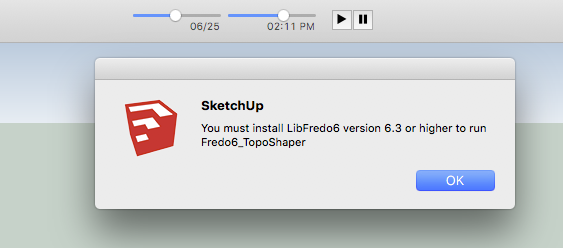
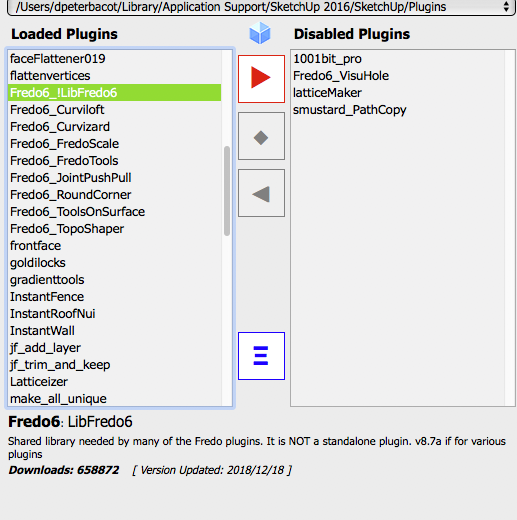
                                I have loaded this plugin but my Fredo tools don't work. I get several prompts on opening SketchUp. According to the Plugin Manager I have the latest plugin.
                                Screen Shot 2018-12-19 at 12.35.23 PM.png


                                Screen Shot 2018-12-19 at 12.37.39 PM.png

                                MacOSX MojaveSketchUp Pro v19 Twilight v2 Thea v3 PowerCADD

                                1 답글 마지막 답글 답글 인용 0
                                • fredo6F 오프라인
                                  fredo6
                                  마지막 수정자:

                                  @pbacot said:

                                  I have loaded this plugin but my Fredo tools don't work. I get several prompts on opening SketchUp. According to the Plugin Manager I have the latest plugin.

                                  Seems to be something quite old, because there is no longer a reference to LibFredo6 6.3 in the latest version of my plugins. Can you check for TopoShaper.

                                  Also, ff you run LibFredo6 8.7a, could you send me the trace file (Windows > Library Settings > Trace Log File...
                                  Another user has signaled me an anomaly with popup messages.

                                  Thanks

                                  Fredo

                                  1 답글 마지막 답글 답글 인용 0
                                  • pbacotP 오프라인
                                    pbacot
                                    마지막 수정자:

                                    @fredo6 said:

                                    @pbacot said:

                                    I have loaded this plugin but my Fredo tools don't work. I get several prompts on opening SketchUp. According to the Plugin Manager I have the latest plugin.

                                    Seems to be something quite old, because there is no longer a reference to LibFredo6 6.3 in the latest version of my plugins. Can you check for TopoShaper.

                                    Also, ff you run LibFredo6 8.7a, could you send me the trace file (Windows > Library Settings > Trace Log File...
                                    Another user has signaled me an anomaly with popup messages.

                                    Thanks

                                    Fredo

                                    I choose "View Trace Log Files..." and nothing happens. Let me try updating. I know most plugins are recent updates, but some like TopoShaper may not be.

                                    MacOSX MojaveSketchUp Pro v19 Twilight v2 Thea v3 PowerCADD

                                    1 답글 마지막 답글 답글 인용 0
                                    • pbacotP 오프라인
                                      pbacot
                                      마지막 수정자:

                                      hmm... check for updates doesn't work either.

                                      MacOSX MojaveSketchUp Pro v19 Twilight v2 Thea v3 PowerCADD

                                      1 답글 마지막 답글 답글 인용 0
                                      • fredo6F 오프라인
                                        fredo6
                                        마지막 수정자:

                                        Same problem as Oxer. You are on Mac, and there seems to be a problem with Web dialog boxes.

                                        Since you have FredoTools installed, could you check if

                                        • the Quick Launcher works
                                        • if Solid Volume displays a dialog box

                                        Thanks

                                        Fredo

                                        1 답글 마지막 답글 답글 인용 0
                                        • pbacotP 오프라인
                                          pbacot
                                          마지막 수정자:

                                          Ok updating several Fredo6 plugins allows me to open without prompts and FredoTools and Fredo Collection seem to be in place as before!

                                          Still when I choose "View Trace Log Files..." sometimes a window flashes on and off but nothing else happens.

                                          FredoTools Launcher doesn't do anything.
                                          Solid Volume flashes a window briefly.

                                          MacOSX MojaveSketchUp Pro v19 Twilight v2 Thea v3 PowerCADD

                                          1 답글 마지막 답글 답글 인용 0
                                          • fredo6F 오프라인
                                            fredo6
                                            마지막 수정자:

                                            @oxer, @pbacot,

                                            Can you tell me which version of Safari you run on your Mac.

                                            It seems that Safari does not like a change I made in my code related to dialog boxes.

                                            Thanks

                                            Fredo

                                            1 답글 마지막 답글 답글 인용 0

                                            Hello! It looks like you're interested in this conversation, but you don't have an account yet.

                                            Getting fed up of having to scroll through the same posts each visit? When you register for an account, you'll always come back to exactly where you were before, and choose to be notified of new replies (either via email, or push notification). You'll also be able to save bookmarks and upvote posts to show your appreciation to other community members.

                                            With your input, this post could be even better 💗

                                            등록 로그인
                                            • 1
                                            • 2
                                            • 67
                                            • 68
                                            • 69
                                            • 70
                                            • 71
                                            • 110
                                            • 111
                                            • 69 / 111
                                            • 첫 게시물
                                              마지막 게시물
                                            Buy SketchPlus
                                            Buy SUbD
                                            Buy WrapR
                                            Buy eBook
                                            Buy Modelur
                                            Buy Vertex Tools
                                            Buy SketchCuisine
                                            Buy FormFonts

                                            Advertisement