[Plugin Library] LibFredo6 - v15.8e - 15 Feb 26



-
@jas13 said:
il se situe bien dans le gestionnaire mais bien qu'activer je ne vois aucun changement dans mes barres d'outils même en fermant et rouvrant l'application.
Dans le gestionnaire l'icône de l'extension est sous la forme d'un diamant gris.LibFredo6 n'ajoute aucune barre d'outils. C'est juste une librarie, qui n'a d'intérêt que si un autre de mes plugins est installé (comme RoundCorner, FredoScale, ...).
Toutefois, LibFredo6 ajoute un menu Window > LibFredo6 Settings... s'il est bien installé. -
Bonjour,
J'ai télécharge ce jour le Plug "Libfredo6" et "joinPushPull" sur Sketch'up 2020; suivant indications du tuto. Téléchargement, installation par le gestionnaire.
A l'ouverture de SketchUp le message suivant s'afficheErreur de chargement du fichier Fredo6_!LibFredo6.rb
Error: #<ArgumentError: invalid byte sequence in UTF-8>
c:/users/sylvain/appdata/roaming/sketchup/sketchup 2020/sketchup/plugins/fredo6_!libfredo6/lib6core.rbe:806:inmatch' c:/users/sylvain/appdata/roaming/sketchup/sketchup 2020/sketchup/plugins/fredo6_!libfredo6/lib6core.rbe:806:inblock (2 levels) in load_from_config'
c:/users/sylvain/appdata/roaming/sketchup/sketchup 2020/sketchup/plugins/fredo6_!libfredo6/lib6core.rbe:805:ineach' c:/users/sylvain/appdata/roaming/sketchup/sketchup 2020/sketchup/plugins/fredo6_!libfredo6/lib6core.rbe:805:inblock in load_from_config'
c:/users/sylvain/appdata/roaming/sketchup/sketchup 2020/sketchup/plugins/fredo6_!libfredo6/lib6core.rbe:803:inforeach' c:/users/sylvain/appdata/roaming/sketchup/sketchup 2020/sketchup/plugins/fredo6_!libfredo6/lib6core.rbe:803:inload_from_config'
c:/users/sylvain/appdata/roaming/sketchup/sketchup 2020/sketchup/plugins/fredo6_!libfredo6/lib6core.rbe:1218:inblock in load_all_plugins' c:/users/sylvain/appdata/roaming/sketchup/sketchup 2020/sketchup/plugins/fredo6_!libfredo6/lib6core.rbe:1218:ineach'
c:/users/sylvain/appdata/roaming/sketchup/sketchup 2020/sketchup/plugins/fredo6_!libfredo6/lib6core.rbe:1218:inload_all_plugins' c:/users/sylvain/appdata/roaming/sketchup/sketchup 2020/sketchup/plugins/fredo6_!libfredo6/top_libfredo6.rbe:254:instartup'
C:/Users/sylvain/AppData/Roaming/SketchUp/SketchUp 2020/SketchUp/Plugins/Fredo6_!LibFredo6.rb:63:inprocess' C:/Users/sylvain/AppData/Roaming/SketchUp/SketchUp 2020/SketchUp/Plugins/Fredo6_!LibFredo6.rb:70:inmodule:LibFredo6_Loader'
C:/Users/sylvain/AppData/Roaming/SketchUp/SketchUp 2020/SketchUp/Plugins/Fredo6_!LibFredo6.rb:28:in<top (required)>' Erreur de chargement du fichier Fredo6_JointPushPull.rb Error: #<TypeError: can't convert nil into an exact number> C:/Users/sylvain/AppData/Roaming/SketchUp/SketchUp 2020/SketchUp/Plugins/Fredo6_!LibFredo6.rb:79:in-'
C:/Users/sylvain/AppData/Roaming/SketchUp/SketchUp 2020/SketchUp/Plugins/Fredo6_!LibFredo6.rb:79:in<top (required)>' C:/Program Files/SketchUp/SketchUp 2020/Tools/RubyStdLib/rubygems/core_ext/kernel_require.rb:59:inrequire'
C:/Program Files/SketchUp/SketchUp 2020/Tools/RubyStdLib/rubygems/core_ext/kernel_require.rb:59:inrequire' C:/Users/sylvain/AppData/Roaming/SketchUp/SketchUp 2020/SketchUp/Plugins/Fredo6_JointPushPull.rb:47:inmodule:Fredo6'
C:/Users/sylvain/AppData/Roaming/SketchUp/SketchUp 2020/SketchUp/Plugins/Fredo6_JointPushPull.rb:26:in `<top (required)>'Par avance merci de votre aide.
-
J'ai résolu au final le problème, il traînait un vieux fichier "ZLoader__OnSurface" dans le dossier Plugins.
J'ai réalisé un grand nettoyage et réinstallé Plug par Plug et cela marche !
-
Hi Fredo6, I have a little problem with your plugins in SketchUp 2020
"FredoTools 3.8c" plugin does not display "svg" icons. Color palettes in "Color Paint" do not work. Window size is not saved in all your plugins. In SketchUp 2019, everything was great. (Installed LibFredo6 9.5k). Perhaps this information will help make your plugins perfect. Thank you for your work.
P.S. Sorry for my English
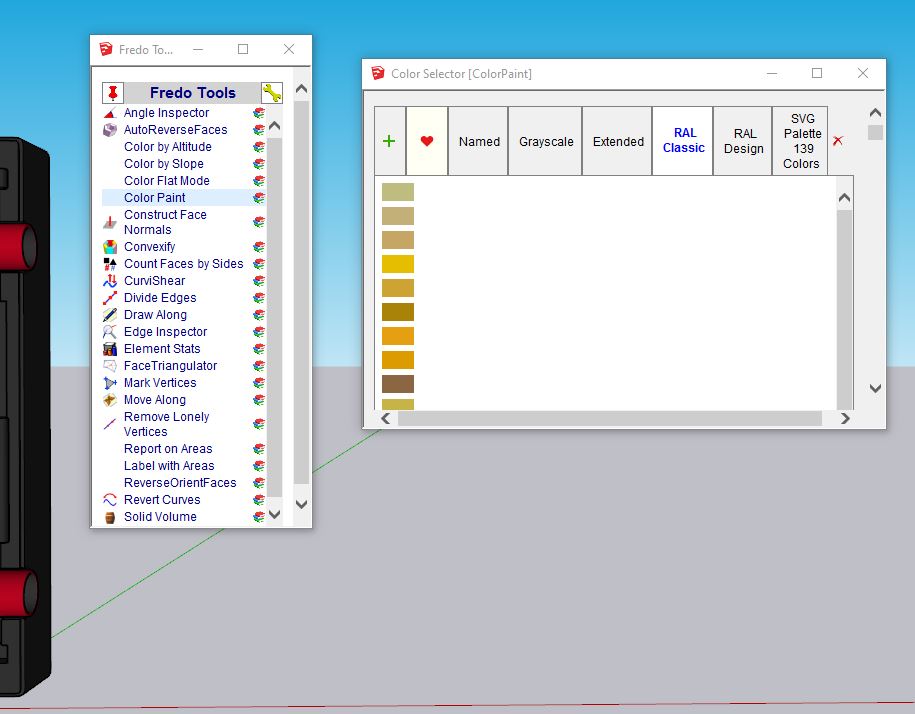
-
@fedser said:
Hi Fredo6, I have a little problem with your plugins in SketchUp 2020
"FredoTools 3.8c" plugin does not display "svg" icons. Color palettes in "Color Paint" do not work. Window size is not saved in all your plugins. In SketchUp 2019, everything was great. (Installed LibFredo6 9.5k). Perhaps this information will help make your plugins perfect. Thank you for your work.
P.S. Sorry for my EnglishWhich Windows system do you have?
Do you always get the problem on SU2020 or since you moved to LibFredo6 9.5k? -
@unknownuser said:
Which Windows system do you have?
Do you always get the problem on SU2020 or since you moved to LibFredo6 9.5k?Windows 10 Home (v.1903 single language)
Installed LibFredo6 9.5k when switching to SU2020 (clean installation) another version of the plugin is no longer available. I tried a set of SU2019 + LibFredo6 9.5k works fine. -
@fedser said:
@unknownuser said:
Which Windows system do you have?
Do you always get the problem on SU2020 or since you moved to LibFredo6 9.5k?Windows 10 Home (v.1903 single language)
Installed LibFredo6 9.5k when switching to SU2020 (clean installation) another version of the plugin is no longer available. I tried a set of SU2019 + LibFredo6 9.5k works fine.There is something wrong with SU2020 as it seems to use settings for the embedded API to HTML which is not HTML5, explaining no SVG support and all other sorts of visual problems.
I have heard of the problem, but do not remember where.
-
@unknownuser said:
There is something wrong with SU2020 as it seems to use settings for the embedded API to HTML which is not HTML5, explaining no SVG support and all other sorts of visual problems.
I have heard of the problem, but do not remember where.
I tried to say this. But I am not a developer and I can not express myself correctly. I wanted to convey this information to you because you began to use svg often and in SU2020 you will run into a problem. Your plugins are wonderful and we all hope that they will be even better, thank you.
-
When you installed SketchUp v2020 did you do it correctly ?
An incorrect installation can cause unexpected and weird issues...This is the correct way to do it - when it's already installed you can do a "Repair", which shouldn't affect your personal set up...
While logged into your usual Windows user-account ensure SketchUp is not running.
Fine the SketchUp installer's exe file - usually in your Downloads folder ?
Select that exe file's icon, right-click > context-menu > "Run as administrator"
When prompted choose "Repair"
When it's completed restart SketchUp and see if it's any better...Installing a complex app's installer's exe file in any other way will cause unpredictable issues.
So never double-click on the installer's exe file to "Run" it... even if your normal-user has admin-powers it is NOT the same as doing it as I outlined above... -
@TIG
Hi
This action does not solve the problem. I always install SU with administrator rights. I tried to install it on another computer. Problem still exists. The "Portrait" plugin also has a problem with svg. The plugin itself is working properly. SU2019 doesn't have this problem. Maybe this problem is only with me, I wanted to know how it works on your SU2020?
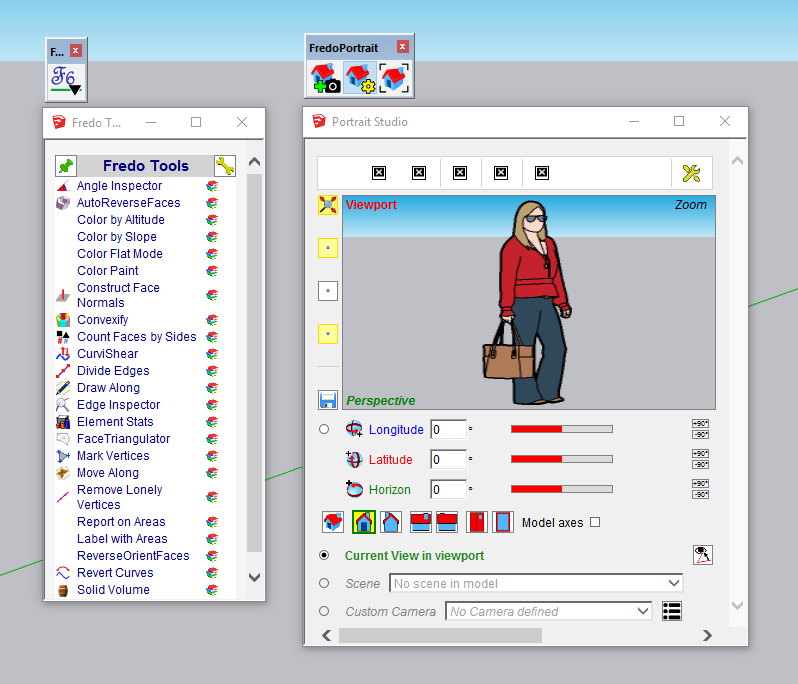
-
@fedser said:
@TIG
Hi
This action does not solve the problem. I always install SU with administrator rights. I tried to install it on another computer. Problem still exists. The "Portrait" plugin also has a problem with svg. The plugin itself is working properly. SU2019 doesn't have this problem. Maybe this problem is only with me, I wanted to know how it works on your SU2020?Exactly same problem here with SU 2020. After reinstalling Windows 10 and upgrading Sketchup 2019 to 2020 on a new ssd on my asus notebook INTEL i7-6700 (windows 10 pro 1909), some Fredo6 plugins are missing svg icons.
I have the same w10 configuration on my Desktop computer AMD RYZEN 7 and everything is absolutely fine.
Tried upgrading nvidia drivers, downgrading them, reinstalling Sketchup.
Many thanks for your plugins anyway... -
The problem has to do with the default web browser on Windows.
For whatever reason, SU2020 seems to use an old version of IE which is not compatible with HTML 5 and does not support SVG.
Why is it OK on SU2019 and not on SU2020 is a mystery.
I don't know how to help on that. I'll try to get some info.
Fredo
-
NEW RELEASE: LibFredo6 v10.0a - 20 Apr 20
LibFredo6 10.0a is the first release of LibFredo6 for SU2016+.
All subsequent versions of LibFredo6 will only be maintained for SU2016+. This is due to a recent change in Trimble policy for the releasing of signed extensions.
For users of Sketchup versions up to SU2015, I have archived the frozen version of LibFredo6 and my other plugin in this post.
See plugin home page of LibFredo6 for Download of LibFredo6.
Main Post of the LibFredo6 thread
Fredo
-
@fredo6 said:
The problem has to do with the default web browser on Windows.
For whatever reason, SU2020 seems to use an old version of IE which is not compatible with HTML 5 and does not support SVG.
Why is it OK on SU2019 and not on SU2020 is a mystery.
I don't know how to help on that. I'll try to get some info.
Fredo
Problem solved, also I am not sure wether I identified the real cause...
I installed sketchup 2019 and I observed it installed Microsoft Visual C++ 2015-2019 which was not installed with sketchup 2020 probably.
Why is a question that I cannot answer but it may be worth exploring for those who are more competent than me.
I then launched sketchup 2020 and everything was fine. I uninstalled skp 2019 and Fredos's plugins aren't missing anything now.
Thank you! -
Sketchup uses an embedded web-browser which comes from Windows and maybe the VC++. So there is an external dependency.
Good to hear that it now works.
Fredo
-
@babak
Just a mystery ... thanks for the solution
but ...
Indeed, if you install both SU2019 and SU2020 everything works fine. But if you remove SU2019, the problem reappears. The problem is not in VC++ 2015-2019 (v14.25.28508), I have this package installed earlier than SU2020. -
NEW RELEASE: LibFredo6 v10.1a - 27 Apr 20
LibFredo6 10.1a is a maintenance release
- Fixes a bug in the interpolation of camera in parallel projections in Animator
- Provide 'eye' icons for Quick Launchers dialogs for Mac
See plugin home page of LibFredo6 for Download of LibFredo6.
Main Post of the LibFredo6 thread
Fredo
-
Fredo6 plugins don't work anymore.
Have a error message on the front page bij starting Sketchup 2020 on Window 10 pro since I load LibFredo6 - v10.1a.
No plugin are available anymore. I have downloading Sketchup 2020 and the Fredo6 plugin again with the same error message as shown below.
I ask for help, thanks.Error Loading File C:/Users/Hugo/AppData/Roaming/SketchUp/SketchUp 2020/SketchUp/Plugins/Fredo6_!LibFredo6/top_LibFredo6.rbe
Failed to read RBE/RBS file.
Error Loading File Fredo6_!LibFredo6.rb
Error: #<NameError: uninitialized constant LibFredo6_Loader::LibFredo6>
C:/Users/Hugo/AppData/Roaming/SketchUp/SketchUp 2020/SketchUp/Plugins/Fredo6_!LibFredo6.rb:65:inprocess' C:/Users/Hugo/AppData/Roaming/SketchUp/SketchUp 2020/SketchUp/Plugins/Fredo6_!LibFredo6.rb:72:inmodule:LibFredo6_Loader'
C:/Users/Hugo/AppData/Roaming/SketchUp/SketchUp 2020/SketchUp/Plugins/Fredo6_!LibFredo6.rb:30:in<top (required)>' Error Loading File Fredo6_FredoSpline.rb Error: #<TypeError: can't convert nil into an exact number> C:/Users/Hugo/AppData/Roaming/SketchUp/SketchUp 2020/SketchUp/Plugins/Fredo6_!LibFredo6.rb:81:in-' -
@wacht79 said:
Fredo6 plugins don't work anymore.
Have a error message on the front page bij starting Sketchup 2020 on Window 10 pro since I load LibFredo6 - v10.1a.
No plugin are available anymore. I have downloading Sketchup 2020 and the Fredo6 plugin again with the same error message as shown below.Very strange, because you get the infamous message "Failed to read RBE/RBS file.", which usually comes from a permissions problem arising from the incorrect installation of Sketchup itself (you must Run the installer's exe as Administrator).
Did you try to reinstall Sketchup?
-
@unknownuser said:
Very strange, because you get the infamous message "Failed to read RBE/RBS file.", which usually comes from a permissions problem arising from the incorrect installation of Sketchup itself (you must Run the installer's exe as Administrator).
Did you try to reinstall Sketchup?
I reinstall Sketchup 2020 pro again and also Fredo6 Lib with the same result.




Advertisement