sketchucation logo sketchucation
    • 登入
    Oops, your profile's looking a bit empty! To help us tailor your experience, please fill in key details like your SketchUp version, skill level, operating system, and more. Update and save your info on your profile page today!
    🔌 Smart Spline | Fluid way to handle splines for furniture design and complex structures. Download

    [Plugin] Put shadow on current day and hour

    已排程 已置頂 已鎖定 已移動 Plugins
    22 貼文 10 Posters 17.1k 瀏覽 10 Watching
    正在載入更多貼文
    • 從舊到新
    • 從新到舊
    • 最多點贊
    回覆
    • 在新貼文中回覆
    登入後回覆
    此主題已被刪除。只有擁有主題管理權限的使用者可以查看。
    • M 離線
      Matt666
      最後由 Matt666 編輯

      Hi all!
      I created a mini-plugin that puts shadows on current date and hour. But when I try it, SU "forgets" one hour... I don't know why!
      Perhaps it depends of country it is installed and customized...
      So: Can you test it, and tell me if SU forgets this hour out of France??? Or can you tell me why?

      Thank you! 😉

      %(#BF0000)[EDIT: Problem solved. Plugin works!
      EDIT2: Works well on SU V7 free and Pro. If you use an older version, please Jim's plugin to set your location.]


      Shadows=Now! in plugins menu

      Frenglish at its best !
      My scripts

      1 條回覆 最後回覆 回覆 引用 0
      • pilouP 離線
        pilou
        最後由 編輯

        Is that work also with the free version who has only a default Days hours location place?

        Frenchy Pilou
        Is beautiful that please without concept!
        My Little site :)

        1 條回覆 最後回覆 回覆 引用 0
        • D 離線
          Daniel S
          最後由 編輯

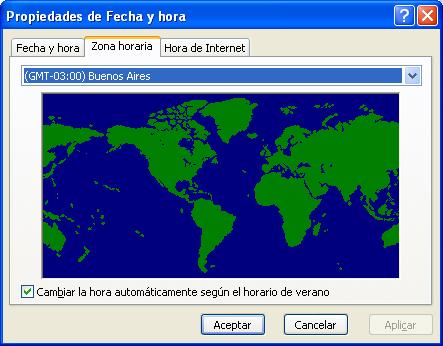
          I´m in Argentina. My current time is 8:49 am and the plugin says 11:49 am.
          I think that the difference of three hours is because i´m in GMT -3.

          Daniel S


          myhour.JPG

          1 條回覆 最後回覆 回覆 引用 0
          • M 離線
            Matt666
            最後由 編輯

            Ok, thank you Daniel!
            Can you try code updated in the first post, please?

            @unknownuser said:

            Is that work also with the free version who has only a default Days hours location place?
            Hi Pilou! I have a free version. So yes, it could works on it! 😉

            Frenglish at its best !
            My scripts

            1 條回覆 最後回覆 回覆 引用 0
            • D 離線
              Daniel S
              最後由 編輯

              Now is working right...
              I´m happy with this version... my country is happy too!! 😛

              Thank you,
              Daniel S

              1 條回覆 最後回覆 回覆 引用 0
              • M 離線
                Matt666
                最後由 編輯

                🤣

                Frenglish at its best !
                My scripts

                1 條回覆 最後回覆 回覆 引用 0
                • W 離線
                  watkins
                  最後由 編輯

                  Dear Matthieu,

                  A brief explanation would be useful. I take it that your plugin updates shadows to the current, local time when selected. So, if I select the plugin at 15:25 Oxford UK time, the shadows show correctly for that location and time. Is that correct?

                  Regards,
                  Bob

                  1 條回覆 最後回覆 回覆 引用 0
                  • K 離線
                    KevinKarney
                    最後由 編輯

                    Hi All
                    To correctly display the shadow of an object, one needs the
                    "Local Apparent Solar Time" - which is a function of the Sun's altitude and azimuth in the sky at your particular location. The local apparent solar time is 12:00 when the Sun is due South (or North in the Southern Hemisphere).

                    Your watch and your computer indicate Civil Mean Time which is related to "UTC (Universal Time Coordinated)" - which is Atomic Time (and within a hair's breadth is the same as the out-of-date Greenwich Mean Time). Atomic Time is maintained by the Bureau International des Poids et Meseurs, which is a UN Agency. It averages out the time from a large number of atomic Cesium clocks around the world

                    Civil Mean Time = UTC + Time Zone + Daylight Saving Hours

                    Local Mean Time = Civil Mean Time +/- (the Longitude difference between your time zone longitude and your local Longitude) * 4 minutes

                    Local Apparent Solar Time = Local Mean Time + "The Equation of Time"

                    The Equation of Time is the difference between mean and apparent time. There is a difference between the two, since the Mean Sun (by definition!) is a virtual object that goes around the equator at a uniform speed, while the True Sun moves around the Ecliptic (23 deg to the Equator) at a non-uniform speed (in a ellipse). I attach a graph of the Equation of Time.

                    Confused.... But Sketchup has all this technology built in! It's shadows are spot-on for local apparent solar time.

                    Check this out 1) set June 14th when the equation of time is zero. 2) set your local Latitude and Longitude. 3) Draw a vertical stick. 4) Select the time around midday when the shadow is due North or South. The time you get +/- 12 will be the difference in longitude between your time zone longitude and your local longitude * 4.


                    Equation of Time

                    Best Regards
                    Kevin Karney

                    1 條回覆 最後回覆 回覆 引用 0
                    • pilouP 離線
                      pilou
                      最後由 編輯

                      @unknownuser said:

                      Hi Pilou! I have a free version. So yes, it could works on it!

                      Yes but what about good Latitude, longitude inside the free?

                      Frenchy Pilou
                      Is beautiful that please without concept!
                      My Little site :)

                      1 條回覆 最後回覆 回覆 引用 0
                      • M 離線
                        Matt666
                        最後由 編輯

                        Hi Pilou!
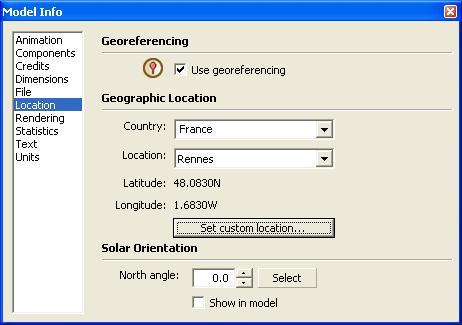
                        I don't know. I do some tests, and Longitude/latitude parameter is customized in menu Window/Model info->Location.
                        Sans titre 1.jpg
                        Copy and paste code below in the ruby console, you will have all shadow infos.

                        Sketchup.active_model.shadow_info.keys.each{|k|puts(k+"; "+Sketchup.active_model.shadow_info[k].to_s)}
                        

                        Hi KevinKarney!
                        Sorry, but I don't understand you problem (my poor english!!)... This plugin just putd SU shadows on the current date & time... Can you tell me what I should do to correctly display the shadow of an object? Thank you! 😄 If I able to..

                        Frenglish at its best !
                        My scripts

                        1 條回覆 最後回覆 回覆 引用 0
                        • pilouP 離線
                          pilou
                          最後由 編輯

                          @Matt : this don't exist in the free 😒
                          Console gives that

                          City: Boulder (CO)
                          Country: USA

                          Latitude: 40.017
                          Longitude: -105.283

                          ShadowTime: Fri Nov 08 14:30:00 Paris, Madrid 2002 (Normal I have this regulate at this time)
                          I must verify what place is
                          Latitude: 40.017
                          Longitude: -105.283

                          Frenchy Pilou
                          Is beautiful that please without concept!
                          My Little site :)

                          1 條回覆 最後回覆 回覆 引用 0
                          • TIGT 離線
                            TIG Moderator
                            最後由 編輯

                            http://download.sketchup.com/OnlineDoc/gsu6_win/Content/S-Common_Tasks/Tasks-SettingLocation.htm

                            Explains difference between Pro and Free Location Tools...

                            TIG

                            1 條回覆 最後回覆 回覆 引用 0
                            • J 離線
                              Jim
                              最後由 編輯

                              This is my solution for version 6 Free users:

                              Link Preview Image
                              Plugin: Model Location

                              * This plug-in was made for SketchUp version 6 Free because it lacked the dialog (which Pro had) to change these settings. This has become ...

                              favicon

                              (sketchuptips.blogspot.com)

                              Version 7 Free does include the Location settings.

                              Hi

                              1 條回覆 最後回覆 回覆 引用 0
                              • pilouP 離線
                                pilou
                                最後由 編輯

                                Thx for all these tricky solutions ☀

                                Frenchy Pilou
                                Is beautiful that please without concept!
                                My Little site :)

                                1 條回覆 最後回覆 回覆 引用 0
                                • M 離線
                                  Matt666
                                  最後由 編輯

                                  Aah, ok... Pilou uses V6!
                                  You are completely out, man! 🤣

                                  Frenglish at its best !
                                  My scripts

                                  1 條回覆 最後回覆 回覆 引用 0
                                  • GaieusG 離線
                                    Gaieus
                                    最後由 編輯

                                    Yup,Location was not put into the free (Windows*) SU 5 and 6 but now with SU 7 it's there. Nevertheless by taking a GE snapshot, you can always "geolocate" your model (or use Jim's plugin)


                                    *Interestingly, it was only a Windows "(un)feature" only, as the Free SU 6 for the Mac has location. 😒

                                    Gai...

                                    1 條回覆 最後回覆 回覆 引用 0
                                    • M 離線
                                      Matt666
                                      最後由 編輯

                                      Ok, thank you Gaieus!

                                      @watkins said:

                                      A brief explanation would be useful. I take it that your plugin updates shadows to the current, local time when selected. So, if I select the plugin at 15:25 Oxford UK time, the shadows show correctly for that location and time. Is that correct?
                                      Exactly, watkins 😉

                                      Frenglish at its best !
                                      My scripts

                                      1 條回覆 最後回覆 回覆 引用 0
                                      • P 離線
                                        Pout
                                        最後由 編輯

                                        i would at this to your script:

                                        Sketchup.active_model.shadow_info["DisplayShadows"]=true
                                        This will immediately also show the shadow in the model.
                                        Otherwise one will not see the shadows if the are not set on

                                        1 條回覆 最後回覆 回覆 引用 0
                                        • R 離線
                                          remus
                                          最後由 編輯

                                          Pout, turning on shadows as soon as you set them could be a little annoying, as it would lock SU up in a large model. Better to leave them off (if they are already off) and let the user turn them on, i reckon.

                                          http://remusrendering.wordpress.com/

                                          1 條回覆 最後回覆 回覆 引用 0
                                          • M 離線
                                            Matt666
                                            最後由 編輯

                                            Yep, that's why I didn't set shadows on in the code... 😉

                                            Frenglish at its best !
                                            My scripts

                                            1 條回覆 最後回覆 回覆 引用 0
                                            • 1
                                            • 2
                                            • 2 / 2
                                            • 第一個貼文
                                              最後的貼文
                                            Buy SketchPlus
                                            Buy SUbD
                                            Buy WrapR
                                            Buy eBook
                                            Buy Modelur
                                            Buy Vertex Tools
                                            Buy SketchCuisine
                                            Buy FormFonts

                                            Advertisement