[REQ] Fold or Bend?
-
Lets think through it a little bit.
Should it try to add any geometry so that the model bends better/smoother? Or should it be expected that the user has put in enough detail for the model to actually bend. For example, an elongated cube made up of just 6 sides will not bend because there are no bend points in it. The user would have to divide it into smaller pieces so that it could bend. Or the script could attemp to add bend points into the model (I don't know how to go about this). It seems like that would be cool to implement a way for the script subdivide objects, but I don't know exactly how that would work. But it seems like it should be do-able. Heck, subdivide and smooth does it. But it would be significantly easier if the user would divide it all up first.
Also, how should it handle components/groups. I would guess that it would be ideal to have it make the component unique and then bend it too. But it would be easiest if it could just ignore comps/groups.
Also, I have feeling that if that elongataed cube was off axis, SU would have a hard time fitting a box around it to use as the bend bounding box. So the easy to code answer is to have user to align the model to an axis first, then bend it.
I have not really played with other program's bend functions. Maybe I should go through the 3dsmax bend modifier. I think it only works with the geometry as the user made it - it doesn't subdivide it for you I think.
Anyhow, those are some initial thoughts on how it could be implemented. I'm sure it sould be started small and basic and then be improved on over time.
Chris
-
Chris, I'll PM you with some details shortly.
Dave
-
@chris fullmer said:
LI have not really played with other program's bend functions. Maybe I should go through the 3dsmax bend modifier. I think it only works with the geometry as the user made it - it doesn't subdivide it for you I think.
in this thread:
http://www.sketchucation.com/forums/scf/viewtopic.php?f=180&t=17151
you'll see an animated gif from bonzai3d showing it's bend modifier. i've exported a few shapes to sketchup from a couple of different programs (bonzai3d and cheetah3d) prior to bending them.. the unbent shapes are simple with no subdivision.. apparently, the software controls the subdivision and it's not necessary for the user to divide the shapes prior to modifying them.. -
That bendy bonzai3d one was precisely the image I had in my mind while I was writing this out. The abilty of the script to subdivide is interesting and challenging. It sould be straightforward for a shape like that. But what when people try to bend large complex models. Seems tricky.
Chris
-
Slightly different, but closer to your image is the idea of fitting shapes to a path or to other shapes. This idea keeps popping up in my mind. It would be cool to draw the straight version of your wall, then draw a path that is the shape of the curve and then have the wall matchitself up tot he curve. That would be useful too.
Chris
-
@chris fullmer said:
Slightly different, but closer to your image is the idea of fitting shapes to a path or to other shapes. This idea keeps popping up in my mind. It would be cool to draw the straight version of your wall, then draw a path that is the shape of the curve and then have the wall matchitself up tot he curve. That would be useful too.
Chris
useful indeed... i personally have an exact instance to use such a thing that is a pain to draw in sketchup.. i'm running out right now but i'll post up an example later today.
-
@chris fullmer said:
Slightly different, but closer to your image is the idea of fitting shapes to a path or to other shapes. This idea keeps popping up in my mind. It would be cool to draw the straight version of your wall, then draw a path that is the shape of the curve and then have the wall matchitself up tot he curve. That would be useful too.
Chris
Something like this?
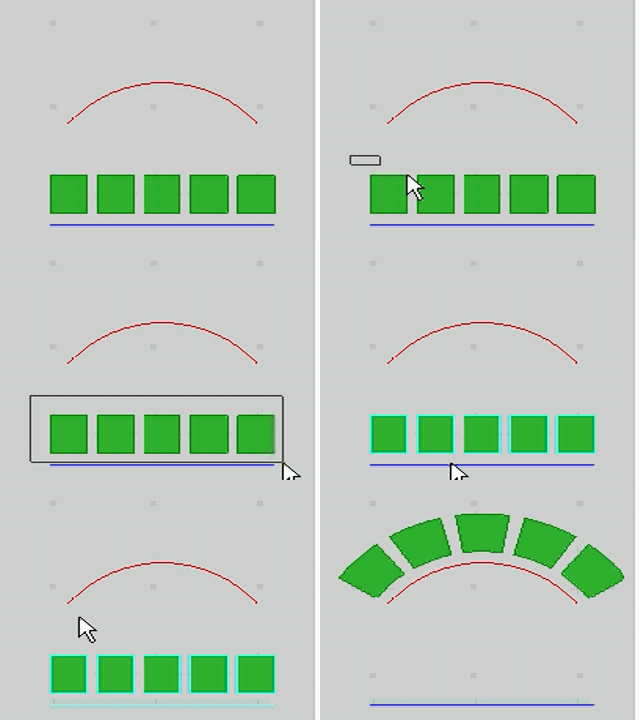
Daniel S
-
Yeah, thats pretty much what I'd have in mind for one version of it. That was not SU, right?

Chris
-
Chris, did you get my PM?
-
@chris fullmer said:
Yeah, thats pretty much what I'd have in mind for one version of it. That was not SU, right?
Chris
Not SU. It`s an option called flow... Here is an example of Flow on a Surface:
[flash=800,450:3v3daw0b]http://vimeo.com/moogaloop.swf?clip_id=3111916&server=vimeo.com&show_title=0&show_byline=0&show_portrait=0&color=00adef&fullscreen=1[/flash:3v3daw0b]
Daniel S
-
Yes DAve, I got your PM and looked at the model. The woodworking terms and ideas were over my head
, but the model looked good. Its given me some ideas. I don't know if bend is precisely the right word for what needs to happen in your model Dave. It seems more like a "flow" as shown in the video above. Fit existing geometry onto a warped surface. Lots of great ideas here. I'll see if I can get any simple geometry to bend, warp, transform, subdivide - ANYTHING. If I get anything working, I'll post it here.Chris
-
Thanks Chris. You may be right regarding what to call it.



Hello! It looks like you're interested in this conversation, but you don't have an account yet.
Getting fed up of having to scroll through the same posts each visit? When you register for an account, you'll always come back to exactly where you were before, and choose to be notified of new replies (either via email, or push notification). You'll also be able to save bookmarks and upvote posts to show your appreciation to other community members.
With your input, this post could be even better 💗
Register Login


Advertisement