sketchucation logo sketchucation
    • 登入
    Oops, your profile's looking a bit empty! To help us tailor your experience, please fill in key details like your SketchUp version, skill level, operating system, and more. Update and save your info on your profile page today!
    🔌 Smart Spline | Fluid way to handle splines for furniture design and complex structures. Download

    [Plugin] Perpendicular Face Tools (UPDATED 26-03-09)

    已排程 已置頂 已鎖定 已移動 Plugins
    201 貼文 64 Posters 186.0k 瀏覽 65 Watching
    正在載入更多貼文
    • 從舊到新
    • 從新到舊
    • 最多點贊
    回覆
    • 在新貼文中回覆
    登入後回覆
    此主題已被刪除。只有擁有主題管理權限的使用者可以查看。
    • MALAISEM 離線
      MALAISE
      最後由 編輯

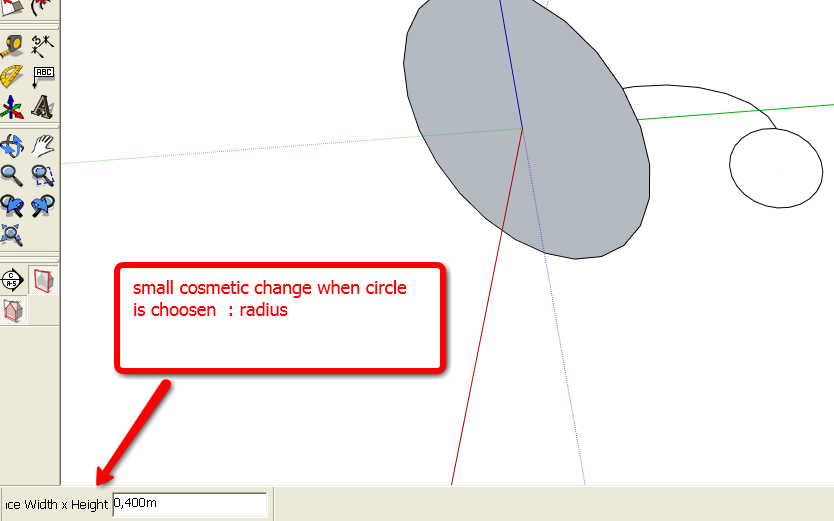
      Hi Chris, really good tool 😍

      Just have a look :

      MALAISE


      Plugin_Clf.png

      La Connaissance n'a de valeur que partagée

      1 條回覆 最後回覆 回覆 引用 0
      • Chris FullmerC 離線
        Chris Fullmer
        最後由 編輯

        Hmm, interesting I'll look at that cosmetic issue.

        Also, is there someone on a Mac who would be able to help me find the right key for the up arrow? You would just install the little ruby attached to this message like a regular ruby. Then run sketchup. Open the ruby console and type:

        load 'key_finder.rb'

        After you type that, leave the ruby console open. And click back into the Sketchup window. Then press the up arrow. A message will display in the ruby console. Hopefully something like

        The Key identifier is: 38

        Could you please copy and paste that message back here for me?

        Probably just delete the file from your plugins folder afterwards. Thanks

        Chris


        key_finder.rb

        Lately you've been tan, suspicious for the winter.
        All my Plugins I've written

        1 條回覆 最後回覆 回覆 引用 0
        • jeff hammondJ 離線
          jeff hammond
          最後由 編輯

          The Key idenetifier is: 63232
          (that's for the up arrow)

          [took me a while to figure out how to open the ruby console 😆 ]

          dotdotdot

          1 條回覆 最後回覆 回覆 引用 0
          • Chris FullmerC 離線
            Chris Fullmer
            最後由 編輯

            Excellent, thanks! I'll try to get that worked into the code tonight.

            Also, I've thought about trying to make it more compatible with multiple faces. It would not be all that difficult to make it work with multiple flat faces. It would take a little bit more work to get it to work with non-planar faces. But I have a feeling that if I sat down and tried to make it work like that, I would also iron out the bug that makes the custom face tool slightly unpredictable. So maybe it would be good. But multiple planar faces would actually probably be pretty straightforward to implement.

            Thanks for the help and suggestions everyone,

            Chris

            Lately you've been tan, suspicious for the winter.
            All my Plugins I've written

            1 條回覆 最後回覆 回覆 引用 0
            • J 離線
              Jim
              最後由 編輯

              Don't the key constants work? It seems like the most portable solution.

              Hi

              1 條回覆 最後回覆 回覆 引用 0
              • Chris FullmerC 離線
                Chris Fullmer
                最後由 編輯

                Well, yes. But I would nee dot figure out how to use those 😳

                Also, I didn't spend a lot of time with them because I wanted to use the up arrow key, which it seems is not supported with the key constants.

                Have any hints how to you use those and which is best? I like ctrl on the PC, but it apparently conflict on the Mac.

                Chris

                Lately you've been tan, suspicious for the winter.
                All my Plugins I've written

                1 條回覆 最後回覆 回覆 引用 0
                • J 離線
                  Jim
                  最後由 編輯

                  Well, then we woo nee dot show lkie tihs.

                  
                  if key == VK_UP
                    # do this
                  end


                  Hi

                  1 條回覆 最後回覆 回覆 引用 0
                  • jeff hammondJ 離線
                    jeff hammond
                    最後由 編輯

                    @chris fullmer said:

                    I like ctrl on the PC, but it apparently conflict on the Mac.

                    actually, i'm not quite sure ctrl would conflict..
                    ctrl is used with some other tools:

                    cmd-ctrl-leftclick = orbit
                    shift-ctrl with the eraser = unsoften/unsmooth

                    i was just saying earlier that it's generally used for right clicking if you use apple's one button mouse.

                    with the orbit example, i can ctrl-leftclick and get the context menu or i can add the command key and start orbiting.. i'm guessing it won't be a problem to use ctrl for the rotate function in your script and besides, it would probably be nicer to have a key on the left side of the keyboard instead of the right..

                    is there anyway i can test a ruby with a ctrl modifier to see if it works on a mac?

                    dotdotdot

                    1 條回覆 最後回覆 回覆 引用 0
                    • Chris FullmerC 離線
                      Chris Fullmer
                      最後由 編輯

                      @jim said:

                      Well, then we woo nee dot show lkie tihs.

                      
                      > if key == VK_UP
                      >   # do this
                      > end
                      > 
                      

                      I am a bad typer and a fast typer.....they don't go together well!

                      Thanks for the tip Jim. Is there a way to list all the constants? I tried constant_variables (like global_variables does for globals), but thats not it. Is there a variable that contains all the initialized constants?

                      Chris

                      Lately you've been tan, suspicious for the winter.
                      All my Plugins I've written

                      1 條回覆 最後回覆 回覆 引用 0
                      • Dave RD 離線
                        Dave R
                        最後由 編輯

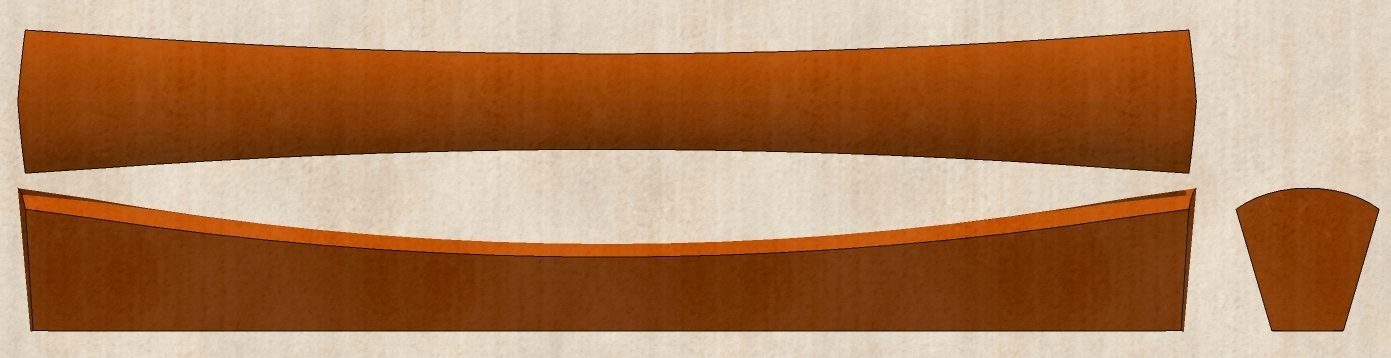
                        Chris, I've been playing with this plugin some more. I like it in case you haven't noticed. 😄

                        Drawer Pull.jpg
                        This is a drawer or door pull or maybe a handle for the lid of an Asian influenced box.

                        Etaoin Shrdlu

                        %

                        (THERE'S NO PLACE LIKE)

                        G28 X0.0 Y0.0 Z0.0

                        M30

                        %

                        1 條回覆 最後回覆 回覆 引用 0
                        • Chris FullmerC 離線
                          Chris Fullmer
                          最後由 編輯

                          Dave, how are you getting the scale to change over the length of the shape? My tool only places the face on the line, but your shapes are all changing scale along their path quite smoothly. What is the trick there?

                          Chris

                          Lately you've been tan, suspicious for the winter.
                          All my Plugins I've written

                          1 條回覆 最後回覆 回覆 引用 0
                          • Dave RD 離線
                            Dave R
                            最後由 編輯

                            Chris, I'd love to tell you something like, "I found a loophole in your script." 😆 Alas, I'm just scaling the faces after placing them. In the case of the last image I posted, I drew a Bezier curve for the path--the curve you see in the top view--and another for the curve you see in the side view. I drew the custom face as half the profile and used your script to put it at the vertices along the curve. I rotated the large end profile 5° off vertical for this pull and then scaled all of them to height to match that upper curve.

                            After that was all done, I exploded the faces, deleted the faces leaving the edges and used the Skin plugin to fill things in. I only made a quarter of the handle, made it a component and copied/fipped it to make the other three quarters.

                            I probably don't need to use your plugin to create this but it is so quick at putting the faces in at the desired points and I think the end shape looks a bit nicer with the faces turned at each vertex to split the angle.

                            Etaoin Shrdlu

                            %

                            (THERE'S NO PLACE LIKE)

                            G28 X0.0 Y0.0 Z0.0

                            M30

                            %

                            1 條回覆 最後回覆 回覆 引用 0
                            • Chris FullmerC 離線
                              Chris Fullmer
                              最後由 編輯

                              @dave r said:

                              Chris, I'd love to tell you something like, "I found a loophole in your script." 😆

                              Ha, yeah right. A "loophole" in my script would be more likely to crash your system indefintely than create unexpected awesome geometry 😄

                              Thanks for the explanation. I was wondering how you were getting the scaleing to come out so evenly. The bezier above them makes a lot of sense,

                              Chris

                              Lately you've been tan, suspicious for the winter.
                              All my Plugins I've written

                              1 條回覆 最後回覆 回覆 引用 0
                              • takesh hT 離線
                                takesh h
                                最後由 編輯

                                An interesting Ruby, Chris. This can be really handy.
                                One wish from me - Is it possible to pick a reference point (a vertice that sticks to the path) when placing profiles onto a path?
                                Right now it uses centers (more or less) of faces?

                                1 條回覆 最後回覆 回覆 引用 0
                                • Dave RD 離線
                                  Dave R
                                  最後由 編輯

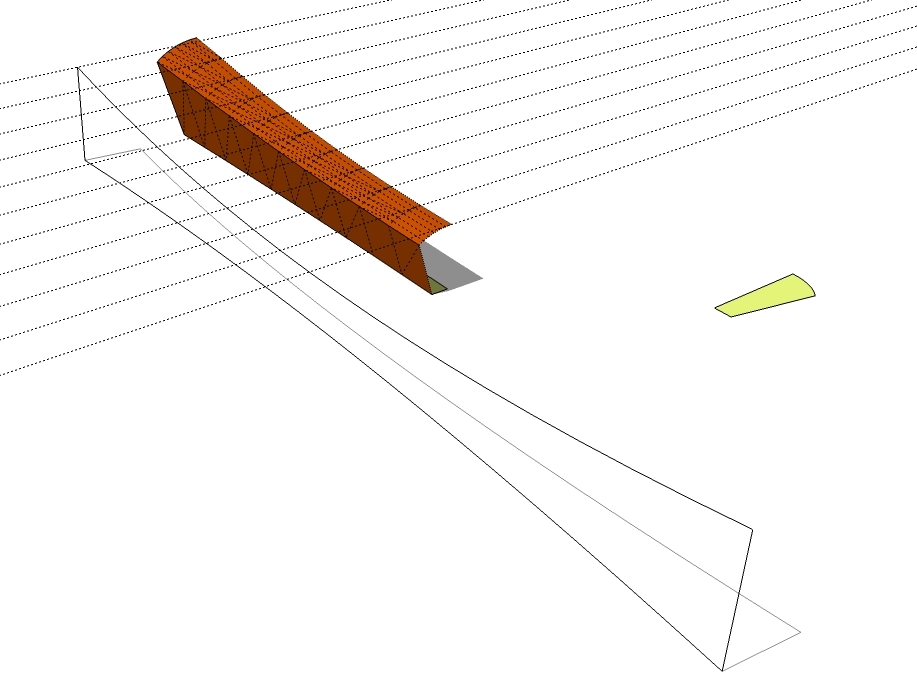
                                  Chris, I don't mean to be getting off topic but here's sort of a deconstruction of the thing. The horizontal guides intersect the Bezier curve at the nodes or vertices. (Is it proper to call them nodes?) You can see the Bezier drawn on the ground plane, too. I copied that one and used the copy as the "path" for placing the faces with your plugin. All of this runs parallel to the red axis. Which you would glean from the position of the original face shown in green off to the right.

                                  I did have to scale the faces in the green direction to get the vertical edges to lie on the centerline of the handle.
                                  Drawer Pull Explained.jpg

                                  Etaoin Shrdlu

                                  %

                                  (THERE'S NO PLACE LIKE)

                                  G28 X0.0 Y0.0 Z0.0

                                  M30

                                  %

                                  1 條回覆 最後回覆 回覆 引用 0
                                  • X 離線
                                    xrok1
                                    最後由 編輯

                                    @unknownuser said:

                                    Thanks for the explanation. I was wondering how you were getting the scaleing to come out so evenly. The bezier above them makes a lot of sense,

                                    wouldn't it be awsome if you could get you're script to do that automatically?!! 😛 scale to curves. WOW! how about this; draw to curves (rails) at get the profile to copy and scale at given intervals, say /6 or /12 or whatever. 😛

                                    now that would be a great tool!!!!!!!!!!!

                                    “There are three classes of people: those who see. Those who see when they are shown. Those who do not see.”

                                    http://www.Twilightrender.com try it!

                                    1 條回覆 最後回覆 回覆 引用 0
                                    • X 離線
                                      xrok1
                                      最後由 編輯

                                      @takesh h said:

                                      An interesting Ruby, Chris. This can be really handy.
                                      One wish from me - Is it possible to pick a reference point (a vertice that sticks to the path) when placing profiles onto a path?
                                      Right now it uses centers (more or less) of faces?

                                      place a constuction point and you should be able to use that.

                                      “There are three classes of people: those who see. Those who see when they are shown. Those who do not see.”

                                      http://www.Twilightrender.com try it!

                                      1 條回覆 最後回覆 回覆 引用 0
                                      • Chris FullmerC 離線
                                        Chris Fullmer
                                        最後由 編輯

                                        Yeah, it would be very easy to make it recognize a construvtion point as the placement point. So next round:

                                        Near future:
                                        Add construction point placement
                                        Fix rotation keys
                                        Add multiple flat face support for the custom tool.

                                        Distant Future:
                                        Re-write custom face tool to rotate correctly always.

                                        My Next Life:
                                        Turn it into a proper sweep tool with multiple deformation methods.

                                        Lets hope for the best 😄

                                        Chris

                                        And thanks for the detail on that Dave, quite useful. It might be possible to implement that funcitonality. Is that something that is wideuly used enough that it woul be helpful?

                                        Lately you've been tan, suspicious for the winter.
                                        All my Plugins I've written

                                        1 條回覆 最後回覆 回覆 引用 0
                                        • Dave RD 離線
                                          Dave R
                                          最後由 編輯

                                          Chris, if the function was available I think it would be used a lot by certain woodworkers who are using SU for designing their work. I can imagine others would use it as well. I've drawn a number of pieces utilizing the method I used for that handle such as table legs but I've always had to manually place the faces. I always found that the more tedious part of the process.

                                          If you could automate the sizing of the faces, it would be very handy. I think working to nodes on the curves would be good.

                                          I tend to halve or quarter more complex shapes such as that handle because they're generally a small part of a larger project and I don't want their contribution to the file size to exceed their worth if you know what I mean. I wonder if there would be a way in a dialog box to ask if the shape is half of a symmetric profile and should one edge of the profiles be aligned. Or maybe the scaling could be done such that the faces fit between top and bottom lines and left and right lines. If one of the pair of lines is straight, it could be used as the line of symmetry. Does that make any sense?

                                          Not to dump a lot on you but the topper would be to roll the Skin plugin into your script. The process would be place the faces along the path, scale them to fit between the "sweep" curves, explode the face groups, delete the faces leaving the edges, skin between them and smooth the edges. What do you think of that?

                                          Etaoin Shrdlu

                                          %

                                          (THERE'S NO PLACE LIKE)

                                          G28 X0.0 Y0.0 Z0.0

                                          M30

                                          %

                                          1 條回覆 最後回覆 回覆 引用 0
                                          • Chris FullmerC 離線
                                            Chris Fullmer
                                            最後由 編輯

                                            I've got a few scripts in mind that deal with similar functions. We'll see if I attempt to write it into this one, or create a totally new script. I would definitely like to investigate this area of scripts. They sound like a lot of fun.

                                            Chris

                                            Lately you've been tan, suspicious for the winter.
                                            All my Plugins I've written

                                            1 條回覆 最後回覆 回覆 引用 0
                                            • 1
                                            • 2
                                            • 7
                                            • 8
                                            • 9
                                            • 10
                                            • 11
                                            • 9 / 11
                                            • 第一個貼文
                                              最後的貼文
                                            Buy SketchPlus
                                            Buy SUbD
                                            Buy WrapR
                                            Buy eBook
                                            Buy Modelur
                                            Buy Vertex Tools
                                            Buy SketchCuisine
                                            Buy FormFonts

                                            Advertisement