sketchucation logo sketchucation
    • Login
    Oops, your profile's looking a bit empty! To help us tailor your experience, please fill in key details like your SketchUp version, skill level, operating system, and more. Update and save your info on your profile page today!
    Mac User? | Join the Rayscaper Beta for Mac Learn More

    [Plugin] Perpendicular Face Tools (UPDATED 26-03-09)

    Scheduled Pinned Locked Moved Plugins
    201 Posts 64 Posters 216.4k Views 65 Watching
    Loading More Posts
    • Oldest to Newest
    • Newest to Oldest
    • Most Votes
    Reply
    • Reply as topic
    Log in to reply
    This topic has been deleted. Only users with topic management privileges can see it.
    • B
      Ben Ritter
      last edited by

      Chris,

      A big thank you again for your generosity. Nice work!

      Ben

      1 Reply Last reply
      Reply Quote 0
      • Chris FullmerC
        Chris Fullmer
        last edited by

        Thanks guys. Tig, that makes sense. For some reason I was imaging a transformation as something that erases previous transformations effects once applied. So apply one transformation and it does that. Apply another and it jumps back to the original state before the first transformation and then applies the new transformation. I see now that its not like that (thank goodness). Seems silly I was confused since on hte custom face part I apply a translation first and then a rotation. I should have realized that transformations do not erase the effects of the previous transformation. So yes, I like the methods you describe to always have an edge horizontal. That seems quite logical.

        Would there be a demand to have the custom face option accept more than one face? I know some of my profiles I use often include 3 or different faces that I want to use. So perhaps I'll try and make it accept multiple faces as long as they are co-planar.

        Also I need to make it work when clicking on an edge, not just an end point. Some instances, like when the path makes a completed loop like a circle, there are no endpoints to use. So I'll get that into my next update. Maybe a toolbar too. I think I've got some extra time today during class 😄

        Chris

        Lately you've been tan, suspicious for the winter.
        All my Plugins I've written

        1 Reply Last reply
        Reply Quote 0
        • free agentF
          free agent
          last edited by

          awsome chris!! a time saver, the essence of ruby 😄... now try some UV mapping scripts 😄.... my biggest current peeve in SU (there are so many)

          http://i167.photobucket.com/albums/u143/FreeAgent84/bug.gif

          1 Reply Last reply
          Reply Quote 0
          • MALAISEM
            MALAISE
            last edited by

            👍 👍

            MALAISE

            La Connaissance n'a de valeur que partagée

            1 Reply Last reply
            Reply Quote 0
            • BurkhardB
              Burkhard
              last edited by

              seems somebody understands! great tool and more as I expected 👍

              http://www.ia-plus.de

              1 Reply Last reply
              Reply Quote 0
              • Chris FullmerC
                Chris Fullmer
                last edited by

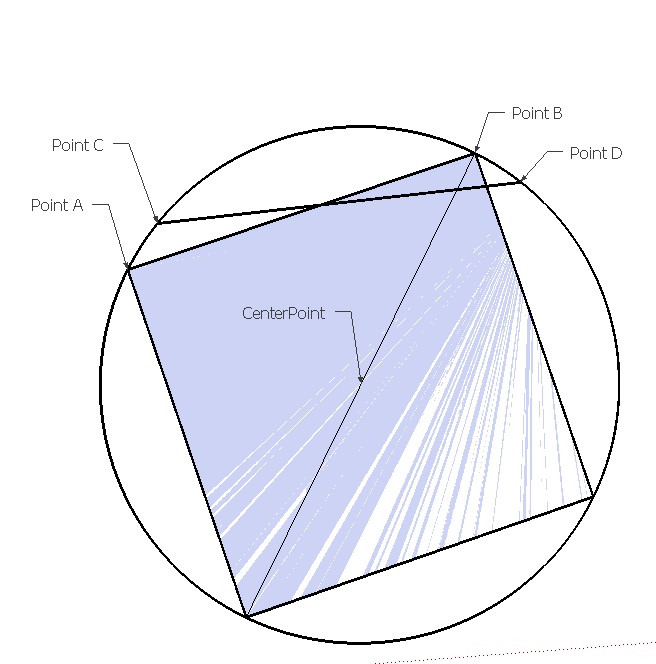
                ok, I'm struggling to get the rotations to work. I'm working on the square first. I can get it to rotate nicely around the z-axis. But I have not figured out a way to determine exactly how much to rotate it to get it where I want. I think this is just my lack of general mathematical knowledge. So can anyone offer some help with this? The image shows a mock-up of the problem. The square is what I am rotating on the labeled centerpoint. Chord AB needs to align with chord CD. But chord AB is not supplied. It is the vector made of 2 points where the y values are equal and its length is equal to AB.

                I'm sure that explanation makes no sense. Hopefully someone out there can read between the lines and figure out what I'm actually asking. Thanks,
                rotationhelp.jpg

                Chris

                Lately you've been tan, suspicious for the winter.
                All my Plugins I've written

                1 Reply Last reply
                Reply Quote 0
                • X
                  xrok1
                  last edited by

                  could you not just align one of the sides to vertical (z)?

                  “There are three classes of people: those who see. Those who see when they are shown. Those who do not see.”

                  http://www.Twilightrender.com try it!

                  1 Reply Last reply
                  Reply Quote 0
                  • Chris FullmerC
                    Chris Fullmer
                    last edited by

                    No, it doesn't show it well, but the sides are often not vertical. The alignment needs to make the top and bottom lie on planes that are "flat", but the sides are not necessarily vertical.

                    Lately you've been tan, suspicious for the winter.
                    All my Plugins I've written

                    1 Reply Last reply
                    Reply Quote 0
                    • P
                      putnik
                      last edited by

                      Thank you Chris A very useful script, am using it right now

                      http://keshas.info

                      1 Reply Last reply
                      Reply Quote 0
                      • L
                        linea
                        last edited by

                        Thanks Chris.

                        1 Reply Last reply
                        Reply Quote 0
                        • erikBE
                          erikB
                          last edited by

                          Chris,
                          Thanks for the usefull ruby !
                          erikB

                          1 Reply Last reply
                          Reply Quote 0
                          • Chris FullmerC
                            Chris Fullmer
                            last edited by

                            Your response hasn't gone un-noticed Tig. I thank you immensely for it. I'm still working on implementing it 😳 I think there is a small flaw in that I don't point C either. I think I know how to get it, so thats good. In fact, it is essentially what you provided with the "cosine rule". Thanks for that! That is currently what I'm working at. I had one method, but it was rather convoluted and started to fall apart for some reason, so I think it must not have been sound. This new method feels much more mathematically correct. I'll let you know how it goes. Hopefully within a few hours. Thanks sooo much for your help and ideas,

                            Chris

                            Lately you've been tan, suspicious for the winter.
                            All my Plugins I've written

                            1 Reply Last reply
                            Reply Quote 0
                            • TIGT
                              TIG Moderator
                              last edited by

                              To rotate the square you have more than enough info. You don't actually need point-D.

                              You want to rotate it about the centre-point [let's call it point-O] - so you know that too.
                              You know point-A and point-C as you have them initially or have just calculated them already.
                              Now find the angle between the two vectors O->A and O->C.***
                              Select all of the square's edges (face will go with them?) and make a rotation-transformation about point-O by that angle: using the normal to the square's face as the axis of rotation...

                              Points A and C, and points B and D will then be coincident...


                              "new vector"
                              v = [x,y,z]
                              vector1 = Geom::Vector3d.new(v)

                              Where v [x,y,z] is obtained from the sum of the two points v = (pointO - pointA) etc

                              you might also want to ".normalize" the vector(s)...

                              Find vector2 (O->C) the same way...

                              "angle_between vectors"

                              The angle_between method is used to compute the angle (in radians) between this vector and another vector.

                              Syntax

                              angle = vector1.angle_between(vector2)

                              Arguments

                              vector2 - a Vector3d object

                              Return Value

                              angle - an angle (in radians)

                              Example

                              vector1 = Geom::Vector3d.new(x,y,z)
                              vector2 = Geom::Vector3d.new(xx,yy,zz)

                              angle = vector1.angle_between(vector2)

                              ###########

                              A bit more complicated to my mind is doing it with the 'cosine rule',

                              here it is though - you can easily find the length 'AC'

                              you have the other two points and can use 'AC = pointA.distance(pointC)' method for that.

                              You also know the circle's Radius - or can easily get it from the square's side dim.

                              Angle = Math::acos((RadiusRadius + RadiusRadius - ACAC) / (2Radius))

                              Note: if Angle > 90 degrees (pi/2) then it's negative...

                              .

                              TIG

                              1 Reply Last reply
                              Reply Quote 0
                              • MALAISEM
                                MALAISE
                                last edited by

                                Hi Chris

                                Small feedback : using customer shape crashes SU ( under Windows XP 3)without any message.

                                MALAISE

                                La Connaissance n'a de valeur que partagée

                                1 Reply Last reply
                                Reply Quote 0
                                • Chris FullmerC
                                  Chris Fullmer
                                  last edited by

                                  @malaise said:

                                  Hi Chris

                                  Small feedback : using customer shape crashes SU ( under Windows XP 3)without any message.

                                  MALAISE

                                  Oh dear, thats not good. Can anyone else confirm? I don't have xp sp3 anywhere to test it on. Is it possible that it is a conflict with another script? That doesn't seem likely to me since I think I've written my code so that can not happen.

                                  I do have xp sp2 I can test it on. Perhaps if I can duplicate it there, I can narrow down the problem. Thanks for the notice,

                                  Chris

                                  Lately you've been tan, suspicious for the winter.
                                  All my Plugins I've written

                                  1 Reply Last reply
                                  Reply Quote 0
                                  • Dave RD
                                    Dave R
                                    last edited by

                                    Chris, I've done a couple of experiments with it. No crashes yet. I've got XP Pro SP3.

                                    Dave

                                    Etaoin Shrdlu

                                    %

                                    (THERE'S NO PLACE LIKE)

                                    G28 X0.0 Y0.0 Z0.0

                                    M30

                                    %

                                    1 Reply Last reply
                                    Reply Quote 0
                                    • E
                                      Ecuadorian
                                      last edited by

                                      An artist who is also a coder?
                                      That's Chris Fullmer!

                                      Thank you very much for taking the time to code this; with a couple of tweaks, this will be perfect. 😎

                                      -Miguel Lescano
                                      Subscribe to my house plans YouTube channel! (30K+ subs)

                                      1 Reply Last reply
                                      Reply Quote 0
                                      • MALAISEM
                                        MALAISE
                                        last edited by

                                        OK, let me see which plugin may be in conflict 👍

                                        MALAISE

                                        La Connaissance n'a de valeur que partagée

                                        1 Reply Last reply
                                        Reply Quote 0
                                        • MALAISEM
                                          MALAISE
                                          last edited by

                                          Hi ALL

                                          Filtering the last downloaded plugins, I've found a conflict with Jim's cd_power_n.rb ( mover2.rb) Has someone experienced that? several times tested.

                                          ( SU V7, Windows XP SP3 )

                                          MALAISE ❓

                                          La Connaissance n'a de valeur que partagée

                                          1 Reply Last reply
                                          Reply Quote 0
                                          • Chris FullmerC
                                            Chris Fullmer
                                            last edited by

                                            Very Interesting. I have that plugin installed with no conflicts. I'll dig around tomorrow and see what I can find. Sorry for the inconvenience,

                                            Chris

                                            Lately you've been tan, suspicious for the winter.
                                            All my Plugins I've written

                                            1 Reply Last reply
                                            Reply Quote 0

                                            Hello! It looks like you're interested in this conversation, but you don't have an account yet.

                                            Getting fed up of having to scroll through the same posts each visit? When you register for an account, you'll always come back to exactly where you were before, and choose to be notified of new replies (either via email, or push notification). You'll also be able to save bookmarks and upvote posts to show your appreciation to other community members.

                                            With your input, this post could be even better 💗

                                            Register Login
                                            • 1
                                            • 2
                                            • 3
                                            • 4
                                            • 5
                                            • 6
                                            • 10
                                            • 11
                                            • 4 / 11
                                            • First post
                                              Last post
                                            Buy SketchPlus
                                            Buy SUbD
                                            Buy WrapR
                                            Buy eBook
                                            Buy Modelur
                                            Buy Vertex Tools
                                            Buy SketchCuisine
                                            Buy FormFonts

                                            Advertisement