sketchucation logo sketchucation
    • 登入
    Oops, your profile's looking a bit empty! To help us tailor your experience, please fill in key details like your SketchUp version, skill level, operating system, and more. Update and save your info on your profile page today!
    🔌 Smart Spline | Fluid way to handle splines for furniture design and complex structures. Download

    [Plugin] Perpendicular Face Tools (UPDATED 26-03-09)

    已排程 已置頂 已鎖定 已移動 Plugins
    201 貼文 64 Posters 186.1k 瀏覽 65 Watching
    正在載入更多貼文
    • 從舊到新
    • 從新到舊
    • 最多點贊
    回覆
    • 在新貼文中回覆
    登入後回覆
    此主題已被刪除。只有擁有主題管理權限的使用者可以查看。
    • HornOxxH 離線
      HornOxx
      最後由 編輯

      Great - Thank you so much !!!
      I discovered this great tool so late 😄

      never trust a skinny cook

      1 條回覆 最後回覆 回覆 引用 0
      • S 離線
        stpauljason
        最後由 編輯

        Chris,

        I love your plugins.

        However I've just recently added your plugins (Extended Views and Perpendicular Faces to Sketchup 2013. When I check the box for the toolbars, they seem to create a unique toolbar just below the normal context menu (File, edit, etc). This toolbar is hidden if any other toolbar is there, and the unique toolbar can not be moved. Additionally only one of the toolbars either Exteneded Views, or Perpendicular Faces displays at one time, hiding the other one.

        1 條回覆 最後回覆 回覆 引用 0
        • thomthomT 離線
          thomthom
          最後由 編輯

          Jason: That's a bug in the first release of SketchUp 2013 - install the update that was released some weeks ago and it should work fine.

          Thomas Thomassen — SketchUp Monkey & Coding addict
          List of my plugins and link to the CookieWare fund

          1 條回覆 最後回覆 回覆 引用 0
          • V 離線
            vojo
            最後由 編輯

            I want to take a quick minute to point out that this plugin works VERY WELL.
            I have not had one problem with this and have used it quite extensively.
            This is a plugin I would recommend

            1 條回覆 最後回覆 回覆 引用 0
            • S 離線
              stpauljason
              最後由 編輯

              Thanks Thomas,

              I updated Sketchup 2013 and the plugin has its own toolbar now.

              1 條回覆 最後回覆 回覆 引用 0
              • H 離線
                Hammerhead64
                最後由 編輯

                Chris this is such a good tool, I have spent years using a combination of the standard tools in SU to get elements perpendicular to a path. Thx for sharing.

                ....... Quicker models here I come.

                1 條回覆 最後回覆 回覆 引用 0
                • gonashviliG 離線
                  gonashvili
                  最後由 編輯

                  Just wanna say that this plugin is them bananas. Super, SUPER useful.

                  Cheers.

                  1 條回覆 最後回覆 回覆 引用 0
                  • sicksickisckS 離線
                    sicksickisck
                    最後由 編輯

                    still does not work inside a component

                    1 條回覆 最後回覆 回覆 引用 0
                    • cottyC 離線
                      cotty
                      最後由 編輯

                      @sicksickisck said:

                      still does not work inside a component

                      What do you mean here? Do you have an example?

                      my SketchUp gallery

                      1 條回覆 最後回覆 回覆 引用 0
                      • Dave RD 離線
                        Dave R
                        最後由 編輯

                        @sicksickisck said:

                        still does not work inside a component

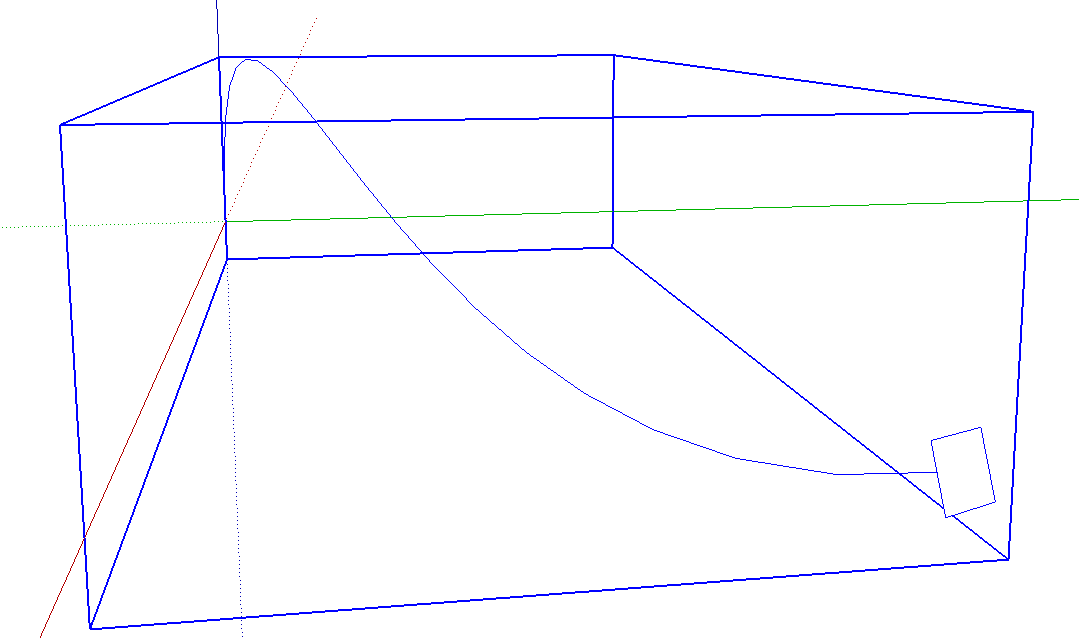
                        Yes. What do you mean? I just tried it and it works fine inside a component. I made a component of the Bezier curve, opened the component for editing and ran the tool. It put the face on the end where I clicked.
                        Screenshot - 10_16_2014 , 4_18_46 AM.png

                        Etaoin Shrdlu

                        %

                        (THERE'S NO PLACE LIKE)

                        G28 X0.0 Y0.0 Z0.0

                        M30

                        %

                        1 條回覆 最後回覆 回覆 引用 0
                        • djohnson.nzD 離線
                          djohnson.nz
                          最後由 編輯

                          Thanks Chris, extremely useful time saver.
                          I did have trouble creating a circle in a group, it didn't seem to work but after closing the group I found the circles outside the group. I was able to remedy this by changing your "Perpendicular Circle" script to read entities=model.active_entities which I found was the only thing different from your Perpendicular Square script.
                          Thanks for all your great work...

                          nO fiKst ideas

                          1 條回覆 最後回覆 回覆 引用 0
                          • designerbursaD 離線
                            designerbursa
                            最後由 編輯

                            [highlight=#ffffbf:39kxqslm]still does not create circles of less than 30 mm[/highlight:39kxqslm]

                            I'm working in mm, 2540 is the default by default.
                            Changed by changing the r.b code
                            thanks for the plugin

                            my edit:

                              def activate
                                @ip = Sketchup::InputPoint.new
                                @iptemp = Sketchup::InputPoint.new
                                @displayed = false
                                @sp = []
                                @end_pos = []
                                @ctrlflag = 0
                                @group = nil
                                if @@ls.to_s == ""
                                  @@ls = **100.mm**
                                end
                                Sketchup.set_status_text @@ls.to_l, SB_VCB_VALUE
                                Sketchup.vcb_label = "Face Width x Height"
                              end
                            
                            1 條回覆 最後回覆 回覆 引用 0
                            • T 離線
                              thegoodguy
                              最後由 編輯

                              Hi,

                              I just installed this on Sketchup 2016. It worked well and was super-useful when I had Sketchup 8, but is not working on 2016. There are no notes I can find saying which versions this plugin is compatible with. Am I missing something?

                              Thanks.

                              1 條回覆 最後回覆 回覆 引用 0
                              • Dave RD 離線
                                Dave R
                                最後由 編輯

                                It works fine in SU2016 as well as every version up through SU2020.

                                You might try restarting SketchUp to make sure the plugin loads.

                                Are you sure it's not working? Is it possible the face it's creating is just so large its edges are outside the view of the camera?

                                Etaoin Shrdlu

                                %

                                (THERE'S NO PLACE LIKE)

                                G28 X0.0 Y0.0 Z0.0

                                M30

                                %

                                1 條回覆 最後回覆 回覆 引用 0
                                • Z 離線
                                  zaz1
                                  最後由 編輯

                                  I just discovered this extremely handy plugin. Thanks so much Chris. Plays very well with Curviloft for drawer pulls and other yet to be discovered objects. I have a couple of questions and please forgive me if these were answered earlier but there are 197 posts on this thread. I am using a MAC and that may be part of the problem with the issues I am seeing.

                                  1. What key controls the rotation? I have tried up, down arrow, option, control but no success.

                                  2. How to access the circle radius change in the VCB ?
                                    The VCB only displays Face Width x Height. I can enter a value, say 2" and that will set the circle radius. The video shows a VCB display of circle radius which I cant seem to display.

                                  3. Is a 1" radius circle the lower limit ? If I enter a value for a circle radius less then 1", it does not display the circle when I click on the line segment. Currentlly I use a 1" radius circle and change it to less than 1" later with entity info.

                                  1 條回覆 最後回覆 回覆 引用 0
                                  • P 離線
                                    ParkKangSuck
                                    最後由 編輯

                                    Hello? I am using the Perpendicular Face Tools created by you. Recently, I would like to modify the content of the source code to add new features according to my needs. Your copyright notice will remain intact, and there will be no changes regarding the copyright. Can you give me permission to modify the source code?

                                    1 條回覆 最後回覆 回覆 引用 0
                                    • P 離線
                                      ParkKangSuck
                                      最後由 編輯

                                      Hello? I am using the Perpendicular Face Tools created by you. Recently, I would like to modify the content of the source code to add new features according to my needs. Your copyright notice will remain intact, and there will be no changes regarding the copyright. Could you grant me permission to modify the source code? Thank you.


                                      1 條回覆 最後回覆 回覆 引用 0
                                      • P 離線
                                        ParkKangSuck
                                        最後由 編輯

                                        Hello? I am using the Perpendicular Face Tools created by you. Recently, I would like to modify the content of the source code to add new features according to my needs. Your copyright notice will remain intact, and there will be no changes regarding the copyright. Could you grant me permission to modify the source code? Thank you.

                                        1 條回覆 最後回覆 回覆 引用 0
                                        • 1
                                        • 2
                                        • 5
                                        • 6
                                        • 7
                                        • 8
                                        • 9
                                        • 10
                                        • 11
                                        • 7 / 11
                                        • 第一個貼文
                                          最後的貼文
                                        Buy SketchPlus
                                        Buy SUbD
                                        Buy WrapR
                                        Buy eBook
                                        Buy Modelur
                                        Buy Vertex Tools
                                        Buy SketchCuisine
                                        Buy FormFonts

                                        Advertisement