sketchucation logo sketchucation
    • 登入
    Oops, your profile's looking a bit empty! To help us tailor your experience, please fill in key details like your SketchUp version, skill level, operating system, and more. Update and save your info on your profile page today!
    🔌 Smart Spline | Fluid way to handle splines for furniture design and complex structures. Download

    Importing a DWG and all curves are faceted....

    已排程 已置頂 已鎖定 已移動 SketchUp Discussions
    sketchup
    21 貼文 10 Posters 7.0k 瀏覽 10 Watching
    正在載入更多貼文
    • 從舊到新
    • 從新到舊
    • 最多點贊
    回覆
    • 在新貼文中回覆
    登入後回覆
    此主題已被刪除。只有擁有主題管理權限的使用者可以查看。
    • C 離線
      Click Draw
      最後由 編輯

      Is there any control over importing a DWG from AutoCad and selecting amount of faceting on all curves and circles? Help...

      Have I mentioned how much of a laugh I get out of some of the Signatures on here!

      1 條回覆 最後回覆 回覆 引用 0
      • Jean LemireJ 離線
        Jean Lemire
        最後由 編輯

        Hi Jeff, hi folks.

        You have an option to merge coplanar faces when importing.

        Just ideas.

        Jean (Johnny) Lemire from Repentigny, Quebec, Canada.

        1 條回覆 最後回覆 回覆 引用 0
        • M 離線
          mirjman
          最後由 編輯

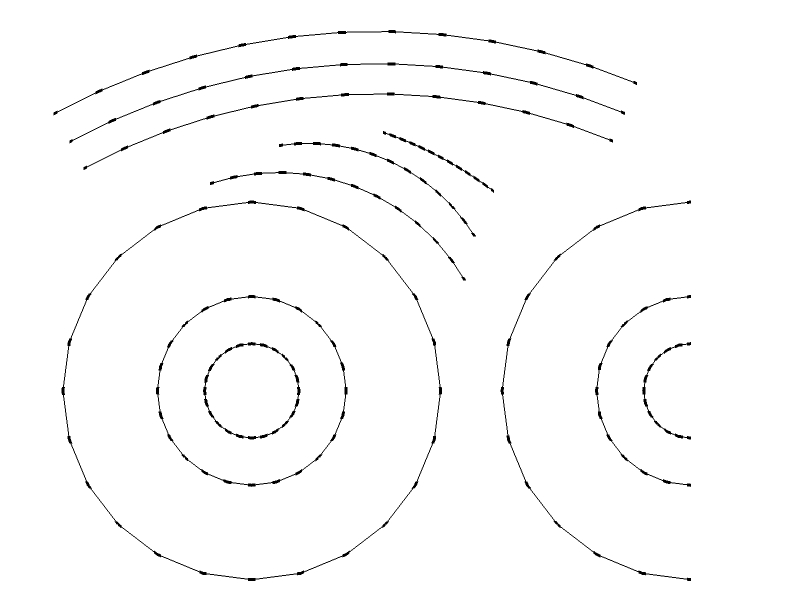
          i am interested in this as well.. it seems like sketchup will automatically divide any circle into 24 segments and any arc into 12 segments regardless of size/length. see attached

          Untitled.jpg

          1 條回覆 最後回覆 回覆 引用 0
          • daleD 離線
            dale
            最後由 編輯

            By either typing in the number of segments you want to have (bottom right hand corner box) or right clicking on the circle after it is created you can change the number of segments to what you want. This also works with arcs, and should work once the acad import becomes a SketchUp edge.

            Just monkeying around....like Monsanto

            1 條回覆 最後回覆 回覆 引用 0
            • M 離線
              mirjman
              最後由 編輯

              Dale- that works great! Just to clarify: the process is click on autocad imported curve, select entity info, and fix the segments value in the palette that opens up

              1 條回覆 最後回覆 回覆 引用 0
              • thomthomT 離線
                thomthom
                最後由 編輯

                hmm... still, allot of manual work if you have many curves. And if you have lines criss-crossing over the curve it becomes worse.

                Thomas Thomassen — SketchUp Monkey & Coding addict
                List of my plugins and link to the CookieWare fund

                1 條回覆 最後回覆 回覆 引用 0
                • daleD 離線
                  dale
                  最後由 編輯

                  @thomthom said:

                  hmm... still, allot of manual work if you have many curves. And if you have lines criss-crossing over the curve it becomes worse.

                  I agree, but I'm finding that importing Cad seems to require a lot of work both before and after import.

                  Just monkeying around....like Monsanto

                  1 條回覆 最後回覆 回覆 引用 0
                  • C 離線
                    Click Draw
                    最後由 編輯

                    Hi Jean,
                    I don't see any dialog box come up regarding merging???

                    Have I mentioned how much of a laugh I get out of some of the Signatures on here!

                    1 條回覆 最後回覆 回覆 引用 0
                    • J 離線
                      Jim
                      最後由 編輯

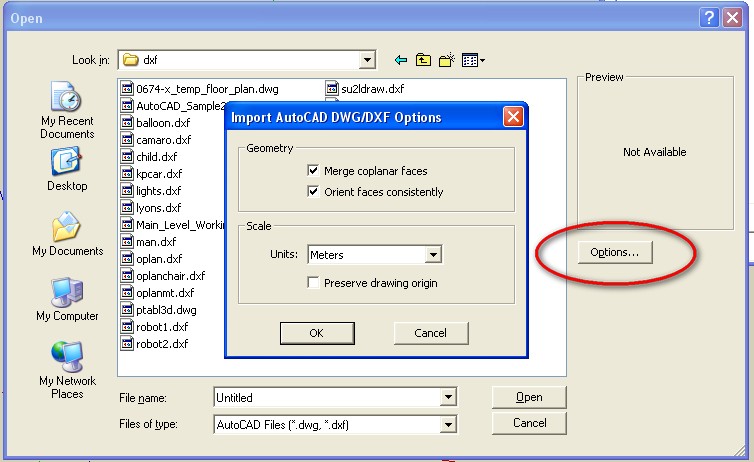
                      Jeff, I think he means the Options button that is on the Open File dialog.

                      2009-02-28_095146.jpg

                      Hi

                      1 條回覆 最後回覆 回覆 引用 0
                      • C 離線
                        Click Draw
                        最後由 編輯

                        Thanks Jim,
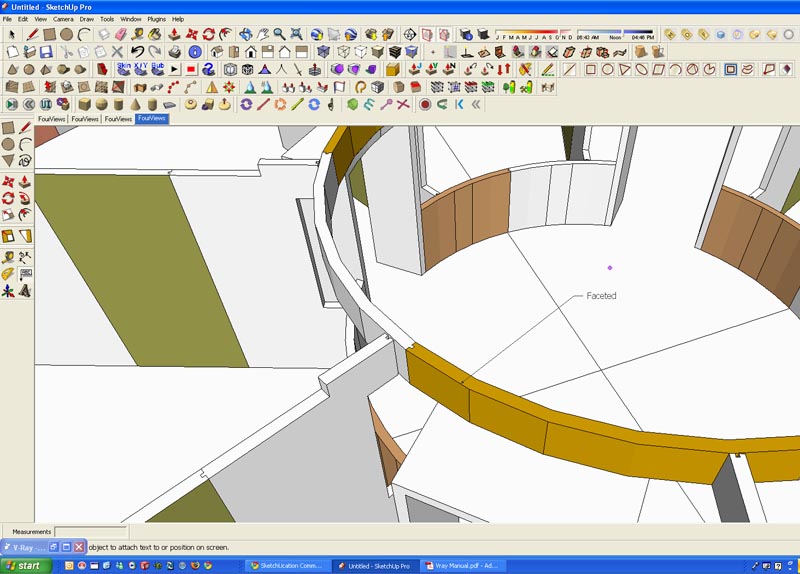
                        Found (actually looked) the options menu. Didn't seem to make a difference tho. Any ideas?
                        Thanks

                        facets.jpg

                        Have I mentioned how much of a laugh I get out of some of the Signatures on here!

                        1 條回覆 最後回覆 回覆 引用 0
                        • GaieusG 離線
                          Gaieus
                          最後由 編輯

                          The "merge coplanar face" is first of ll good for those imports coming from apps where the faces are triangulated. It removes the triangulating lines in case they are just there to divide the faces otherwise coplanar.

                          It wont weld vertices nor it will smooth curved surfaces.

                          Gai...

                          1 條回覆 最後回覆 回覆 引用 0
                          • C 離線
                            Click Draw
                            最後由 編輯

                            Ok....so, does anyone know if Rhino or Modo will import DWG's and NOT facet curves? Where I work, it seems everyone uses a different modeling program. The Design starts in Vectorworks(Toronto office uses C4D), then is rendered in C4D, then once approved the design goes to the CAD guy who uses AutoCad. Then I get drawings in DWG's so I can do my shop drawings. Pretty crazy. I won't get into the never ending issue of Shetchup not being taken seriously. Anyway, I got off topic so back to the original question above...
                            Thanks

                            Have I mentioned how much of a laugh I get out of some of the Signatures on here!

                            1 條回覆 最後回覆 回覆 引用 0
                            • R 離線
                              rabbit
                              最後由 編輯

                              If you are getting dwgs after all that process you describe below then why are you trying to bring them into sketchup to create "shop drawings", which i would assume would be 2D anyway, and which you would be better off working with in autocad or some other CAD program...but perhaps i misunderstand what it is you are doing.

                              Anyway, to answer your question, rhino will import dwgs with all curves as curves or polylines, depending on what they are in the autocad drawing.
                              Modo has no dwg import option, but it will import dxf curves without faceting them.

                              Import / export among programs is a continual hassle, and best avoided if at all possible...but of course it rarely works out like that.
                              cheers
                              rabbit

                              ok....so, does anyone know if Rhino or Modo will import DWG's and NOT facet curves? Where I work, it seems everyone uses a different modeling program. The Design starts in Vectorworks(Toronto office uses C4D), then is rendered in C4D, then once approved the design goes to the CAD guy who uses AutoCad. Then I get drawings in DWG's so I can do my shop drawings. Pretty crazy. I won't get into the never ending issue of Shetchup not being taken seriously. Anyway, I got off topic so back to the original question above...
                              Thanks

                              1 條回覆 最後回覆 回覆 引用 0
                              • C 離線
                                Click Draw
                                最後由 編輯

                                Hi Rabbit,

                                The drawings I get are not detailed as the draftsman does not know the detail as to how I will build something. He will give me outside dims etc and I detail it from there. I don't use AutoCad and I can detail and build on the fly with SU. I work better in 3D than 2D. If I was to learn yet another graphic/modeling program, it wouldn't be AutoCad. Thanks for your input.
                                Jeff

                                Have I mentioned how much of a laugh I get out of some of the Signatures on here!

                                1 條回覆 最後回覆 回覆 引用 0
                                • bigstickB 離線
                                  bigstick
                                  最後由 編輯

                                  I think you will always have facets, because that's how Autocad displays curves. Have you tried changing the curve resolution in Autocad first? You do this by altering the VIEWRES variable. Have a look here (http://autocadsolutions.wordpress.com/), it might help.

                                  Failing that, you could try to see if Rhino, a vector-based NURBS modeller deals with dwg files any differently.

                                  1 條回覆 最後回覆 回覆 引用 0
                                  • C 離線
                                    Click Draw
                                    最後由 編輯

                                    Hi Bigstick,

                                    As far as I understood, AutoCad doesn't facet curves....?

                                    Rhino might be my solution tho...Maybe I'll check with Kwist here to see how his Rhino learning is coming along...

                                    Thanks for your input.

                                    Jeff

                                    Have I mentioned how much of a laugh I get out of some of the Signatures on here!

                                    1 條回覆 最後回覆 回覆 引用 0
                                    • Chris FullmerC 離線
                                      Chris Fullmer
                                      最後由 編輯

                                      True, in 2d autocad does not facet curves. But 3d modelers will facet curves (except maybe some solid modelers or something?).

                                      The best you can do in SU is to import it with lots of facets and then smooth the facets. I prefer to hold ctrl while using the eraser tool to smooth lines the fastest. The more facets you have, the smoother the curve will look.

                                      Chris

                                      Lately you've been tan, suspicious for the winter.
                                      All my Plugins I've written

                                      1 條回覆 最後回覆 回覆 引用 0
                                      • C 離線
                                        Click Draw
                                        最後由 編輯

                                        I just tried holding ctrl and use the eraser but I didn't notice anything happen on the curve...?

                                        Have I mentioned how much of a laugh I get out of some of the Signatures on here!

                                        1 條回覆 最後回覆 回覆 引用 0
                                        • Chris FullmerC 離線
                                          Chris Fullmer
                                          最後由 編輯

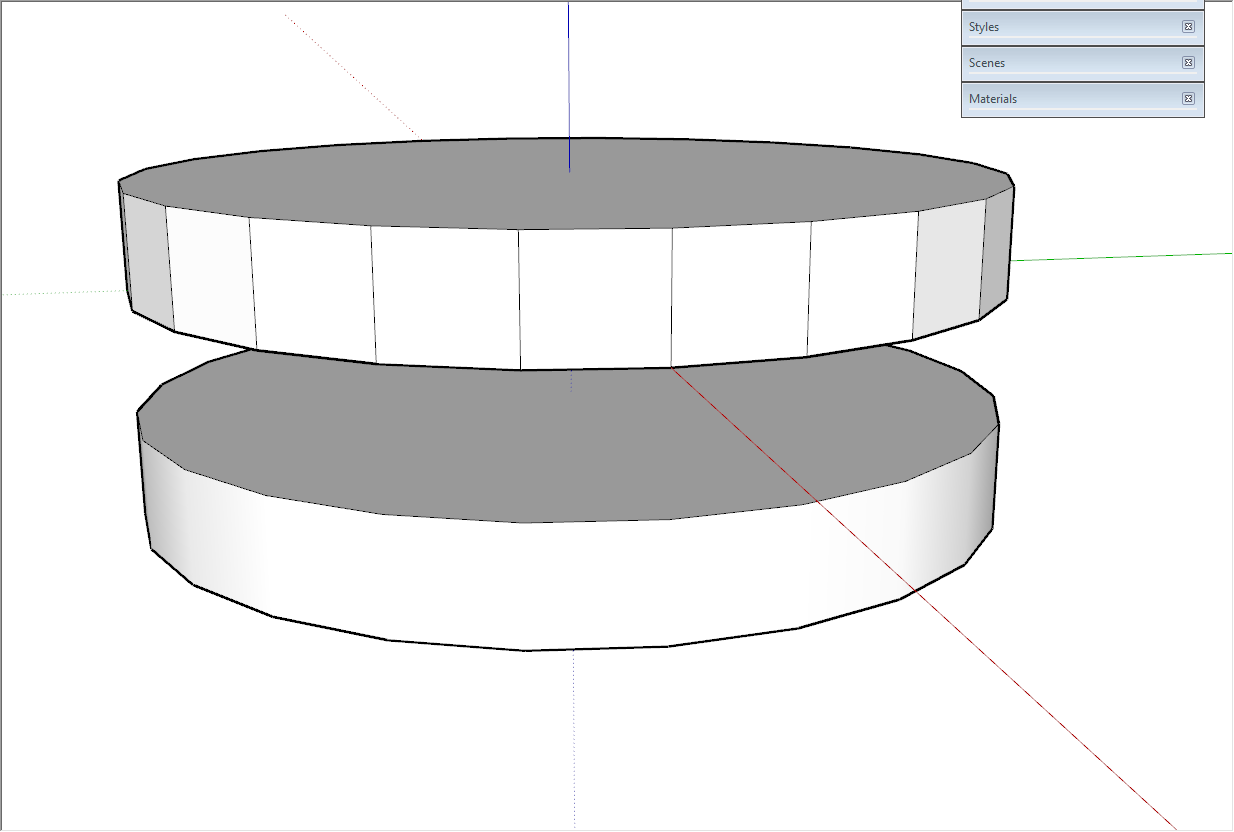
                                          Do it on the facet that you want to look smooth. Like this:
                                          smooth_facets.png

                                          So you would hold ctrl and run the erase cursor over the vertical lines. On a Mac, it might be a different key (but not shift, that will hide the lines, but leave them faces faceted).

                                          Hope that helps,

                                          Chris

                                          Lately you've been tan, suspicious for the winter.
                                          All my Plugins I've written

                                          1 條回覆 最後回覆 回覆 引用 0
                                          • GaieusG 離線
                                            Gaieus
                                            最後由 編輯

                                            I think it's the Ctrl on the Mac, too.
                                            So unfortunately it won't weld the segments into a polyline (curve/circle/arc...) only soften lines dividing faces.

                                            To see what I mean, draw a circle, right click on its perimeter and "explode curve". Now you try to "soften" the circle back to a welded curve in vain; it won't weld. If you Push/Pull it, the sides of the cylinder will also be faceted but at least you can soften the edges making these facets with the Ctrl Eraser tool.


                                            Gai...

                                            1 條回覆 最後回覆 回覆 引用 0
                                            • 1
                                            • 2
                                            • 2 / 2
                                            • 第一個貼文
                                              最後的貼文
                                            Buy SketchPlus
                                            Buy SUbD
                                            Buy WrapR
                                            Buy eBook
                                            Buy Modelur
                                            Buy Vertex Tools
                                            Buy SketchCuisine
                                            Buy FormFonts

                                            Advertisement

