sketchucation logo sketchucation
    • 登入
    Oops, your profile's looking a bit empty! To help us tailor your experience, please fill in key details like your SketchUp version, skill level, operating system, and more. Update and save your info on your profile page today!
    🔌 Smart Spline | Fluid way to handle splines for furniture design and complex structures. Download

    [Plugin] Color by Z (Updated August 27th, 2009)

    已排程 已置頂 已鎖定 已移動 Plugins
    54 貼文 21 Posters 52.8k 瀏覽 21 Watching
    正在載入更多貼文
    • 從舊到新
    • 從新到舊
    • 最多點贊
    回覆
    • 在新貼文中回覆
    登入後回覆
    此主題已被刪除。只有擁有主題管理權限的使用者可以查看。
    • PixeroP 離線
      Pixero
      最後由 編輯

      I still don't get a smooth gradient. 😕

      1 條回覆 最後回覆 回覆 引用 0
      • Chris FullmerC 離線
        Chris Fullmer
        最後由 編輯

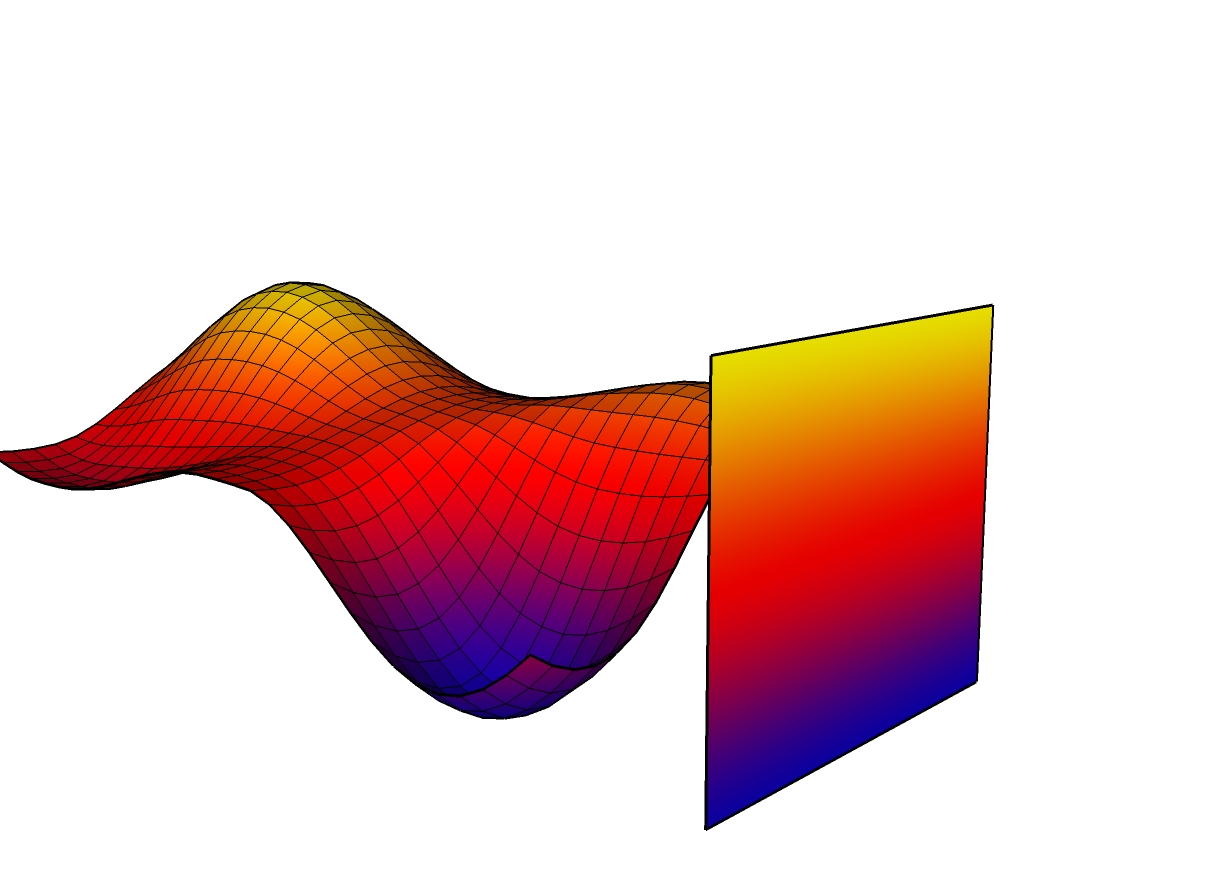
        The way to get a smooth gradient is to make a material in photoshop that is a big smooth gradient. Then bring it into your model and turn it so it is standing vertical next to your model. Set it to "Projected". THen select all of the land for it to be applied to and apply it to your model. You'll get all faces nicely mapped with a single image.

        I just don't know how to do all that in one clean ruby unfortunately. So painting each face its own material is the closest I can get for now 😄

        gradient z color.jpg

        And with the combine textures bit....theres a HUGE downside to that. While it works great in that video I did, it only works on planar faces. So to get it to work on something like this, I would need to create a flat version of my terrain mesh, then apply all my materials to it, then run combine textures, then re-apply the new textuire onto my non-flattened terrain. So thats not terribly smooth either.

        But it is what it is. Hopefully this script will be helpful for someone 😄

        Chris

        Lately you've been tan, suspicious for the winter.
        All my Plugins I've written

        1 條回覆 最後回覆 回覆 引用 0
        • PixeroP 離線
          Pixero
          最後由 編輯

          The script idea I played with was to apply different colors based on slope and the side projected gradient doesnt work for that. 😞
          Texturing is another area in SU we could wish for improvements in.

          1 條回覆 最後回覆 回覆 引用 0
          • Chris FullmerC 離線
            Chris Fullmer
            最後由 編輯

            Ahh, tis true! If you wanted to do slopes as gradients, then you're out of luck. The only possible workaround I can think of is to use the subdivide scrip to subdivide faces into a tone of smaller faces. Then apply a single color to each face. Then somehow turn the whole thing into a single material and re-apply it to the pre-subdivided mesh. But I have a feeling that is 1. beyond the scope of Ruby and 2. probably just not very efficient and would be better suited for another 3d modeler? Maybe someone like Al's team could write an entirely separate app that reads the SU model and does all that work with the UV and gradients, and then sticks the model back into SU.

            Chris

            Lately you've been tan, suspicious for the winter.
            All my Plugins I've written

            1 條回覆 最後回覆 回覆 引用 0
            • JClementsJ 離線
              JClements
              最後由 編輯

              Hi Chris, again.

              Other ideas:

              1. enable the script to "remember" the settings last used during the same SU session.
              2. save the settings in to a library (each "style" would be saved a record in a text file).
              3. call up the color wheel dialog

              And OMG, is Mt Hood going following in the foot steps of Mt St. Helens?
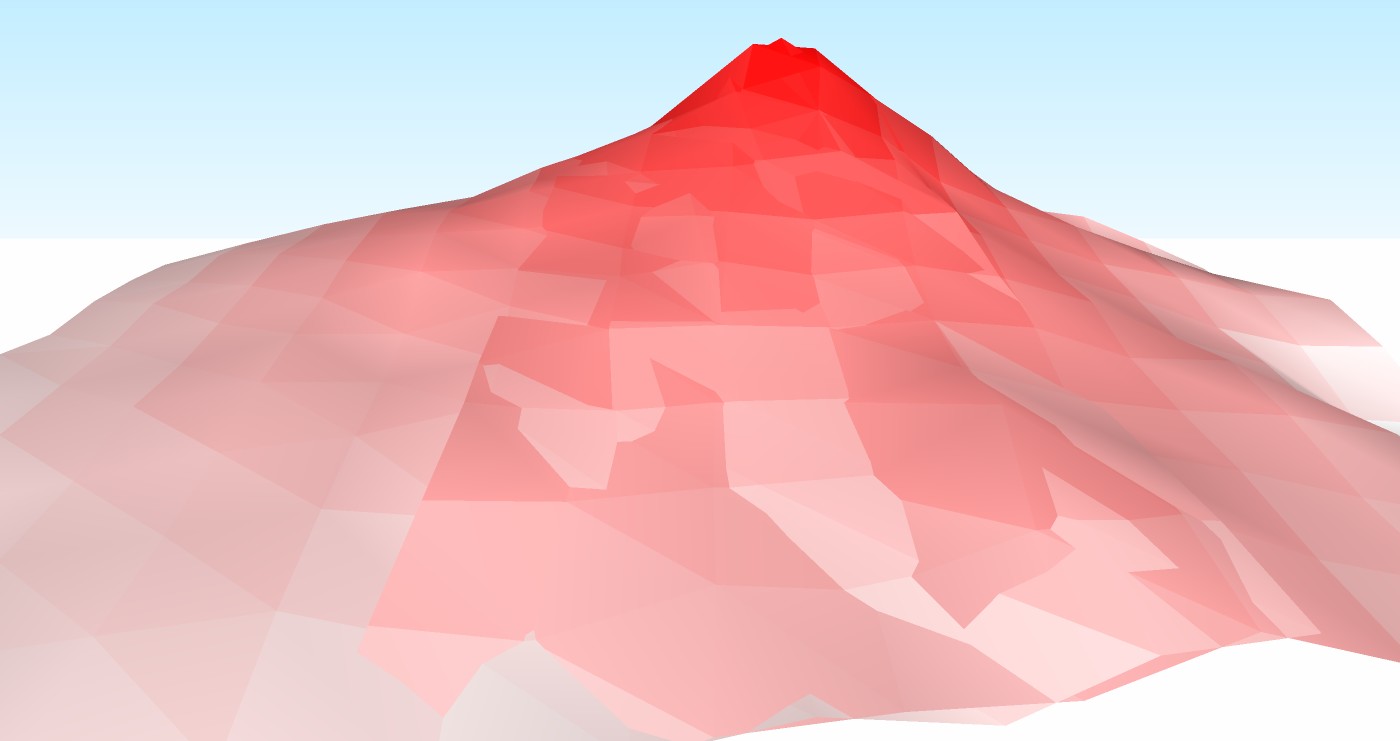
              Mt Hood gone Active Vulcanic AGAIN.jpg

              EDIT: 14 Feb 09
              Here is the skp , Chris. It may be that I didn't input the same values for the two terrains. It is geolocated, it will take you back to Mt. Hood in GE.


              Mt Hood gone Active Vulcanic AGAIN.skp

              John | Illustrator | Beaverton, Oregon

              1 條回覆 最後回覆 回覆 引用 0
              • JClementsJ 離線
                JClements
                最後由 編輯

                Chris, .skp was added to my previous posting.

                John | Illustrator | Beaverton, Oregon

                1 條回覆 最後回覆 回覆 引用 0
                • Chris FullmerC 離線
                  Chris Fullmer
                  最後由 編輯

                  Cool, thanks John. I see it now. There is some overlapping geometry that I couldn't see in the image. That accounts for the coloration working the way it is. Thanks John!

                  Chris

                  Lately you've been tan, suspicious for the winter.
                  All my Plugins I've written

                  1 條回覆 最後回覆 回覆 引用 0
                  • X 離線
                    xrok1
                    最後由 編輯

                    maybe a better direction for this would be to create a plug that creates 'real' gradient textures based on the height of geo in a scene. they could then be projected manually or auto matically based on a plane that is created with a similiar prcess to a section plane?

                    “There are three classes of people: those who see. Those who see when they are shown. Those who do not see.”

                    http://www.Twilightrender.com try it!

                    1 條回覆 最後回覆 回覆 引用 0
                    • Chris FullmerC 離線
                      Chris Fullmer
                      最後由 編輯

                      THats a nice arrow their John. It took me a while to find it on the image, but once I clicked on the image to expand it, it all made sense. Very nice. And your mountain looks great too! It works out really nice with white at the top that changes quickly into a brown and works its way down to give a nice snow capped mountain appearance 😄

                      Chris

                      Lately you've been tan, suspicious for the winter.
                      All my Plugins I've written

                      1 條回覆 最後回覆 回覆 引用 0
                      • X 離線
                        xrok1
                        最後由 編輯

                        @daniel s said:

                        SU7 has an option called Combine Textures (The Combine Textures menu item combines separate textures on adjacent co-planar faces into a single larger texture. This feature also, optionally, removes edges between co-planar faces to reduce the polygon count for the model as a whole. Context-click on multiple selected parallel faces, with at least one face having a texture, and select Combine Textures to create a texture which is unique to that set of faces.)
                        This is a great tool, but it will be more usefull if it`s extended into curved surfaces. This Color by Z or the Tools On Surface are examples of plugins that will be benefit.

                        Daniel S

                        how can you get to this tool? i can't find it, tried RC menu?

                        “There are three classes of people: those who see. Those who see when they are shown. Those who do not see.”

                        http://www.Twilightrender.com try it!

                        1 條回覆 最後回覆 回覆 引用 0
                        • Chris FullmerC 離線
                          Chris Fullmer
                          最後由 編輯

                          Here's a video on using combine textures.

                          [flash=727,635:2s0w7uxd]http://www.chrisfullmer.com/chrisfullmer/forums/combine_textures.swf[/flash:2s0w7uxd]

                          Chris

                          Lately you've been tan, suspicious for the winter.
                          All my Plugins I've written

                          1 條回覆 最後回覆 回覆 引用 0
                          • X 離線
                            xrok1
                            最後由 編輯

                            thats sweet. thank you very much for that. coincidentally you just answer a another question, i was trying to figure out how to make a painted wall texture for skindigo, but i couldn't figure out how get SK to UV map surfaces with just white material on it so i could apply displacement. now after watching your vid i figure i can just make unique my material then it should be uv'ed.

                            thank you

                            “There are three classes of people: those who see. Those who see when they are shown. Those who do not see.”

                            http://www.Twilightrender.com try it!

                            1 條回覆 最後回覆 回覆 引用 0
                            • L 離線
                              linea
                              最後由 編輯

                              Good idea Chris, thanks

                              1 條回覆 最後回覆 回覆 引用 0
                              • urgenU 離線
                                urgen
                                最後由 編輯

                                ...nice idea Chris! 👍 😄

                                --pupil forever...------

                                1 條回覆 最後回覆 回覆 引用 0
                                • soloS 離線
                                  solo
                                  最後由 編輯

                                  Cool and thanks, this should come in handy.


                                  http://img13.imageshack.us/img13/6384/colorfulkk4.jpg

                                  http://www.solos-art.com

                                  If you see a toilet in your dreams do not use it.

                                  1 條回覆 最後回覆 回覆 引用 0
                                  • JClementsJ 離線
                                    JClements
                                    最後由 編輯

                                    It never occurred to me to project a gradient color onto a terrain, great idea.
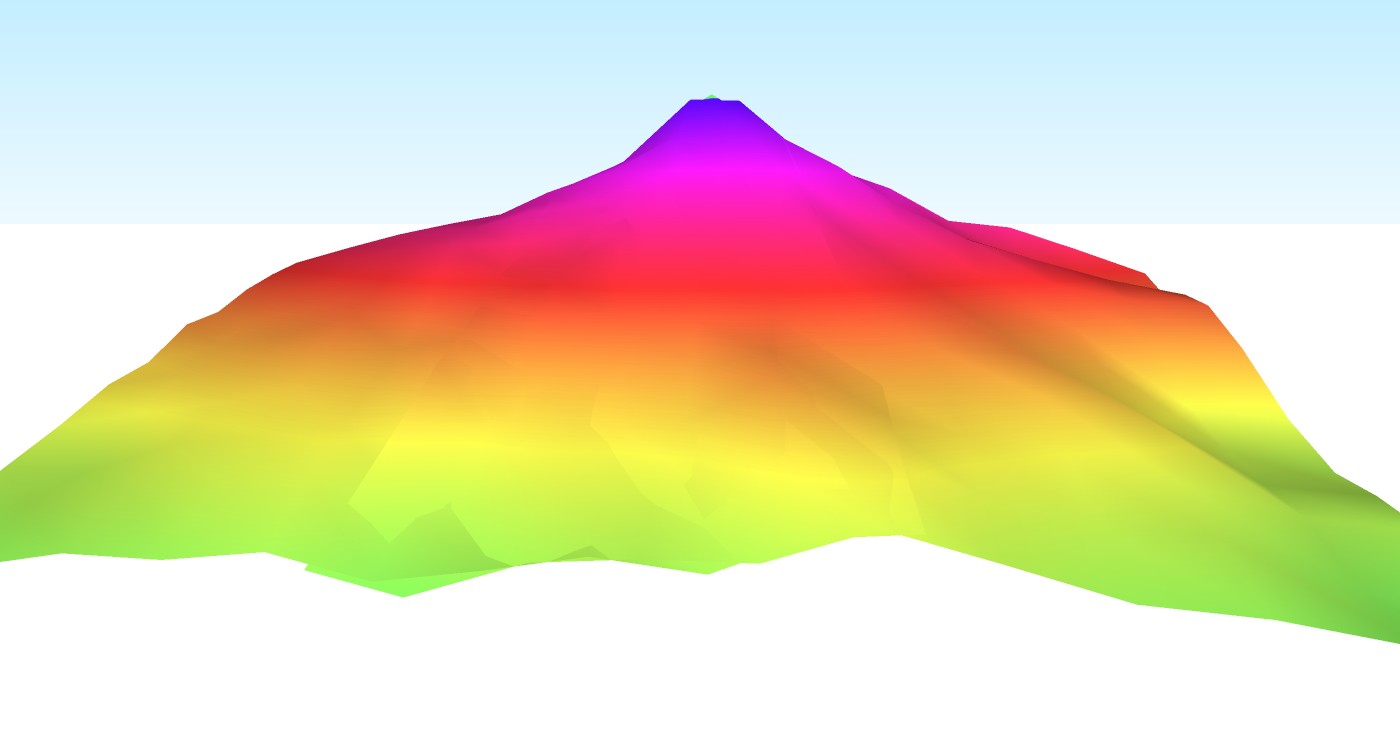
                                    Mt Hood gone Active Vulcanic AGAIN 2.jpg

                                    However, I do project gradient transparency along with gradient color onto a single surface to make arrow-shaped objects and "swooshes" that indicate direction or motion.
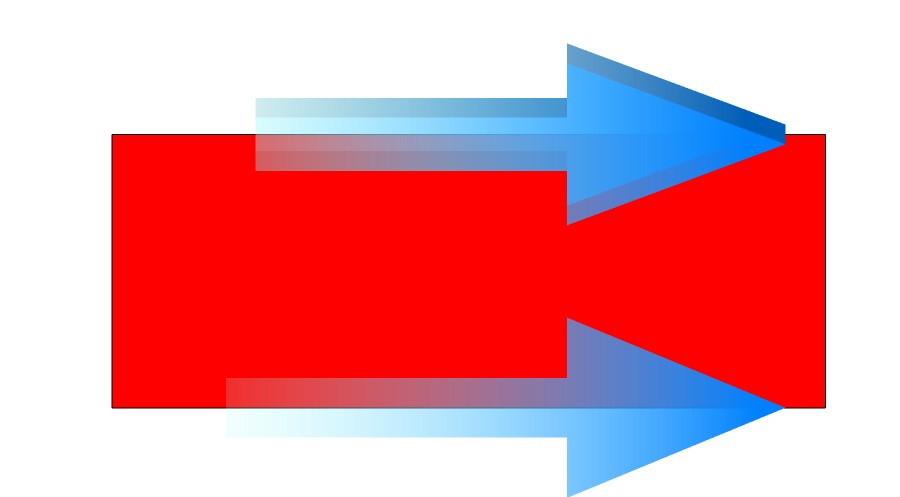
                                    Gradient Arrow in SKP.jpg


                                    Mt Hood gone Active Vulcanic AGAIN 2.skp


                                    Gradient Arrow.skp

                                    John | Illustrator | Beaverton, Oregon

                                    1 條回覆 最後回覆 回覆 引用 0
                                    • Chris FullmerC 離線
                                      Chris Fullmer
                                      最後由 編輯

                                      Solo, was that made with the plugin or with the image gradient method?

                                      Chris

                                      Lately you've been tan, suspicious for the winter.
                                      All my Plugins I've written

                                      1 條回覆 最後回覆 回覆 引用 0
                                      • GaieusG 離線
                                        Gaieus
                                        最後由 編輯

                                        Hi Chris and all,

                                        I haven't been able to drop by the Ruby Dept for days so I might be a bit late... Do you know however Didier's "paint_altitude_faces.rb" by any chance? It works kind of similar (only with the gradients of the same colour):
                                        http://www.crai.archi.fr/RubyLibraryDepot/Ruby/em_ren_page.htm
                                        There's also a demonstration video supplied.

                                        All in all, yours is a very cool plugin with this texture gradient! 👍

                                        Gai...

                                        1 條回覆 最後回覆 回覆 引用 0
                                        • Chris FullmerC 離線
                                          Chris Fullmer
                                          最後由 編輯

                                          Yeah, I have a tendency to not look around to see if similar scripts exist before starting one (I think there were already about 4 version of a random pushpull script before I wrote mine, for example). Mostly because I'm still just writing these for the experience and they each teach me a new little portion of the Ruby SketchUp API. But I definitely need to watch out for that before I embark on any seriously large and in-depth projects I suppose!

                                          So I tried to check his out, and its only painting black faces on my model regardless of what color I select. I suppose it might be a units thing? but I changed my model units to metric with no luck. Also the avi file wouldn't play for me so I couldn't see it in action. I even tried playing it with mPlayer, which generally plays anything you throw at it. But that didn't work. It came out all garbled.

                                          Chris

                                          Lately you've been tan, suspicious for the winter.
                                          All my Plugins I've written

                                          1 條回覆 最後回覆 回覆 引用 0
                                          • thomthomT 離線
                                            thomthom
                                            最後由 編輯

                                            @chris fullmer said:

                                            So I tried to check his out, and its only painting black faces on my model regardless of what color I select. I suppose it might be a units thing? but I changed my model units to metric with no luck. Also the avi file wouldn't play for me so I couldn't see it in action.

                                            Ditto.

                                            Thomas Thomassen — SketchUp Monkey & Coding addict
                                            List of my plugins and link to the CookieWare fund

                                            1 條回覆 最後回覆 回覆 引用 0
                                            • 1
                                            • 2
                                            • 3
                                            • 2 / 3
                                            • 第一個貼文
                                              最後的貼文
                                            Buy SketchPlus
                                            Buy SUbD
                                            Buy WrapR
                                            Buy eBook
                                            Buy Modelur
                                            Buy Vertex Tools
                                            Buy SketchCuisine
                                            Buy FormFonts

                                            Advertisement