sketchucation logo sketchucation
    • 登入
    Oops, your profile's looking a bit empty! To help us tailor your experience, please fill in key details like your SketchUp version, skill level, operating system, and more. Update and save your info on your profile page today!
    🔌 Smart Spline | Fluid way to handle splines for furniture design and complex structures. Download

    [Plugin] Random Painter (Updated March 9th, 09)

    已排程 已置頂 已鎖定 已移動 Plugins
    73 貼文 23 Posters 111.6k 瀏覽 23 Watching
    正在載入更多貼文
    • 從舊到新
    • 從新到舊
    • 最多點贊
    回覆
    • 在新貼文中回覆
    登入後回覆
    此主題已被刪除。只有擁有主題管理權限的使用者可以查看。
    • dereiD 離線
      derei
      最後由 編輯

      @tig said:

      WxSU is/was an add-on to offer new functionality to SUp but it proved to be a big flaky [and/or difficult to 'get right'] and so Chris wrote the alternative version that didn't need it...

      Thanks, just downloaded it. I hoped it will work on groups/components too. Maybe Chris reads this and update the plugin? 😄
      Other nice functionality would be to be able to "pick" materials/textures from model and/or from Material Browser and use them to paint the selected entities...

      DESIGNER AND ARTIST DEREI.UK

      1 條回覆 最後回覆 回覆 引用 0
      • L 離線
        lapx
        最後由 編輯

        Thanks Chris

        This is a very useful tool. Perhaps would could be improved by using su's dialogue color picker which I know you have probably thought of already.

        You ruby God's are fantastic!

        1 條回覆 最後回覆 回覆 引用 0
        • pilouP 離線
          pilou
          最後由 編輯

          Yes ultra cool 😉
          I am fan from the beginning! 💚


          Randompushpul1.jpg

          Frenchy Pilou
          Is beautiful that please without concept!
          My Little site :)

          1 條回覆 最後回覆 回覆 引用 0
          • Chris FullmerC 離線
            Chris Fullmer
            最後由 編輯

            I'm actually sitting on a color picker I made that is built into SketchUp's view. Its pretty cool. I have not ever gotten around to using it for anything, maybe I should post the code so someone else can use it.

            Lately you've been tan, suspicious for the winter.
            All my Plugins I've written

            1 條回覆 最後回覆 回覆 引用 0
            • thomthomT 離線
              thomthom
              最後由 編輯

              @chris fullmer said:

              I'm actually sitting on a color picker I made that is built into SketchUp's view. Its pretty cool. I have not ever gotten around to using it for anything, maybe I should post the code so someone else can use it.

              Oh - that one! Please do make something out of it. It was cool!

              Thomas Thomassen — SketchUp Monkey & Coding addict
              List of my plugins and link to the CookieWare fund

              1 條回覆 最後回覆 回覆 引用 0
              • L 離線
                lapx
                最後由 編輯

                @unknownuser said:

                1. call up the color wheel dialog
                  😄
                1 條回覆 最後回覆 回覆 引用 0
                • Z 離線
                  zardoze
                  最後由 編輯

                  Very helpful plug-in, Chris! Thanks so much for making and sharing this.

                  1 條回覆 最後回覆 回覆 引用 0
                  • HornOxxH 離線
                    HornOxx
                    最後由 編輯

                    great - thank you !!!

                    never trust a skinny cook

                    1 條回覆 最後回覆 回覆 引用 0
                    • E 離線
                      Ecuadorian
                      最後由 編輯

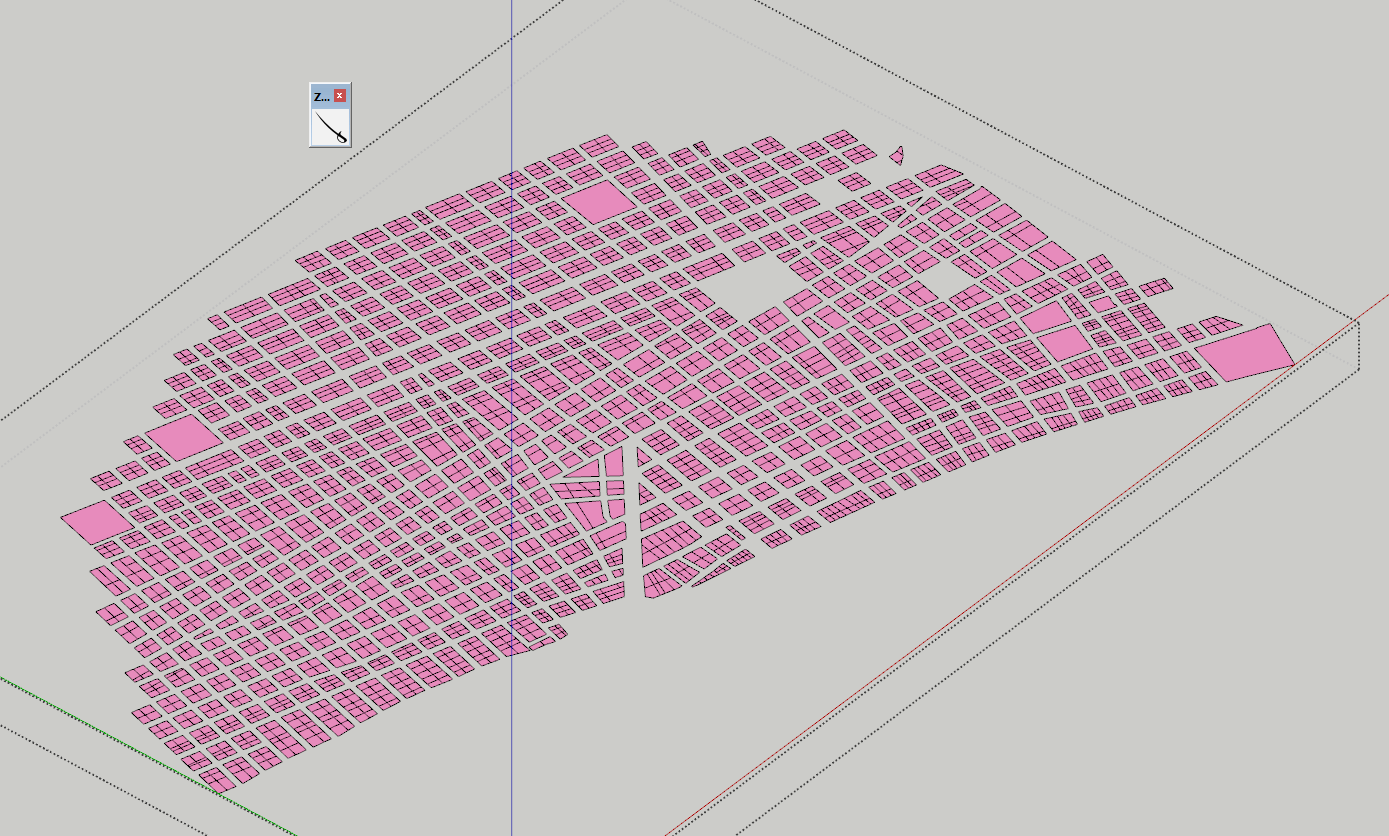
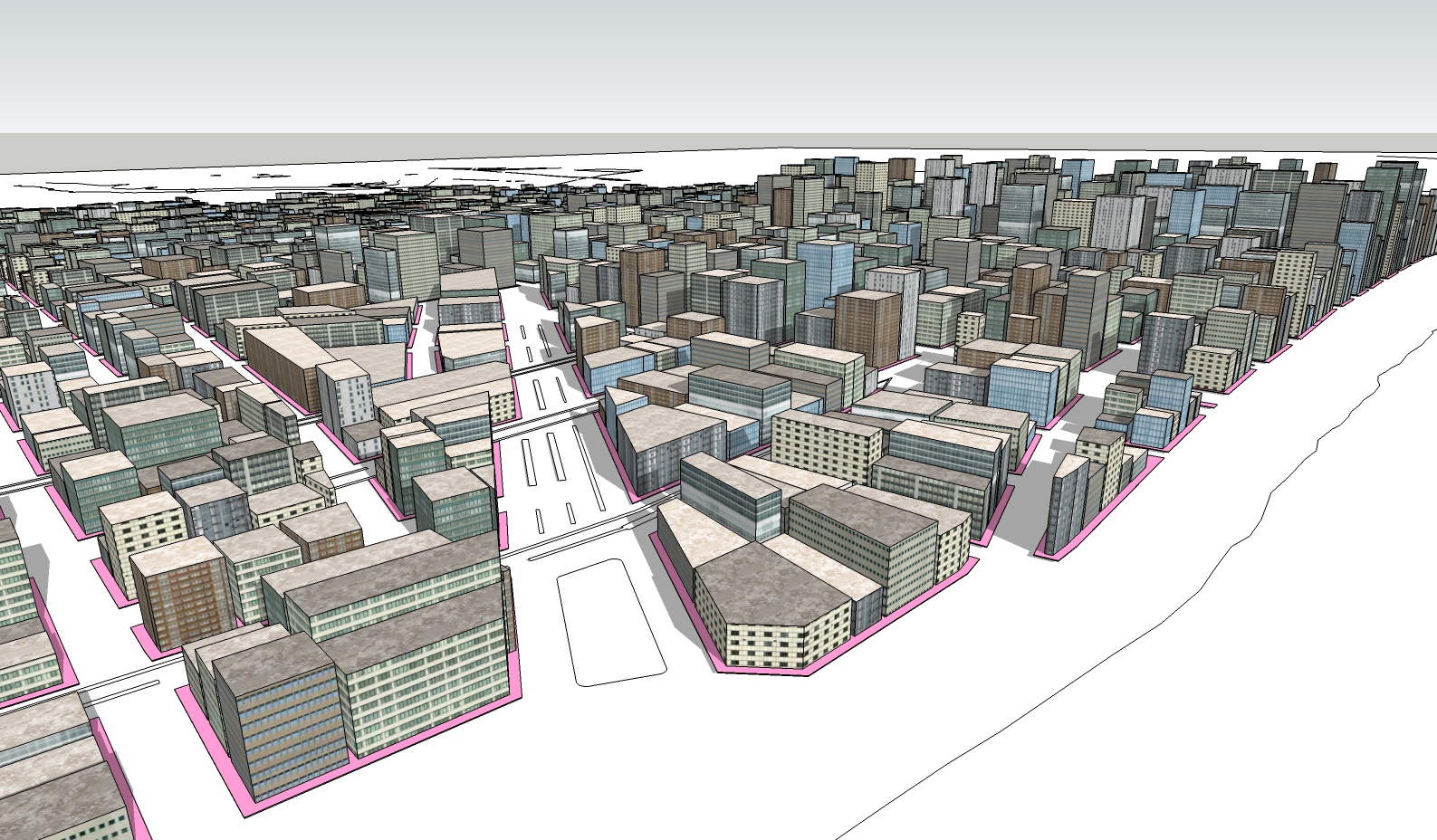
                      Hey, everyone. Just wanted to show you that the method in the first page is still a good way to create a city. I had completely forgotten about it (even though I wrote it). I'm working on a project that required a background of my city, Guayaquil, and noticed that my city's OpenStreetMap is severely lacking 3D buildings, so I remembered this old method and gave it a go. Here's the result. I worked from an AutoCAD drawing of city blocks.

                      This time I used Zorro 2 to divide the blocks into buildings, because the original Greeble plugin (not Chris Fullmer's Greeble) is nowhere to be found.

                      I also used Eneroth's face creator to create the city blocks from the CAD file

                      And instead of using the original Random Push Pull plugin (didn't bother to find out if it's still supported in SU 2017), I used Chris Fullmer's Greeble, but turning off the offset.
                      gye1.PNG


                      Entorno.jpg

                      -Miguel Lescano
                      Subscribe to my house plans YouTube channel! (30K+ subs)

                      1 條回覆 最後回覆 回覆 引用 0
                      • pilouP 離線
                        pilou
                        最後由 編輯

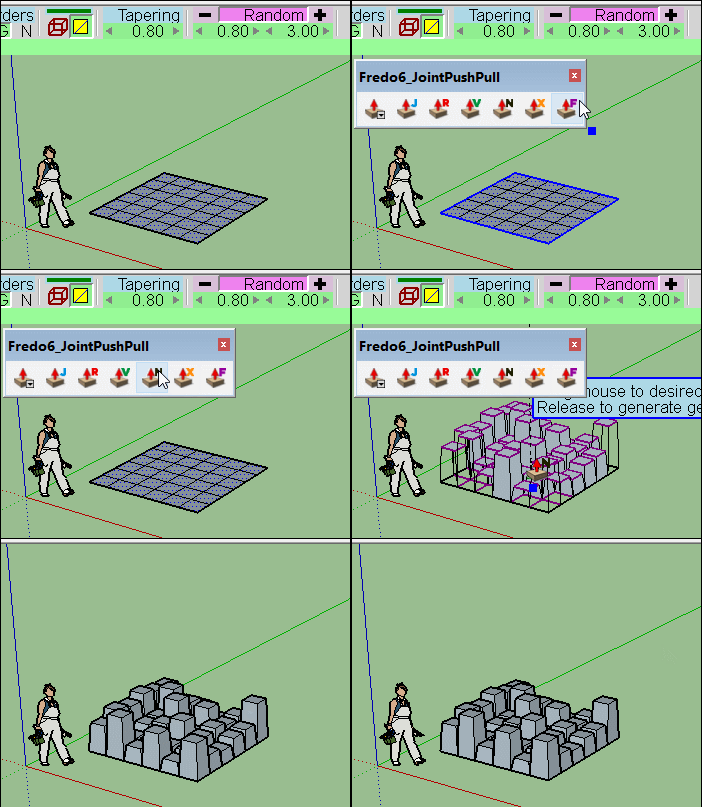
                        About the random Push Pull you can use the Joint Push Pull Interactive by Fredo! 😉
                        GIF_Nfredo.gif

                        Frenchy Pilou
                        Is beautiful that please without concept!
                        My Little site :)

                        1 條回覆 最後回覆 回覆 引用 0
                        • 1
                        • 2
                        • 3
                        • 4
                        • 4 / 4
                        • 第一個貼文
                          最後的貼文
                        Buy SketchPlus
                        Buy SUbD
                        Buy WrapR
                        Buy eBook
                        Buy Modelur
                        Buy Vertex Tools
                        Buy SketchCuisine
                        Buy FormFonts

                        Advertisement