sketchucation logo sketchucation
    • Login
    Oops, your profile's looking a bit empty! To help us tailor your experience, please fill in key details like your SketchUp version, skill level, operating system, and more. Update and save your info on your profile page today!
    ⚠️ Update | Sketchucation Tools 5.0.8 released with licensing improvements and bugfixes Download

    [Plugin] FollowMe and keep (v0.04 update 20090210)

    Scheduled Pinned Locked Moved Plugins
    223 Posts 79 Posters 220.5k Views 79 Watching
    Loading More Posts
    • Oldest to Newest
    • Newest to Oldest
    • Most Votes
    Reply
    • Reply as topic
    Log in to reply
    This topic has been deleted. Only users with topic management privileges can see it.
    • G
      gata
      last edited by

      Wikii,

      I got mixed results by reversing the face. Sometimes the reversal worked, sometimes not.

      People who want FAK to model nice looking roads in a landscape would have some intersecting paths.

      I mistakenly selected two faces for the plugin to extrude at the same time. FAK made 2 groups. One good, and one looks strange.


      FAK .03 test 2.skp

      1 Reply Last reply
      Reply Quote 0
      • W
        wikii
        last edited by

        v0.04 updated.

        1 Reply Last reply
        Reply Quote 0
        • pilouP
          pilou
          last edited by

          you pass from rbs to rb 😉
          So I can put your crazy plug in the Tools menu! Thx! ☀
          Seems there is yet a lilbug 😉
          if I incline & rotate the curve to the ground that works 😉
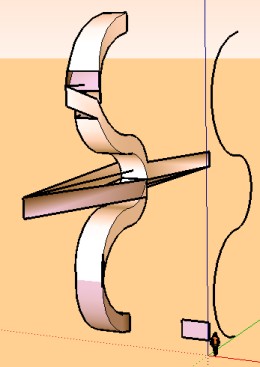

          lilbug.jpg


          lilbugs.skp

          Frenchy Pilou
          Is beautiful that please without concept!
          My Little site :)

          1 Reply Last reply
          Reply Quote 0
          • E
            Ecuadorian
            last edited by

            It's because the profile itself is kept vertical!

            -Miguel Lescano
            Subscribe to my house plans YouTube channel! (30K+ subs)

            1 Reply Last reply
            Reply Quote 0
            • pilouP
              pilou
              last edited by

              yes auto intersect 😄

              Frenchy Pilou
              Is beautiful that please without concept!
              My Little site :)

              1 Reply Last reply
              Reply Quote 0
              • W
                wikii
                last edited by

                @unknownuser said:

                you pass from rbs to rb 😉
                So I can put your crazy plug in the Tools menu! Thx! ☀
                Seems there is yet a lilbug 😉
                if I incline & rotate the curve to the ground that works 😉

                there can‘t has vertical segment in the path.
                for the reason? you think it.
                😉

                1 Reply Last reply
                Reply Quote 0
                • G
                  gata
                  last edited by

                  Wikii,

                  All attempts to extrude a profile - from several locations and profile face orientations - on the figure 8 path worked very well.

                  The way reversing the profile face only changes the orientation of the extruded faces is very nice. People making tunnels, or are otherwise are more interested in the inside of the extrusion will like this feature. It's a keeper.

                  FAK did not like quite like extruding unless the face was at the end of the selected path. The shape was fine, but the group moved to a new location.

                  And when I ran the script on the entire path, at least one face did not close near the path intersection area.
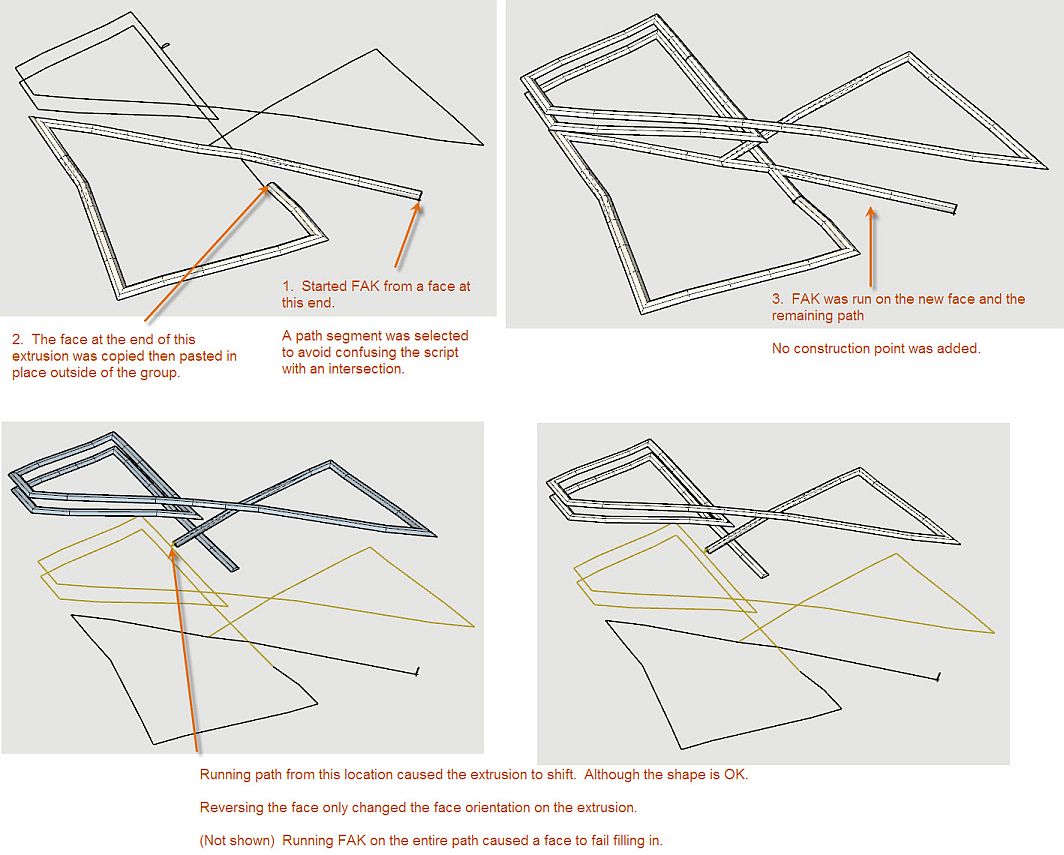

                  FAK .04 test.jpg

                  1 Reply Last reply
                  Reply Quote 0
                  • D
                    davecoopstl
                    last edited by

                    Take a look at this model of a basic roller coaster track.

                    I drew three circles as the profile: one for the main beam, and two for the coaster rails.

                    Look at the top of the hill, how the rails cross paths and switch to the opposite sides of the main beam.

                    Is this expected behavior? Am I doing something wrong? Is there a way to keep this from happening?

                    Hope someone can help.
                    Thanks!
                    Dave/


                    Here's a simple roller coaster track, but the profile is 'reversing' at the top of the hill!

                    1 Reply Last reply
                    Reply Quote 0
                    • H
                      hebrides
                      last edited by

                      Unloaded your rar into SU7 plugins....nothing!. Not surprising, I find that 2 out of 3 free rubies just don't work on first try.
                      I wish the ruby community would buy themselves installer software and use it when there are other files or folder dependancies.

                      1 Reply Last reply
                      Reply Quote 0
                      • C
                        Click Draw
                        last edited by

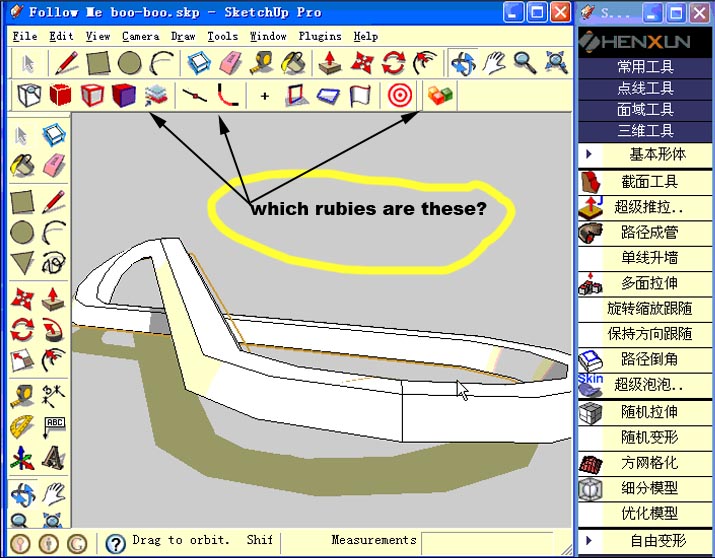
                        Which rubies are these???


                        rubies.jpg

                        Have I mentioned how much of a laugh I get out of some of the Signatures on here!

                        1 Reply Last reply
                        Reply Quote 0
                        • S
                          sorgesu
                          last edited by

                          I was just getting ready to start up dating the manual for my advance classes, in which there is the spiral stair exercise. I thought I would check here to see the progress on this ruby and was so pleasantly surprised to see that it has arrived. Thank you so much for this. Really really appreciated.

                          Susan Sorger
                          Former Seller Hand Rendered Entourage
                          Former Canadian Authorized Training Centre, SketchUp

                          1 Reply Last reply
                          Reply Quote 0
                          • E
                            Ecuadorian
                            last edited by

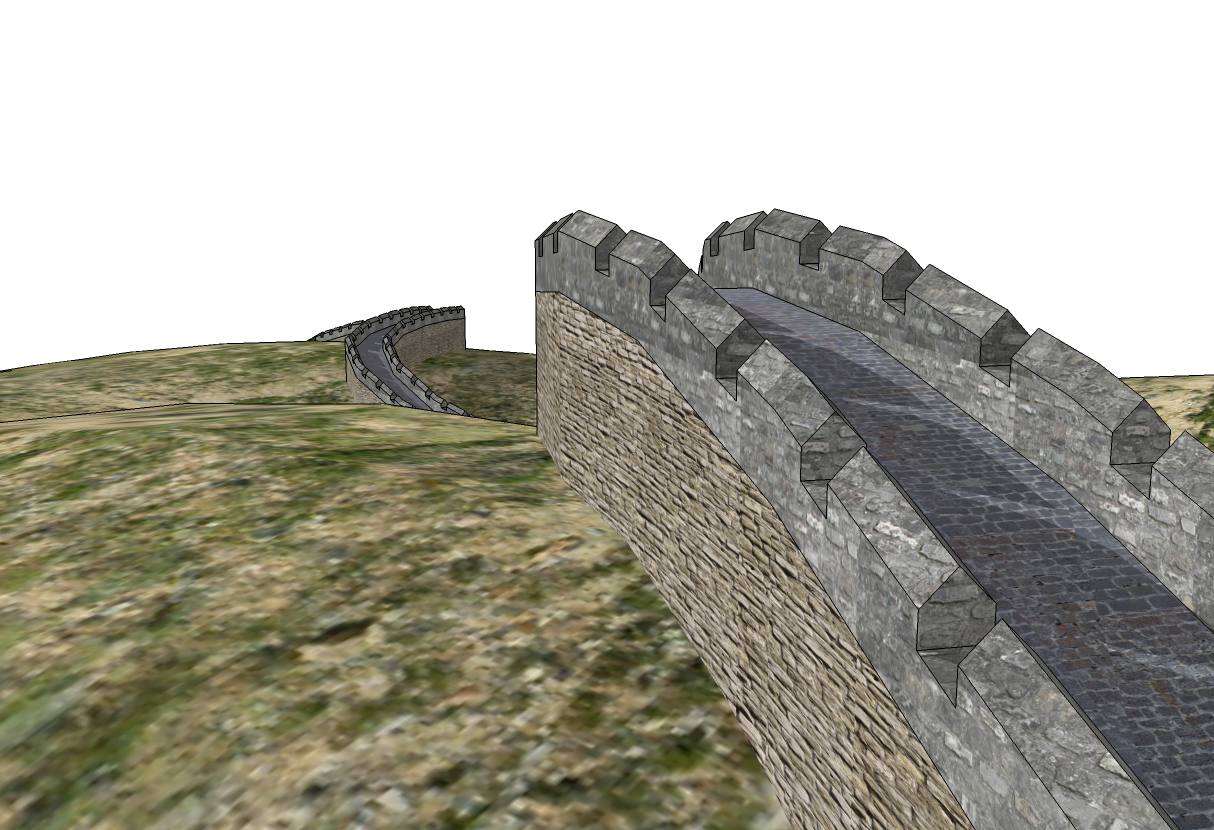
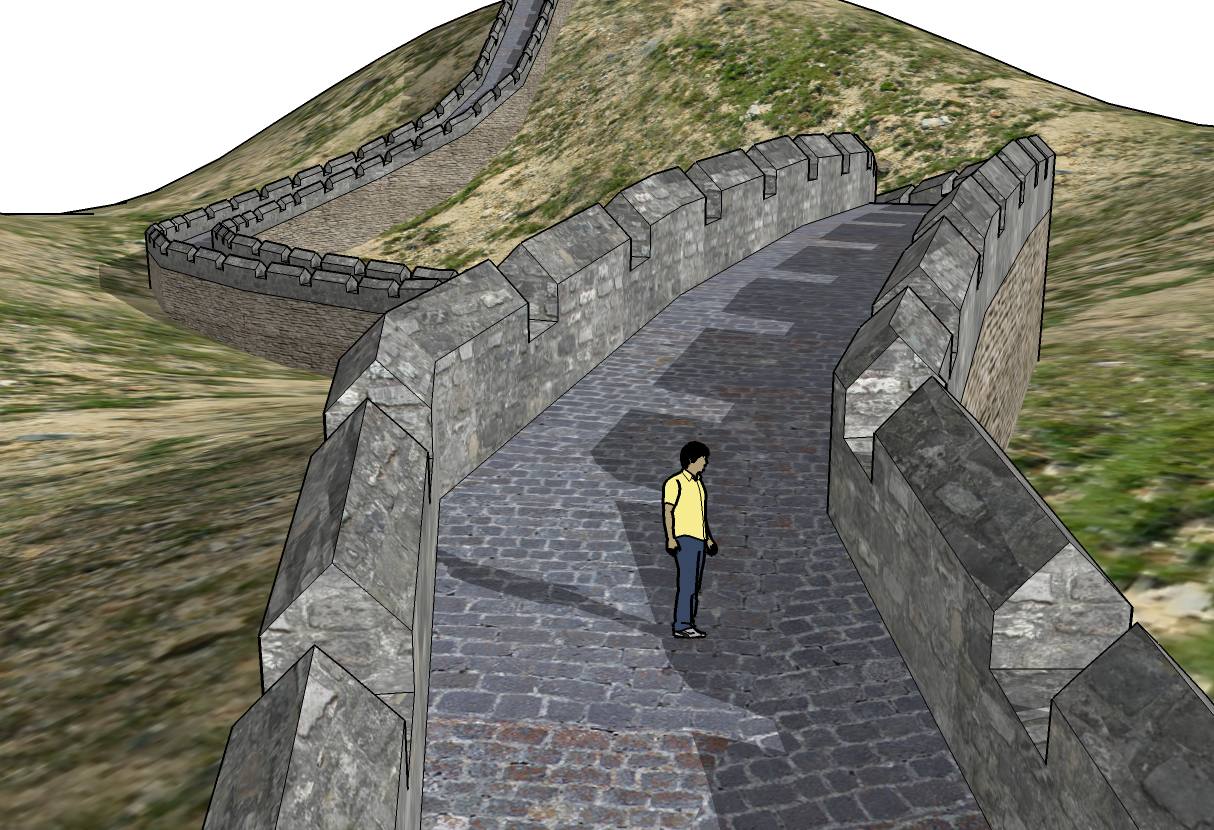
                            Thank you, Wikii!


                            Great_Wall_of_SketchUp.jpg


                            Great_Wall_of_SketchUp_2.jpg

                            -Miguel Lescano
                            Subscribe to my house plans YouTube channel! (30K+ subs)

                            1 Reply Last reply
                            Reply Quote 0
                            • X
                              xrok1
                              last edited by

                              which part did you use followmeandkeep for?

                              “There are three classes of people: those who see. Those who see when they are shown. Those who do not see.”

                              http://www.Twilightrender.com try it!

                              1 Reply Last reply
                              Reply Quote 0
                              • G
                                gata
                                last edited by

                                Dave, you need to add a contruction point at the end of the path. Select all faces, path and point and run script. There are at least 2 scripts which which let you add a construction point - AddVertex+.rb and add_construction_point.rb.

                                And to model a loop-de-loop, you need to do the loop part separate. Make a helix from one of the helix scripts. Rotate a copy of your rail faces 90° and position it at the end of the helix path. Don't forget to add a construction point. Then rotate the new extrusion to the correct orientation.

                                hebrides, rar is a zip file used in many parts of the world. The stuff you want is inside. Get 7-zip.

                                Wikii, a progress bar would be a nice addition. For now I can tell the script is running by how my cursor looks and a slight flicker in a menu bar.

                                1 Reply Last reply
                                Reply Quote 0
                                • E
                                  Ecuadorian
                                  last edited by

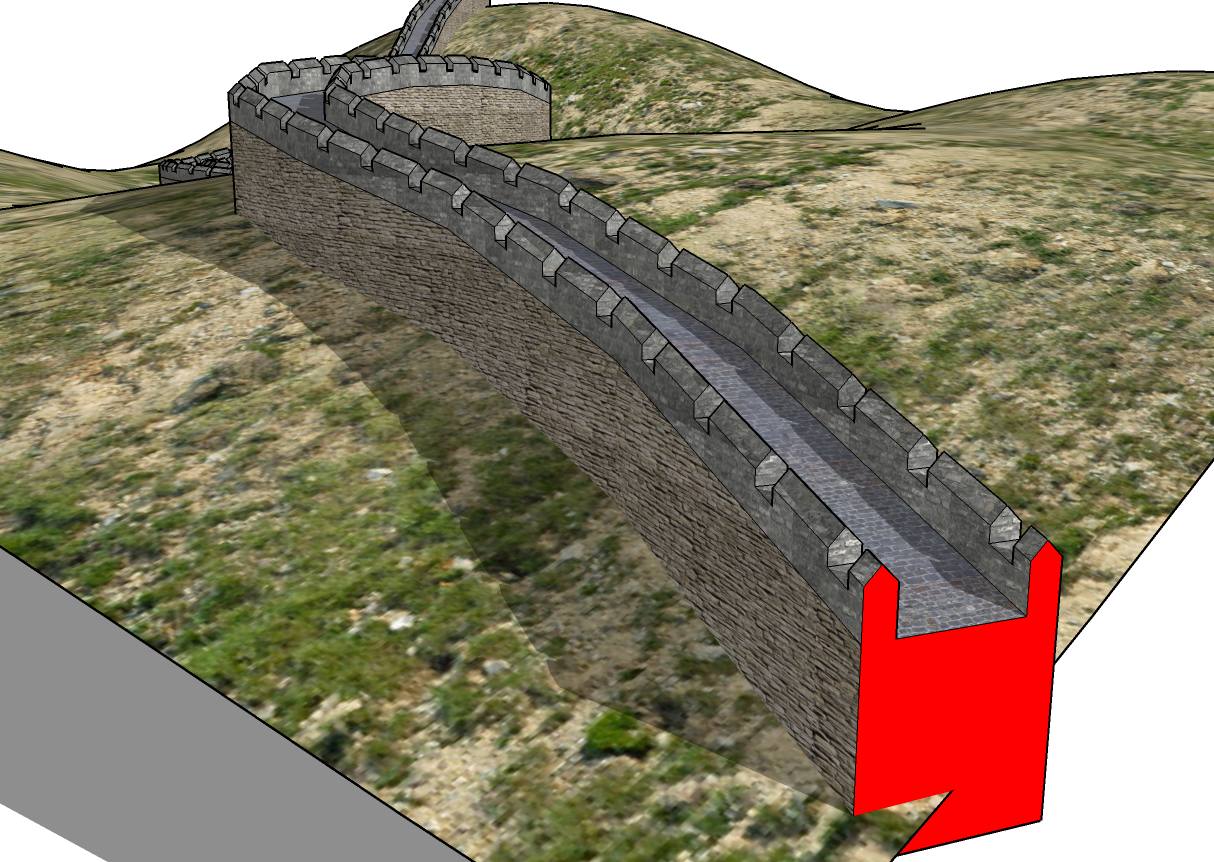
                                  I used it to make the wall, with the profile you see in red.

                                  I then "pathcopied" a component and used booltools to make the battlements.

                                  Great_Wall001.jpg

                                  -Miguel Lescano
                                  Subscribe to my house plans YouTube channel! (30K+ subs)

                                  1 Reply Last reply
                                  Reply Quote 0
                                  • X
                                    xrok1
                                    last edited by

                                    ahhh... yes, it was the cutouts i was wondering about.
                                    thanks

                                    “There are three classes of people: those who see. Those who see when they are shown. Those who do not see.”

                                    http://www.Twilightrender.com try it!

                                    1 Reply Last reply
                                    Reply Quote 0
                                    • pilouP
                                      pilou
                                      last edited by

                                      Seems miss the "little holes" 😉

                                      Frenchy Pilou
                                      Is beautiful that please without concept!
                                      My Little site :)

                                      1 Reply Last reply
                                      Reply Quote 0
                                      • E
                                        Ecuadorian
                                        last edited by

                                        @unknownuser said:

                                        Seems miss the "little holes" 😉

                                        Yup... I was lazy 😉 I'll try it with "little holes" tomorrow.

                                        -Miguel Lescano
                                        Subscribe to my house plans YouTube channel! (30K+ subs)

                                        1 Reply Last reply
                                        Reply Quote 0
                                        • S
                                          Slimdog
                                          last edited by

                                          Hello all. I am new to the forum and have been reading back through the old posts and learning a lot. I have only been on sketchup for a few months but have a couple of years on AutoCad.

                                          I have been trying to get the follow me and keep plugin to work but cant figure it out. I have installed a few plugins before with no problem. I just down load the rb. file and chuck it in the plugin folder. The thing I dont get is that in the very first post by Wikii there is a skp. file and a rar. file. I have down loaded them both. With the FAK.skp file I follow the words saying to highlight all and then run the plugin except there is no follow me in my plugins menu.

                                          Not sure what to do next. Is there an rb. file some where in the skp. file?

                                          -S
                                          ps I am on a mac

                                          1 Reply Last reply
                                          Reply Quote 0
                                          • S
                                            Slimdog
                                            last edited by

                                            Thanks for posting rb. file Pilou. I tried it and works great. Thanks also to Wikii.

                                            -S

                                            1 Reply Last reply
                                            Reply Quote 0

                                            Hello! It looks like you're interested in this conversation, but you don't have an account yet.

                                            Getting fed up of having to scroll through the same posts each visit? When you register for an account, you'll always come back to exactly where you were before, and choose to be notified of new replies (either via email, or push notification). You'll also be able to save bookmarks and upvote posts to show your appreciation to other community members.

                                            With your input, this post could be even better 💗

                                            Register Login
                                            • 1
                                            • 2
                                            • 3
                                            • 4
                                            • 5
                                            • 11
                                            • 12
                                            • 3 / 12
                                            • First post
                                              Last post
                                            Buy SketchPlus
                                            Buy SUbD
                                            Buy WrapR
                                            Buy eBook
                                            Buy Modelur
                                            Buy Vertex Tools
                                            Buy SketchCuisine
                                            Buy FormFonts

                                            Advertisement