sketchucation logo sketchucation
    • 登入
    Oops, your profile's looking a bit empty! To help us tailor your experience, please fill in key details like your SketchUp version, skill level, operating system, and more. Update and save your info on your profile page today!
    🔌 Smart Spline | Fluid way to handle splines for furniture design and complex structures. Download

    [Plugin] FollowMe and keep (v0.04 update 20090210)

    已排程 已置頂 已鎖定 已移動 Plugins
    223 貼文 79 Posters 186.2k 瀏覽 79 Watching
    正在載入更多貼文
    • 從舊到新
    • 從新到舊
    • 最多點贊
    回覆
    • 在新貼文中回覆
    登入後回覆
    此主題已被刪除。只有擁有主題管理權限的使用者可以查看。
    • gillesG 離線
      gilles
      最後由 編輯

      I've been waiting for this tool for a while.

      Thanks.

      But there is something wrong:

      It does not really follow the path, see attached files.

      And sometimes SU quite.

      OSX 10.4 SU6
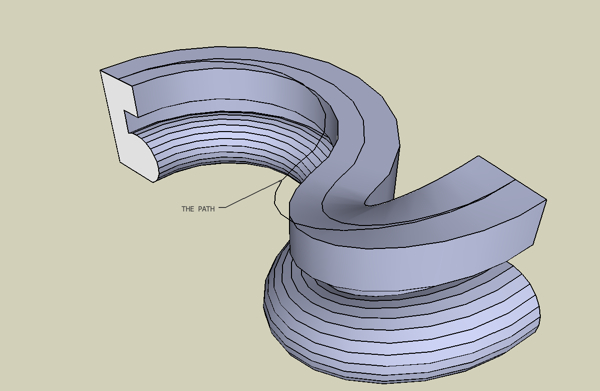

      FAK.jpg


      FAK.skp

      " c'est curieux chez les marins ce besoin de faire des phrases "

      1 條回覆 最後回覆 回覆 引用 0
      • Jean-FrancoJ 離線
        Jean-Franco
        最後由 編輯

        Hi, that was also my remark from yesterday. Have a look at the beginning of this thread.
        You have to place a construction point at the origin of your curved path. Then it works.
        This is equivalent to scene 2 in the WiKi's file FAK.skp

        Jean-Franco

        1 條回覆 最後回覆 回覆 引用 0
        • B 離線
          boilingsnow
          最後由 編輯

          @gilles said:

          I've been waiting for this tool for a while.

          Thanks.

          But there is something wrong:

          It does not really follow the path, see attached files.

          And sometimes SU quite.

          OSX 10.4 SU6

          I think it will be no problem if you make the path in the middle of the profile instead at one side of it.

          1 條回覆 最後回覆 回覆 引用 0
          • W 離線
            wikii
            最後由 編輯

            @gata said:

            I have some paths where both versions of the script failed. On the bright side, they will be good for future testing.

            Edit: More fun things to play with (done on the figure 8 path):

            1. different results if the path is welded verses non-welded.
            2. if the edges of the extruding face are also selected, the extrusion face is reversed and the extrusion location changes.

            download v0.03
            all problems in your skp is solved.

            1 條回覆 最後回覆 回覆 引用 0
            • W 離線
              wikii
              最後由 編輯

              @gilles said:

              I've been waiting for this tool for a while.

              Thanks.

              But there is something wrong:

              It does not really follow the path, see attached files.

              And sometimes SU quite.

              OSX 10.4 SU6

              Add a construciont point at the start piont of path and select it before running.

              1 條回覆 最後回覆 回覆 引用 0
              • B 離線
                bellwells
                最後由 編輯

                @xrok1 said:

                an option for the sweep to start at the beginning of the line no matter where the profile is drawn would make this perfect. maybe a checkbox for start at path or start at profile. then maybe a normal(size of path) or distance from(size*distance from path) instead of the construction point. it seems a pain to make a construction point?

                I think this would be a great improvement. Regardless, this is a tremendous script, wikii. Thank you so very much!!

                Ron

                1 條回覆 最後回覆 回覆 引用 0
                • G 離線
                  gata
                  最後由 編輯

                  Good job. There was a big improvement in just a few hours.

                  Using the same SKP file with the face position in the same locations, some of the face profiles extruded on the wrong side and one relocated.

                  In all cases the path, construction point, face+edges were selected to run the plugin.

                  Paths that intersect will most likely need to be done in sections. Plugins have limited mind-reading abilities, but version .03 at least was able to do extrude something along the entire complex path in one step.

                  (These two paths upset the last plugin attempt to correct the follow me twist.)
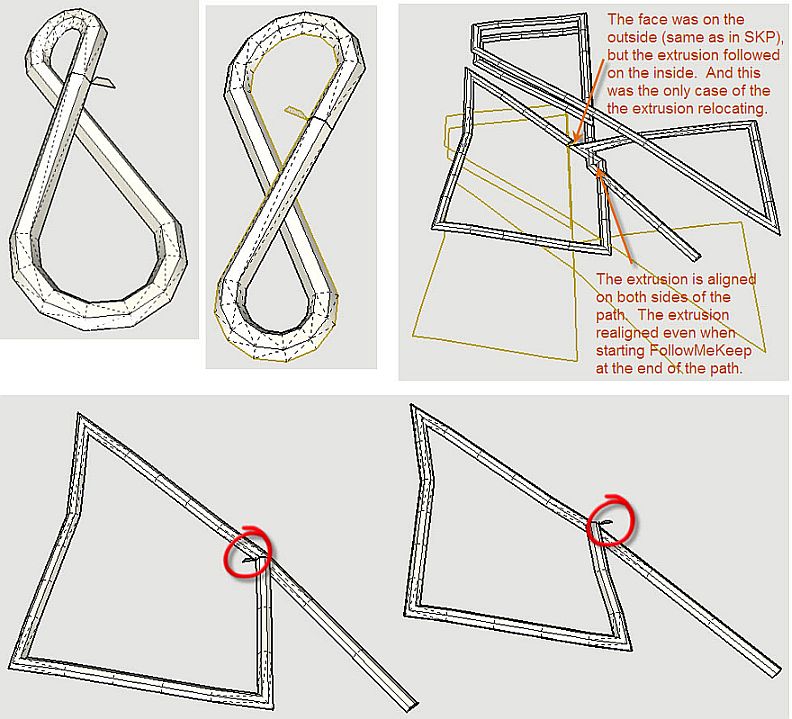

                  FollowMeKeep .03.jpg

                  1 條回覆 最後回覆 回覆 引用 0
                  • pilouP 離線
                    pilou
                    最後由 編輯

                    Is there a conceptual difference with the Profile Builder by Whaat ?

                    Frenchy Pilou
                    Is beautiful that please without concept!
                    My Little site :)

                    1 條回覆 最後回覆 回覆 引用 0
                    • thomthomT 離線
                      thomthom
                      最後由 編輯

                      @unknownuser said:

                      Is there a conceptual difference with the Profile Builder by Whaat ?

                      PB uses the FollowMe tool to create the profiles and therefore suffers from twisting. This one if a custom implmentation that prevents twisting.

                      Thomas Thomassen — SketchUp Monkey & Coding addict
                      List of my plugins and link to the CookieWare fund

                      1 條回覆 最後回覆 回覆 引用 0
                      • pilouP 離線
                        pilou
                        最後由 編輯

                        Thx for precision 😎

                        Frenchy Pilou
                        Is beautiful that please without concept!
                        My Little site :)

                        1 條回覆 最後回覆 回覆 引用 0
                        • W 離線
                          wikii
                          最後由 編輯

                          @gata said:

                          Good job. There was a big improvement in just a few hours.

                          Using the same SKP file with the face position in the same locations, some of the face profiles extruded on the wrong side and one relocated.

                          In all cases the path, construction point, face+edges were selected to run the plugin.

                          Paths that intersect will most likely need to be done in sections. Plugins have limited mind-reading abilities, but version .03 at least was able to do extrude something along the entire complex path in one step.

                          (These two paths upset the last plugin attempt to correct the follow me twist.)

                          Try to reverse face before using FAK.

                          1 條回覆 最後回覆 回覆 引用 0
                          • D 離線
                            dtrarch
                            最後由 編輯

                            Wikii

                            Any chance of adding an align face/profile perpendicular to endpoint fcn?
                            Maybe just a separate script would do or does one exist that will pick face and align by selecting the endpoint of the path??

                            dtr

                            1 條回覆 最後回覆 回覆 引用 0
                            • G 離線
                              gata
                              最後由 編輯

                              Wikii,

                              I got mixed results by reversing the face. Sometimes the reversal worked, sometimes not.

                              People who want FAK to model nice looking roads in a landscape would have some intersecting paths.

                              I mistakenly selected two faces for the plugin to extrude at the same time. FAK made 2 groups. One good, and one looks strange.


                              FAK .03 test 2.skp

                              1 條回覆 最後回覆 回覆 引用 0
                              • W 離線
                                wikii
                                最後由 編輯

                                v0.04 updated.

                                1 條回覆 最後回覆 回覆 引用 0
                                • pilouP 離線
                                  pilou
                                  最後由 編輯

                                  you pass from rbs to rb 😉
                                  So I can put your crazy plug in the Tools menu! Thx! ☀
                                  Seems there is yet a lilbug 😉
                                  if I incline & rotate the curve to the ground that works 😉
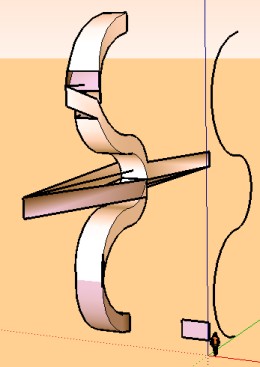

                                  lilbug.jpg


                                  lilbugs.skp

                                  Frenchy Pilou
                                  Is beautiful that please without concept!
                                  My Little site :)

                                  1 條回覆 最後回覆 回覆 引用 0
                                  • E 離線
                                    Ecuadorian
                                    最後由 編輯

                                    It's because the profile itself is kept vertical!

                                    -Miguel Lescano
                                    Subscribe to my house plans YouTube channel! (30K+ subs)

                                    1 條回覆 最後回覆 回覆 引用 0
                                    • pilouP 離線
                                      pilou
                                      最後由 編輯

                                      yes auto intersect 😄

                                      Frenchy Pilou
                                      Is beautiful that please without concept!
                                      My Little site :)

                                      1 條回覆 最後回覆 回覆 引用 0
                                      • W 離線
                                        wikii
                                        最後由 編輯

                                        @unknownuser said:

                                        you pass from rbs to rb 😉
                                        So I can put your crazy plug in the Tools menu! Thx! ☀
                                        Seems there is yet a lilbug 😉
                                        if I incline & rotate the curve to the ground that works 😉

                                        there can‘t has vertical segment in the path.
                                        for the reason? you think it.
                                        😉

                                        1 條回覆 最後回覆 回覆 引用 0
                                        • G 離線
                                          gata
                                          最後由 編輯

                                          Wikii,

                                          All attempts to extrude a profile - from several locations and profile face orientations - on the figure 8 path worked very well.

                                          The way reversing the profile face only changes the orientation of the extruded faces is very nice. People making tunnels, or are otherwise are more interested in the inside of the extrusion will like this feature. It's a keeper.

                                          FAK did not like quite like extruding unless the face was at the end of the selected path. The shape was fine, but the group moved to a new location.

                                          And when I ran the script on the entire path, at least one face did not close near the path intersection area.
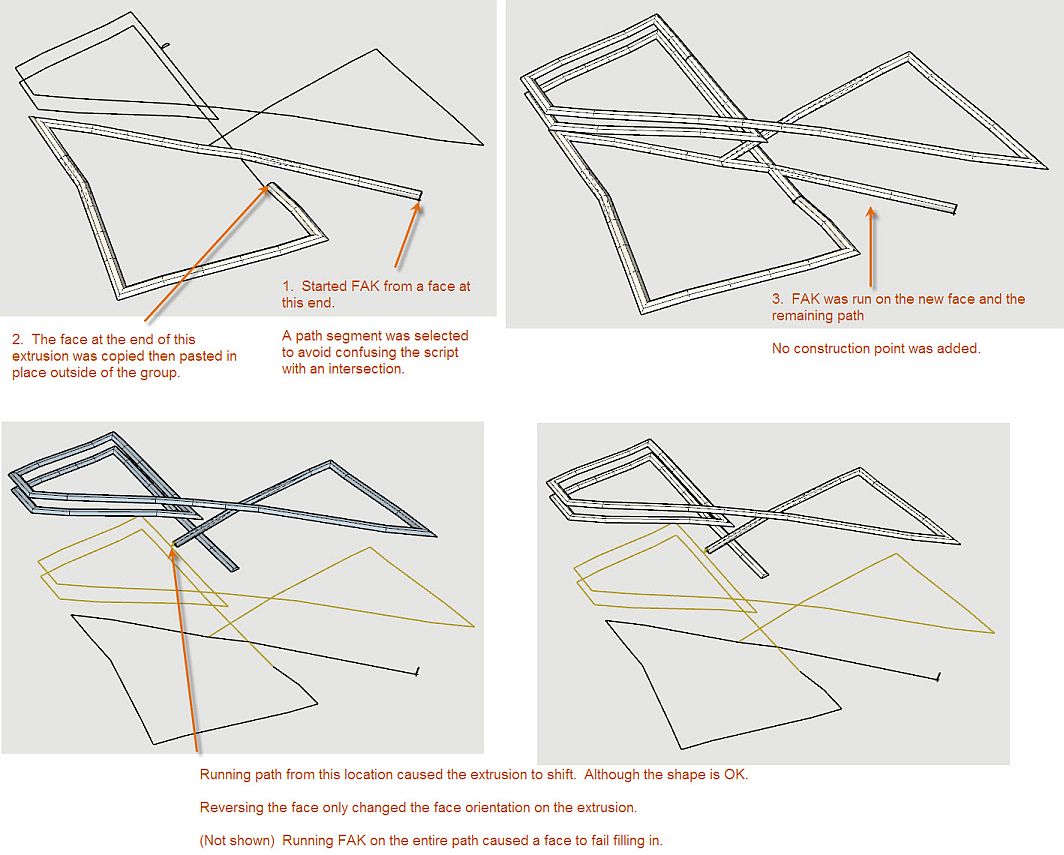

                                          FAK .04 test.jpg

                                          1 條回覆 最後回覆 回覆 引用 0
                                          • D 離線
                                            davecoopstl
                                            最後由 編輯

                                            Take a look at this model of a basic roller coaster track.

                                            I drew three circles as the profile: one for the main beam, and two for the coaster rails.

                                            Look at the top of the hill, how the rails cross paths and switch to the opposite sides of the main beam.

                                            Is this expected behavior? Am I doing something wrong? Is there a way to keep this from happening?

                                            Hope someone can help.
                                            Thanks!
                                            Dave/


                                            Here's a simple roller coaster track, but the profile is 'reversing' at the top of the hill!

                                            1 條回覆 最後回覆 回覆 引用 0
                                            • 1
                                            • 2
                                            • 8
                                            • 9
                                            • 10
                                            • 11
                                            • 12
                                            • 10 / 12
                                            • 第一個貼文
                                              最後的貼文
                                            Buy SketchPlus
                                            Buy SUbD
                                            Buy WrapR
                                            Buy eBook
                                            Buy Modelur
                                            Buy Vertex Tools
                                            Buy SketchCuisine
                                            Buy FormFonts

                                            Advertisement

