sketchucation logo sketchucation
    • 登入
    Oops, your profile's looking a bit empty! To help us tailor your experience, please fill in key details like your SketchUp version, skill level, operating system, and more. Update and save your info on your profile page today!
    🔌 Smart Spline | Fluid way to handle splines for furniture design and complex structures. Download

    [Plugin] FollowMe and keep (v0.04 update 20090210)

    已排程 已置頂 已鎖定 已移動 Plugins
    223 貼文 79 Posters 186.3k 瀏覽 79 Watching
    正在載入更多貼文
    • 從舊到新
    • 從新到舊
    • 最多點贊
    回覆
    • 在新貼文中回覆
    登入後回覆
    此主題已被刪除。只有擁有主題管理權限的使用者可以查看。
    • TIGT 離線
      TIG Moderator
      最後由 編輯

      @phoeniax said:

      It does not work now i used it for some time now it does nor do anything
      Obviously it does work for many people!
      If you explain better what doesn't work, what's installed, what's changed etc... we might find what's wrong.

      TIG

      1 條回覆 最後回覆 回覆 引用 0
      • JBJDesignsJ 離線
        JBJDesigns
        最後由 編輯

        Thank you wikii! I can really use this tool!!! Jo 😄

        ...you send them to school, you give them books, and they eat the pages...

        1 條回覆 最後回覆 回覆 引用 0
        • N 離線
          News
          最後由 編輯

          Hi everyone,

          I am trying to draw a handrail for "2 quart tournant" stairs ( don't know the word in english 😕 ) since a bit.
          When i saw this plugin i thought a miracle will come, but actually after i downloaded and installed it...nothing happened !
          I select my path and my shape and then click on the FAK pluginin my plugin menu, but nothing happens.
          Where am i wrong ? What do i don't understand ?

          Please help, this handrail is making me crazy !

          Thanks !!


          Handrail stairs.skp

          1 條回覆 最後回覆 回覆 引用 0
          • BoxB 離線
            Box
            最後由 編輯

            The profile and path need to be in the same context. Put the profile into the paths group and try again. Your path isn't continuous either, there is a slight problem in the top straight section, easy fix, delete it and redraw it making sure to connect properly with the curve.
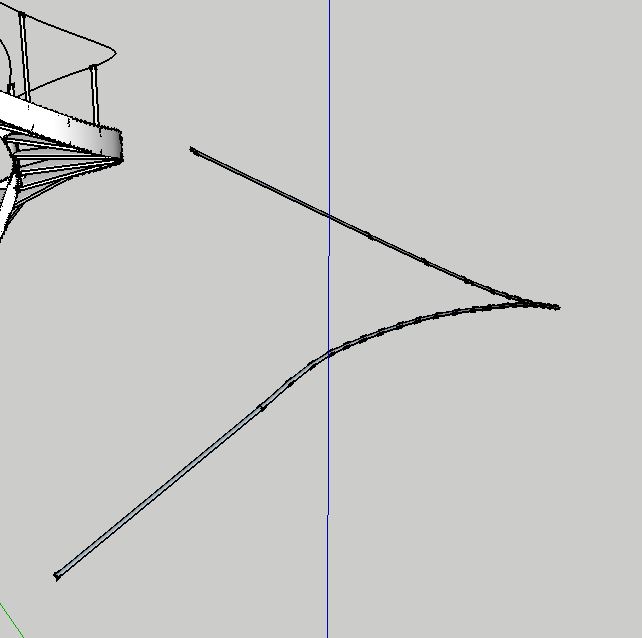

            Hand.JPG

            1 條回覆 最後回覆 回覆 引用 0
            • N 離線
              News
              最後由 編輯

              Thank you soo much for answering so quickly !
              I tried to do what you explain, but nothing happens again.
              I may not redraw and fix well the straight sections, but i don't know how to do it properly.
              Would you help me again ? could you join the .skp file you did for me to see how you did ?
              Thanks again !

              1 條回覆 最後回覆 回覆 引用 0
              • N 離線
                News
                最後由 編輯

                I even tried to connect the lines with the Weld ruby script, then put the profile into the path context, but it dosen't work.
                😢

                1 條回覆 最後回覆 回覆 引用 0
                • BoxB 離線
                  Box
                  最後由 編輯

                  Here you go.


                  Handrail.skp

                  1 條回覆 最後回覆 回覆 引用 0
                  • N 離線
                    News
                    最後由 編輯

                    Ohh merci ! But i have SU8 so i can't open your file who is in SU13 😕

                    1 條回覆 最後回覆 回覆 引用 0
                    • BoxB 離線
                      Box
                      最後由 編輯

                      Why does your profile say 2013, I checked that before I saved it.


                      SU8

                      1 條回覆 最後回覆 回覆 引用 0
                      • TIGT 離線
                        TIG Moderator
                        最後由 編輯

                        Here is the 'written' version...

                        Edit the path group...
                        Double-click on an end segment.
                        If there is a break in the path not all of it will highlight.
                        Zoom into the 'gap' between the parts.
                        In this case it's near the top part and very small...
                        Either draw in the missing piece, or perhaps more easily - deselect everything, and then use the Move tool to drag and relocated the end of one part snapped onto the other, thereby closing the gap.
                        Double-click again and everything should highlight.
                        IF you want a smooth path now 'weld' the selection, and provided there are no branching lines in the path [none in this case], it'll become a single 'curve': this will select with a single pick-click.
                        Exit the path edit.

                        That's the path fixed.

                        Next... did you understand the part about 'same context'.
                        You only need one profile and that needs to be at one end of the path.
                        Delete any others?
                        Now select the profile and Edit>Cut.
                        Edit the path group again and Edit>Paste In Place to add the profile onto the path end.

                        Now you should be able to use FAK [FollowMeAndKeep] on the desired path and the profile face as desired... You may need to smooth the result or reverse faces [depends on the profile's initial orientation], or with View > Hidden Geometry ON you may wish to make some of the form's edges solid [NOT smoothed/softened] - so select them and use the Entity Info check-boxes to adjust as desired...

                        TIG

                        1 條回覆 最後回覆 回覆 引用 0
                        • N 離線
                          News
                          最後由 編輯

                          Merci beaucoup beaucoup !
                          I will try to do exactly what you say.
                          Hope i'll be smart enough to suceed !

                          1 條回覆 最後回覆 回覆 引用 0
                          • N 離線
                            News
                            最後由 編輯

                            And thank you Box, i can open it now!

                            1 條回覆 最後回覆 回覆 引用 0
                            • N 離線
                              News
                              最後由 編輯

                              @tig said:

                              Either draw in the missing piece, or perhaps more easily - deselect everything, and then use the Move tool to drag and relocated the end of one part snapped onto the other, thereby closing the gap.
                              Double-click again and everything should highlight.

                              What i don't understand is that when i use the move tool at the end of the straight line on the top, the curved line moves with it, as if it was already snapped. So i don't figure out where is the gap you are talking about

                              1 條回覆 最後回覆 回覆 引用 0
                              • TIGT 離線
                                TIG Moderator
                                最後由 編輯

                                With nothing selected the Move tool looks for objects below the cursor and offers you the best hit.
                                That can be a face, edge or the start/end vertex of a edge - hover over the very end and it should display a green-dot, then press+drag that to the nearby other vertex - on the other side of the gap... then the gap is 'healed'...

                                TIG

                                1 條回覆 最後回覆 回覆 引用 0
                                • N 離線
                                  News
                                  最後由 編輯

                                  Thank you for your answer.

                                  I had to redraw all the path in one time, because even doing what you said at last, it wasn't working. I am sure there's something i don't get, i'll figure out one day.

                                  Thank you for all your effort !

                                  1 條回覆 最後回覆 回覆 引用 0
                                  • T 離線
                                    tspco
                                    最後由 編輯

                                    Trying to make a screw conveyor, using Follow me helix, making a profile, then trying FAK, the result is not pretty, nor round as it should be. Quite frustrated at this point.


                                    fakerror.skp

                                    SU make 2017, /Twilight Render Hobby
                                    Windows 10,64 bit,16GB ram, quad core Athlon 3.6 gHz proc. Anything else you want to know, ask me.

                                    1 條回覆 最後回覆 回覆 引用 0
                                    • gillesG 離線
                                      gilles
                                      最後由 編輯

                                      Try Screw_1.5.

                                      " c'est curieux chez les marins ce besoin de faire des phrases "

                                      1 條回覆 最後回覆 回覆 引用 0
                                      • gillesG 離線
                                        gilles
                                        最後由 編輯

                                        http://sketchucation.com/forums/viewtopic.php?f=15%26amp;t=50134%26amp;start=30#p452795

                                        " c'est curieux chez les marins ce besoin de faire des phrases "

                                        1 條回覆 最後回覆 回覆 引用 0
                                        • T 離線
                                          tspco
                                          最後由 編輯

                                          Got my problem solved, what I was doing was not FAKs fault, apparently there is a issue with Follow me helix, and doing what I wanted, I went and got drawhelix13, good to go!


                                          archydro.skp

                                          SU make 2017, /Twilight Render Hobby
                                          Windows 10,64 bit,16GB ram, quad core Athlon 3.6 gHz proc. Anything else you want to know, ask me.

                                          1 條回覆 最後回覆 回覆 引用 0
                                          • U 離線
                                            uma30
                                            最後由 編輯

                                            good day can someone help me off here im having problem with downloading and installing of follo me tool please help thank you


                                            1 條回覆 最後回覆 回覆 引用 0
                                            • 1
                                            • 2
                                            • 3
                                            • 4
                                            • 5
                                            • 11
                                            • 12
                                            • 3 / 12
                                            • 第一個貼文
                                              最後的貼文
                                            Buy SketchPlus
                                            Buy SUbD
                                            Buy WrapR
                                            Buy eBook
                                            Buy Modelur
                                            Buy Vertex Tools
                                            Buy SketchCuisine
                                            Buy FormFonts

                                            Advertisement

