Bounding box not aligned?
-
Hi,
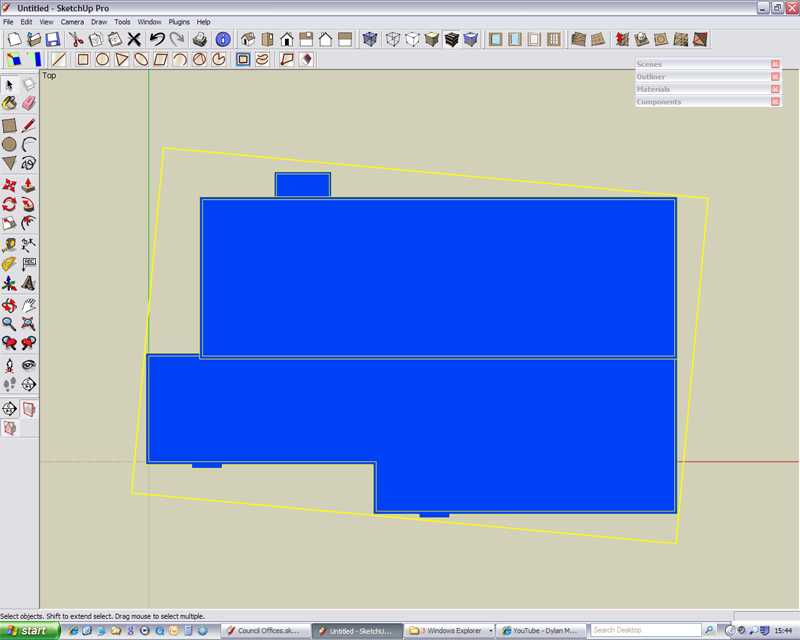
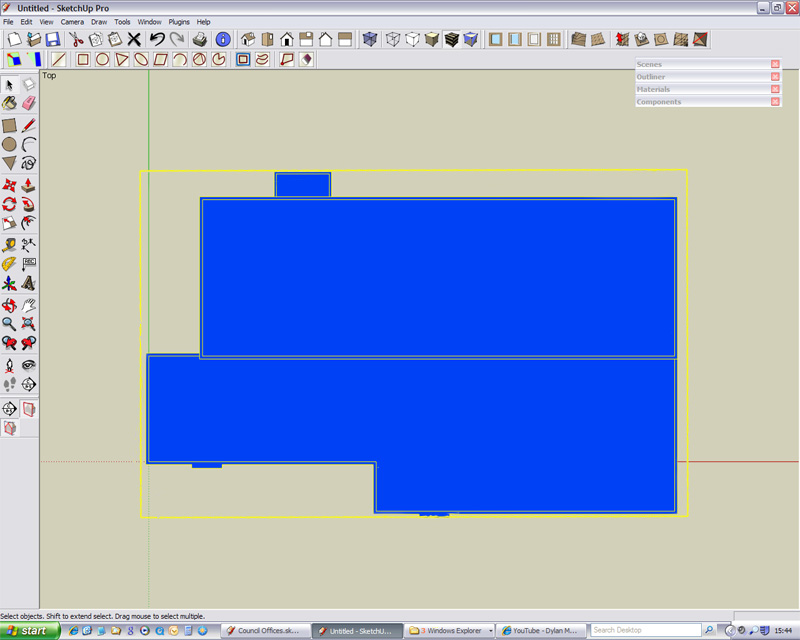
Why, when I build an object that is aligned with the "world" axis and at the centre origin point does its bounding box not seem to stay aligned?
I have attached 2 pictures which should explain better what I mean.
They show the top view (Parallel Projection) of a building I have created and then made as a group.
When this group is clicked on and selected the bounding box seems to be askew. The second picture (altered in Photoshop) shows how I would have expected the bounding box to look like.
Can anyone explain why I am getting this result?
Thanks.Regards
Mr S
=======
-
Are you sure you haven't changed the axes? If you right click on one,is there a "Reset" item available in the context menu?
(SU 7 would do it "correctly" even if you change the axes...)
-
Hi Gaieus,
Yes, thats the answer.
I forgot that I must have changed the axis at some point.Nice to know that SU7 has "fixed" this issue.
Thanks.
Regards
Mr S -
yes, that is one of the most important bug fixes in SketchUp 7 in my opinion (seriously). because now it makes sense to actually change the coordinate axes (previously I never did it, precisely because of this issue)
-
Well, I wouldn't call the "old" behaviour a bug but maybe a feature everyone disliked

Actually, at least inferencing works/ed in changed axis mode in SU 6 as well.


Hello! It looks like you're interested in this conversation, but you don't have an account yet.
Getting fed up of having to scroll through the same posts each visit? When you register for an account, you'll always come back to exactly where you were before, and choose to be notified of new replies (either via email, or push notification). You'll also be able to save bookmarks and upvote posts to show your appreciation to other community members.
With your input, this post could be even better 💗
Register Login


Advertisement