sketchucation logo sketchucation
    • Login
    Oops, your profile's looking a bit empty! To help us tailor your experience, please fill in key details like your SketchUp version, skill level, operating system, and more. Update and save your info on your profile page today!
    Mac User? | Join the Rayscaper Beta for Mac Learn More

    [Plugin] Zorro2 (beta)

    Scheduled Pinned Locked Moved Plugins
    314 Posts 154 Posters 430.7k Views 154 Watching
    Loading More Posts
    • Oldest to Newest
    • Newest to Oldest
    • Most Votes
    Reply
    • Reply as topic
    Log in to reply
    This topic has been deleted. Only users with topic management privileges can see it.
    • N
      Nilez83
      last edited by

      Yep,the same screen I get

      1 Reply Last reply
      Reply Quote 0
      • Dave RD
        Dave R
        last edited by

        @nilez83 said:

        Hi TIG,

        I've put the file in the \program files\Sketchup\Sketchup 2014\plugins folder.

        Wrong folder. It should be in the User (your username)/App Data/SketchUp 2014/... Plugins folder.

        @nilez83 said:

        I downloaded the file as .rb not rbz, from the first post of this thread. Because I don't have it as a rbz file it doesn't show up when I try to install it using preferences>extensions>install.

        It wouldn't show with Install Extension, would it?

        Move it to the right location and all should be fine.

        Etaoin Shrdlu

        %

        (THERE'S NO PLACE LIKE)

        G28 X0.0 Y0.0 Z0.0

        M30

        %

        1 Reply Last reply
        Reply Quote 0
        • N
          Nilez83
          last edited by

          Ok installed it in the right directory and it's working again. Thanks very much!

          1 Reply Last reply
          Reply Quote 0
          • TIGT
            TIG Moderator
            last edited by

            @Box

            There is indeed an issue with 'Zorro2'...

            The version includes a space before the 'beta' in the RBZ name.
            It should be replaced by a '_' when the path is setup server-side [GΓ‘bor !]
            I have fixed it... it's now versioned as '_beta'.
            I've also done similar fixes for some others Plugins in the Store.

            It will now install properly from the dialog πŸ˜„

            TIG

            1 Reply Last reply
            Reply Quote 0
            • N
              Nilez83
              last edited by

              Thanks TIG!

              1 Reply Last reply
              Reply Quote 0
              • TIGT
                TIG Moderator
                last edited by

                OK. πŸ˜„
                That issue should have never happened in the first place, and hopefully it won't recur in the future [GΓ‘bor !]

                Incidentally you should NEVER have a Plugins folder for v2014 inside the its 'Programs Files' folder-path.
                It should default to each Users' Plugins folder - as Dave explained.
                There is another potential 'shared' Plugins folder that you can make in the ProgramData tree... BUT do not make this unless you really really want to 'share' plugins...
                All Plugins AutoInstall into the User's Plugins folder anyway - using the native installer.
                The SketchUcation PluginStore's equivalent AutoInstaller will prompt for an alternative destination, but only IF it'd been defined and in $: [Fredo's AdditionalPluginsFolder tool allows you to specify alternative custom-plugins folders BUT is only necessary if you need them - e.g. you are on a commercial/educational network with restricted permissions, or you have several computers and want to share one folder via DropBox, or similar...]

                TIG

                1 Reply Last reply
                Reply Quote 0
                • B
                  beardj0dj0
                  last edited by

                  GOODDDDDDDDDDDDDDDDDDDDDDDDDDDDDDDDDDDDDDDDDDDDDDDDDDDDDDDDDDDDDDDD

                  1 Reply Last reply
                  Reply Quote 0
                  • I
                    Ibragol09
                    last edited by

                    Hi
                    I'm a newbie
                    I downloded Zorro that i found in page 1 of this thread

                    So i copy the file .rb in /library/app support/sketchup ......

                    So it don't work on my sketchUp 2013 and 2014 for MAC!...

                    However CutFace work on it...

                    What wrong?

                    Sorry for my brutal english....i'm italian ...

                    Bye bye

                    1 Reply Last reply
                    Reply Quote 0
                    • TIGT
                      TIG Moderator
                      last edited by

                      Why not get the RBZ version from the PlugniStore ?
                      http://sketchucation.com/pluginstore?listtype=1%26amp;author=0%26amp;category=0%26amp;search=zorro%26amp;submit=%3F
                      Then use the v2013/v2014 Preferences >Extensions > Install button to properly install the contents into the correct Plugins folder.
                      The correct Plugins folder is also found using the Ruby Console command: Sketchup.find_support_file('Plugins')
                      If you have manually installed files elsewhere remove them... πŸ˜•

                      TIG

                      1 Reply Last reply
                      Reply Quote 0
                      • D
                        DADAZ
                        last edited by

                        Very nice zorro 2..... thank very for this....

                        1 Reply Last reply
                        Reply Quote 0
                        • masterpaulM
                          masterpaul
                          last edited by

                          Hi,
                          This plugin doesn't cut objects into separate components? It just slices through the model?

                          1 Reply Last reply
                          Reply Quote 0
                          • Dave RD
                            Dave R
                            last edited by

                            @masterpaul said:

                            Hi,
                            This plugin doesn't cut objects into separate components? It just slices through the model?

                            Right. It just does what it says in the first post of the thread. πŸ˜’

                            Etaoin Shrdlu

                            %

                            (THERE'S NO PLACE LIKE)

                            G28 X0.0 Y0.0 Z0.0

                            M30

                            %

                            1 Reply Last reply
                            Reply Quote 0
                            • BoxB
                              Box
                              last edited by

                              I have a banana that won't cut bread no matter how hard I try.

                              1 Reply Last reply
                              Reply Quote 0
                              • Dave RD
                                Dave R
                                last edited by

                                Yer holding yer tongue wrong. πŸ˜„

                                Etaoin Shrdlu

                                %

                                (THERE'S NO PLACE LIKE)

                                G28 X0.0 Y0.0 Z0.0

                                M30

                                %

                                1 Reply Last reply
                                Reply Quote 0
                                • masterpaulM
                                  masterpaul
                                  last edited by

                                  @dave r said:

                                  @masterpaul said:

                                  Hi,
                                  This plugin doesn't cut objects into separate components? It just slices through the model?

                                  Right. It just does what it says in the first post of the thread. πŸ˜’

                                  "- Cutting through nested components results in creation of many unique components"

                                  Yeah it says it creates new components in nested components, but it doesn't create new components on my PC. That's why I asked.

                                  SU 2014, windows 7.

                                  1 Reply Last reply
                                  Reply Quote 0
                                  • BoxB
                                    Box
                                    last edited by

                                    It's not quite what that means.
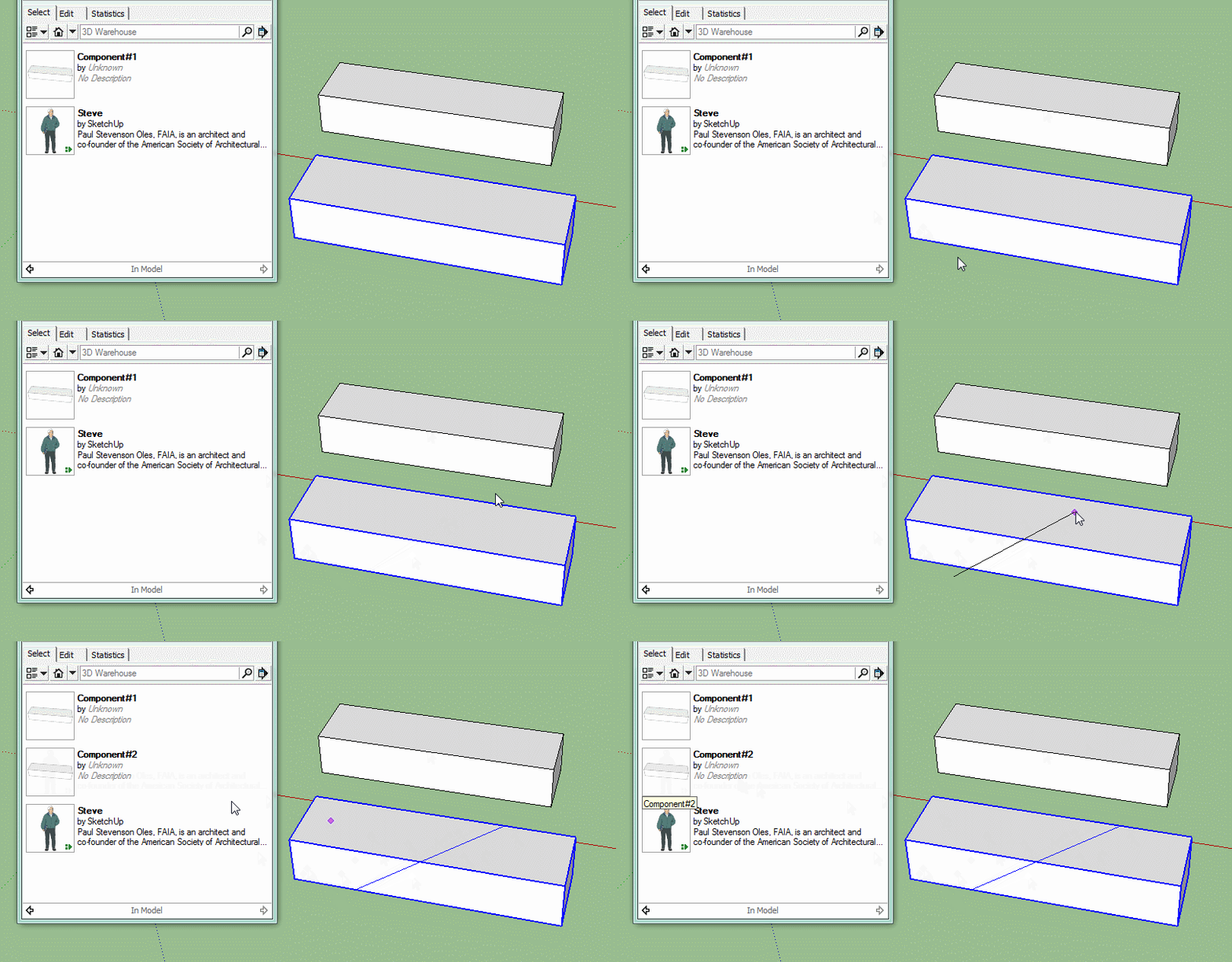
                                    Zorro will make a component unique when it cuts it. Not make separate unique components from the cuts.

                                    Make a simple component, make a copy of it and use ctrl with zorro to slice the second one. Look at the entity info and you will see it has changed the name therefore making that a unique component.

                                    Click me to animate

                                    1 Reply Last reply
                                    Reply Quote 0
                                    • masterpaulM
                                      masterpaul
                                      last edited by

                                      @BOX

                                      Cheers for clearing that up, I thought it was an error originally. Guess will have to take that extra step.

                                      Is there an alternative that divides components into separate components after cutting?

                                      1 Reply Last reply
                                      Reply Quote 0
                                      • BoxB
                                        Box
                                        last edited by

                                        Yes, S4u Slice, not free, but very cheap.
                                        http://sketchucation.com/forums/viewtopic.php?f=323%26amp;t=59170

                                        1 Reply Last reply
                                        Reply Quote 0
                                        • R
                                          reauen
                                          last edited by

                                          WHAAAAAAAAT!! this is amazing!! i need to hug you!

                                          thanks!

                                          Especially slice model at section is freaking awsome!!
                                          πŸ‘ πŸ‘ πŸ‘ πŸ‘ πŸ‘ πŸ‘

                                          1 Reply Last reply
                                          Reply Quote 0
                                          • J
                                            jtbrockmeyer
                                            last edited by

                                            I am trying to install this in a Mac with the SU 2014 version. I am not certain where/how to install the file i downloaded "Zorro2_v2.0_beta.rbz".

                                            I have read all the responses and I still can't seem to get it to work.

                                            Can anyone help?

                                            Thanks in advance.

                                            1 Reply Last reply
                                            Reply Quote 0

                                            Hello! It looks like you're interested in this conversation, but you don't have an account yet.

                                            Getting fed up of having to scroll through the same posts each visit? When you register for an account, you'll always come back to exactly where you were before, and choose to be notified of new replies (either via email, or push notification). You'll also be able to save bookmarks and upvote posts to show your appreciation to other community members.

                                            With your input, this post could be even better πŸ’—

                                            Register Login
                                            • 1
                                            • 2
                                            • 12
                                            • 13
                                            • 14
                                            • 15
                                            • 16
                                            • 15 / 16
                                            • First post
                                              Last post
                                            Buy SketchPlus
                                            Buy SUbD
                                            Buy WrapR
                                            Buy eBook
                                            Buy Modelur
                                            Buy Vertex Tools
                                            Buy SketchCuisine
                                            Buy FormFonts

                                            Advertisement

