sketchucation logo sketchucation
    • Login
    Oops, your profile's looking a bit empty! To help us tailor your experience, please fill in key details like your SketchUp version, skill level, operating system, and more. Update and save your info on your profile page today!
    ⚠️ Update | Sketchucation Tools 5.0.8 released with licensing improvements and bugfixes Download

    [Obsolete] FredoScale 1.0e (Free Scaling, Taper Scaling)

    Scheduled Pinned Locked Moved Developers' Forum
    140 Posts 61 Posters 52.7k Views 61 Watching
    Loading More Posts
    • Oldest to Newest
    • Newest to Oldest
    • Most Votes
    Reply
    • Reply as topic
    Log in to reply
    This topic has been deleted. Only users with topic management privileges can see it.
    • pilouP
      pilou
      last edited by

      Super bestial ! Very tricky! 👍 😎

      Frenchy Pilou
      Is beautiful that please without concept!
      My Little site :)

      1 Reply Last reply
      Reply Quote 0
      • K
        kwistenbiebel
        last edited by

        Fantastic fredo!

        Very useful. It will be one of those tools you cannot live without once you used it.
        You guys (the wizard ruby masters) should take over the further development of sketchup as a whole.
        Thank you very much. 👍 👍

        1 Reply Last reply
        Reply Quote 0
        • J
          johnsenior1973
          last edited by

          Thank you for another great plugin.

          1 Reply Last reply
          Reply Quote 0
          • W
            watkins
            last edited by

            Dear Fredo6

            I have just tried FreeScale. EXCELLENT!!!

            Thank you for your generosity.

            Kind regards,
            Bob

            1 Reply Last reply
            Reply Quote 0
            • thomthomT
              thomthom
              last edited by

              Yes! I was thinking just this week that it'd be so nice ot be able to taper scale objects. This is another must have plugin. Thank you very much Fredo.

              Thomas Thomassen — SketchUp Monkey & Coding addict
              List of my plugins and link to the CookieWare fund

              1 Reply Last reply
              Reply Quote 0
              • N
                notareal
                last edited by

                Great! Thanks for your effort.

                Welcome to try Thea Render, Thea support | kerkythea.net -team member

                1 Reply Last reply
                Reply Quote 0
                • J
                  johnsenior1973
                  last edited by

                  Solo is going to find his cartoon characters a great deal easier with this. This is clearly another great leap for Sketchup.

                  1 Reply Last reply
                  Reply Quote 0
                  • T
                    Teezer
                    last edited by

                    Wonderful! Great! Excellent! Thank you, thank you, thank you... 🎉 😄

                    Real life is just another website, albeit a rather boring one.

                    1 Reply Last reply
                    Reply Quote 0
                    • tbdT
                      tbd
                      last edited by

                      to be able to run on Mac I had to create DEFPARAM_Dir under plugins dir (due permissions restriction the mkdir command in Lib6Core_30 failed)

                      nice work Fredo

                      SketchUp Ruby Consultant | Podium 1.x developer
                      http://plugins.ro

                      1 Reply Last reply
                      Reply Quote 0
                      • soloS
                        solo
                        last edited by

                        Bravo!!
                        http://users.atw.hu/swb/smile/taps.gif

                        Just what I need for my character modeling, thanks a ton.

                        http://www.solos-art.com

                        If you see a toilet in your dreams do not use it.

                        1 Reply Last reply
                        Reply Quote 0
                        • W
                          watkins
                          last edited by

                          Dear Fredo6,

                          One little known option of the native SU Scale tool is the ability to input final dimensions via the VCB (example: 100mm,100mm,100mm). The scale box is then scaled to those dimensions. Is this something that could be include in your script?

                          Kind regards,
                          Bob

                          1 Reply Last reply
                          Reply Quote 0
                          • O
                            otb designworks
                            last edited by

                            Great script! Thank you thank you!.

                            However, I, as you know, am on a MAC and I am having serious issues with this script.

                            The standard scaling tool works beautifully and as expected. Being able to set the orientation is brilliant!.

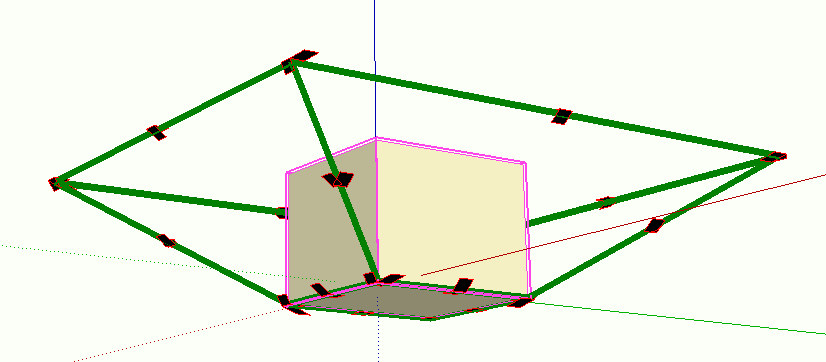
                            The taper scale tool, however, isn't working at all.

                            It displays the bounding box and shows the results of all of the tool manipulations, but it never actually changes the object geometry. Picture attached. Hitting return or clicking outside the box erases the bounding box and the cube remains as is.

                            Let me know what I can do to assist diagnosis.

                            Thanks again.

                            Picture 1.png

                            Cheers, Chuck

                            OTB Designworks is on Youtube

                            6 core nMP, 32 gig RAM, (2) D700 GPU's, dual monitors

                            1 Reply Last reply
                            Reply Quote 0
                            • M
                              Matt666
                              last edited by

                              😲 😲 Awesome !!! Thank you Fredo !

                              Frenglish at its best !
                              My scripts

                              1 Reply Last reply
                              Reply Quote 0
                              • MALAISEM
                                MALAISE
                                last edited by

                                Hi Fredo

                                Incredible enhancement 👍 👍 ☀

                                MERCI

                                MALAISE

                                La Connaissance n'a de valeur que partagée

                                1 Reply Last reply
                                Reply Quote 0
                                • D
                                  Daniel S
                                  last edited by

                                  Awesome!!!
                                  Thank you Fredo!!!

                                  I only have a problem when set the dimension in the dialog box by pressing TAB. It dosen´t accept what I put.. just make a beep 😕
                                  I attach a video example of this.

                                  Daniel S


                                  a video of the problem (.wmv)

                                  1 Reply Last reply
                                  Reply Quote 0
                                  • fredo6F
                                    fredo6
                                    last edited by

                                    @daniel s said:

                                    I only have a problem when set the dimension in the dialog box by pressing TAB. It dosen´t accept what I put.. just make a beep 😕
                                    I attach a video example of this.

                                    Daniel S

                                    Daniel,

                                    Strange. What is the default decimal separator you normally use in your version of Sketchup.
                                    Just in case, can you turn the Ruby console on to see if anything is displayed.
                                    Can you also type in the Ruby console the following command:

                                    Traductor.string_to_length_formula "20"
                                    

                                    and see what it does.

                                    I don't know if any other users has found that problem?

                                    I will analyze what it could be in parallel.

                                    Fredo

                                    1 Reply Last reply
                                    Reply Quote 0
                                    • fredo6F
                                      fredo6
                                      last edited by

                                      @watkins said:

                                      Dear Fredo6,

                                      One little known option of the native SU Scale tool is the ability to input final dimensions via the VCB (example: 100mm,100mm,100mm). The scale box is then scaled to those dimensions. Is this something that could be include in your script?

                                      Kind regards,
                                      Bob

                                      Bob,

                                      Just press TABwhen the scaling handle is highlighted (or use the contextual menu). You should have the Dimension box appearing. For teh time being, I preferred to reserve the VCB to scale values.

                                      Fredo

                                      PS: Daniel S. has found some issues with this dialog box. Maybe you can report if found any.

                                      1 Reply Last reply
                                      Reply Quote 0
                                      • fredo6F
                                        fredo6
                                        last edited by

                                        @unknownuser said:

                                        The taper scale tool, however, isn't working at all.

                                        It displays the bounding box and shows the results of all of the tool manipulations, but it never actually changes the object geometry. Picture attached. Hitting return or clicking outside the box erases the bounding box and the cube remains as is.

                                        Let me know what I can do to assist diagnosis.

                                        Thanks again.

                                        It is clear that there is an error in the execution of the deformation, as shown on your image.
                                        The best would be to turn on the Ruby console and see what it says. I don't know if it could be related to Mac.
                                        Also can you tell me if your run SU 7 or 6.

                                        Fredo

                                        1 Reply Last reply
                                        Reply Quote 0
                                        • R
                                          roadkill
                                          last edited by

                                          many thanks dude... that is special!

                                          1 Reply Last reply
                                          Reply Quote 0
                                          • O
                                            otb designworks
                                            last edited by

                                            Hi Fredo!

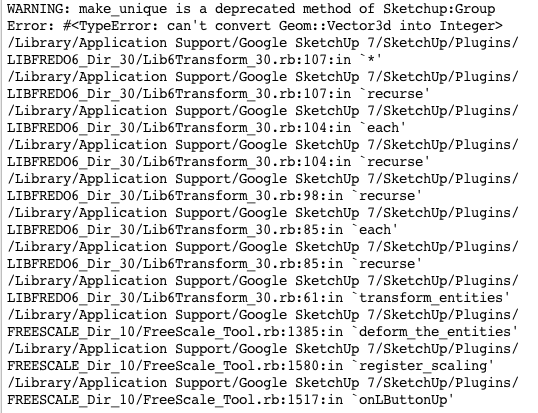
                                            Here is the Ruby Console result from attempting to taper scale.

                                            I am using SU7, OS 10.5.6.

                                            Thanks!

                                            Picture 1.png

                                            Cheers, Chuck

                                            OTB Designworks is on Youtube

                                            6 core nMP, 32 gig RAM, (2) D700 GPU's, dual monitors

                                            1 Reply Last reply
                                            Reply Quote 0

                                            Hello! It looks like you're interested in this conversation, but you don't have an account yet.

                                            Getting fed up of having to scroll through the same posts each visit? When you register for an account, you'll always come back to exactly where you were before, and choose to be notified of new replies (either via email, or push notification). You'll also be able to save bookmarks and upvote posts to show your appreciation to other community members.

                                            With your input, this post could be even better 💗

                                            Register Login
                                            • 1
                                            • 2
                                            • 3
                                            • 4
                                            • 5
                                            • 6
                                            • 7
                                            • 4 / 7
                                            • First post
                                              Last post
                                            Buy SketchPlus
                                            Buy SUbD
                                            Buy WrapR
                                            Buy eBook
                                            Buy Modelur
                                            Buy Vertex Tools
                                            Buy SketchCuisine
                                            Buy FormFonts

                                            Advertisement


