sketchucation logo sketchucation
    • 登入
    Oops, your profile's looking a bit empty! To help us tailor your experience, please fill in key details like your SketchUp version, skill level, operating system, and more. Update and save your info on your profile page today!
    🔌 Smart Spline | Fluid way to handle splines for furniture design and complex structures. Download

    [Plugin] 1001bit Tools - Architectural tools for SketchUp

    已排程 已置頂 已鎖定 已移動 Plugins
    243 貼文 65 Posters 234.6k 瀏覽 65 Watching
    正在載入更多貼文
    • 從舊到新
    • 從新到舊
    • 最多點贊
    回覆
    • 在新貼文中回覆
    登入後回覆
    此主題已被刪除。只有擁有主題管理權限的使用者可以查看。
    • utilerU 離線
      utiler
      最後由 編輯

      Thanks Goh, I'll go try it out..... I assumed 1 row or 1 column would add a mullion or transom to the panel...

      Just Curious...

      1 條回覆 最後回覆 回覆 引用 0
      • utilerU 離線
        utiler
        最後由 編輯

        I did try that Goh but still the problem is occurring. I will PM you the .skp file and a short .swf file of the process.....
        thanks!!!

        Just Curious...

        1 條回覆 最後回覆 回覆 引用 0
        • G 離線
          gohch
          最後由 編輯

          hi Andrew,
          really odd, because i have no problem using the panel divider tool on the same face that you seems to have problem with,
          with the same settings.
          utiler-dividepanel.swf
          i'll try a few different configurations and see....
          thanks

          1 條回覆 最後回覆 回覆 引用 0
          • G 離線
            gohch
            最後由 編輯

            hi everyone, version 1.1.3 is now ready for download.
            Upgrades include:

            1) Slope selected edges tool - converts selected edges to slope along a fixed gradient.
            http://www.1001bit.com/products/slopeedges.shtml
            user can enter:

            • height difference
            • angle (in degrees)
            • gradient (as in 1 to 200)
            • pick end level

            This tool comes with an interactive dialog box that can be used to calculate angles, gradient, or height.
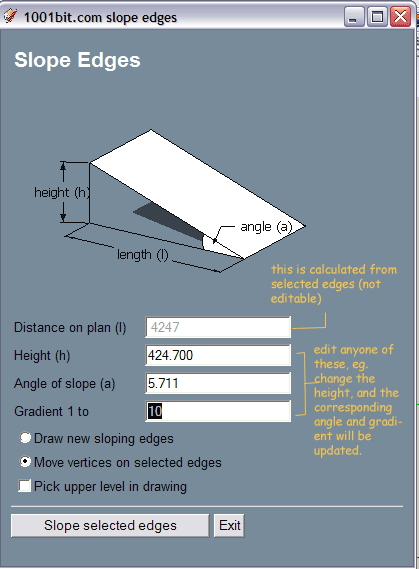
            slope edges dialog box
            This tool can be used to create sloping path/driveway from flat plane.
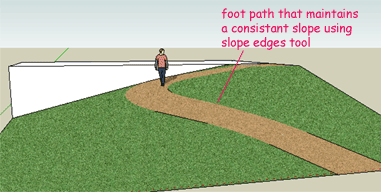
            example of sloping foot path using slope edges tool

            2) Extrude along path tool - extrude profile along selected path.
            http://www.1001bit.com/products/extrude1.shtml
            This tool solves the twisting problem that occurs when you extrude a profile along a curved and sloping path with SU's standard followme tool.

            Useful for creating handrails for spiral staircases, carpark ramps, cicular ramps etc.
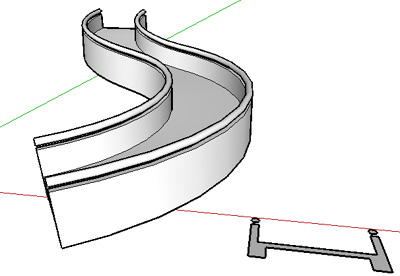
            sloping curved ramp using extrude along path tool

            3) Bug fixes on horizontal and vertical louvres tools.

            User can now enter 0 for louver thickness to create single plane louvres.

            4) Option to show different toolbars separately.
            from menu View >> Toolbars

            Installation
            Just download the file
            http://www.1001bit.com/download/1001bit(1.1.3).zip
            and replace/overwrite the current files in your 1001bit folder.

            The user license that you have for v1.1.x is still valid. If you choose to delete the old folders before installing the new ones,
            Please keep a copy of the 1001bit.key file, which contains your license information.
            As long as you put this file back into the 1001bit folder, your license remains valid.

            Thanks and cheers!
            Goh C H

            1 條回覆 最後回覆 回覆 引用 0
            • utilerU 離線
              utiler
              最後由 編輯

              Way to go, Goh!!!

              Just Curious...

              1 條回覆 最後回覆 回覆 引用 0
              • pilouP 離線
                pilou
                最後由 編輯

                Works like a charm! ☀
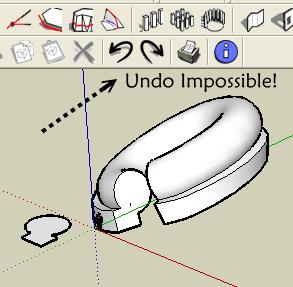
                Except Undo to the beginning of the start session Seems block after Extrude profil along a path! 😮
                Soften Edges seems the blockage! And it's repeatable at any times! 😉
                So Big bug! 😄 (V6) (Plug not install in the V7)


                Undo.jpg

                Frenchy Pilou
                Is beautiful that please without concept!
                My Little site :)

                1 條回覆 最後回覆 回覆 引用 0
                • G 離線
                  gohch
                  最後由 編輯

                  hi Pilou,
                  Thanks, missed that out.
                  Bug fixed -- download the patch from
                  http://www.1001bit.com/download/extrude1_patch(15-Mar-09).zip
                  and overwrite the extrude1.rbs file.
                  Thanks and cheers!
                  Goh C H

                  1 條回覆 最後回覆 回覆 引用 0
                  • S 離線
                    sepo
                    最後由 編輯

                    Fantastic toolset. 👍

                    1 條回覆 最後回覆 回覆 引用 0
                    • pilouP 離線
                      pilou
                      最後由 編輯

                      Works fine now! 😉

                      Frenchy Pilou
                      Is beautiful that please without concept!
                      My Little site :)

                      1 條回覆 最後回覆 回覆 引用 0
                      • jeff hammondJ 離線
                        jeff hammond
                        最後由 編輯

                        i like the new extrude tool much better than fak.rb (well, i think i do.. i haven't done a real world test with it yet:) )

                        http://homepage.mac.com/jeffhammond/.Public/scf/followmes.jpg


                        followmes.skp

                        dotdotdot

                        1 條回覆 最後回覆 回覆 引用 0
                        • thomthomT 離線
                          thomthom
                          最後由 編輯

                          That's a very nice comparison. I was wondering what their difference would be. I can see there's uses for both the variants.

                          Thomas Thomassen — SketchUp Monkey & Coding addict
                          List of my plugins and link to the CookieWare fund

                          1 條回覆 最後回覆 回覆 引用 0
                          • pilouP 離線
                            pilou
                            最後由 編輯

                            Fak asks to have the face section on the curve path
                            1001 permits to have the face section out of the curve path

                            Frenchy Pilou
                            Is beautiful that please without concept!
                            My Little site :)

                            1 條回覆 最後回覆 回覆 引用 0
                            • utilerU 離線
                              utiler
                              最後由 編輯

                              fak....? I haven't seen this one....

                              Who's is it Pilou?

                              Just Curious...

                              1 條回覆 最後回覆 回覆 引用 0
                              • pilouP 離線
                                pilou
                                最後由 編輯

                                Follow me and Keep 😉 So FAK 😄

                                Frenchy Pilou
                                Is beautiful that please without concept!
                                My Little site :)

                                1 條回覆 最後回覆 回覆 引用 0
                                • utilerU 離線
                                  utiler
                                  最後由 編輯

                                  👍 Pilou,
                                  Gee, you could be bogged down in extensions nowadays....

                                  Just Curious...

                                  1 條回覆 最後回覆 回覆 引用 0
                                  • thomthomT 離線
                                    thomthom
                                    最後由 編輯

                                    One request related tot he toolbars, could you put them into a submenu in the View->Toolbars menu?

                                    Thomas Thomassen — SketchUp Monkey & Coding addict
                                    List of my plugins and link to the CookieWare fund

                                    1 條回覆 最後回覆 回覆 引用 0
                                    • G 離線
                                      gohch
                                      最後由 編輯

                                      hi Thomas,
                                      I'm still finding my way around how to better organize the toolbars. Don't really like what i have now because it just fills up the entire pull down menu. I'll work on making something that is more efficient in the next upgrade.
                                      Thanks

                                      1 條回覆 最後回覆 回覆 引用 0
                                      • thomthomT 離線
                                        thomthom
                                        最後由 編輯

                                        What would be really great was if you had a webdialog which allowed you to add and remove the various buttons. You might wan to look into Organizer. Quite a few plugins support customizing via that.

                                        btw, the slope edge tool; great! And just in time. I just had a rush project today where I had a curved ramp and this tool was a lifesaver. 👍

                                        Thomas Thomassen — SketchUp Monkey & Coding addict
                                        List of my plugins and link to the CookieWare fund

                                        1 條回覆 最後回覆 回覆 引用 0
                                        • utilerU 離線
                                          utiler
                                          最後由 編輯

                                          @thomthom said:

                                          One request related tot he toolbars, could you put them into a submenu in the View->Toolbars menu?

                                          You beat me to it Thomas, I was going to suggest just that!!!
                                          I think it would be be as simple as grouping the icons into separate toolbars so we can view which ever we really need.
                                          say:
                                          Architecture [Walls / partitions / stairs / windows / doors / roofs..]
                                          Draw [draw / setting out / arrays....]
                                          Edit [as listed in the drop down menus....]

                                          Not sure how to do this but with some BIM programs I have used 'stack' their functions under an icon and identify this by a small triangle in the bottom corner of the icon. Click on the icon and a vertical drop down of the toolset appears.....

                                          Hope this helps.
                                          Cheers,

                                          Just Curious...

                                          1 條回覆 最後回覆 回覆 引用 0
                                          • G 離線
                                            gohch
                                            最後由 編輯

                                            Thanks guys, for the ideas. i'll definitely look into this. Need to explore different options.
                                            Thought of using the webdialog with a series of checkboxes to show and hide different group of icons, however, i'm having a hard time arranging different group of toolbar nicely in SU. They just keep pushing each other around.
                                            Not sure is this a SU problem or simply i haven't master this part yet.
                                            I'll experiment with both approach and see where they lead to. ☀

                                            1 條回覆 最後回覆 回覆 引用 0
                                            • 1
                                            • 2
                                            • 3
                                            • 4
                                            • 5
                                            • 12
                                            • 13
                                            • 1 / 13
                                            • 第一個貼文
                                              最後的貼文
                                            Buy SketchPlus
                                            Buy SUbD
                                            Buy WrapR
                                            Buy eBook
                                            Buy Modelur
                                            Buy Vertex Tools
                                            Buy SketchCuisine
                                            Buy FormFonts

                                            Advertisement