sketchucation logo sketchucation
    • 登入
    Oops, your profile's looking a bit empty! To help us tailor your experience, please fill in key details like your SketchUp version, skill level, operating system, and more. Update and save your info on your profile page today!
    🔌 Smart Spline | Fluid way to handle splines for furniture design and complex structures. Download

    Construction & Working Drawings - Discussion

    已排程 已置頂 已鎖定 已移動 LayOut Discussions
    layout
    453 貼文 114 Posters 405.9k 瀏覽 114 Watching
    正在載入更多貼文
    • 從舊到新
    • 從新到舊
    • 最多點贊
    回覆
    • 在新貼文中回覆
    登入後回覆
    此主題已被刪除。只有擁有主題管理權限的使用者可以查看。
    • S 離線
      sonder
      最後由 編輯

      @utiler said:

      Gee Nick, there must be something you can do about that!!! How do you transfer files to sub- consultants electronically? 😕

      I lower the PDF file size through acrobat if need be. Typically I just use Dropbox so the best quality goes through. The 400+mb files are out to bid to 4 contractors and no one has complained. All contractors only received the download link. The print quality at that size is outstanding.

      1 條回覆 最後回覆 回覆 引用 0
      • utilerU 離線
        utiler
        最後由 編輯

        I bet it is!!!! 👍

        Just Curious...

        1 條回覆 最後回覆 回覆 引用 0
        • W 離線
          whitelock
          最後由 編輯

          @bmike said:

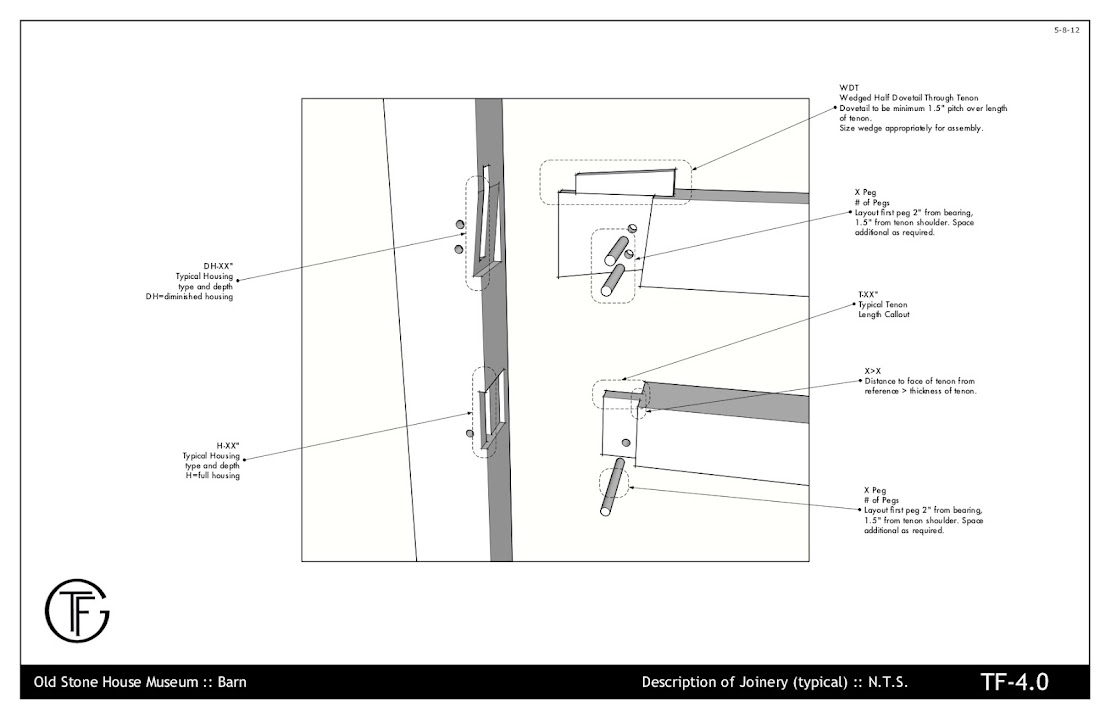
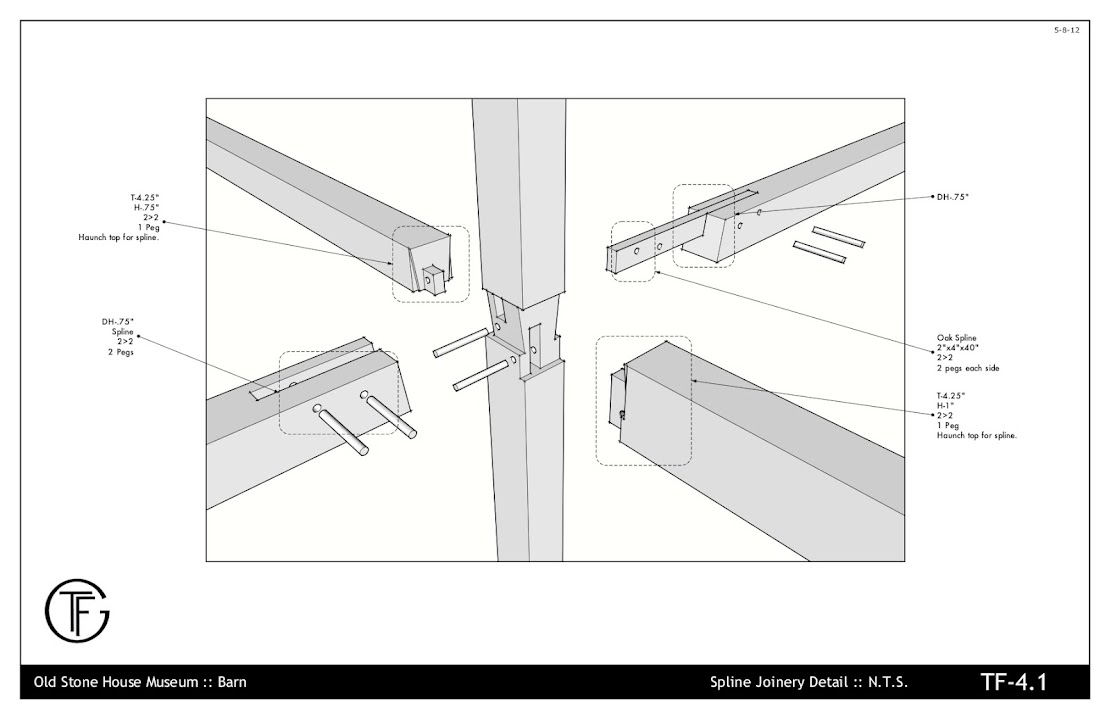
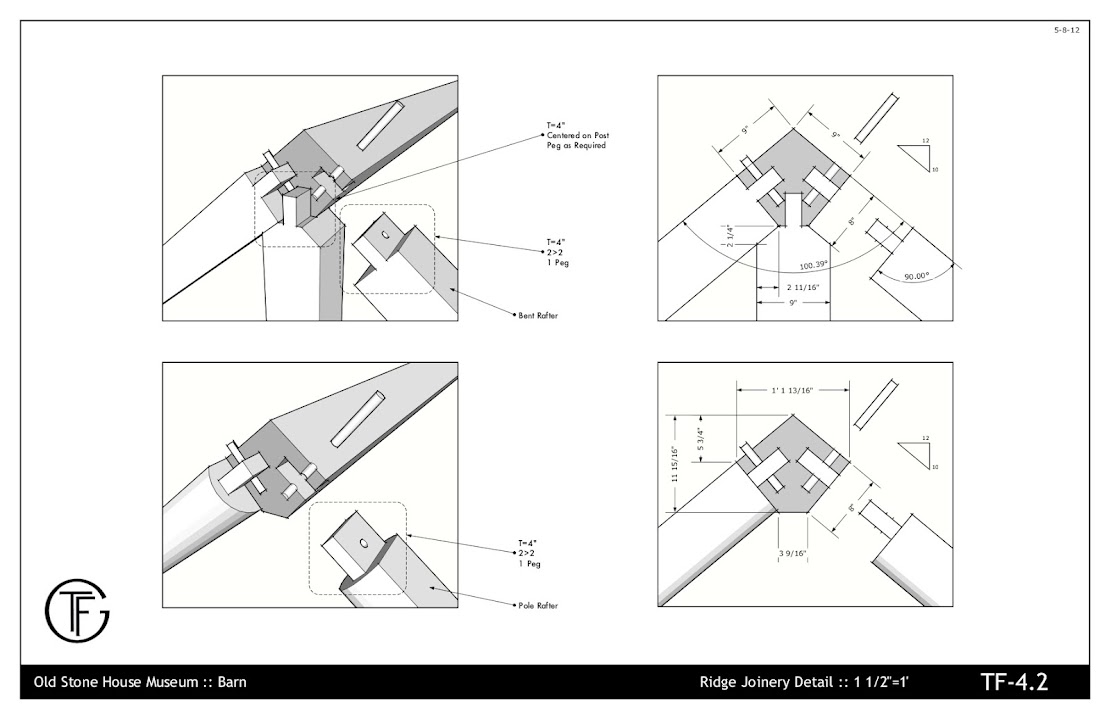
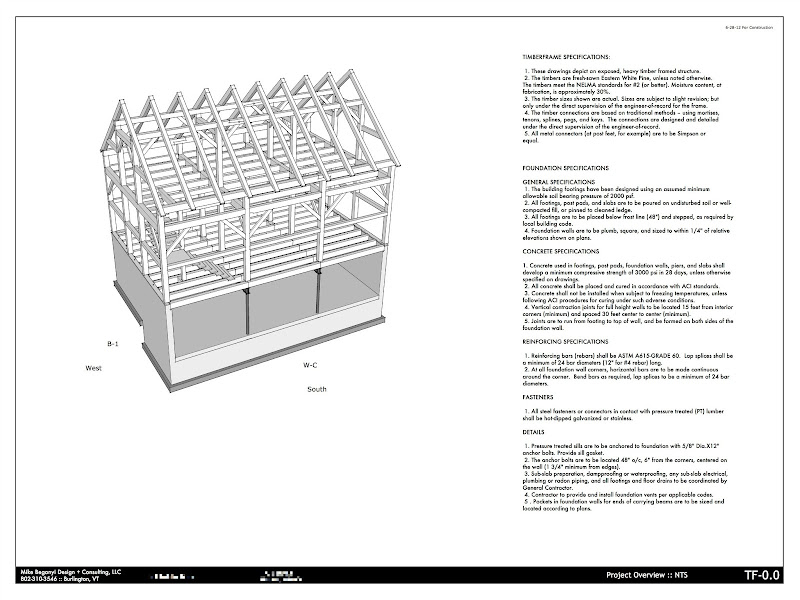
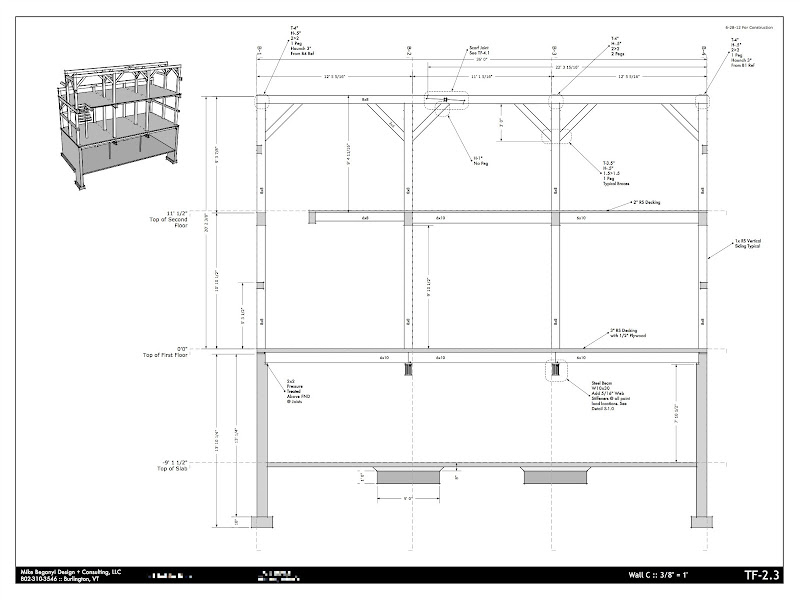
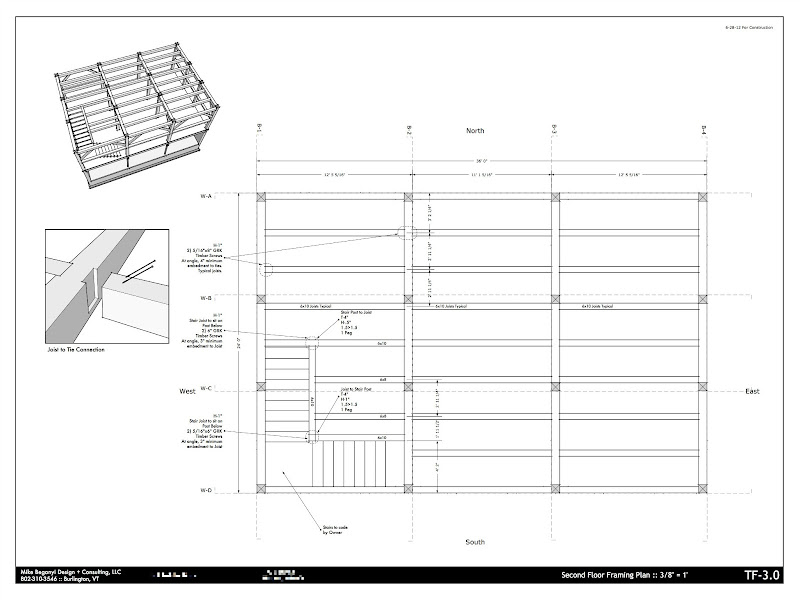
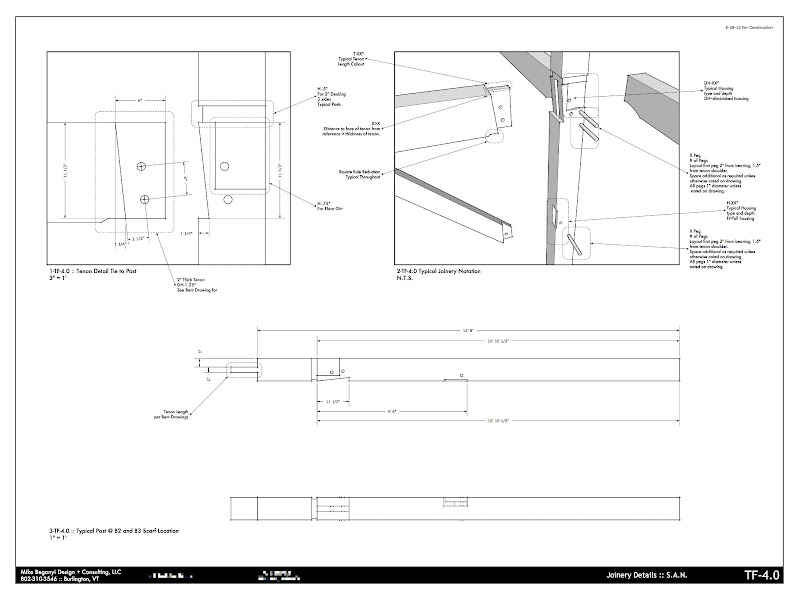
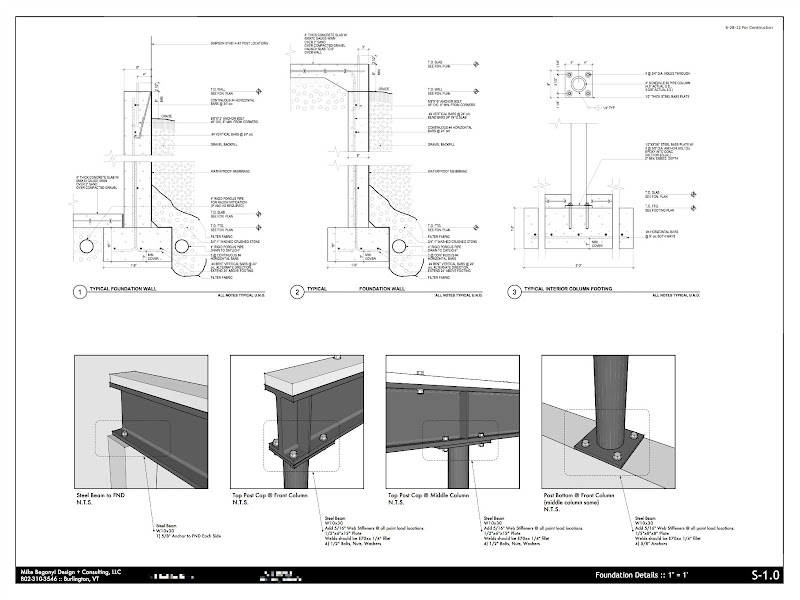
          Another small project for a workshop.

          https://lh3.googleusercontent.com/-M9q773YwJH8/T6p8LKfkUMI/AAAAAAAASwY/doQR7UawG4s/s1111/oldstonebarn-3-22-11_01.jpg

          https://lh4.googleusercontent.com/-yLUqMkN0uhk/T6p8Lm0pT1I/AAAAAAAASwc/pYLzFNPq-9A/s1111/oldstonebarn-3-22-11_14.jpg

          https://lh5.googleusercontent.com/-g0JVrNLkqXo/T6p8MJ-W7aI/AAAAAAAASws/3NtM1N1e1rA/s1111/oldstonebarn-3-22-11_15.jpg

          https://lh4.googleusercontent.com/-B0tHwN6dO_I/T6p8M5AslGI/AAAAAAAASw0/LaGqNH2fnHo/s1111/oldstonebarn-3-22-11_16.jpg

          On deck are 2 small buildings - I'm taking the entire process through SU and LO, as well as another small timber frame workshop project (similar in scope to these drawings).

          Here's hoping Trimble sees the value in LayOut and ups the development of it. It is my go to tool now for taking 3d to 2d.

          Hi, Beautiful detail sheets can you tell me what settings you use for your styles?

          1 條回覆 最後回覆 回覆 引用 0
          • daleD 離線
            dale
            最後由 編輯

            @utiler said:

            Gee Nick, there must be something you can do about that!!! How do you transfer files to sub- consultants electronically? 😕

            This is an excellent question. Our electrical and mechanical engineers all request dxf/dwg drawings as they take our base drawings and build theirs on that.
            Can you export layout in dxf/dwg?

            Just monkeying around....like Monsanto

            1 條回覆 最後回覆 回覆 引用 0
            • beginnerB 離線
              beginner
              最後由 編輯

              Yes you can export in DWG or DXF (AC12 to AC2010)
              http://forums.sketchucation.com/viewtopic.php?f=12&t=47135&p

              Regards, SU 'beginner'

              1 條回覆 最後回覆 回覆 引用 0
              • daleD 離線
                dale
                最後由 編輯

                Thanks beginner. I'm just starting to consider Layout for final working drawings, but having a proper set of dxf/dwg drawings for other consultants is a must.
                Doesn't sound flawless, so I might have to take certain drawings (ie floorplans, reflected ceiling plans) from SketchUp into one of my Cad programs first on order to accomplish this. Too bad.

                Just monkeying around....like Monsanto

                1 條回覆 最後回覆 回覆 引用 0
                • beginnerB 離線
                  beginner
                  最後由 編輯

                  Hi Dale,

                  @unknownuser said:

                  Doesn't sound flawless, so I might have to take certain drawings (ie floorplans, reflected ceiling plans) from SketchUp into one of my Cad programs first on order to accomplish this. Too bad.

                  Have a look this...
                  http://forums.sketchucation.com/viewtopic.php?f=12&t=47488

                  Regards, SU 'beginner'

                  1 條回覆 最後回覆 回覆 引用 0
                  • S 離線
                    sonder
                    最後由 編輯

                    @dale said:

                    @utiler said:

                    Gee Nick, there must be something you can do about that!!! How do you transfer files to sub- consultants electronically? 😕

                    This is an excellent question. Our electrical and mechanical engineers all request dxf/dwg drawings as they take our base drawings and build theirs on that.
                    Can you export layout in dxf/dwg?

                    Yes you can and in either model or paper space. What I do for my consultants and my floor plans is create a group from slice in the section tool. This accurately isolates simply line work of a plan or section. Then export that group only as a dwg file. They then have a simple background without all the crap that they usually have to erase. So far my structural engineers and surveyors have commented on how my drawings are the easiest to deal with. Pretty funny considering I don't even open ACAD to provide them.

                    1 條回覆 最後回覆 回覆 引用 0
                    • daleD 離線
                      dale
                      最後由 編輯

                      Thanks Sonder. That will tilt me over the edge to Layout.
                      I'm sure there will be lots of questions ahead.

                      Dale

                      Just monkeying around....like Monsanto

                      1 條回覆 最後回覆 回覆 引用 0
                      • bmikeB 離線
                        bmike
                        最後由 編輯

                        another recent project:

                        https://lh5.googleusercontent.com/-U-EwYdi2sLk/UFCialLe_II/AAAAAAAATsI/OmnhcXPFBxY/s800/barn1.jpg

                        https://lh3.googleusercontent.com/-SP2sdU4ho7k/UFCiawfvwtI/AAAAAAAATsQ/a6GocncGtS8/s800/barn2.jpg

                        https://lh5.googleusercontent.com/-zOCKblZaYyM/UFCibGoYdVI/AAAAAAAATsY/1Kd10KN3PV4/s800/barn3.jpg

                        https://lh6.googleusercontent.com/-lYSQ76479nQ/UFCibd78eMI/AAAAAAAATsg/5ZtvTyKqa3c/s800/barn4.jpg

                        https://lh4.googleusercontent.com/-nm_llXvalOo/UFCib99wz-I/AAAAAAAATsk/mkLVkK2IK14/s800/barn5.jpg

                        https://lh6.googleusercontent.com/-hd3dqkROaKA/UFCicA6VTLI/AAAAAAAATsw/78lawNA-jcg/s800/barn6.jpg

                        https://lh5.googleusercontent.com/-BlJIu6KX2mA/UFCicioq0pI/AAAAAAAATs4/Tww8g9UEz5w/s800/barn7.jpg

                        mike beganyi design + consulting llc

                        1 條回覆 最後回覆 回覆 引用 0
                        • porch_unpluggedP 離線
                          porch_unplugged
                          最後由 編輯

                          @bmike said:

                          another recent project:

                          very nice. did you do your foundation details as 2D's in layout?

                          1 條回覆 最後回覆 回覆 引用 0
                          • bmikeB 離線
                            bmike
                            最後由 編輯

                            @porch_unplugged said:

                            @bmike said:

                            another recent project:

                            very nice. did you do your foundation details as 2D's in layout?

                            the foundation details are 'typical' and were pasted in as a PDF from my engineer.
                            if you look at the 'Round Barn' project I modeled the foundation details in SketchUp, then detailed in LayOut.

                            mike beganyi design + consulting llc

                            1 條回覆 最後回覆 回覆 引用 0
                            • ccaponigroC 離線
                              ccaponigro
                              最後由 編輯

                              Thought I would jump in here. I'm pretty new to sketchup but have 30 years of acad disappointment under my belt. Right now I use Architectural Desktop for plans and schedules and creating a model from them for all my elevations and layout to present them. I wanted them to look like b/w CD's so I saved the model and changed all the textures to have no color. I would love to do everything in layout but it is hard to give up all the bim and attribute extraction. This is a real project with real clients so it was a leap of faith since I had never used sketchup for a real project before this. We have a permit and it's under construction. The clients love being able to see the model. Constructive criticisum welcome.


                              I know the grade is rough but I'm flying by the seat of my pants here.


                              Try drawing this in autocad I dare you.


                              And some design development for the interiors.

                              cfcaia.com

                              1 條回覆 最後回覆 回覆 引用 0
                              • M 離線
                                mwm5053
                                最後由 編輯

                                Very impresive 👍

                                2011 iMac
                                SU 2015 Pro, 2017 Make
                                V2 Twilight
                                macOS Sierra 10.12.5

                                1 條回覆 最後回覆 回覆 引用 0
                                • pbacotP 離線
                                  pbacot
                                  最後由 編輯

                                  @ccaponigro said:

                                  Thought I would jump in here. I'm pretty new to sketchup but have 30 years of acad disappointment under my belt. Right now I use Architectural Desktop for plans and schedules and creating a model from them for all my elevations and layout to present them. I wanted them to look like b/w CD's so I saved the model and changed all the textures to have no color.

                                  Really nice work! Thanks for posting and the information.
                                  A trick I have used in LO to hide the terrain and create a ground line: trace along the ground line in LO, making a polygon- complete the polygon, below, to mask the terrain with fill, make a duplicate and trim this to use as a thick ground line (without fill)

                                  MacOSX MojaveSketchUp Pro v19 Twilight v2 Thea v3 PowerCADD

                                  1 條回覆 最後回覆 回覆 引用 0
                                  • ccaponigroC 離線
                                    ccaponigro
                                    最後由 編輯

                                    @pbacot said:

                                    @ccaponigro said:

                                    Thought I would jump in here. I'm pretty new to sketchup but have 30 years of acad disappointment under my belt. Right now I use Architectural Desktop for plans and schedules and creating a model from them for all my elevations and layout to present them. I wanted them to look like b/w CD's so I saved the model and changed all the textures to have no color.

                                    Really nice work! Thanks for posting and the information.
                                    A trick I have used in LO to hide the terrain and create a ground line: trace along the ground line in LO, making a polygon- complete the polygon, below, to mask the terrain with fill, make a duplicate and trim this to use as a thick ground line (without fill)

                                    Thanks! I like that idea and it sure wouldn't hurt to get that terrain turned off.

                                    cfcaia.com

                                    1 條回覆 最後回覆 回覆 引用 0
                                    • pbacotP 離線
                                      pbacot
                                      最後由 編輯

                                      Yes, actually don't need the terrain layer to be on, but you may want something to draw the ground line to, at least at first.

                                      MacOSX MojaveSketchUp Pro v19 Twilight v2 Thea v3 PowerCADD

                                      1 條回覆 最後回覆 回覆 引用 0
                                      • N 離線
                                        njh
                                        最後由 編輯

                                        Hi folks

                                        The plan shown by Sonder looks fantastic! I've tried to attach the one I'm talking about.

                                        I'm just picking up Sketchup and Layout again after a lengthy absence and I'm hoping to adopt it as my full time design package rather than Vectorworks so I have a query about the electrical layout, fans etc on the drawing- are they part of the sketchup model or drawn "on top" of the view in layout?

                                        Apologies if this is explained in the thread somewhere and I've not noticed it.

                                        Neil

                                        Screen grab.pdf

                                        1 條回覆 最後回覆 回覆 引用 0
                                        • A 離線
                                          ArCAD-UK
                                          最後由 編輯

                                          I take the line SU is for the 3D modelling bit and LO is for the 2D graphics and notes. Have you looked at the scrapbook facility? That is where you would start to save time if you have an office standard.

                                          1 條回覆 最後回覆 回覆 引用 0
                                          • pbacotP 離線
                                            pbacot
                                            最後由 編輯

                                            @njh said:

                                            Hi folks

                                            The plan shown by Sonder looks fantastic! I've tried to attach the one I'm talking about.

                                            I'm just picking up Sketchup and Layout again after a lengthy absence and I'm hoping to adopt it as my full time design package rather than Vectorworks so I have a query about the electrical layout, fans etc on the drawing- are they part of the sketchup model or drawn "on top" of the view in layout?

                                            Apologies if this is explained in the thread somewhere and I've not noticed it.

                                            Neil

                                            [attachment=0:358rspb4]<!-- ia0 -->Screen grab.pdf<!-- ia0 -->[/attachment:358rspb4]

                                            Curious to know why switch from VectorWorks (VW OR SU might be my options if my CAD expired--development ended).

                                            The electrical layout by Sonder is done in LO. http://sketchucation.com/forums/viewtopic.php?f=12&t=15911&start=255#p392706


                                            MacOSX MojaveSketchUp Pro v19 Twilight v2 Thea v3 PowerCADD

                                            1 條回覆 最後回覆 回覆 引用 0
                                            • 1
                                            • 2
                                            • 3
                                            • 4
                                            • 5
                                            • 6
                                            • 22
                                            • 23
                                            • 4 / 23
                                            • 第一個貼文
                                              最後的貼文
                                            Buy SketchPlus
                                            Buy SUbD
                                            Buy WrapR
                                            Buy eBook
                                            Buy Modelur
                                            Buy Vertex Tools
                                            Buy SketchCuisine
                                            Buy FormFonts

                                            Advertisement