[Plugin] Blackout
-
Hi onzki,
Go to your 'Plugins' folder and open 'blackout.rb' in a pure text editor (Notepad++ for instance).
Search for lines like this one:
material.color = 'Black'Replace 'Black' with the color you want, like 'red', 'green', 'blue' and so on.
Lines to be modified are: 42, 69,91, if i'm not mistaken.
The names of available colors can be found on this page:
https://ruby.sketchup.com/Sketchup/Color.htmlTo customize the color with RGB values will be a little longer to explain

Save the file blackout.rb, quit SketchUp and restart.Regards,
-
Hi, me again,
Here is an enhanced version with which you can select your color in a list.
Menu can still be found in the 'Extensions' menu but I've put the 3 options in a sub-menu to spare your menu space
Hope Thomthom won't mind if I modified his script.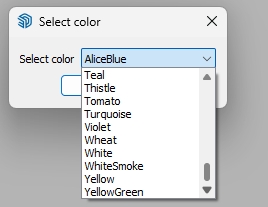

Regards,
-
@didier bur said:
Hi, me again,
Here is an enhanced version with which you can select your color in a list.
Regards,
Amazing! Big Thanks!



Hello! It looks like you're interested in this conversation, but you don't have an account yet.
Getting fed up of having to scroll through the same posts each visit? When you register for an account, you'll always come back to exactly where you were before, and choose to be notified of new replies (either via email, or push notification). You'll also be able to save bookmarks and upvote posts to show your appreciation to other community members.
With your input, this post could be even better 💗
Register Login


Advertisement