sketchucation logo sketchucation
    • Login
    Oops, your profile's looking a bit empty! To help us tailor your experience, please fill in key details like your SketchUp version, skill level, operating system, and more. Update and save your info on your profile page today!
    Mac User? | Join the Rayscaper Beta for Mac Learn More

    [Plugin] V-Ray Tools

    Scheduled Pinned Locked Moved Plugins
    238 Posts 80 Posters 301.7k Views 80 Watching
    Loading More Posts
    • Oldest to Newest
    • Newest to Oldest
    • Most Votes
    Reply
    • Reply as topic
    Log in to reply
    This topic has been deleted. Only users with topic management privileges can see it.
    • R
      redsteel
      last edited by

      @thomthom said:

      That's a bad bug in SketchUp 2013. The toolbar is there - it's just that it's hidden underneath your existing docked toolbars.

      I knew that I wasn't crazy. Thanks for the answer πŸ˜›

      1 Reply Last reply
      Reply Quote 0
      • thomthomT
        thomthom
        last edited by

        Yea - you're not crazy. But the bug is. They are working on a fix though.

        Thomas Thomassen β€” SketchUp Monkey & Coding addict
        List of my plugins and link to the CookieWare fund

        1 Reply Last reply
        Reply Quote 0
        • Alan FraserA
          Alan Fraser
          last edited by

          That V2013 bug is more easily overcome by simply unchecking and then rechecking V-Ray Tools in the View > Toolbars dialog. it removes itself from wherever it was hiding and relocates to a floating position in the drawing space.

          3D Figures
          Were you required to walk 500 miles? Were you advised to walk 500 more?
          You could be entitled to compensation. Call the Pro Claimers now!

          1 Reply Last reply
          Reply Quote 0
          • thomthomT
            thomthom
            last edited by

            @alan fraser said:

            That V2013 bug is more easily overcome by simply unchecking and then rechecking V-Ray Tools in the View > Toolbars dialog. it removes itself from wherever it was hiding and relocates to a floating position in the drawing space.

            Didn't work for me...

            Thomas Thomassen β€” SketchUp Monkey & Coding addict
            List of my plugins and link to the CookieWare fund

            1 Reply Last reply
            Reply Quote 0
            • pyrolunaP
              pyroluna
              last edited by

              Thomas you're a champ.
              As always.

              I really like the update to the V-ray tools πŸ˜„
              Especially the load-on-demand saves me a headache every time I start SketchUp!

              1 Reply Last reply
              Reply Quote 0
              • M
                miamiarnold
                last edited by

                Installed your plugin and it somehow messed up the material link when you pick a material from sketchup model it doesn't reflect on the vray material editor, the selection in the vray material editor is always stuck on 1 material, tried uninstalling the ruby by deleting the files and folder in the sketchup root folder then uninstalled sketchup and re installed but i seem to get the same problem am using vray 2.0 and sketchup 2013, seems the problem might have started when i purged materials using vray tools, i have also tried copying the model to a fresh sketchup file but still nothing fruitful, 😞 the project is due and am stuck i get this error when i open the file

                Error Loading File C:\ProgramData/ASGVIS/VfS/Ruby/R2P.rb
                undefined method entityID' for nil:NilClass Error Loading File vfs.rb undefined method entityID' for nil:NilClass

                any help will be appreciated, and thanks in advance. i just need my vray back to the way it was thank you
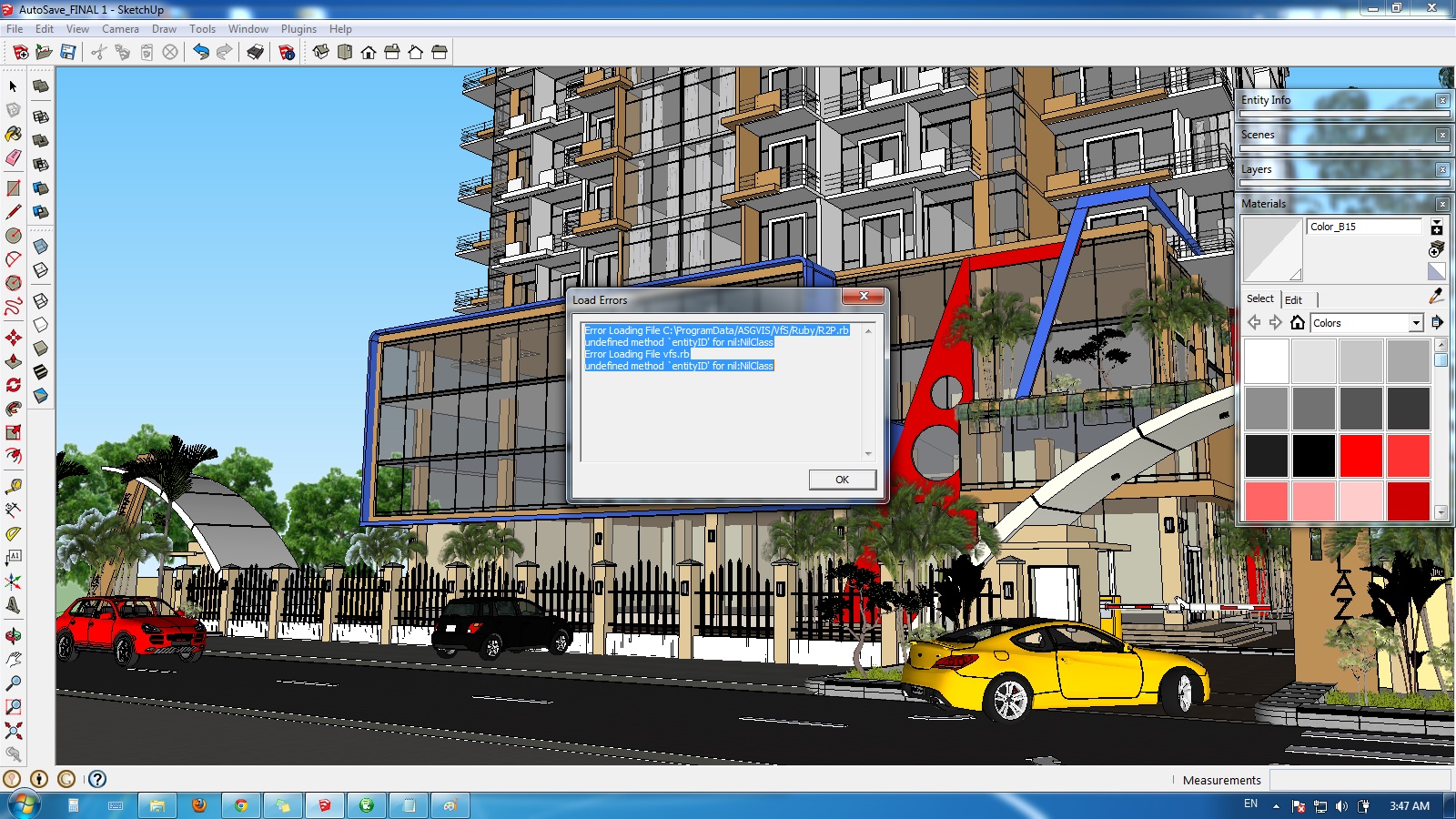

                vray err report.jpg

                1 Reply Last reply
                Reply Quote 0
                • T
                  tequilawine
                  last edited by

                  when i tried this plugin, i can not export pic and sometimes i don't know why i can't get the right rendering ratio

                  1 Reply Last reply
                  Reply Quote 0
                  • tt_suT
                    tt_su
                    last edited by

                    Can you describe in more detail?
                    Do you get errors in the Ruby Console (if you keep it open)?
                    Do you have screenshots of what you see?
                    What are the steps you do when you can not export?

                    1 Reply Last reply
                    Reply Quote 0
                    • I
                      itsupport
                      last edited by

                      Ello,

                      Loving this Tool for quick loading V-Ray - really awesome. We can only install this plugin by copying the rpz files (unpacked) to the SketchUp plugin directory.

                      It means we have to manually click Windows > Pref > and select the tools for every first time use. Is there a way round this, that the newly copied TT plugin files could also be set to be loaded (but not the actual V-Ray plugin obviously)?

                      Many thanks in advance πŸ˜„

                      1 Reply Last reply
                      Reply Quote 0
                      • thomthomT
                        thomthom
                        last edited by

                        I'm sorry but I don't quite understand the question here.
                        Is it an installation issue?

                        Thomas Thomassen β€” SketchUp Monkey & Coding addict
                        List of my plugins and link to the CookieWare fund

                        1 Reply Last reply
                        Reply Quote 0
                        • I
                          itsupport
                          last edited by

                          @thomthom said:

                          I'm sorry but I don't quite understand the question here.
                          Is it an installation issue?

                          Hi Thomthom - thanks for the super speedy reply πŸ˜„

                          So we are copying the unpacked files to the plugin folder. This works fine, but on first use they aren't setup as default enabled, so it has to be done manually. Once enabled, everything seems to work great.

                          How would we enable the plugin on first SketchUp use using this method (EG, not using sketchup plugin installer) ? If it means enabling all plugins that that would be ok (not ideal) - is there a registry setting or something we could set a GPO up to always enable the plugin ?

                          Many thanks ! πŸ˜„

                          1 Reply Last reply
                          Reply Quote 0
                          • T
                            tacomomo
                            last edited by

                            @miamiarnold said:

                            "Installed your plugin and it somehow messed up the material link when you pick a material from sketchup model it doesn't reflect on the vray material editor, the selection in the vray material editor is always stuck on 1 material, tried uninstalling the ruby by deleting the files and folder in the sketchup root folder then uninstalled sketchup and re installed but i seem to get the same problem am using vray 2.0 and sketchup 2013, seems the problem might have started when i purged materials using vray tools, i have also tried copying the model to a fresh sketchup file but still nothing fruitful, 😞 the project is due and am stuck i get this error when i open the file

                            Error Loading File C:\ProgramData/ASGVIS/VfS/Ruby/R2P.rb
                            undefined method entityID' for nil:NilClass Error Loading File vfs.rb undefined method entityID' for nil:NilClass

                            any help will be appreciated, and thanks in advance. i just need my vray back to the way it was thank you"

                            please help him too because we encounter the same problem

                            1 Reply Last reply
                            Reply Quote 0
                            • thomthomT
                              thomthom
                              last edited by

                              Didn't notice this until now... :s
                              What does it mean that "material editor is always stuck on 1 material"? I'm really not sure what is being described here. Any screenshots? Sample model?

                              Thomas Thomassen β€” SketchUp Monkey & Coding addict
                              List of my plugins and link to the CookieWare fund

                              1 Reply Last reply
                              Reply Quote 0
                              • I
                                itsupport
                                last edited by

                                @itsupport said:

                                @thomthom said:

                                I'm sorry but I don't quite understand the question here.
                                Is it an installation issue?

                                Hi Thomthom - thanks for the super speedy reply πŸ˜„

                                So we are copying the unpacked files to the plugin folder. This works fine, but on first use they aren't setup as default enabled, so it has to be done manually. Once enabled, everything seems to work great.

                                How would we enable the plugin on first SketchUp use using this method (EG, not using sketchup plugin installer) ? If it means enabling all plugins that that would be ok (not ideal) - is there a registry setting or something we could set a GPO up to always enable the plugin ?

                                Many thanks ! πŸ˜„

                                Ello, have you any thoughts about this, I hope it's clearer to understand, but pelase let know if I've not made it clear.

                                Kind Regards πŸ˜„

                                1 Reply Last reply
                                Reply Quote 0
                                • I
                                  itsupport
                                  last edited by

                                  No Worries,

                                  Got it sorted, we wrote a little program to open your plugin's first, and also to not allow V-Ray plugin to open so that your excellent programs control it by default.

                                  Cheers

                                  1 Reply Last reply
                                  Reply Quote 0
                                  • maeglin1M
                                    maeglin1
                                    last edited by

                                    For me this is the best tool ever. Saved me alot of frustration and stress with all the Vray issues. A BIG Thankyou πŸ˜„

                                    1 Reply Last reply
                                    Reply Quote 0
                                    • S
                                      sanjaygrg
                                      last edited by

                                      Hi everybody,
                                      I installed TTLib v2.9.9 and ttvray tools v2.2.1 (sketchup 8, vray for SU 2), I can't find the camera tools in vray camera tool toolbar. My question is whether camera tool is not available in vray for SU ver. 2.

                                      1 Reply Last reply
                                      Reply Quote 0
                                      • tt_suT
                                        tt_su
                                        last edited by

                                        Should be there... what does your toolbar look like?

                                        1 Reply Last reply
                                        Reply Quote 0
                                        • S
                                          sanjaygrg
                                          last edited by

                                          here is the attachment of the toolbar..
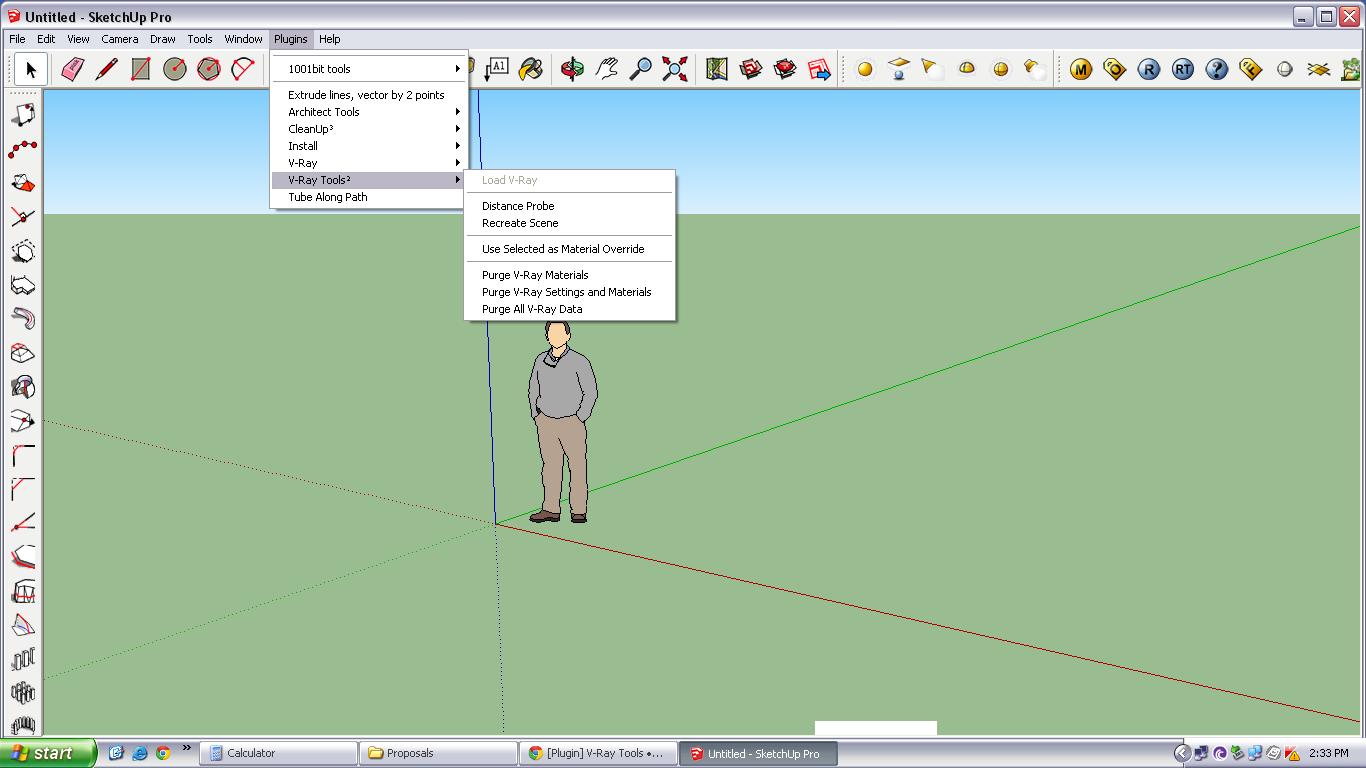

                                          11.JPG

                                          1 Reply Last reply
                                          Reply Quote 0
                                          • S
                                            sanjaygrg
                                            last edited by

                                            here is the attachment of the toolbar..
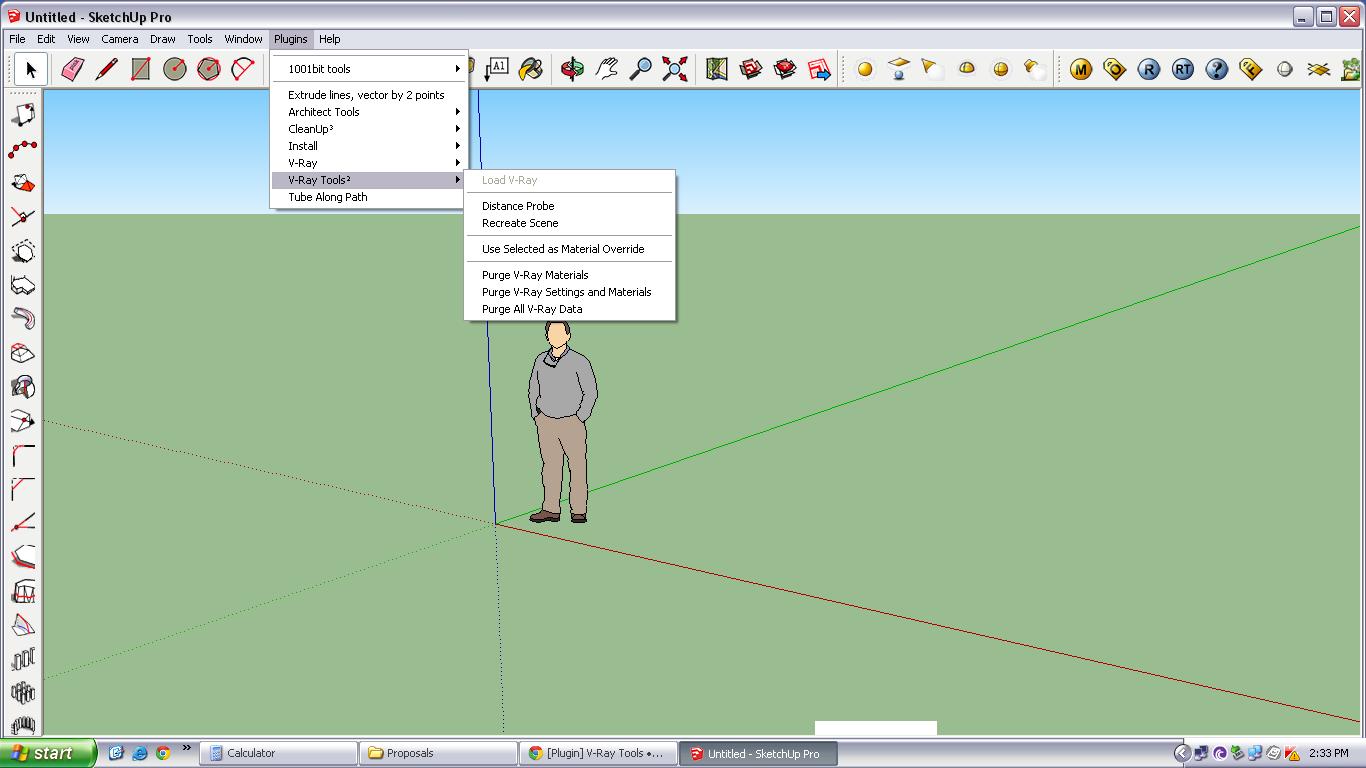

                                            11.JPG

                                            1 Reply Last reply
                                            Reply Quote 0

                                            Hello! It looks like you're interested in this conversation, but you don't have an account yet.

                                            Getting fed up of having to scroll through the same posts each visit? When you register for an account, you'll always come back to exactly where you were before, and choose to be notified of new replies (either via email, or push notification). You'll also be able to save bookmarks and upvote posts to show your appreciation to other community members.

                                            With your input, this post could be even better πŸ’—

                                            Register Login
                                            • 1
                                            • 2
                                            • 8
                                            • 9
                                            • 10
                                            • 11
                                            • 12
                                            • 12 / 12
                                            • First post
                                              Last post
                                            Buy SketchPlus
                                            Buy SUbD
                                            Buy WrapR
                                            Buy eBook
                                            Buy Modelur
                                            Buy Vertex Tools
                                            Buy SketchCuisine
                                            Buy FormFonts

                                            Advertisement