sketchucation logo sketchucation
    • Login
    Oops, your profile's looking a bit empty! To help us tailor your experience, please fill in key details like your SketchUp version, skill level, operating system, and more. Update and save your info on your profile page today!
    ⚠️ Update | Sketchucation Tools 5.0.8 released with licensing improvements and bugfixes Download

    [Plugin] Selection Toys

    Scheduled Pinned Locked Moved Plugins
    594 Posts 121 Posters 552.6k Views 121 Watching
    Loading More Posts
    • Oldest to Newest
    • Newest to Oldest
    • Most Votes
    Reply
    • Reply as topic
    Log in to reply
    This topic has been deleted. Only users with topic management privileges can see it.
    • D
      dedmin
      last edited by

      Win 7 64 bit, SU 2014 Pro (latest update)
      See the video.
      Video_2014-06-07_080026.wmv

      1 Reply Last reply
      Reply Quote 0
      • thomthomT
        thomthom
        last edited by

        Any errors in the Ruby Console?

        Thomas Thomassen — SketchUp Monkey & Coding addict
        List of my plugins and link to the CookieWare fund

        1 Reply Last reply
        Reply Quote 0
        • D
          dedmin
          last edited by

          @thomthom said:

          Any errors in the Ruby Console?

          Nope.
          selection_toys.7z

          1 Reply Last reply
          Reply Quote 0
          • thomthomT
            thomthom
            last edited by

            All look at it when I get back from my vacation that starts now. I'll be gone for two week cycling - with little or no internet access.

            Thomas Thomassen — SketchUp Monkey & Coding addict
            List of my plugins and link to the CookieWare fund

            1 Reply Last reply
            Reply Quote 0
            • B
              bruorlando
              last edited by

              Hi Thom,

              This script helps me so much in my everyday work I have no words to thank you enough.

              I'm writing, though, trying to solve a bug I just can't figured out where it came from. Although the script works for every type of selection, it no longer runs for LINEAR DIMENSIONS. Not via the toolbar, nor contextual menu.

              I've tried reinstalling the plugin, updating the software (14.1.1283), but so far, that one remains "mute".

              Has anyone faced similar problem?
              Do you have any suggestions?

              Thanks in advance.

              Bruno

              1 Reply Last reply
              Reply Quote 0
              • Dan RathbunD
                Dan Rathbun
                last edited by

                The exposure of dimension objects changed in the Ruby API for SU2014.

                Do you have the latest version of of Selection Toys ?

                I'm not here much anymore.

                1 Reply Last reply
                Reply Quote 0
                • thomthomT
                  thomthom
                  last edited by

                  Ah, yes - new classes where introduced in SU2014. I'll have to fix that.

                  Thomas Thomassen — SketchUp Monkey & Coding addict
                  List of my plugins and link to the CookieWare fund

                  1 Reply Last reply
                  Reply Quote 0
                  • thomthomT
                    thomthom
                    last edited by

                    Fix live on EW. Found a couple of other small bugs that I need to fix in another update. Will post that soon and make sure to update on PluginStore as well.

                    Thomas Thomassen — SketchUp Monkey & Coding addict
                    List of my plugins and link to the CookieWare fund

                    1 Reply Last reply
                    Reply Quote 0
                    • plot-parisP
                      plot-paris
                      last edited by

                      I have a selection question. I guess if any plugin can help me, it is this one. But I am not sure how. Maybe someone can help me.

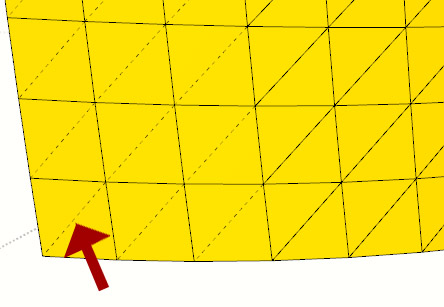
                      I have this model with many (non-quad) faces. And I would like to soften all the triangulation-edges so that I am left with seemingly quad faces.
                      2014-08_HiddenEdges.jpg
                      I guess the best way would be to soften everything, then select the edge loops and unsoften them. But I don't know how.

                      Is it possible at all with this plugin?

                      If yes, how?

                      Any help would be appreciated.

                      Cheers,
                      Jakob

                      1 Reply Last reply
                      Reply Quote 0
                      • thomthomT
                        thomthom
                        last edited by

                        It's unpredictable to try to determine the diagonals of pseudo-quads. I've tried but what is easy to our eyes is not easy to a script.

                        How did you create that mesh btw? Several extensions have support for QuadFace tools. which will create what you want.

                        Thomas Thomassen — SketchUp Monkey & Coding addict
                        List of my plugins and link to the CookieWare fund

                        1 Reply Last reply
                        Reply Quote 0
                        • J
                          jumpjack
                          last edited by

                          I can't understand if and how I can use this plugin to select only edges delimiting holes inside a surface, rather than also external edges of the surface itself.

                          For example, in this case:
                          hole-example.png

                          I want only this selection:
                          hole-example-edges.png

                          1 Reply Last reply
                          Reply Quote 0
                          • pbacotP
                            pbacot
                            last edited by

                            You might be able to select those edges more easily if you soften/smooth the surface first.

                            MacOSX MojaveSketchUp Pro v19 Twilight v2 Thea v3 PowerCADD

                            1 Reply Last reply
                            Reply Quote 0
                            • Dave RD
                              Dave R
                              last edited by

                              Indeed! And then you could probably drag a selection box around the edges of the hole to select the edges. No plugin needed.

                              Etaoin Shrdlu

                              %

                              (THERE'S NO PLACE LIKE)

                              G28 X0.0 Y0.0 Z0.0

                              M30

                              %

                              1 Reply Last reply
                              Reply Quote 0
                              • J
                                jumpjack
                                last edited by

                                This is only a small part of a very large model, it would take years to edit all holes by hand:

                                http://sketchucation.com/forums/download/file.php?id=124357&t=1

                                That's why I'm looking for some automation.

                                1 Reply Last reply
                                Reply Quote 0
                                • thomthomT
                                  thomthom
                                  last edited by

                                  Right Click > Select Only > Border Edges

                                  Thomas Thomassen — SketchUp Monkey & Coding addict
                                  List of my plugins and link to the CookieWare fund

                                  1 Reply Last reply
                                  Reply Quote 0
                                  • josephkim626J
                                    josephkim626
                                    last edited by

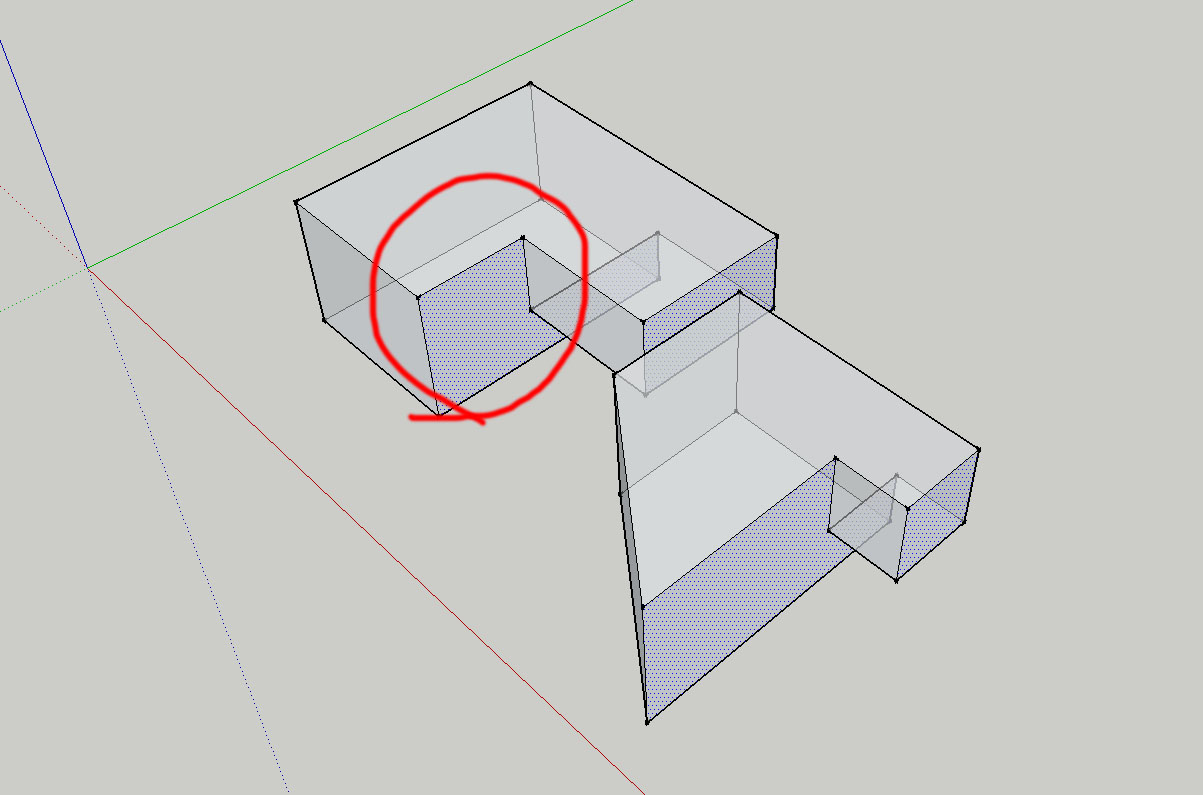
                                    For some reason, "Select Coplanar Faces" results some other parallel faces selected that aren't necessarily "Coplanar"?

                                    1 Reply Last reply
                                    Reply Quote 0
                                    • Dave RD
                                      Dave R
                                      last edited by

                                      @josephkim626 said:

                                      For some reason, "Select Coplanar Faces" results some other parallel faces selected that aren't necessarily "Coplanar"?

                                      Could you post an example SKP file that exhibits this behavior?

                                      And please complete your profile with SketchUp version and operating system.

                                      Etaoin Shrdlu

                                      %

                                      (THERE'S NO PLACE LIKE)

                                      G28 X0.0 Y0.0 Z0.0

                                      M30

                                      %

                                      1 Reply Last reply
                                      Reply Quote 0
                                      • tt_suT
                                        tt_su
                                        last edited by

                                        @josephkim626 said:

                                        For some reason, "Select Coplanar Faces" results some other parallel faces selected that aren't necessarily "Coplanar"?

                                        The menu name is misleading - it's Same Direction instead of truly coplanar.

                                        1 Reply Last reply
                                        Reply Quote 0
                                        • josephkim626J
                                          josephkim626
                                          last edited by

                                          @dave r said:

                                          @josephkim626 said:

                                          For some reason, "Select Coplanar Faces" results some other parallel faces selected that aren't necessarily "Coplanar"?

                                          Could you post an example SKP file that exhibits this behavior?

                                          And please complete your profile with SketchUp version and operating system.

                                          Sorry, it is tested on windows 7 and sketchup 2014 (in different machines)
                                          Red circled face was the face that was used to execute "select coplanar face"
                                          example


                                          skp file

                                          1 Reply Last reply
                                          Reply Quote 0
                                          • Dave RD
                                            Dave R
                                            last edited by

                                            @tt_su said:

                                            The menu name is misleading - it's Same Direction instead of truly coplanar.

                                            So there's no bug. Just a naming confusion. it would appear that "Coplanar Faces" should read something like "Parallel Faces with Normals Facing the Same Direction". Select>Parallel Faces selects Parallel Faces regardless of the normal orientation.


                                            Etaoin Shrdlu

                                            %

                                            (THERE'S NO PLACE LIKE)

                                            G28 X0.0 Y0.0 Z0.0

                                            M30

                                            %

                                            1 Reply Last reply
                                            Reply Quote 0

                                            Hello! It looks like you're interested in this conversation, but you don't have an account yet.

                                            Getting fed up of having to scroll through the same posts each visit? When you register for an account, you'll always come back to exactly where you were before, and choose to be notified of new replies (either via email, or push notification). You'll also be able to save bookmarks and upvote posts to show your appreciation to other community members.

                                            With your input, this post could be even better 💗

                                            Register Login
                                            • 1
                                            • 2
                                            • 24
                                            • 25
                                            • 26
                                            • 27
                                            • 28
                                            • 29
                                            • 30
                                            • 26 / 30
                                            • First post
                                              Last post
                                            Buy SketchPlus
                                            Buy SUbD
                                            Buy WrapR
                                            Buy eBook
                                            Buy Modelur
                                            Buy Vertex Tools
                                            Buy SketchCuisine
                                            Buy FormFonts

                                            Advertisement